# TINGEE Open API
> TINGEE (by HENO) Open API integration docs: virtual accounts (VA), QR Code, payment gateway, Direct Debit, disbursement (Direct Link), TingeeBox devices, e-invoices. Docs version: 1.2.2.
General rules:
- Base URL: https://open-api.tingee.vn (PROD), https://uat-open-api.tingee.vn (UAT).
- Required headers: x-client-id, x-request-timestamp (yyyyMMddHHmmssSSS, UTC+7), x-signature = HMAC_SHA512("{timestamp}:{JSON.stringify(body)}", secretKey) as hex; requests without a body sign "{}".
- Every API returns HTTP 200; check the "code" field ("00" = success). Error codes: https://developers.tingee.vn/en/md/docs/error-list.md
- OpenAPI: https://developers.tingee.vn/en/openapi.json · Postman: https://developers.tingee.vn/en/tingee-open-api.postman_collection.json
# Getting Started
**
Welcome to Tingee BaaS
The all-in-one payment solution
**
**Main services**
All APIs and features, organized into clear business areas.
**Your integration journey**
Three simple steps to add payments to your application
↓
↓
↓
Step 01
**Explore**
Read the API documentation and find the payment methods that fit your needs. The Developer Portal has detailed guides, code samples and best practices.
🔍
Step 02
**Test and integrate**
Use the Sandbox to test your API key, webhooks and payment flows. Integrate the SDK into your application and verify every feature before going live.
🛠️
Step 03
**Go live**
Switch to Production with your live API key. Get 24/7 support from our technical team and start accepting real payments from your customers.
🚀
Get started
-
Join thousands of businesses that trust Tingee
---
# Webhook (IPN)
**Webhook (IPN — Instant Payment Notification)** is the mechanism Tingee uses to push notifications to your server as soon as a transaction occurs, so you do not have to keep polling the API.
---
## Flow
✅
Transaction succeeds
→
📤
Tingee POSTs to Webhook URL
→
🔐
Verify signature
→
🛒
Update order
→
🟢
Return HTTP 200
---
## Signature verification
Every webhook request from Tingee carries an `x-signature` header. You **must verify** it before processing:
```javascript title="Node.js"
const crypto = require('crypto');
function verifyWebhookSignature(secretToken, requestTimestamp, body, receivedSignature) {
const expected = crypto
.createHmac('sha512', secretToken)
.update(`${requestTimestamp}:${JSON.stringify(body)}`)
.digest('hex');
return expected === receivedSignature;
}
```
```python title="Python"
def verify_signature(secret_token: str, timestamp: str, body: dict, received: str) -> bool:
message = f"{timestamp}:{json.dumps(body, separators=(',', ':'))}"
expected = hmac.new(secret_token.encode(), message.encode(), hashlib.sha512).hexdigest()
return hmac.compare_digest(expected, received)
```
:::danger Ignore requests with an invalid signature
If `x-signature` does not match, **ignore the request entirely**. It may be a spoofing attack.
:::
---
## Retry policy
If your endpoint returns an error (anything other than HTTP 200) or times out, Tingee automatically resends:
| Retry | After |
|:---|:---|
| Retry 1 | 30 seconds |
| Retry 2 | 2 minutes |
| Retry 3 | 10 minutes |
| Retry 4 | 1 hour |
| Retry 5 | 6 hours |
:::tip Idempotency
Always use `transactionId` or `orderId` to check whether an order has already been processed, to avoid duplicates when you receive a retry.
:::
---
## Event catalog
| Event type | Description |
|:---|:---|
| `PAYMENT_SUCCESS` | Successful QR / VA transaction |
| `DEEPLINK_RETURN` | Payment result via Deep Link |
| `DIRECT_DEBIT_RESULT` | Direct Debit result |
See the payload structure in detail at [Webhook Payment Callback](https://developers.tingee.vn/en/docs/webhook/webhook-payment-callback).
---
# Get started
## Introduction
To integrate with the Tingee system, you must use a **Client ID**, a **Secret Token** and a **generated signature** to authenticate every API request and ensure it is valid. This guide explains in detail how to retrieve this information for each partner account.
---
## How to get the Client ID & Secret Token
- **Step 1**. Go to the [Tingee BaaS Portal](https://baas.tingee.vn) (or the test site [uat-baas-portal.tingee.vn](https://uat-baas-portal.tingee.vn)) and sign up / sign in to your partner account.
- **Step 2**. In the left sidebar menu, click **API Credentials** (or go directly to [baas.tingee.vn/api-credentials](https://baas.tingee.vn/api-credentials)).
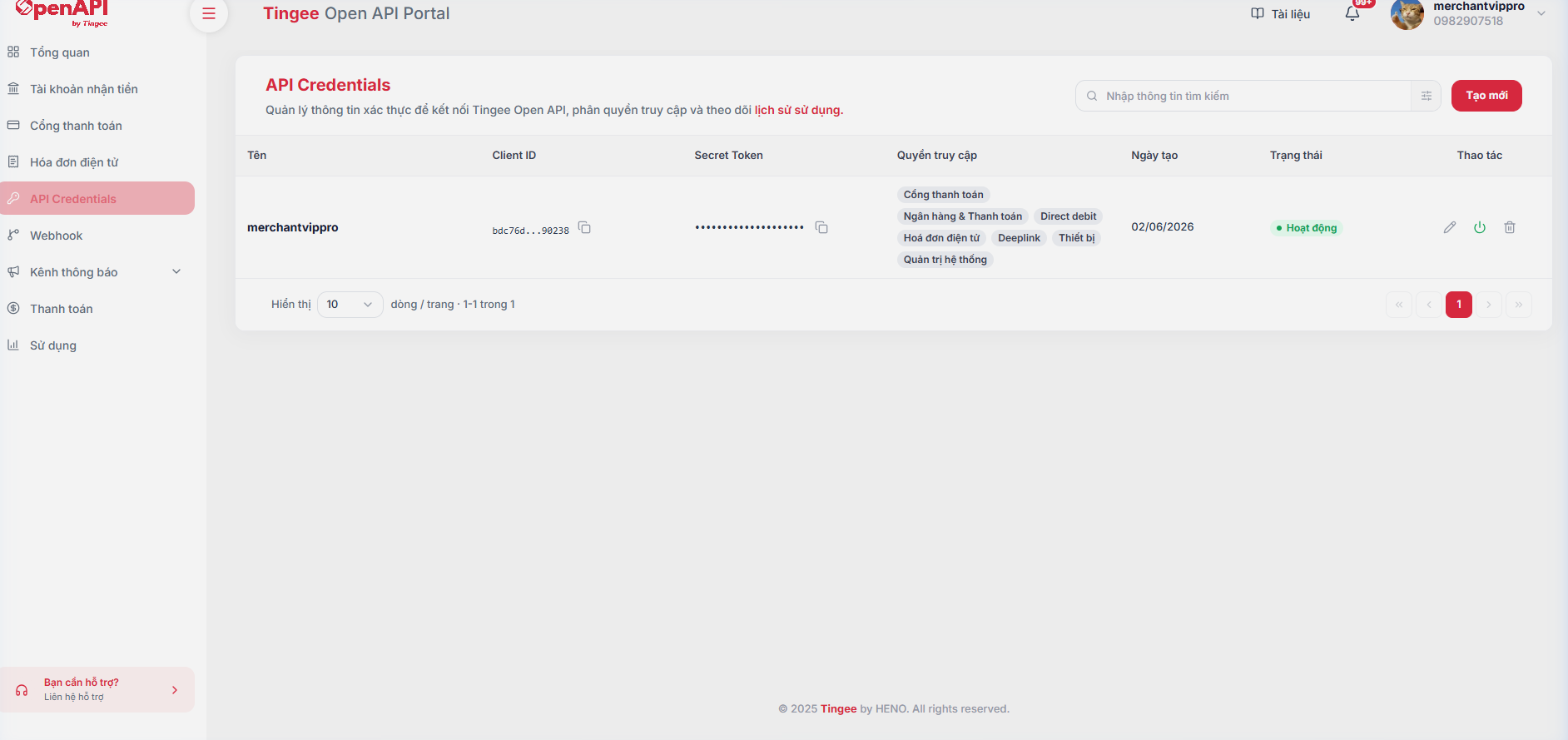
- **Step 3**. Click **Create new** (or **Create new API Credentials**) to open the credential creation modal:
- **Basic information**: Enter a *Display name* (to tell credentials apart by purpose, e.g. Live Credentials, POS Test, Mobile App...) and a *Description*.
- **Access permissions**: Select the product/service groups this credential is allowed to call (Payment gateway, QR, Bank Link, Direct Debit, etc.), or click **Select all**.
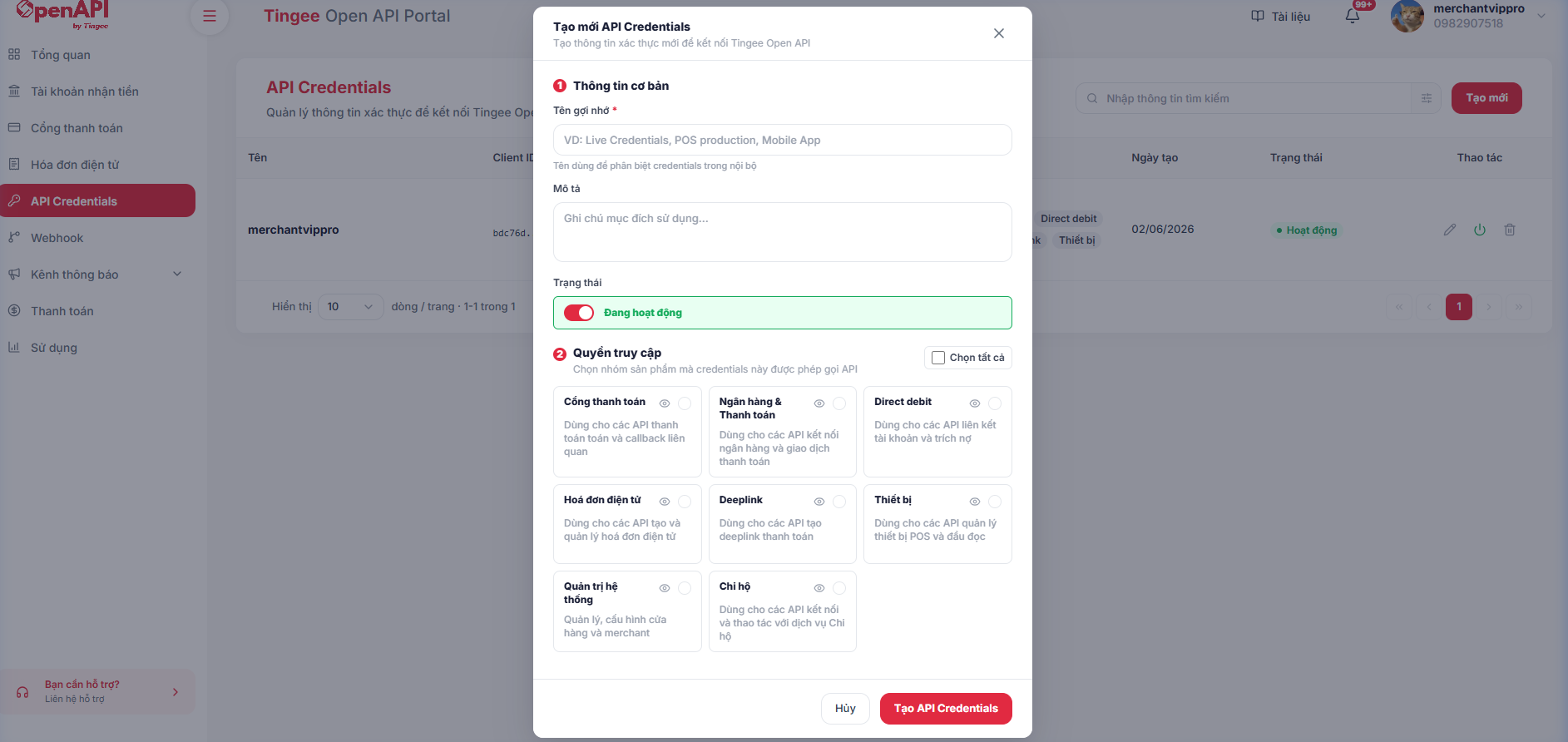
- **Step 4**. Click **Create API Credentials** to save. The system generates the credentials and shows the **Client ID** and **Secret Token** in the list. Use the **Copy** button to copy them into your integration configuration.
---
## Generate the signature
Every API request sent to Tingee must include a digital signature to ensure integrity and authenticate the partner.
### Signature formula
```
x-signature = HMAC_SHA512( x-request-timestamp + ":" + requestBody, secretToken )
```
Where:
- `x-request-timestamp` — Time the request is sent, format `yyyyMMddHHmmssSSS` (**UTC+7**)
- `requestBody` — The request body as a JSON string produced by **`JSON.stringify()`** (minified, no extra whitespace)
- `secretToken` — The **Secret Token** from the Developers page of your partner account
### Required headers
| Header | Required | Example |
| :--- | :---: | :--- |
| `x-client-id` | ✅ | Partner identifier issued by TINGEE [See how to get it](https://developers.tingee.vn/en/docs/config-info#hướng-dẫn-lấy-client-id--secret-token) |
| `x-request-timestamp` | ✅ | 20260101101122333 |
| `x-signature` | ✅ | SHA-512 signature |
| `Content-Type` | ✅ | `application/json` |
### Sample code
**Node.js**
```js
const crypto = require('crypto');
function generateSignature(timestamp, requestBody, secretToken) {
const message = `${timestamp}:${requestBody}`;
return crypto
.createHmac('sha512', secretToken)
.update(message, 'utf8')
.digest('hex');
}
// Usage example
// Timestamp in UTC+7 (add 7 hours to UTC time)
const timestamp = new Date(Date.now() + 7 * 60 * 60 * 1000)
.toISOString()
.replace(/[-:T.Z]/g, '')
.slice(0, 17); // "yyyyMMddHHmmssSSS"
const body = JSON.stringify({ clientId: 'abc123', amount: 50000 });
const signature = generateSignature(timestamp, body, 'YOUR_SECRET_TOKEN');
// Attach to the headers when calling the API
const headers = {
'Content-Type': 'application/json',
'x-client-id': 'YOUR_CLIENT_ID',
'x-request-timestamp': timestamp,
'x-signature': signature,
};
```
**C#**
```csharp
using System;
using System.Security.Cryptography;
using System.Text;
public class TingeeSignature
{
public static string Generate(string timestamp, string requestBody, string secretToken)
{
var message = $"{timestamp}:{requestBody}";
var keyBytes = Encoding.UTF8.GetBytes(secretToken);
var messageBytes = Encoding.UTF8.GetBytes(message);
using (var hmac = new HMACSHA512(keyBytes))
{
var hash = hmac.ComputeHash(messageBytes);
return BitConverter.ToString(hash).Replace("-", "").ToLower();
}
}
// Usage example
public static void Example()
{
var timestamp = DateTime.UtcNow.AddHours(7).ToString("yyyyMMddHHmmssfff"); // UTC+7
var body = "{\"clientId\":\"abc123\",\"amount\":50000}";
var signature = Generate(timestamp, body, "YOUR_SECRET_TOKEN");
// Attach to the headers when calling the API
// request.Headers["x-client-id"] = "YOUR_CLIENT_ID";
// request.Headers["x-request-timestamp"] = timestamp;
// request.Headers["x-signature"] = signature;
}
}
```
**Java**
```java
public class TingeeSignature {
public static String generate(String timestamp, String requestBody, String secretToken)
throws Exception {
String message = timestamp + ":" + requestBody;
Mac hmac = Mac.getInstance("HmacSHA512");
SecretKeySpec keySpec = new SecretKeySpec(
secretToken.getBytes(StandardCharsets.UTF_8), "HmacSHA512");
hmac.init(keySpec);
byte[] hash = hmac.doFinal(message.getBytes(StandardCharsets.UTF_8));
StringBuilder sb = new StringBuilder();
for (byte b : hash) sb.append(String.format("%02x", b));
return sb.toString();
}
public static void main(String[] args) throws Exception {
String timestamp = ZonedDateTime.now(ZoneId.of("Asia/Ho_Chi_Minh")) // UTC+7
.format(DateTimeFormatter.ofPattern("yyyyMMddHHmmssSSS"));
String body = "{\"clientId\":\"abc123\",\"amount\":50000}";
String signature = generate(timestamp, body, "YOUR_SECRET_TOKEN");
System.out.println("x-signature: " + signature);
}
}
```
**PHP**
```php
function generateSignature(string $timestamp, string $requestBody, string $secretToken): string {
$message = $timestamp . ':' . $requestBody;
return hash_hmac('sha512', $message, $secretToken);
}
// Usage example
$now = new DateTime('now', new DateTimeZone('Asia/Ho_Chi_Minh')); // UTC+7
$timestamp = $now->format('YmdHisv'); // "yyyyMMddHHmmssSSS" (v = milliseconds)
// JSON_UNESCAPED_*: keep "/" and Vietnamese characters unescaped to match JSON.stringify on the TINGEE side
$body = json_encode(['clientId' => 'abc123', 'amount' => 50000], JSON_UNESCAPED_SLASHES | JSON_UNESCAPED_UNICODE);
$signature = generateSignature($timestamp, $body, 'YOUR_SECRET_TOKEN');
$headers = [
'Content-Type: application/json',
'x-client-id: YOUR_CLIENT_ID',
'x-request-timestamp: ' . $timestamp,
'x-signature: ' . $signature,
];
```
:::caution Important
- **Do not share** your `secretToken` in source code or public repositories.
- The timestamp **must not be later than the current time** and **must not be more than 10 minutes old** compared with the Tingee server time (UTC+7).
- `requestBody` must be the result of **`JSON.stringify(body)`** — a minified JSON string, with no added whitespace or reformatting, so that the signature matches exactly.
:::
---
## Developer toolkit
The resources below are generated automatically from this documentation and always reflect the latest version.
| Resource | Description |
| :--- | :--- |
| [Postman Collection](pathname:///tingee-open-api.postman_collection.json) | All APIs with sample requests. The `x-signature` and `x-request-timestamp` headers are **generated automatically** by a pre-request script. |
| [OpenAPI 3 (openapi.json)](pathname:///openapi.json) | Standard OpenAPI specification for importing into Swagger UI, Insomnia, Apidog or generating SDK clients. |
| [llms.txt](pathname:///llms.txt) · [llms-full.txt](pathname:///llms-full.txt) | Index and full documentation in Markdown, for use with ChatGPT, Claude, Cursor... |
### Using the Postman Collection
1. Download the Postman Collection from the table above, open Postman and choose **Import**.
2. In the collection's **Variables** tab, fill in `clientId` and `secretKey` from the API Key management page.
3. The `baseUrl` variable defaults to the UAT environment (`https://uat-open-api.tingee.vn`). Change it to `https://open-api.tingee.vn` when calling PROD.
4. Select any request and click **Send** — no need to compute the signature yourself.
:::tip Copy docs for AI
Every documentation page has a **Copy Markdown** button in the top-right corner, so you can quickly paste the page content into an AI tool when writing integration code.
:::
---
## Webhook configuration
- Tingee sends HTTP requests (POST method) to your Webhook URL whenever a transaction occurs on accounts linked on Tingee.
- You configure and manage webhooks under **Webhook** in the Portal sidebar menu:
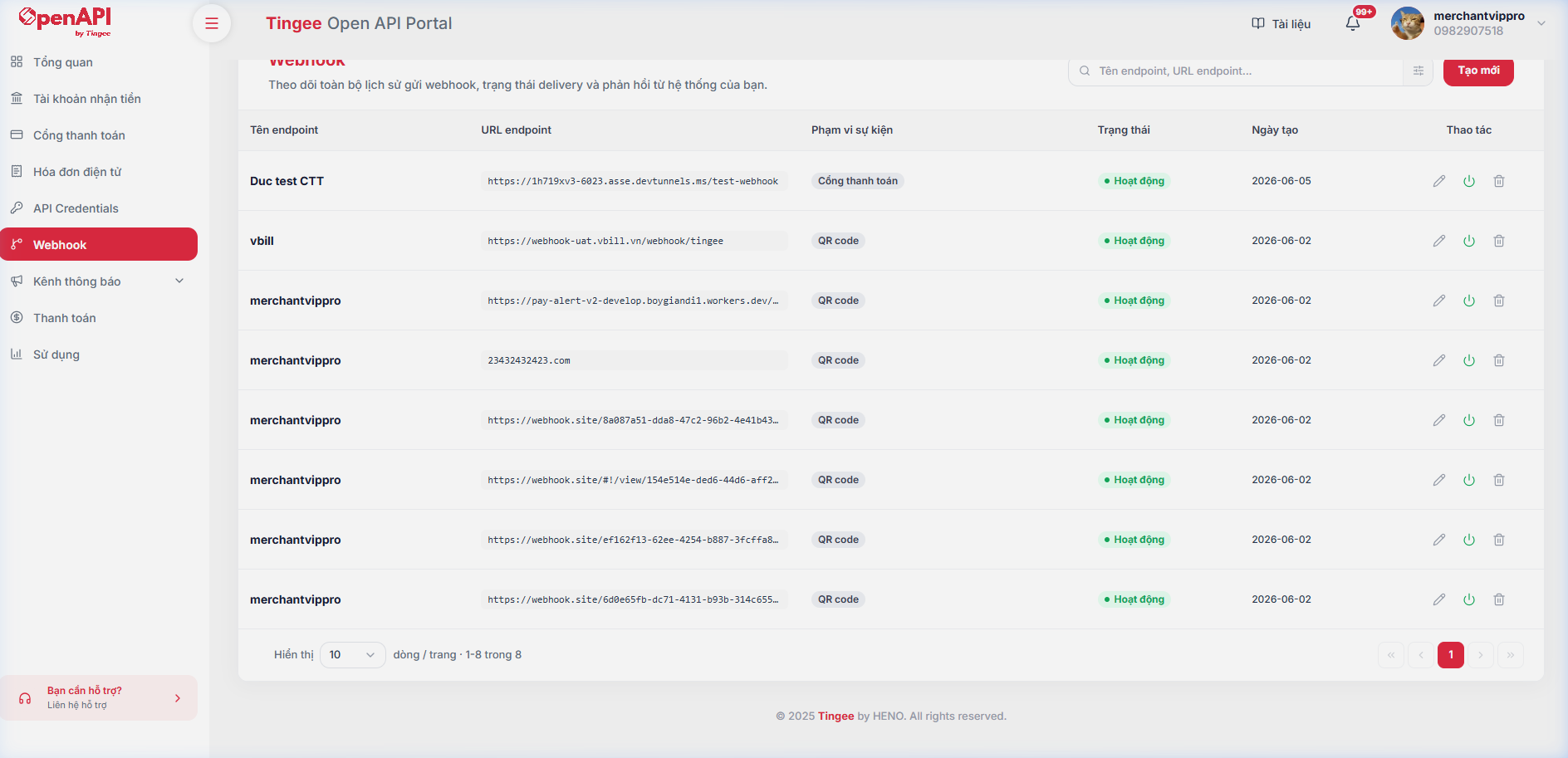
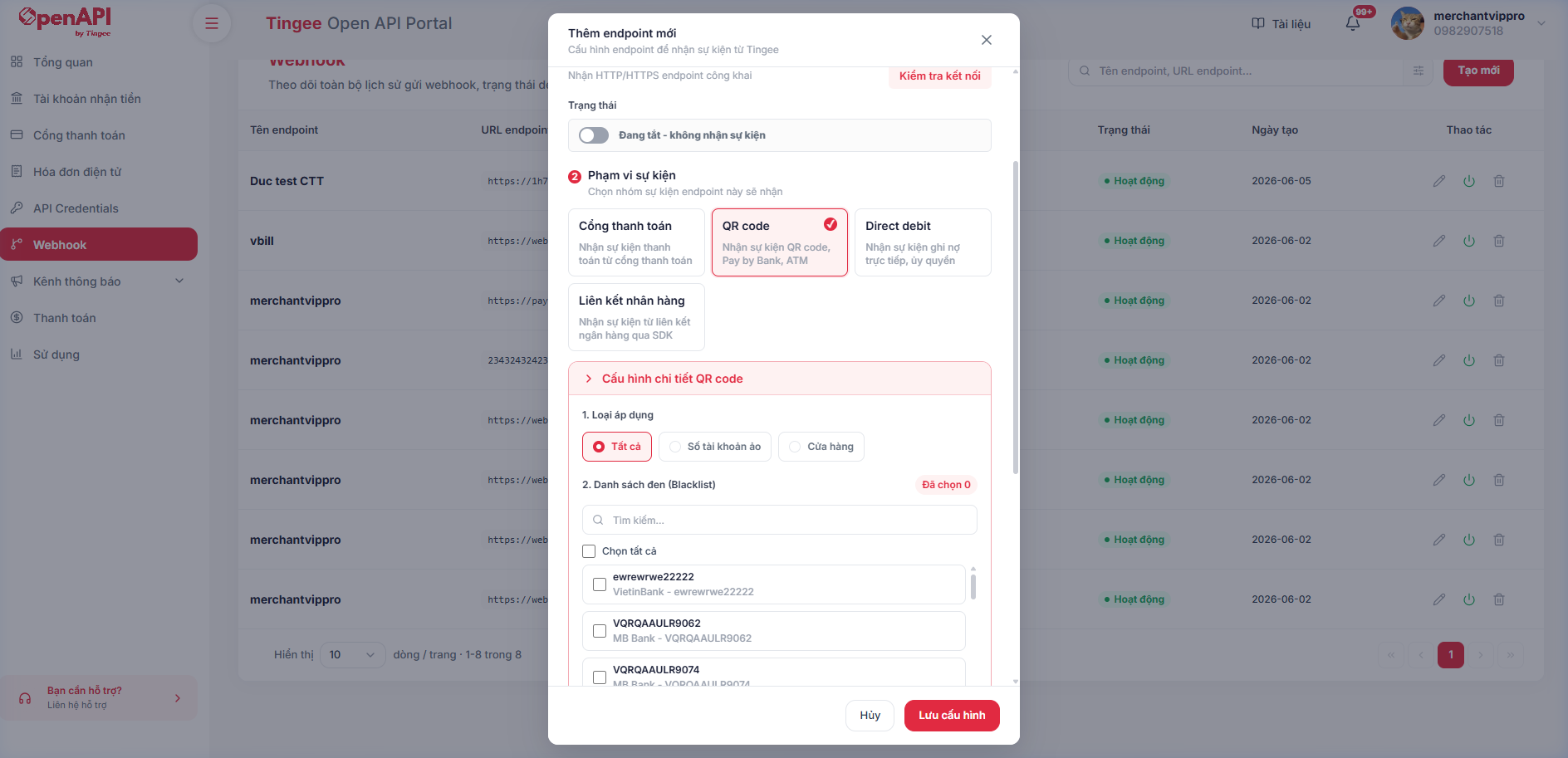
- Click **Create new** to open the modal for configuring an event endpoint:
- **Basic information**:
- *Endpoint name*: Enter a display name.
- *Webhook endpoint URL*: Enter the HTTP/HTTPS address that receives the data. You can click **Connection Test** to check that the URL is reachable.
- **Event scope**: Select the event groups you want to be notified about (e.g. *QR Code*).
- If you select *QR Code*, choose the **Apply to** type:
- *All*: Receive events for all accounts.
- *Virtual account number*: Select the specific accounts you want to receive events for.
- *Shop*: Select the specific shops you want to receive events for.
- You can also set up a **Blacklist** to exclude account numbers you do not want webhooks sent for.
- **Webhook retry configuration**: Turn retry on/off, set the resend conditions (timeout, HTTP status errors) and custom parameters such as timeout (5-10 seconds), number of retries (1-5) and interval (2-3600 seconds).
- **Webhook authentication type**: Choose the security method attached to the headers when Tingee sends a webhook (None, API Key or API Credentials).
- You can enable/disable (turn on/off) or edit a webhook configuration directly from the management screen.
---
## Webhook log
- You can view the webhook delivery history (webhook status, number of retries, HTTP status code...) of each endpoint on the **Usage** page, **Webhook history** tab, of the Portal.
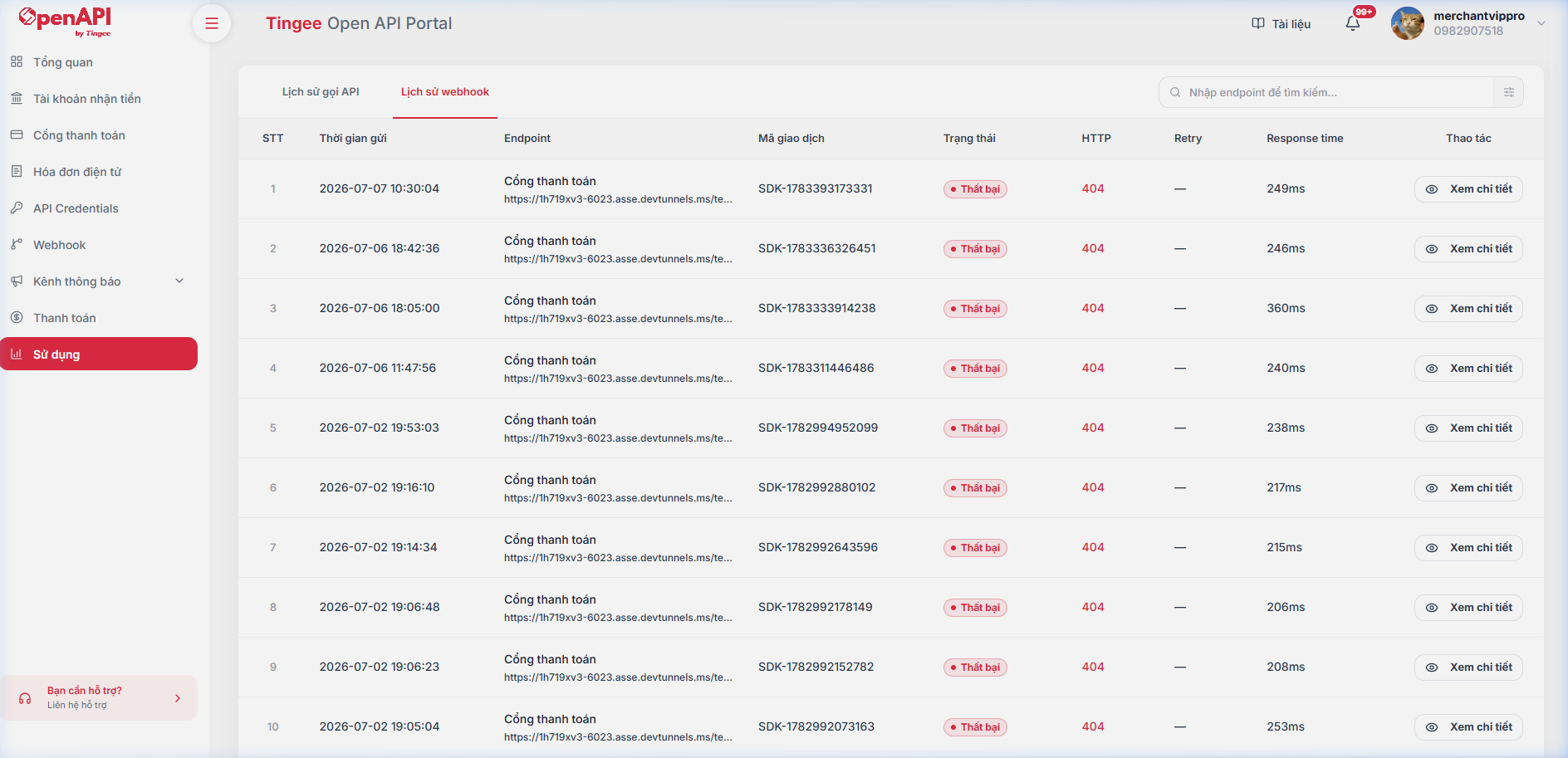
- Here you can track delivery status, retry count, HTTP response status code and response time in detail, or click **View details** to see the Request/Response payload of each webhook event.
---
# Important notes
Before integrating, read the notes below carefully to make sure your system works correctly and reliably.
---
## QR support by bank / e-wallet
Dynamic/static QR support depends on each bank/e-wallet and on the type of linked account (Personal, Household business or Business).
- See details at: [**Full list of supported banks / e-wallets**](https://developers.tingee.vn/en/docs/banking/get-banks)
padding: '12px',
textAlign: 'center',
fontSize: '1.2rem'
};
padding: '12px',
fontWeight: 'bold',
backgroundColor: 'var(--ifm-color-emphasis-100)',
textAlign: 'center'
};
Bank / E-wallet
Personal
Household business
Business
Dynamic QR
Static QR
Dynamic QR
Static QR
Dynamic QR
Static QR
**Vietcombank**
No
Yes
Yes
Yes
Yes
Yes
**BIDV**
No
Yes
No
Yes
Yes
Yes
{`
.vietin-row td {
border-bottom: none !important;
background-color: transparent !important;
}
.vietin-note-row td {
border-top: none !important;
background-color: transparent !important;
padding-bottom: 6px !important;
}
`}
**VietinBank**
No
Yes
No
Yes
Yes
Yes
* **VietinBank** does not return the payment description when a transaction occurs, so the **webhook from Tingee** to the partner will **not include** this field either.
**MBBank**
Yes
Yes
Yes
Yes
Yes
Yes
**VPBank**
No
Yes
Yes
Yes
Yes
Yes
**Sacombank**
No
Yes
No
Yes
No
No
**ACB**
No
Yes
No
Yes
No
Yes
**OCB**
Yes
Yes
No
Yes
Yes
Yes
**VIB**
No
Yes
No
Yes
No
Yes
**PGB**
No
Yes
No
Yes
No
Yes
**TPBank**
No
Yes
No
Yes
No
Yes
**MSB**
No
Yes
No
Yes
No
Yes
**Co-opBank**
No
Yes
No
Yes
No
Yes
**BAOKIM e-wallet**
Yes
Yes
Yes
Yes
Yes
Yes
---
## Configure the account before linking a household business / business account
For **household business** and **business** accounts, some banks require the account information to be configured before linking.
### Self-configure via API
You can call the [Business account configuration](https://developers.tingee.vn/en/docs/cau-hinh-tai-khoan-dn) API yourself to set up:
BankAccount types that require configuration
**BIDV**Business
**VietinBank**Business
**ACB**Business, Household business
**Vietcombank (VCB)**Business, Household business
**VPBank (VPB)**Business, Household business
**MSB**All account types
### Contact TINGEE for configuration
Some banks **do not support configuration via API** — contact the TINGEE team for assistance:
BankAccount types that require configuration
**VIB**Business
**MBBank**Business
**OCB**Business
---
## Requirements for linking VIB bank accounts
For **VIB** (`bankBin: "970441"`), this rule **applies to all 3 account types** (`personal-account`, `business-household-account`, `business-account`).
The customer must complete the **Register for the speaker on VIB iBusiness** procedure before you call the [Create virtual account (VA)](https://developers.tingee.vn/en/docs/banking/create-va) API.
### Steps:
1. **Step 1 — Register a MyVIB account:** If the customer has never used MyVIB, they need to download the MyVIB app and register to open an account.
2. **Step 2 — Register for the iBusiness package:** The customer opens the MyVIB app and registers for the **iBusiness** package.
3. **Step 3 — Register for the speaker on VIB iBusiness:**
- Use the MyVIB login credentials to sign in to the **VIB iBusiness** app/system.
- In VIB iBusiness, select the **Register for speaker** feature.
### Video tutorials:
**1. Register for the iBusiness package (MyVIB)**
Your browser does not support video playback.
**2. Register for the speaker on VIB iBusiness**
Your browser does not support video playback.
:::warning Important
Only after the "Register for the speaker on VIB iBusiness" step is complete can you call the `POST /v1/create-va` API to create a virtual account and link the VIB account successfully. Otherwise, the bank rejects the VA creation request.
:::
---
## Original account number linking support
When calling the [Create virtual account (VA)](https://developers.tingee.vn/en/docs/banking/create-va) API, use the `isNotifyAccountNumber` parameter:
- `false` (default): Create a virtual account (VA).
- `true`: Link the original bank account number to receive balance notifications.
Only the banks and account types in the table below support linking the original account number:
| Bank | Account types supporting original account number (`isNotifyAccountNumber = true`) | VA supported (`false`)? | Notes |
| :--- | :--- | :---: | :--- |
| **ACB** | All account types (Personal, Household business, Business) | Yes | |
| **TPBank** | All account types (Personal, Household business, Business) | Yes | Personal and household business accounts have no VA (only Business accounts have VA) |
| **VPBank** | Personal, Business | Yes | Original account number not yet supported for household business |
| **OCB** | Business, Household business | Yes | Original account number not yet supported for Personal |
| **VietinBank** | Personal, Household business | Yes | Original account number not yet supported for Business |
| **PGBank** | Supported account types | No | Original account number linking only; VA creation not supported (handled automatically by the system) |
| **Co-opBank** | Supported account types | No | Original account number linking only; VA creation not supported (handled automatically by the system) |
:::info Other banks
For all other banks, the system supports virtual account (VA) creation by default; pass `isNotifyAccountNumber = false` or leave the default.
:::
:::warning Webhook trigger rules: transfers to the original account number vs the virtual account (VA)
- **Accounts that support original account number linking (`isNotifyAccountNumber = true`):** When the payer transfers to the **original account number**, the bank records the balance change and sends the data to Tingee → Tingee sends a **webhook** to the partner.
- **Accounts that do NOT support original account number linking (VA only, `isNotifyAccountNumber = false`):**
- The payer must transfer to the issued **virtual account (VA) number** for Tingee to receive the balance notification and send a webhook.
- If the money is transferred to the **original account number**, the bank does **not record** the transaction as part of the Tingee integration → **Tingee does not receive the transaction from the bank → No webhook is sent to the partner**.
:::
---
## Dynamic QR transactions — amount modification risk
For payments via **dynamic QR**, the payer may **change the amount** when scanning the code, so the amount actually received **differs from the amount embedded in the QR code**.
See detailed transaction verification guidance at [Payment webhook — Dynamic QR transaction note](https://developers.tingee.vn/en/docs/webhook/webhook-payment-callback#qr-dong).
---
# Accounts & Identification
Core APIs that let partners manage virtual accounts (VA), handle debit/credit transactions, and perform in-depth financial reconciliation.
:::tip Before you start
- **Base URL:** `https://uat-open-api.tingee.vn` (UAT) · `https://open-api.tingee.vn` (PROD)
- **Authentication:** Every request must include the `x-client-id`, `x-request-timestamp` headers and the `x-signature` signature (HMAC SHA512). See [Get your API key & generate the signature](https://developers.tingee.vn/en/docs/config-info#sinh-ch%E1%BB%AF-k%C3%BD-signature).
- **Result:** The API always returns HTTP `200`; check the `code` field (`00` = success). See [Error codes](https://developers.tingee.vn/en/docs/error-list).
:::
**🏦 Account management**
Create and manage, in bulk, dedicated identification accounts for each customer or point of sale.
**🔔 Balance notifications**
Receive real-time notifications as soon as a transaction occurs, through a secure Webhook system.
**📊 Lookup & reconciliation**
Look up the transaction history of each account to reconcile financial data with your system.
---
## Standard integration process
**1. Create a virtual account**
Call the `create-va` API to create or link an account number. The result returns a `confirmId` used for the verification step.
**2. Verify the OTP**
Call the `confirm-va` API with the `confirmId` (plus `otpNumber` if the bank sends an OTP to the account holder) to complete the linking.
**3. Register for balance notifications (some banks)**
For banks that require separate registration, such as ACB, call `register-notify` and then verify the OTP via `confirm-register-notify`.
**4. Receive webhooks & reconcile**
Receive transaction notifications via [Webhook](https://developers.tingee.vn/en/docs/webhook) and use the `transaction/get-paging` API for periodic reconciliation.
## Detailed flow diagram
```mermaid
sequenceDiagram
autonumber
participant Client as Partner system
participant Tingee as Tingee Open API
participant Bank as Bank
actor Owner as Account holder
Client->>Tingee: Create/Link account (POST /v1/create-va)
activate Tingee
Tingee->>Bank: Send link request
Bank-->>Owner: Send OTP (SMS / bank app)
Tingee-->>Client: Return confirmId
deactivate Tingee
Owner-->>Client: Provide OTP
Client->>Tingee: Confirm link (POST /v1/confirm-va)
activate Tingee
Tingee->>Bank: Verify OTP
Bank-->>Tingee: Activated successfully
Tingee-->>Client: Return vaAccountNumber
deactivate Tingee
opt Bank requires balance notification registration (ACB)
Client->>Tingee: Register for balance notifications (POST /v1/register-notify)
Tingee-->>Client: Return confirmId
Client->>Tingee: Confirm with OTP (POST /v1/confirm-register-notify)
end
Note over Bank,Owner: Customer transfers money to the account
Bank->>Tingee: Balance notification
Tingee->>Client: Transaction webhook (POST to Webhook URL)
Client->>Tingee: Periodic reconciliation (POST /v1/transaction/get-paging)
```
:::info
For **Vietcombank** and **TPBank**, the linking result is sent to the `webhookUrl` instead of being confirmed via `confirm-va`. See [Account link status webhook](https://developers.tingee.vn/en/docs/webhook/webhook-va-status).
:::
---
## API catalog
| Function | Method | Endpoint |
| :--- | :---: | :--- |
| [**Supported banks**](https://developers.tingee.vn/en/docs/banking/get-banks) | GET | `/v1/get-banks` |
| [**List account numbers**](https://developers.tingee.vn/en/docs/banking/get-va-paging) | POST | `/v1/get-va-paging` |
| [**Create/Link account number**](https://developers.tingee.vn/en/docs/banking/create-va) | POST | `/v1/create-va` |
| [**Confirm account number**](https://developers.tingee.vn/en/docs/banking/confirm-va) | POST | `/v1/confirm-va` |
| [**Register for balance notifications**](https://developers.tingee.vn/en/docs/banking/register-notify) | POST | `/v1/register-notify` |
| [**Confirm balance notification registration**](https://developers.tingee.vn/en/docs/banking/confirm-register-notify) | POST | `/v1/confirm-register-notify` |
| [**Delete account number**](https://developers.tingee.vn/en/docs/banking/delete-va) | POST | `/v1/delete-va` |
| [**Confirm account deletion**](https://developers.tingee.vn/en/docs/banking/confirm-delete-va) | POST | `/v1/confirm-delete-va` |
| [**Register for debit notifications (ACB)**](https://developers.tingee.vn/en/docs/banking/create-debit) | POST | `/v1/create-debit` |
| [**Cancel debit notifications (ACB)**](https://developers.tingee.vn/en/docs/banking/delete-debit) | DELETE | `/v1/delete-debit` |
| [**Transaction history**](https://developers.tingee.vn/en/docs/banking/get-paging-transaction) | POST | `/v1/transaction/get-paging` |
---
# List supported banks and e-wallets
Use this API to get the list of banks and e-wallets that Tingee supports for account linking and virtual account (VA) creation.
**GET** `https://open-api.tingee.vn/v1/get-banks`
UAT: `https://uat-open-api.tingee.vn/v1/get-banks`
> Get the full list of banks and e-wallets supported by Tingee, e.g. to let users pick one.
### Header Request
| Header | Required | Description |
| :--- | :---: | :--- |
| `Content-Type` | Yes | `application/json` |
| `x-client-id` | Yes | Partner identifier issued by TINGEE. |
| `x-signature` | Yes | HMAC SHA512 authentication signature. See [How to generate the signature](https://developers.tingee.vn/en/docs/config-info#sinh-ch%E1%BB%AF-k%C3%BD-signature). |
| `x-request-timestamp` | Yes | Time the request is sent (format: `yyyyMMddHHmmssSSS`, UTC+7) |
### Code samples
```bash
curl --request GET 'https://open-api.tingee.vn/v1/get-banks' \
--header 'x-client-id: YOUR_CLIENT_ID' \
--header 'x-request-timestamp: yyyyMMddHHmmssSSS' \
--header 'x-signature: HMAC_SHA512("{timestamp}:{}", SECRET_KEY)'
```
> NestJS, C#, Java and PHP samples and signature generation: see the original documentation page.
### Sample Response
:::info
Unlike the other APIs, this API returns **an array** of banks directly, not wrapped in the `{ code, message, data }` structure.
:::
```json
[
{
"code": "BIDV",
"name": "Ngân hàng TMCP Đầu tư và Phát triển Việt Nam",
"bin": "970418",
"shortName": "BIDV",
"urlLogo": "https://app.tingee.vn/assets/media/logo/bank/bidv.png",
"termsAndConditions": {
"urlVA": "https://bidv.com.vn/uudai/DKDKSDDV_VIETQR_HENO_140324.pdf"
}
},
{
"code": "BAOKIM",
"name": "Ví điện tử BAOKIM",
"bin": "BAOKIM",
"shortName": "BAOKIM",
"urlLogo": "https://app.tingee.vn/assets/media/logo/bank/baokim.png",
"termsAndConditions": {
"url": ""
}
}
]
```
| Field | Type | Description |
| :--- | :---: | :--- |
| `[].code` | string | Bank / e-wallet code (e.g. `BIDV`, `VCB`, `BAOKIM`). |
| `[].name` | string | Full name of the bank / e-wallet. |
| `[].shortName` | string | Short name. |
| `[].bin` | string | BIN used for the `bankBin` parameter of other APIs. For e-wallets / partners without a BIN, this is the partner code (e.g. `BAOKIM`). |
| `[].urlLogo` | string | Logo URL. |
| `[].termsAndConditions` | object | Links to the terms of use (`url`) and the virtual account terms (`urlVA`), if any. Each property may be missing or an empty string. |
---
## Common error codes
| Code | Description | How to handle |
| :--- | :--- | :--- |
| `90`, `91`, `92`, `97` | Request authentication error (timestamp, client-id, signature) | See [System error codes](https://developers.tingee.vn/en/docs/error-list#mã-lỗi-hệ-thống). |
| `Others` | Other errors | See [Error codes](https://developers.tingee.vn/en/docs/error-list). |
---
# Query the account list
Use this API to query the list of virtual accounts (VA) created on the Tingee system, with pagination and search by multiple criteria.
**POST** `https://open-api.tingee.vn/v1/get-va-paging`
UAT: `https://uat-open-api.tingee.vn/v1/get-va-paging`
> Get a paginated list of VAs. You can filter by creation time, bank code or account type.
### Header Request
| Header | Required | Description |
| :--- | :---: | :--- |
| `Content-Type` | Yes | `application/json` |
| `x-client-id` | Yes | Partner identifier issued by TINGEE. |
| `x-signature` | Yes | HMAC SHA512 authentication signature. See [How to generate the signature](https://developers.tingee.vn/en/docs/config-info#sinh-ch%E1%BB%AF-k%C3%BD-signature). |
| `x-request-timestamp` | Yes | Time the request is sent (format: `yyyyMMddHHmmssSSS`, UTC+7) |
### Body Parameter
| Field | Type | Required | Description |
| :--- | :---: | :---: | :--- |
| `filter` | string | No | Search keyword (partial match on the original account number, virtual account number or account holder name). |
| `skipCount` | number | No | Number of records to skip (e.g. `0` for the first page). |
| `maxResultCount` | number | No | Maximum number of records per page (e.g. `10`, up to `2000`). |
| `startTime` | string | No | Filter by account creation time, from this point (ISO 8601 date-time, e.g. `2025-09-01T00:00:00+07:00`). Only takes effect when passed together with `endTime`. |
| `endTime` | string | No | Filter by account creation time, up to this point (ISO 8601 date-time, e.g. `2025-09-30T23:59:59+07:00`). Only takes effect when passed together with `startTime`. |
| `merchantId` | number | No | Merchant ID (required if you connect with a Master Merchant account). |
| `bankBin` | string | No | Bank BIN. See [Supported banks](https://developers.tingee.vn/en/docs/banking/get-banks). |
| `accountType` | string | No | Account type (`personal-account`, `business-account`, `business-household-account`). |
| `shopId` | number | No | Filter by shop ID. |
| `status` | string | No | Account status: `active`, `inactive`, `lock`. |
| `transactionType` | string | No | Registered transaction type: `credit` or `debit`. |
:::note
Do not pass an empty string `""` for filter fields (`bankBin`, `accountType`, `status`...). If you are not filtering by a field, omit it from the body.
:::
### Code samples
```bash
curl --request POST 'https://open-api.tingee.vn/v1/get-va-paging' \
--header 'x-client-id: YOUR_CLIENT_ID' \
--header 'x-request-timestamp: yyyyMMddHHmmssSSS' \
--header 'x-signature: HMAC_SHA512("{timestamp}:{minified JSON body}", SECRET_KEY)' \
--header 'Content-Type: application/json' \
--data '{
"skipCount": 0,
"maxResultCount": 10,
"bankBin": "970418",
"accountType": "personal-account"
}'
```
> NestJS, C#, Java and PHP samples and signature generation: see the original documentation page.
### Sample Response
```json
{
"code": "00",
"message": "Success",
"data": {
"totalCount": 1,
"items": [
{
"bankName": "BIDV",
"bankBin": "970418",
"accountType": "personal-account",
"accountName": "LE DUY NGHIEM",
"accountNumber": "0123456789111",
"vaAccountNumber": "VQRQAHFVA0551",
"status": "active",
"creationTime": "2025-09-04T08:12:32.160Z",
"shopId": 1001,
"transactionType": "credit"
}
]
}
}
```
| Field | Type | Description |
| :--- | :---: | :--- |
| `code` | string | Result code (`00` = success). |
| `message` | string | Response message. |
| `data.totalCount` | number | Total number of records matching the criteria. |
| `data.items` | array | List of accounts, sorted by creation time, newest first. |
| `data.items[].bankName` | string | Bank code (e.g. `BIDV`, `MBB`, `ACB`). |
| `data.items[].bankBin` | string | Bank BIN. |
| `data.items[].accountType` | string | Account type (`personal-account`, `business-account`, `business-household-account`). |
| `data.items[].accountName` | string | Account holder name. |
| `data.items[].accountNumber` | string | Original account number. |
| `data.items[].vaAccountNumber` | string | Virtual account (VA) number used to receive money. For accounts linked by original account number, the value may be the same as the original account number. |
| `data.items[].status` | string | Account status: `active`, `inactive`, `lock`. |
| `data.items[].creationTime` | string | Account creation time (ISO 8601, UTC). |
| `data.items[].shopId` | number | ID of the shop the account is assigned to. |
| `data.items[].transactionType` | string | Registered notification type: `credit` or `debit`. |
---
## Common error codes
| Code | Description | How to handle |
| :--- | :--- | :--- |
| `90`, `91`, `92`, `97` | Request authentication error (timestamp, client-id, signature) | See [System error codes](https://developers.tingee.vn/en/docs/error-list#mã-lỗi-hệ-thống). |
| `Others` | Other errors | See [Error codes](https://developers.tingee.vn/en/docs/error-list). |
---
# Create a virtual account (VA)
Use this API to create a new virtual account (VA) for a Merchant, so you can receive balance notifications and manage cash flows separately.
:::tip
This API registers for **credit** notifications (money in). To receive **debit** notifications (money out) on an ACB account, use the [Register for debit notifications](https://developers.tingee.vn/en/docs/banking/create-debit) API.
:::
> Try it in the Sandbox: https://developers.tingee.vn/sandbox/bank-link
**POST** `https://open-api.tingee.vn/v1/create-va`
UAT: `https://uat-open-api.tingee.vn/v1/create-va`
> Start a request to create or link a virtual account with the bank. The result returns a confirmId to use in the next confirmation step.
### Header Request
| Header | Required | Description |
| :--- | :---: | :--- |
| `Content-Type` | Yes | `application/json` |
| `x-client-id` | Yes | Partner identifier issued by TINGEE. |
| `x-signature` | Yes | HMAC SHA512 authentication signature. See [How to generate the signature](https://developers.tingee.vn/en/docs/config-info#sinh-ch%E1%BB%AF-k%C3%BD-signature). |
| `x-request-timestamp` | Yes | Time the request is sent (format: `yyyyMMddHHmmssSSS`, UTC+7) |
:::warning Important note for VIB (applies to all 3 account types)
For **VIB** (`bankBin: "970441"`), the customer **must register for the payment speaker on VIB iBusiness** before you call the create VA API. See the steps in [VIB account linking requirements](https://developers.tingee.vn/en/docs/luu-y-quan-trong#dieu-kien-vib) or the VIB tab in [Sample Request Body](#mẫu-request-body-theo-từng-ngân-hàng).
:::
### Body Parameter
#### 1. Bank & general account information
| Field | Type | Required | Description |
| :--- | :---: | :---: | :--- |
| `bankBin` | string | Yes | Bank BIN (6 digits). See [Supported banks](https://developers.tingee.vn/en/docs/banking/get-banks). Examples: `970418` (BIDV), `970436` (VCB), `970422` (MBB), `970415` (VietinBank)... |
| `accountType` | string | Conditional | Account type (`BankAccountTypeEnum`): - `personal-account`: personal account. - `business-account`: business account. - `business-household-account`: household business account. Required for all banks except `BAOKIM`. |
| `accountNumber` | string | Conditional | Original bank account number to link. Not required for: **TPBank, VCB, MSB and BAOKIM**. |
| `accountName` | string | Conditional | Bank account holder name (uppercase, without diacritics). Not required for **TPBank, PGBank, BAOKIM** and business accounts of **BIDV, OCB, VIB, SHINHAN, VietinBank (CTG)**. |
| `identity` | string | Conditional | Customer's identity document (ID card / citizen ID or tax code). Not applicable to **VCB, ACB** and business accounts. |
| `mobile` | string | Conditional | Phone number registered to receive the OTP / for linking. Format: 10 digits, starting with `0`. Required for most banks (including **Vietcombank** personal accounts and all **ACB** account types). Not required for: **VPBank, VietinBank (CTG), VIB, BAOKIM, TPBank**, **Vietcombank** (except personal accounts) and business accounts of **BIDV, Shinhan, OCB**. |
| `isNotifyAccountNumber` | boolean | No | Link type: - `false` (default): create a virtual account. - `true`: link the original account number (receive balance notifications for the original account number). For **VIB**, the system always sets this to `false`. *Only applies to supported banks. See [Important notes](https://developers.tingee.vn/en/docs/luu-y-quan-trong#lien-ket-stk-goc) for details.* |
| `appType` | string | Conditional | Integration app type; pass `baas`. Required for **Vietcombank (VCB)** personal accounts. |
#### 2. Virtual account & shop information
| Field | Type | Required | Description |
| :--- | :---: | :---: | :--- |
| `vaPrefix` | string | No | Virtual account (VA) prefix. The VA number (`vaPrefix` + `vaSuffix`) must not contain the string `QRD`. |
| `vaSuffix` | string | Conditional | Virtual account (VA) suffix. Required for **BIDV** business accounts (used to build the VA number `${vaPrefix}${vaSuffix}`) and **OCB** business accounts (when `isNotifyAccountNumber = false`). For **VietinBank (CTG)** business accounts: pass `vaSuffix` to build the VA number. For personal accounts (e.g. BIDV, OCB, VietinBank), if left empty, the system generates the suffix automatically. |
| `vaAccountNumber` | string | Conditional | Existing virtual account number to link (at least 4 characters). Required for **MSB**: the VA number already registered at MSB for the Merchant's account. |
| `merchantName` | string | Conditional | Name displayed at payment (VA account holder). Required for **BIDV** business accounts and **OCB** business accounts (when `isNotifyAccountNumber = false`). For **BIDV** and **VietinBank (CTG)** business accounts, the name must start with the registered business name. For other banks, the value is used as the shop name when the system automatically creates a new shop. |
| `merchantId` | number | Conditional | ID of the sub-merchant to create the VA for (required if you connect with a Master Merchant account). |
| `shopId` | number | No | ID of the shop to assign the VA to. If you pass this parameter, the system assigns the created VA to that shop. If left empty, the system automatically creates a new shop when creating the VA and assigns the VA to it. (The shop ID is returned in the response). |
| `merchantAddress` | string | No | Shop/merchant address (used when a new shop is created automatically). |
| `name` | string | No | Cash flow name / cash flow identifier for internal management. |
| `taxCode` | string | No | Tax code of the business / household business. |
#### 3. Bank-specific parameters
| Bank | Field | Type | Required | Description |
| :--- | :--- | :---: | :---: | :--- |
| **Vietcombank (VCB)** | `redirectUrl` | string | Conditional | URL that takes the customer back to the partner's system after completing verification in the VCB Digibank app. Required for **Vietcombank** personal accounts. |
| **Vietcombank (VCB)** & **TPBank** | `webhookUrl` | string | Conditional | URL that receives the account registration/cancellation result from the bank. Required for **TPBank** (all account types) or **Vietcombank** (personal, household business). See the data structure in [Account link status webhook](https://developers.tingee.vn/en/docs/webhook/webhook-va-status). |
| **TPBank (TPB)** | `requestId` | string | Conditional | Unique request identifier from the partner. Required for **TPBank**. |
| **ACB** | `acbUserId` | string | Conditional | Login user ID on ACB Online / Biz. Required for ACB business or household business accounts. |
| **Bảo Kim (BAOKIM)** | `walletId` | string | Conditional | ID of the Bảo Kim e-wallet to create the virtual account number for. Required when `bankBin = BAOKIM`. |
:::warning Notes on linking the original account number (`isNotifyAccountNumber = true`)
- **Banks that support linking the original account number:**
- **ACB, TPBank:** Support all account types (personal, household business, business). *(Note: for TPBank, only business accounts have a VA; personal and household business accounts do not.)*
- **VPBank:** Supports business and personal accounts.
- **OCB:** Supports business and household business accounts.
- **VietinBank:** Supports personal and household business accounts.
- **PGBank, Co-opBank:** Only support linking the original account number (no VA; the system handles this automatically).
- **How transaction webhooks work by account type:**
- For accounts linked by original account number (`isNotifyAccountNumber = true`): only transfers to the **original account number** trigger a webhook from Tingee.
- For accounts that do not support original account linking (VA only, `isNotifyAccountNumber = false`): transfers must go to the **virtual account (VA) number**. If money is transferred to the original account number, the bank does not send the transaction to Tingee → **Tingee does not receive the transaction from the bank → no webhook**.
- For all other banks, the system only supports creating virtual accounts (VA) by default; set `isNotifyAccountNumber = false` or omit it.
- See [Original account number linking support table](https://developers.tingee.vn/en/docs/luu-y-quan-trong#lien-ket-stk-goc) for details.
:::
### Sample Request Body by bank
**Common personal (MBB, OCB, Sacombank...)**
Use this to link personal accounts at standard banks (MB Bank, Sacombank, OCB, Shinhan, BIDV personal...):
```json
{
"bankBin": "970422",
"accountType": "personal-account",
"accountNumber": "0935926988",
"accountName": "NGUYEN THI HUYEN",
"identity": "040191014068",
"mobile": "0123456789",
"isNotifyAccountNumber": false
}
```
**BIDV & VietinBank (business)**
Applies to **BIDV** (`970418`) and **VietinBank** (`970415`) business accounts. The system builds the VA number as `vaPrefix + vaSuffix`:
```json
{
"bankBin": "970418",
"accountType": "business-account",
"accountNumber": "1234567890",
"vaPrefix": "TINGEE",
"vaSuffix": "8888",
"merchantName": "CONG TY TNHH ABC CUA HANG 1",
"isNotifyAccountNumber": false
}
```
> *Note: `merchantName` must start with the exact business name registered with the bank.*
**Vietcombank (personal)**
Applies to Vietcombank personal accounts (`970436`). The customer opens the VCB Digibank app via a Deep Link to complete the link verification:
```json
{
"bankBin": "970436",
"accountType": "personal-account",
"accountName": "NGUYEN VAN A",
"mobile": "0935926988",
"appType": "baas",
"redirectUrl": "https://your-domain.com/vcb-link/result",
"webhookUrl": "https://your-domain.com/webhook/vcb-link",
"isNotifyAccountNumber": false
}
```
**TPBank**
Applies to TPBank (`970423`). Pass a unique `requestId` and a `webhookUrl` to receive the linking result from TPBank Biz:
```json
{
"bankBin": "970423",
"accountType": "personal-account",
"requestId": "REQ_20261008_0001",
"webhookUrl": "https://your-domain.com/webhook/tpbank-link",
"isNotifyAccountNumber": false
}
```
**ACB (business / household business)**
Applies when creating a business or household business account at ACB (`970416`):
```json
{
"bankBin": "970416",
"accountType": "business-account",
"accountNumber": "88889999",
"accountName": "CONG TY CP CONG NGHE XYZ",
"mobile": "0935926988",
"acbUserId": "ACB_USER_LOGIN_ID",
"isNotifyAccountNumber": false
}
```
**Bảo Kim**
Applies when linking a Bảo Kim e-wallet:
```json
{
"bankBin": "BAOKIM",
"walletId": "WALLET_BAOKIM_123456",
"isNotifyAccountNumber": false
}
```
**VIB**
:::important Prerequisites for VIB (applies to all 3 account types)
The customer must complete the following steps on VIB's system before you call the create VA API:
1. Register an account on the **MyVIB** app (if they don't have one).
2. In the MyVIB app, register for the **iBusiness** package.
3. Use the MyVIB account to log in to **VIB iBusiness** and click **Đăng ký nhận loa** (Register for payment speaker).
:::
Sample request body for creating a VA at VIB (`970441`):
```json
{
"bankBin": "970441",
"accountType": "personal-account",
"accountNumber": "0123456789",
"accountName": "NGUYEN VAN A",
"identity": "001200012345",
"isNotifyAccountNumber": false
}
```
### Code samples
```bash
curl --request POST 'https://open-api.tingee.vn/v1/create-va' \
--header 'x-client-id: YOUR_CLIENT_ID' \
--header 'x-request-timestamp: yyyyMMddHHmmssSSS' \
--header 'x-signature: HMAC_SHA512("{timestamp}:{minified JSON body}", SECRET_KEY)' \
--header 'Content-Type: application/json' \
--data '{
"bankBin": "970418",
"accountType": "personal-account",
"accountNumber": "0935926988",
"accountName": "NGUYEN THI HUYEN",
"identity": "040191014068",
"mobile": "0123456789",
"isNotifyAccountNumber": false
}'
```
> NestJS, C#, Java and PHP samples and signature generation: see the original documentation page.
### Sample Response
The fields in `data` depend on the bank and the account type. There are 2 main result types:
**OTP confirmation required**
The bank sends an OTP to the account holder. Use the `confirmId` to call the [Confirm account number](https://developers.tingee.vn/en/docs/banking/confirm-va) API:
```json
{
"code": "00",
"message": "Success",
"data": {
"confirmId": "886b05e9-2d94-4b41-9839-138c941fd1d9"
}
}
```
**Created immediately**
The account is created immediately, with no confirmation step (e.g. a configured business account, MSB):
```json
{
"code": "00",
"message": "Success",
"data": {
"merchantAccountNumberId": 12345,
"bankName": "BIDV",
"shopId": 1024,
"status": "active",
"vaAccountNumber": "TINGEE8888"
}
}
```
| Field | Type | Description |
| :--- | :---: | :--- |
| `code` | string | Result code (`00` = success). |
| `message` | string | Response message. |
| `data.confirmId` | string | Confirmation ID to use with the [Confirm account number](https://developers.tingee.vn/en/docs/banking/confirm-va) API. Only returned when the bank requires OTP verification. For **Vietcombank** personal accounts, the linking result is sent via `webhookUrl` instead of calling `confirm-va`. |
| `data.merchantAccountNumberId` | number | Account ID on the TINGEE system. Only returned when the account is created immediately (no OTP needed). |
| `data.bankName` | string | Bank code (e.g. `BIDV`, `CTG`, `MSB`). Returned when the account is created immediately. |
| `data.shopId` | number | ID of the shop the account is assigned to (the shop you passed or the one the system created). Returned when the account is created immediately. |
| `data.status` | string | Account status: `active`, `inactive`, `lock`. Returned when the account is created immediately. |
| `data.vaAccountNumber` | string | Virtual account (VA) number. Returned when the account is created immediately; for **OCB** and **Vietcombank** personal accounts, it is returned together with `confirmId` (the expected VA number, only valid after confirmation). |
| `data.authorizeLink` | string | TPBank BIZ web login link where the customer verifies the link (**TPBank** only; in this case there is no `confirmId` and the result is sent via `webhookUrl`). |
| `data.deepLink` | string | Link that opens the Vietcombank Digibank app (**Vietcombank** personal accounts only). |
| `data.otpMethod` | string | OTP verification method set by the bank: `SMSTTT`, `SmartOTP`, `mCode` (**Sacombank** only). |
:::note
Some special cases return only part of the information: linking the original account number of an **OCB** business account returns only `shopId`. Use the [List account numbers](https://developers.tingee.vn/en/docs/banking/get-va-paging) API to check the account after creation.
:::
---
## Common error codes
| Code | Description | How to handle |
| :--- | :--- | :--- |
| `1021` | Bank or account type not supported | Check `bankBin` and `accountType` against [Supported banks](https://developers.tingee.vn/en/docs/banking/get-banks). |
| `1083` | Invalid VA creation details | This bank/account type does not allow passing `vaSuffix`. See [Body Parameter](#body-parameter). |
| `1084` | Virtual account number contains invalid characters | Check `vaPrefix` and `vaSuffix`. |
| `1013` | Business account not configured | Complete the [Business account configuration](https://developers.tingee.vn/en/docs/cau-hinh-tai-khoan-dn) before creating a VA for a business account. |
| `1082` | Invalid display name | `merchantName` must start with the registered business name (**BIDV**, **VietinBank**). |
| `1022`, `1048` | Account / VA number already exists | The account number or VA has already been linked / registered. Use [List account numbers](https://developers.tingee.vn/en/docs/banking/get-va-paging) to check. |
| `1081` | Account number already linked to another Merchant | Each account number can only be linked to one Merchant. |
| `1031`, `1085` | Shop does not exist or is inactive | Check that `shopId` belongs to the Merchant and is active, or leave it empty so the system creates a shop. |
| `1037`, `1103` | The shop's TingeeBox device does not support this bank | Choose another shop or a bank that matches the device configuration. |
| `1133` | Not authorized | Linking **VPBank** or **Vietcombank** business / household business accounts must be done with the Merchant's API key, not the Master Merchant API key. |
| `1087`, `1088` | Bảo Kim wallet not configured / synced | Check `walletId` and the Bảo Kim wallet sync status. |
| `90`, `91`, `92`, `97` | Request authentication error (timestamp, client-id, signature) | See [System error codes](https://developers.tingee.vn/en/docs/error-list#mã-lỗi-hệ-thống). |
| `Others` | Other errors | See [Error codes](https://developers.tingee.vn/en/docs/error-list). |
---
# Confirm a virtual account (VA)
Use this API to confirm the creation of a virtual account (VA) after the initiation step. It is typically used when the bank requires OTP verification to complete the linking.
**POST** `https://open-api.tingee.vn/v1/confirm-va`
UAT: `https://uat-open-api.tingee.vn/v1/confirm-va`
> Confirm a VA creation request with the confirmId received from the create-va API. Some banks also require otpNumber.
### Header Request
| Header | Required | Description |
| :--- | :---: | :--- |
| `Content-Type` | Yes | `application/json` |
| `x-client-id` | Yes | Partner identifier issued by TINGEE. |
| `x-signature` | Yes | HMAC SHA512 authentication signature. See [How to generate the signature](https://developers.tingee.vn/en/docs/config-info#sinh-ch%E1%BB%AF-k%C3%BD-signature). |
| `x-request-timestamp` | Yes | Time the request is sent (format: `yyyyMMddHHmmssSSS`, UTC+7) |
### Body Parameter
| Field | Type | Required | Description |
| :--- | :---: | :---: | :--- |
| `merchantId` | number | No | Merchant ID (required if you connect with a Master Merchant account). |
| `bankBin` | string | Yes | Bank BIN. See [Supported banks](https://developers.tingee.vn/en/docs/banking/get-banks). |
| `confirmId` | string | Yes | Confirmation ID received from the `create-va` API. |
| `otpNumber` | string | Yes | OTP the bank sends to the account holder (SMS / bank app). |
### Code samples
```bash
curl --request POST 'https://open-api.tingee.vn/v1/confirm-va' \
--header 'x-client-id: YOUR_CLIENT_ID' \
--header 'x-request-timestamp: yyyyMMddHHmmssSSS' \
--header 'x-signature: HMAC_SHA512("{timestamp}:{minified JSON body}", SECRET_KEY)' \
--header 'Content-Type: application/json' \
--data '{
"bankBin": "970418",
"confirmId": "886b05e9-2d94-4b41-9839-138c941fd1d9",
"otpNumber": "123456"
}'
```
> NestJS, C#, Java and PHP samples and signature generation: see the original documentation page.
### Sample Response
```json
{
"code": "00",
"message": "Success",
"data": {
"bankName": "BIDV",
"accountType": "personal-account",
"accountNumber": "0935926988",
"vaAccountNumber": "88880935926988",
"shopId": 1024
}
}
```
| Field | Type | Description |
| :--- | :---: | :--- |
| `code` | string | Result code (`00` = success). |
| `message` | string | Response message. |
| `data.bankName` | string | Bank code (e.g. `BIDV`, `MBB`, `ACB`). |
| `data.accountType` | string | Account type (`personal-account`, `business-account`, `business-household-account`). |
| `data.accountNumber` | string | Linked original account number. |
| `data.vaAccountNumber` | string | Official virtual account number created. |
| `data.shopId` | number | ID of the shop the account is assigned to. |
---
## Common error codes
| Code | Description | How to handle |
| :--- | :--- | :--- |
| `1065` | OTP timed out | The `confirmId` has expired or does not exist. Call [Create/Link account number](https://developers.tingee.vn/en/docs/banking/create-va) again to get a new `confirmId`. |
| `1080` | Incorrect ConfirmId | The `confirmId` does not belong to the Merchant calling the API. |
| `1021` | The bank does not support the confirmation step | This bank is not confirmed via the `confirm-va` API (e.g. VCB and TPBank receive the result via `webhookUrl`). |
| `1134` | Invalid response from the bank | Try again in a few minutes; if the error persists, contact TINGEE. |
| `90`, `91`, `92`, `97` | Request authentication error (timestamp, client-id, signature) | See [System error codes](https://developers.tingee.vn/en/docs/error-list#mã-lỗi-hệ-thống). |
| `Others` | Other errors | See [Error codes](https://developers.tingee.vn/en/docs/error-list). |
---
# Register for balance notifications (VA Notify)
Use this API to register for balance notifications for a virtual account (VA), especially with banks that require a separate webhook registration step, such as ACB. Once registration succeeds, Tingee sends a callback every time a transaction occurs on the VA.
**POST** `https://open-api.tingee.vn/v1/register-notify`
UAT: `https://uat-open-api.tingee.vn/v1/register-notify`
> Start a balance notification registration request. For some banks, the result includes a confirmId for the next verification step.
### Header Request
| Header | Required | Description |
| :--- | :---: | :--- |
| `Content-Type` | Yes | `application/json` |
| `x-client-id` | Yes | Partner identifier issued by TINGEE. |
| `x-signature` | Yes | HMAC SHA512 authentication signature. See [How to generate the signature](https://developers.tingee.vn/en/docs/config-info#sinh-ch%E1%BB%AF-k%C3%BD-signature). |
| `x-request-timestamp` | Yes | Time the request is sent (format: `yyyyMMddHHmmssSSS`, UTC+7) |
### Body Parameter
| Field | Type | Required | Description |
| :--- | :---: | :---: | :--- |
| `merchantId` | number | No | Merchant ID (required if you connect with a Master Merchant account). |
| `vaAccountNumber` | string | Yes | Virtual account number to receive notifications for (must belong to the Merchant calling the API). |
| `bankBin` | string | Yes | Bank BIN. Currently only **ACB** (`970416`) is supported. |
### Code samples
```bash
curl --request POST 'https://open-api.tingee.vn/v1/register-notify' \
--header 'x-client-id: YOUR_CLIENT_ID' \
--header 'x-request-timestamp: yyyyMMddHHmmssSSS' \
--header 'x-signature: HMAC_SHA512("{timestamp}:{minified JSON body}", SECRET_KEY)' \
--header 'Content-Type: application/json' \
--data '{
"vaAccountNumber": "V1T199988811",
"bankBin": "970416"
}'
```
> NestJS, C#, Java and PHP samples and signature generation: see the original documentation page.
### Sample Response
```json
{
"code": "00",
"message": "Success",
"data": {
"confirmId": "72496bf2-ba25-4397-bd38-b9c04baedfd7"
}
}
```
| Field | Type | Description |
| :--- | :---: | :--- |
| `code` | string | Result code (`00` = success). |
| `message` | string | Response message. |
| `data.confirmId` | string | Confirmation ID for the [Confirm balance notification registration](https://developers.tingee.vn/en/docs/banking/confirm-register-notify) API, valid for 4 minutes. |
---
## Common error codes
| Code | Description | How to handle |
| :--- | :--- | :--- |
| `1047` | Virtual account number not found | Check that `vaAccountNumber` and `bankBin` were created successfully. |
| `1059` | The bank does not support this operation | This API only applies to **ACB**. |
| `90`, `91`, `92`, `97` | Request authentication error (timestamp, client-id, signature) | See [System error codes](https://developers.tingee.vn/en/docs/error-list#mã-lỗi-hệ-thống). |
| `Others` | Other errors | See [Error codes](https://developers.tingee.vn/en/docs/error-list). |
---
# Confirm balance notification registration (VA Notify)
Use this API to confirm the registration for balance notifications (VA Notify) after you have started the request via the `register-notify` API. This step usually requires an OTP sent by the bank to complete the process.
**POST** `https://open-api.tingee.vn/v1/confirm-register-notify`
UAT: `https://uat-open-api.tingee.vn/v1/confirm-register-notify`
> Confirm the registration request with the confirmId and the OTP (if any). After this step, balance notifications are officially activated for the virtual account.
### Header Request
| Header | Required | Description |
| :--- | :---: | :--- |
| `Content-Type` | Yes | `application/json` |
| `x-client-id` | Yes | Partner identifier issued by TINGEE. |
| `x-signature` | Yes | HMAC SHA512 authentication signature. See [How to generate the signature](https://developers.tingee.vn/en/docs/config-info#sinh-ch%E1%BB%AF-k%C3%BD-signature). |
| `x-request-timestamp` | Yes | Time the request is sent (format: `yyyyMMddHHmmssSSS`, UTC+7) |
### Body Parameter
| Field | Type | Required | Description |
| :--- | :---: | :---: | :--- |
| `merchantId` | number | No | Merchant ID (required if you connect with a Master Merchant account). |
| `bankBin` | string | Yes | Bank BIN. Currently only **ACB** (`970416`) is supported. |
| `confirmId` | string | Yes | Confirmation ID received from the [Register for balance notifications](https://developers.tingee.vn/en/docs/banking/register-notify) API (valid for 4 minutes). |
| `otpNumber` | string | Yes | OTP the bank sends to the account holder (SMS / bank app). |
### Code samples
```bash
curl --request POST 'https://open-api.tingee.vn/v1/confirm-register-notify' \
--header 'x-client-id: YOUR_CLIENT_ID' \
--header 'x-request-timestamp: yyyyMMddHHmmssSSS' \
--header 'x-signature: HMAC_SHA512("{timestamp}:{minified JSON body}", SECRET_KEY)' \
--header 'Content-Type: application/json' \
--data '{
"bankBin": "970416",
"confirmId": "886b05e9-2d94-4b41-9839-138c941fd1d9",
"otpNumber": "123456"
}'
```
> NestJS, C#, Java and PHP samples and signature generation: see the original documentation page.
### Sample Response
```json
{
"code": "00",
"message": "Success",
"data": null
}
```
| Field | Type | Description |
| :--- | :---: | :--- |
| `code` | string | Result code (`00` = success). On success, the account switches to `active` status and starts receiving credit notifications. |
| `message` | string | Response message. |
| `data` | null | The API returns no data. |
---
## Common error codes
| Code | Description | How to handle |
| :--- | :--- | :--- |
| `1065` | OTP timed out | The `confirmId` has expired. Call [Register for balance notifications](https://developers.tingee.vn/en/docs/banking/register-notify) again. |
| `1010` | Account number not found | The account number does not belong to the Merchant calling the API. |
| `1059` | The bank does not support this operation | This API only applies to **ACB**. |
| `90`, `91`, `92`, `97` | Request authentication error (timestamp, client-id, signature) | See [System error codes](https://developers.tingee.vn/en/docs/error-list#mã-lỗi-hệ-thống). |
| `Others` | Other errors | See [Error codes](https://developers.tingee.vn/en/docs/error-list). |
---
# Delete a virtual account (VA)
Use this API to delete a previously created virtual account (VA). It is typically used when a Merchant wants to cancel VAs that are no longer in use.
**POST** `https://open-api.tingee.vn/v1/delete-va`
UAT: `https://uat-open-api.tingee.vn/v1/delete-va`
> Send a VA deletion request. The bankBin and vaAccountNumber parameters are passed as Query Parameters.
### Header Request
| Header | Required | Description |
| :--- | :---: | :--- |
| `Content-Type` | Yes | `application/json` |
| `x-client-id` | Yes | Partner identifier issued by TINGEE. |
| `x-signature` | Yes | HMAC SHA512 authentication signature. See [How to generate the signature](https://developers.tingee.vn/en/docs/config-info#sinh-ch%E1%BB%AF-k%C3%BD-signature). |
| `x-request-timestamp` | Yes | Time the request is sent (format: `yyyyMMddHHmmssSSS`, UTC+7) |
### Query Parameter
| Field | Type | Required | Description |
| :--- | :---: | :---: | :--- |
| `merchantId` | number | No | Merchant ID (required if you connect with a Master Merchant account). |
| `bankBin` | string | Yes | Bank BIN. See [Supported banks](https://developers.tingee.vn/en/docs/banking/get-banks). |
| `vaAccountNumber` | string | Yes | Virtual account number to delete. |
### Code samples
```bash
curl --request POST 'https://open-api.tingee.vn/v1/delete-va?bankBin=970422&vaAccountNumber=VQRs23GG4' \
--header 'x-client-id: YOUR_CLIENT_ID' \
--header 'x-request-timestamp: yyyyMMddHHmmssSSS' \
--header 'x-signature: HMAC_SHA512("{timestamp}:{}", SECRET_KEY)'
```
> NestJS, C#, Java and PHP samples and signature generation: see the original documentation page.
### Sample Response
```json
{
"code": "00",
"message": "Success",
"data": {
"confirmId": "DEL_CONFIRM_123456"
}
}
```
| Field | Type | Description |
| :--- | :---: | :--- |
| `code` | string | Result code (`00` = success). |
| `message` | string | Response message. |
| `data.confirmId` | string | Confirmation ID to use with the [Confirm account number deletion](https://developers.tingee.vn/en/docs/banking/confirm-delete-va) API. Only returned when the bank requires OTP verification to cancel (**ACB, OCB, PGBank, VietinBank, Sacombank, VIB**). |
| `data.authorizeLink` | string | TPBank BIZ web login link where the customer verifies the unlinking (only for **TPBank** business / household business accounts; the result is sent via webhook). |
:::note
If the bank does not require a confirmation step, the account is deleted immediately and `data` is an empty object (`{}`).
:::
---
## Common error codes
| Code | Description | How to handle |
| :--- | :--- | :--- |
| `1010` | Account number not found | Check the VA number, `bankBin` and `transactionType`. |
| `1013` | Business account not configured | Check the [Business account configuration](https://developers.tingee.vn/en/docs/cau-hinh-tai-khoan-dn). |
| `1086` | Bảo Kim not configured | Contact TINGEE to check the Bảo Kim wallet configuration. |
| `90`, `91`, `92`, `97` | Request authentication error (timestamp, client-id, signature) | See [System error codes](https://developers.tingee.vn/en/docs/error-list#mã-lỗi-hệ-thống). |
| `Others` | Other errors | See [Error codes](https://developers.tingee.vn/en/docs/error-list). |
---
# Confirm virtual account (VA) deletion
Use this API to confirm the deletion of a virtual account (VA) after you have sent a deletion request. It is typically used when the bank requires OTP verification to complete the cancellation.
**POST** `https://open-api.tingee.vn/v1/confirm-delete-va`
UAT: `https://uat-open-api.tingee.vn/v1/confirm-delete-va`
> Confirm a VA deletion request with the confirmId received from the delete-va API. Depending on the bank, you may also need to pass otpNumber.
### Header Request
| Header | Required | Description |
| :--- | :---: | :--- |
| `Content-Type` | Yes | `application/json` |
| `x-client-id` | Yes | Partner identifier issued by TINGEE. |
| `x-signature` | Yes | HMAC SHA512 authentication signature. See [How to generate the signature](https://developers.tingee.vn/en/docs/config-info#sinh-ch%E1%BB%AF-k%C3%BD-signature). |
| `x-request-timestamp` | Yes | Time the request is sent (format: `yyyyMMddHHmmssSSS`, UTC+7) |
### Body Parameter
| Field | Type | Required | Description |
| :--- | :---: | :---: | :--- |
| `merchantId` | number | No | Merchant ID (required if you connect with a Master Merchant account). |
| `bankBin` | string | Yes | Bank BIN. See [Supported banks](https://developers.tingee.vn/en/docs/banking/get-banks). |
| `confirmId` | string | Yes | Confirmation ID received from the [Delete virtual account number](https://developers.tingee.vn/en/docs/banking/delete-va) API. |
| `otpNumber` | string | Yes | OTP the bank sends to the account holder (SMS / bank app). |
### Code samples
```bash
curl --request POST 'https://open-api.tingee.vn/v1/confirm-delete-va' \
--header 'x-client-id: YOUR_CLIENT_ID' \
--header 'x-request-timestamp: yyyyMMddHHmmssSSS' \
--header 'x-signature: HMAC_SHA512("{timestamp}:{minified JSON body}", SECRET_KEY)' \
--header 'Content-Type: application/json' \
--data '{
"bankBin": "970418",
"confirmId": "72496bf2-ba25-4397-bd38-b9c04baedfd7",
"otpNumber": "123456"
}'
```
> NestJS, C#, Java and PHP samples and signature generation: see the original documentation page.
### Sample Response
On successful confirmation, `data` contains the details of the deleted account:
```json
{
"code": "00",
"message": "Success",
"data": {
"id": 12345,
"creationTime": "2025-09-04T08:12:32.160Z",
"merchantId": 1001,
"shopId": 1024,
"cashFlowSource": "bank-transfer",
"name": "ACB - 88889999",
"bankName": "ACB",
"bankBin": "970416",
"accountType": "personal-account",
"linkType": "api-exact",
"accountName": "NGUYEN VAN A",
"accountNumber": "88889999",
"vaAccountNumber": "88889999",
"realVANumber": "88889999",
"isNotifyAccountNumber": true,
"status": "active",
"transactionType": "credit"
}
}
```
| Field | Type | Description |
| :--- | :---: | :--- |
| `code` | string | Result code (`00` = success). |
| `message` | string | Response message. |
| `data.id` | number | Account ID on the TINGEE system. |
| `data.creationTime` | string | Account creation time (ISO 8601, UTC). |
| `data.merchantId` | number | ID of the Merchant that owns the account. |
| `data.shopId` | number | ID of the shop the account is assigned to. |
| `data.cashFlowSource` | string | Source of funds: `bank-transfer` or `card`. |
| `data.name` | string | Account nickname. |
| `data.bankName` | string | Bank code (e.g. `ACB`, `OCB`). |
| `data.bankBin` | string | Bank BIN. |
| `data.accountType` | string | Account type (`personal-account`, `business-account`, `business-household-account`). |
| `data.linkType` | string | Link method: `api-exact`, `manual-exact`, `manual-include`. |
| `data.accountName` | string | Account holder name. |
| `data.accountNumber` | string | Original account number. |
| `data.vaAccountNumber` | string | Virtual account number stored on the system. |
| `data.realVANumber` | string | Virtual account number used to receive money (the value the partner passed in `vaAccountNumber` when calling the delete API). |
| `data.isNotifyAccountNumber` | boolean | `true` if this is an original account number link. |
| `data.status` | string | Account status at the time of deletion: `active`, `inactive`, `lock`. |
| `data.transactionType` | string | Registered notification type: `credit` or `debit`. |
:::note
`data` may contain additional internal technical fields (audit information, bank configuration...). Do not rely on fields that are not described above.
:::
---
## Common error codes
| Code | Description | How to handle |
| :--- | :--- | :--- |
| `1065` | OTP timed out | The `confirmId` has expired. Call [Delete account number](https://developers.tingee.vn/en/docs/banking/delete-va) again. |
| `1080` | Incorrect ConfirmId | The `confirmId` does not belong to the Merchant calling the API. |
| `1010` | Account number not found | The account number no longer exists or does not belong to the Merchant. |
| `1021` | The bank does not require a confirmation step | Only **ACB, OCB, PGBank, VietinBank, Sacombank, VIB** require deletion confirmation; other banks are deleted immediately at the `delete-va` step. |
| `90`, `91`, `92`, `97` | Request authentication error (timestamp, client-id, signature) | See [System error codes](https://developers.tingee.vn/en/docs/error-list#mã-lỗi-hệ-thống). |
| `Others` | Other errors | See [Error codes](https://developers.tingee.vn/en/docs/error-list). |
---
# Register for debit notifications
Use this API to register for notifications of **debit transactions (money out)** on an ACB original account number. Once registration succeeds, every time money is deducted from the account, TINGEE sends a webhook to the partner's system.
:::info Scope
- Only **ACB** (`bankBin = "970416"`) is supported, for personal, household business and business accounts.
- The API registers on the **original account number**; it does not create a virtual account (VA).
- If the account number is already registered for credit notifications (created with [Create/Link account number](https://developers.tingee.vn/en/docs/banking/create-va) with `isNotifyAccountNumber = true`), the system switches the registration to receive **both credit and debit** notifications.
:::
## Process
1. Call this API to send the registration request. ACB sends an OTP to the account holder's `mobile` phone number, and the result returns a `confirmId`.
2. Call the [Confirm account number](https://developers.tingee.vn/en/docs/banking/confirm-va) API with the `confirmId` and `otpNumber` to complete it. The `confirmId` is valid for **4 minutes**.
**POST** `https://open-api.tingee.vn/v1/create-debit`
UAT: `https://uat-open-api.tingee.vn/v1/create-debit`
> Start a request to register for debit notifications on an ACB account. The result returns a confirmId used for the OTP confirmation step.
### Header Request
| Header | Required | Description |
| :--- | :---: | :--- |
| `Content-Type` | Yes | `application/json` |
| `x-client-id` | Yes | Partner identifier issued by TINGEE. |
| `x-signature` | Yes | HMAC SHA512 authentication signature. See [How to generate the signature](https://developers.tingee.vn/en/docs/config-info#sinh-ch%E1%BB%AF-k%C3%BD-signature). |
| `x-request-timestamp` | Yes | Time the request is sent (format: `yyyyMMddHHmmssSSS`, UTC+7) |
### Body Parameter
| Field | Type | Required | Description |
| :--- | :---: | :---: | :--- |
| `bankBin` | string | Yes | Always `970416` (ACB). |
| `accountType` | string | Yes | Account type: `personal-account`, `business-account`, `business-household-account`. |
| `accountNumber` | string | Yes | ACB account number to register. |
| `accountName` | string | Yes | Account holder name (uppercase, without diacritics). |
| `mobile` | string | Yes | Phone number registered with ACB, used to receive the OTP. Format: 10 digits, starting with `0`. |
| `acbUserId` | string | Conditional | ACB Online / Biz login user ID. Required for business and household business accounts. |
| `merchantId` | number | Conditional | Merchant ID (required if you connect with a Master Merchant account). |
| `shopId` | number | No | ID of the shop to assign the account to. If left empty, the system creates a new shop on confirmation. |
| `name` | string | No | Account nickname. Default: `ACB - {accountNumber} - Ghi nợ`. |
| `merchantName` | string | No | Shop name (used when the system creates a new shop). |
| `merchantAddress` | string | No | Shop address (used when the system creates a new shop). |
### Code samples
```bash
curl --request POST 'https://open-api.tingee.vn/v1/create-debit' \
--header 'x-client-id: YOUR_CLIENT_ID' \
--header 'x-request-timestamp: yyyyMMddHHmmssSSS' \
--header 'x-signature: HMAC_SHA512("{timestamp}:{minified JSON body}", SECRET_KEY)' \
--header 'Content-Type: application/json' \
--data '{
"bankBin": "970416",
"accountType": "personal-account",
"accountNumber": "12345678",
"accountName": "NGUYEN VAN A",
"mobile": "0935926988"
}'
```
> NestJS, C#, Java and PHP samples and signature generation: see the original documentation page.
### Sample Response
```json
{
"code": "00",
"message": "Success",
"data": {
"confirmId": "c2a8f3e0-4b1d-4e0a-9a51-7d2f0e6b9c11"
}
}
```
| Field | Type | Description |
| :--- | :---: | :--- |
| `code` | string | Result code (`00` = success). |
| `message` | string | Response message. |
| `data.confirmId` | string | Confirmation ID, used to call the [Confirm account number](https://developers.tingee.vn/en/docs/banking/confirm-va) API within 4 minutes. |
---
## Common error codes
| Code | Description | How to handle |
| :--- | :--- | :--- |
| `1059` | The bank does not support this operation | This API only applies to **ACB**. |
| `1048` | Account number already registered | The account is already registered for debit notifications. |
| `1022` | Account already exists | The account is already registered for both credit and debit notifications. |
| `1031`, `1085` | Shop does not exist or is inactive | Check `shopId`, or leave it empty so the system creates a shop. |
| `1037`, `1103` | The shop's TingeeBox device does not support this bank | Choose another shop that matches the device configuration. |
| `1095`, `1096` | Master Merchant `merchantId` error | Pass a `merchantId` that belongs to the Master Merchant calling the API. |
| `400` | Invalid data or error from ACB | `message` describes the details (e.g. the phone number does not match the information at ACB). |
| `90`, `91`, `92`, `97` | Request authentication error (timestamp, client-id, signature) | See [System error codes](https://developers.tingee.vn/en/docs/error-list#mã-lỗi-hệ-thống). |
| `Others` | Other errors | See [Error codes](https://developers.tingee.vn/en/docs/error-list). |
---
# Cancel debit notification registration
Use this API to cancel a debit transaction notification registration created with the [Register for debit notifications](https://developers.tingee.vn/en/docs/banking/create-debit) API. If the account is also registered for credit notifications, the credit registration is kept.
## Process
1. Call this API to send the cancellation request. ACB sends an OTP to the account holder's phone number, and the result returns a `confirmId`.
2. Call the [Confirm account deletion](https://developers.tingee.vn/en/docs/banking/confirm-delete-va) API with the `confirmId` and `otpNumber` to complete it. The `confirmId` is valid for **4 minutes**.
**DELETE** `https://open-api.tingee.vn/v1/delete-debit`
UAT: `https://uat-open-api.tingee.vn/v1/delete-debit`
> Start a request to cancel debit notifications on an ACB account. The result returns a confirmId used for the OTP confirmation step.
### Header Request
| Header | Required | Description |
| :--- | :---: | :--- |
| `x-client-id` | Yes | Partner identifier issued by TINGEE. |
| `x-signature` | Yes | HMAC SHA512 authentication signature. The request has no body, so the string to sign is `{x-request-timestamp}:{}`. See [How to generate the signature](https://developers.tingee.vn/en/docs/config-info#sinh-ch%E1%BB%AF-k%C3%BD-signature). |
| `x-request-timestamp` | Yes | Time the request is sent (format: `yyyyMMddHHmmssSSS`, UTC+7) |
### Query Parameters
| Field | Type | Required | Description |
| :--- | :---: | :---: | :--- |
| `bankBin` | string | Yes | Always `970416` (ACB). |
| `vaAccountNumber` | string | Yes | ACB account number registered for debit notifications. |
| `merchantId` | number | Conditional | Merchant ID (required if you connect with a Master Merchant account). |
### Code samples
```bash
curl --request DELETE 'https://open-api.tingee.vn/v1/delete-debit?bankBin=970416&vaAccountNumber=12345678' \
--header 'x-client-id: YOUR_CLIENT_ID' \
--header 'x-request-timestamp: yyyyMMddHHmmssSSS' \
--header 'x-signature: HMAC_SHA512("{timestamp}:{}", SECRET_KEY)'
```
> NestJS, C#, Java and PHP samples and signature generation: see the original documentation page.
### Sample Response
```json
{
"code": "00",
"message": "Success",
"data": {
"confirmId": "7f4c1e9a-2d3b-4c8e-b1a0-5e6f7a8b9c0d"
}
}
```
| Field | Type | Description |
| :--- | :---: | :--- |
| `code` | string | Result code (`00` = success). |
| `message` | string | Response message. |
| `data.confirmId` | string | Confirmation ID, used to call the [Confirm account deletion](https://developers.tingee.vn/en/docs/banking/confirm-delete-va) API within 4 minutes. |
---
## Common error codes
| Code | Description | How to handle |
| :--- | :--- | :--- |
| `1010` | Account number not found | The account is not registered for debit notifications, or `vaAccountNumber` is wrong. |
| `1095`, `1096` | Master Merchant `merchantId` error | Pass a `merchantId` that belongs to the Master Merchant calling the API. |
| `400` | Invalid data or error from ACB | `message` describes the error in detail. |
| `90`, `91`, `92`, `97` | Request authentication error (timestamp, client-id, signature) | See [System error codes](https://developers.tingee.vn/en/docs/error-list#mã-lỗi-hệ-thống). |
| `Others` | Other errors | See [Error codes](https://developers.tingee.vn/en/docs/error-list). |
---
# Transaction history
Use this API to query the transaction history (credit and debit) of a Merchant or shop. You can filter by virtual account (VA) number, bank code or a specific time range for reconciliation.
**POST** `https://open-api.tingee.vn/v1/transaction/get-paging`
UAT: `https://uat-open-api.tingee.vn/v1/transaction/get-paging`
> Query the detailed transaction history. The result includes the amount, transaction type, time and transfer description.
### Header Request
| Header | Required | Description |
| :--- | :---: | :--- |
| `Content-Type` | Yes | `application/json` |
| `x-client-id` | Yes | Partner identifier issued by TINGEE. |
| `x-signature` | Yes | HMAC SHA512 authentication signature. See [How to generate the signature](https://developers.tingee.vn/en/docs/config-info#sinh-ch%E1%BB%AF-k%C3%BD-signature). |
| `x-request-timestamp` | Yes | Time the request is sent (format: `yyyyMMddHHmmssSSS`, UTC+7) |
### Body Parameter
| Field | Type | Required | Description |
| :--- | :---: | :---: | :--- |
| `skipCount` | number | No | Number of records to skip (pagination). |
| `maxResultCount` | number | No | Maximum number of records per page (up to `200`). |
| `merchantId` | number | No | Merchant ID (required if you connect with a Master Merchant account). |
| `shopIds` | array | No | List of shop IDs to filter by. |
| `vaAccountNumbers` | array | No | List of virtual account numbers to filter by. |
| `bankBin` | string | No | Bank BIN. See [Supported banks](https://developers.tingee.vn/en/docs/banking/get-banks). |
| `billId` | string | No | Filter payment transactions for a dynamic QR code (the `billId` returned by the create dynamic QR API). |
| `startTime` | string | Yes | Start time (format: `yyyyMMddHHmmss`, UTC+7). |
| `endTime` | string | Yes | End time (format: `yyyyMMddHHmmss`, UTC+7). |
:::caution Query time range limit
Each request can query a range of **up to 10 days**. The gap between `startTime` and `endTime` must not exceed 10 days. To get data for a longer period, split it into several smaller requests.
:::
### Code samples
```bash
curl --request POST 'https://open-api.tingee.vn/v1/transaction/get-paging' \
--header 'x-client-id: YOUR_CLIENT_ID' \
--header 'x-request-timestamp: yyyyMMddHHmmssSSS' \
--header 'x-signature: HMAC_SHA512("{timestamp}:{minified JSON body}", SECRET_KEY)' \
--header 'Content-Type: application/json' \
--data '{
"skipCount": 0,
"maxResultCount": 50,
"vaAccountNumbers": [
"88880935926988"
],
"bankBin": "970418",
"startTime": "20251001000000",
"endTime": "20251010235959"
}'
```
> NestJS, C#, Java and PHP samples and signature generation: see the original documentation page.
### Sample Response
```json
{
"code": "00",
"message": "Success",
"data": {
"totalCount": 1,
"items": [
{
"transactionId": "3f1c2a9e-8b4d-4e57-9a61-2c7d5b0e8f14",
"merchantId": 1001,
"shopId": 1024,
"bankBin": "970418",
"cashFlowSource": "bank-transfer",
"code": "FT25283123456",
"amount": 100000,
"type": "credit",
"content": "Thanh toan don hang 123",
"currency": "VND",
"accountNumber": "0935926988",
"vaAccountNumber": "88880935926988",
"transactionDate": "20251010103000",
"billId": null
}
]
}
}
```
| Field | Type | Description |
| :--- | :---: | :--- |
| `code` | string | Result code (`00` = success). |
| `message` | string | Response message. |
| `data.totalCount` | number | Total number of transactions found. |
| `data.items[].transactionId` | string | Transaction ID on the TINGEE system (UUID). |
| `data.items[].merchantId` | number | Merchant ID. |
| `data.items[].shopId` | number | Shop ID. |
| `data.items[].bankBin` | string | Bank BIN. |
| `data.items[].cashFlowSource` | string | Source of funds: `bank-transfer` (bank transfer) or `card` (card). |
| `data.items[].code` | string | Bank-side transaction code. |
| `data.items[].amount` | number | Transaction amount. |
| `data.items[].type` | string | Transaction type: `credit` or `debit`. |
| `data.items[].content` | string | Transfer description. |
| `data.items[].currency` | string | Currency. |
| `data.items[].accountNumber` | string | Original account number. |
| `data.items[].vaAccountNumber` | string | Virtual account number that received the money. |
| `data.items[].transactionDate` | string | Transaction time (format: `yyyyMMddHHmmss`, UTC+7). |
| `data.items[].billId` | string | Related dynamic QR ID (if the transaction is a payment for a dynamic QR code). |
---
## Common error codes
| Code | Description | How to handle |
| :--- | :--- | :--- |
| `1107` | Time range exceeds the limit | `endTime` must not be more than 10 days after `startTime`. Split into several smaller requests. |
| `1108` | Page size too large | `maxResultCount` is at most 200. |
| `90`, `91`, `92`, `97` | Request authentication error (timestamp, client-id, signature) | See [System error codes](https://developers.tingee.vn/en/docs/error-list#mã-lỗi-hệ-thống). |
| `Others` | Other errors | See [Error codes](https://developers.tingee.vn/en/docs/error-list). |
---
# Bank Link SDK
The **Tingee Bank Link SDK** lets partners easily embed Tingee's bank account linking screen directly into their website or mobile app.
:::tip Before you start
- **Base URL:** `https://uat-open-api.tingee.vn` (UAT) · `https://open-api.tingee.vn` (PROD)
- **Authentication:** Every request must include the `x-client-id`, `x-request-timestamp` headers and the `x-signature` signature (HMAC SHA512). See [Get your API key & generate the signature](https://developers.tingee.vn/en/docs/config-info#sinh-ch%E1%BB%AF-k%C3%BD-signature).
- **Result:** The API always returns HTTP `200`; check the `code` field (`00` = success). See [Error codes](https://developers.tingee.vn/en/docs/error-list).
:::
Once the customer successfully links a bank account through the SDK, that linked account is automatically linked to the Merchant's shop and supports later payment and reconciliation flows.
---
## Integration Flow
1. **Create a session**: The partner's server (backend) calls the OpenAPI [Create a link session](https://developers.tingee.vn/en/docs/bank-link/create-session) to receive an SDK URL (containing a `token` and a secure signature `s`).
2. **Embed and open the SDK**: The partner embeds the `tingee-bank-link.js` library and calls the function that opens the SDK as a popup (modal) or inline container.
3. **Link the account**: The customer chooses a bank and completes the secure linking steps on Tingee's interface.
4. **Receive the result**:
- **Callback**: The SDK passes the bank linking result (success, failure, cancellation) directly back to your client app via callbacks.
- **Redirect**: If the session has a `redirectUrl`, the customer is redirected back to the partner's URL with the result in query parameters.
- **Webhook**: At the same time, Tingee sends a [Bank link webhook](https://developers.tingee.vn/en/docs/webhook/webhook-bank-link) to your server so you can sync the linked account status in real time.
```mermaid
sequenceDiagram
autonumber
participant Backend as Partner backend
participant App as Partner website / app
participant Tingee as Tingee
actor Customer as Customer
Backend->>Tingee: Create a link session (POST /v1/create-bank-link-session)
Tingee-->>Backend: SDK URL (token + signature)
Backend-->>App: Return SDK URL
App->>Tingee: Open SDK (Popup / Inline)
Customer->>Tingee: Choose bank & complete linking
Tingee-->>App: Result callback (or redirect to redirectUrl)
Tingee->>Backend: Bank link webhook
```
---
## Integration options
* **Web (Frontend)**: Integrate as a popup (modal) or inline via the [Web UI SDK](https://developers.tingee.vn/en/docs/bank-link/ui-sdk).
---
## Security & process rules
- **Do not call the API from the frontend**: Creating a bank link session (`POST /v1/create-bank-link-session`) must be done on the backend so that the `secretToken` (the secret used to sign requests) is never exposed.
- **Do not build the SDK URL yourself**: The frontend must never concatenate the token or signature `s` to build the SDK URL; use the `data` value from the successful OpenAPI response as is.
- **API permissions**: The API credential (`clientId`) used to create bank link sessions must have the `Bank` permission scope.
- **Internal flow**: Tingee handles the actual bank linking flow and the transactions with the bank gateway internally; partners do not need to call gateway APIs directly.
---
## API catalog
| Function | Method | Endpoint |
| :--- | :---: | :--- |
| [**Create a link session**](https://developers.tingee.vn/en/docs/bank-link/create-session) | POST | `/v1/create-bank-link-session` |
---
# Create a link session
This API lets the partner's server (backend) create a bank account link session (Bank Link Session) on the Tingee system and receive a secure SDK URL.
**POST** `https://open-api.tingee.vn/v1/create-bank-link-session`
UAT: `https://uat-open-api.tingee.vn/v1/create-bank-link-session`
> Create a bank account link session to get the SDK URL to display on the client.
### 1. Request Headers
| Header | Type | Required | Description |
| :--- | :--- | :---: | :--- |
| `Content-Type` | `string` | Yes | Data format. Required: `application/json` |
| `x-client-id` | `string` | Yes | Client ID issued to the partner by Tingee. |
| `x-request-timestamp` | `string` | Yes | Time the request is sent (format: `yyyyMMddHHmmssSSS`, e.g. `20260701153045999`). |
| `x-signature` | `string` | Yes | HMAC-SHA512 signature that verifies the integrity of the request data. See [How to generate the signature](../config-info#sinh-ch%E1%BB%AF-k%C3%BD-signature) for details. |
---
### 2. Request Body (JSON)
| Property | Data type | Required | Description |
| :--- | :--- | :---: | :--- |
| `type` | `string` | No | Session type. Values: `bank-link` or `bank-config`. The partner default is `bank-link`. To open the configuration screen, pass `bank-config`. |
| `shopId` | `number` | No | ID of the shop to link the bank account to once linking is complete. |
| `allowedBanks` | `array[string]` | No | List of bank codes shown in the SDK (e.g. `["BIDV", "VCB", "ACB"]`). If omitted, the system shows all supported banks. Values are bank codes (`code` in [Supported banks](https://developers.tingee.vn/en/docs/banking/get-banks)), not BINs. |
| `disallowedBanks` | `array[string]` | No | List of bank codes to hide from the SDK (e.g. `["TPB"]`). After exclusion, at least one bank must remain available. |
| `bankName` | `string` | No | Specify a single bank code (e.g. `BIDV`) to lock the flow and take the customer straight to that bank's linking screen. |
| `bankAccountType` | `string` | No | Type of account to link: `personal-account` (personal), `business-account` (business), `business-household-account` (household business). |
| `redirectUrl` | `string` | No | Your URL to redirect the customer's browser to after linking is complete on the mobile or web SDK. |
| `metadata` | `string` | No | Custom partner data (up to 1000 characters). This value is sent back in the [Account linking webhook](https://developers.tingee.vn/en/docs/webhook/webhook-bank-link). |
| `isEnableQRScan` | `boolean` | No | Show a QR scan button on the mobile SDK screen to auto-fill account details from a bank QR code. Disabled by default. Only shown for some banks / account types supported by the SDK. |
| `merchantId` | `number` | Conditional | Sub-merchant ID. Required when you use a Master Merchant account to create a session for a sub-merchant; the sub-merchant must belong to the Master Merchant calling the API. |
#### Sample Request Body:
```json
{
"shopId": 123,
"type": "bank-link",
"allowedBanks": ["BIDV", "VCB", "ACB"],
"redirectUrl": "https://merchant.example.vn/bank-link/callback"
}
```
---
### 3. Response Data
Tingee OpenAPI returns the result as JSON:
| Property | Data type | Description |
| :--- | :--- | :--- |
| `code` | `string` | Result status code. `00` means the session was created successfully. |
| `message` | `string` | Message describing the response status. |
| `data` | `string` | Full bank link SDK URL containing the security token. |
#### Sample Success Response:
```json
{
"code": "00",
"message": "Success",
"data": "https://uat-bank-link.tingee.vn?token=eyJtZXJjaGFudElkIjoxMDAxfQ&s=7d5b6e..."
}
```
#### Sample Error Response:
```json
{
"code": "97",
"message": "Invalid signature",
"data": null
}
```
#### Business error codes:
| Error code | Meaning | How to handle |
| :--- | :--- | :--- |
| `1063` | No banks available | Make sure `allowedBanks` contains at least one supported bank. |
| `1031` | Shop not found | Check that `shopId` exists and belongs to the right Merchant, or leave `shopId` empty. |
| `1094` | Shop does not belong to the Master Merchant | Check that `shopId` is assigned to the Master Merchant, or leave `shopId` empty. |
| `1095`, `1096` | Master Merchant `merchantId` error | Pass the `merchantId` of a sub-merchant that belongs to the Master Merchant calling the API. |
| `90`, `91`, `92`, `97` | Request authentication error (timestamp, client-id, signature) | See [System error codes](https://developers.tingee.vn/en/docs/error-list#mã-lỗi-hệ-thống). |
| `Others` | Other errors | See [Error codes](https://developers.tingee.vn/en/docs/error-list). |
---
### 4. Backend example (Node.js)
The following code shows how to call the create link session API from your server:
```javascript
// timestamp and signature are generated as described in "Get started"
const body = {
shopId: 123,
type: 'bank-link',
redirectUrl: 'https://merchant.example.vn/bank-link/callback'
};
const response = await fetch(`${process.env.TINGEE_OPEN_API_URL}/v1/create-bank-link-session`, {
method: 'POST',
headers: {
'Content-Type': 'application/json',
'x-client-id': process.env.TINGEE_CLIENT_ID,
'x-request-timestamp': timestamp,
'x-signature': signature
},
body: JSON.stringify(body)
});
const result = await response.json();
if (result.code !== '00') {
throw new Error(`[${result.code}] ${result.message}`);
}
// data is the full SDK URL used on the client
return {
url: result.data
};
}
```
---
# Integrate the UI SDK (Frontend Web)
Tingee provides a **Web SDK (Frontend)** library that lets you embed the bank linking interface directly into your website as a **Popup (Modal)** or display it **Inline** on the page.
---
## 1. Embed the SDK library
Add the following `` tag to your web page's HTML (e.g. `index.html` or your main template file):
**UAT environment:**
```html
```
**Production environment:**
```html
```
---
## 2. Configure & listen for events (Setup)
Before opening the bank linking screen, register callbacks to listen for the result with `TingeeBankLink.Setup(config)`.
```javascript
TingeeBankLink.Setup({
// Default popup window size
size: 'large',
// Customize the primary color
theme: {
primaryColor: '#1E88E5'
},
// Event: bank account linked successfully
onSuccess: function(data) {
console.log("Linked successfully!", data);
// Example: refresh the account list or show a success message
},
// Event: linking failed (e.g. a business error from the bank)
onFailed: function(data) {
console.error("Linking failed:", data.errorMessage);
},
// Event: the user cancelled linking (e.g. clicked the X button to close the popup)
onCancelled: function(data) {
console.log("User cancelled linking:", data);
},
// Event: a system error occurred in the SDK
onError: function(data) {
console.error("SDK system error:", data);
},
// Event: the popup closed (runs after the success/failure/cancel callbacks)
onClose: function() {
console.log("SDK window closed.");
}
});
```
---
## 3. Display the linking interface
After calling your backend and receiving the `url` (the SDK URL from the OpenAPI), call `TingeeBankLink.Url.Open(url, options)` to launch the SDK interface.
```javascript
// url received from your backend via OpenAPI v1/create-bank-link-session
const bankLinkUrl = "https://uat-bank-link.tingee.vn?token=...";
// Open the SDK
TingeeBankLink.Url.Open(bankLinkUrl);
```
> [!TIP]
> If you need per-session customization, you can pass callbacks and size settings in the second parameter of `Open` to override the global configuration (Global Setup).
---
## 4. Customize size & display mode
### 4.1. Size presets
The SDK supports these preset popup window sizes:
| Value | Description |
| :--- | :--- |
| `small` | Small modal. |
| `medium` | Medium modal (default). |
| `large` | Large modal. |
You can also configure a detailed custom size:
```javascript
TingeeBankLink.Url.Open(url, {
size: {
width: 960,
height: '92%',
maxWidth: 'calc(100vw - 32px)',
maxHeight: 820,
borderRadius: 24
}
});
```
### 4.2. Inline display mode (Inline Container)
If you prefer not to use a popup and want to embed the interface directly into an existing container on your web page:
```html
```
---
## 5. Framework integration examples
**React**
```tsx title="BankLinkButton.tsx"
// Declare the global TypeScript type to avoid compiler errors
declare global {
interface Window {
TingeeBankLink: any;
}
}
useEffect(() => {
if (window.TingeeBankLink) {
window.TingeeBankLink.Setup({
size: 'large',
onSuccess: (data: any) => {
console.log("Linked successfully", data);
// Update the UI or call an API to reload the account data
},
onCancelled: () => console.log("Customer closed the SDK"),
});
}
}, []);
const handleOpenSDK = async () => {
try {
// Call your internal API to generate the bank link URL
const response = await fetch('/api/bank-link/session', { method: 'POST' });
const { url } = await response.json();
if (window.TingeeBankLink) {
window.TingeeBankLink.Url.Open(url);
} else {
alert("The SDK failed to load!");
}
} catch (error) {
console.error("Failed to start bank linking", error);
}
};
return (
);
}
```
**Angular**
```typescript title="bank-link.component.ts"
declare var TingeeBankLink: any; // Declare the global variable
@Component({
selector: 'app-bank-link',
template: `
`
})
ngOnInit() {
if (typeof TingeeBankLink !== 'undefined') {
TingeeBankLink.Setup({
size: 'large',
onSuccess: (data: any) => {
console.log("Linked successfully", data);
},
onCancelled: () => console.log("Customer cancelled")
});
}
}
async startLinking() {
try {
// Call your backend service to get the bank link URL
const url = await this.bankLinkService.createSession();
TingeeBankLink.Url.Open(url);
} catch (error) {
console.error("Bank linking error", error);
}
}
}
```
**Vue 3**
```vue title="BankLink.vue"
```
---
## 6. Callback payload format
### 6.1. On success (`onSuccess`)
Returns a JSON object with the details of the successfully linked bank account:
```json
{
"status": "success",
"bankName": "BIDV",
"merchantAccountNumberId": 456,
"vaAccountNumber": "1234567890",
"shopId": 123
}
```
### 6.2. On failure (`onFailed`)
Returns the detailed business error code:
```json
{
"status": "failed",
"errorCode": "BANK_CONFIG_NOT_EXIST",
"errorMessage": "Cấu hình ngân hàng không tồn tại"
}
```
### 6.3. When the user closes the SDK (`onCancelled`)
```json
{
"status": "cancelled",
"errorCode": "USER_CLOSED"
}
```
---
## 7. Handle the result via Redirect URL
If you provided the `redirectUrl` parameter when creating the session on the backend, the SDK automatically redirects the customer's whole browser to that address, with the result as query parameters:
```text
https://merchant.example.vn/bank-link/callback?status=success&bankName=BIDV&merchantAccountNumberId=456&shopId=123
```
You can read the information on this callback URL to show the corresponding result message.
---
## 8. Sync the result via Webhook (recommended)
Although the SDK and the Redirect URL give immediate feedback in the user interface (client-side), using a **Webhook (server-side)** is the safest and most reliable way to sync the bank account link status to your system.
Tingee automatically sends a `POST` request with the details of the successfully linked bank account right after the event occurs.
For details on configuration, the data format (payload) and how to verify the security signature, see [Bank link webhook](https://developers.tingee.vn/en/docs/webhook/webhook-bank-link).
---
# Payment Gateway
Tingee's payment gateway solution lets partners easily integrate a wide range of payment methods (VietQR, ATM card, Pay-by-Bank) into their website or app through a single payment link.
:::tip Before you start
- **Base URL:** `https://uat-open-api.tingee.vn` (UAT) · `https://open-api.tingee.vn` (PROD)
- **Authentication:** Every request must include the `x-client-id` and `x-request-timestamp` headers and the `x-signature` signature (HMAC SHA512). See [Get an API key & generate the signature](https://developers.tingee.vn/en/docs/config-info#sinh-ch%E1%BB%AF-k%C3%BD-signature).
- **Result:** The API always returns HTTP `200`; check the `code` field (`00` = success). See [Error codes](https://developers.tingee.vn/en/docs/error-list).
:::
With the payment gateway, Tingee provides a ready-made, optimized payment interface that reduces risk, strengthens security and improves the user experience.
> Try it in the Sandbox: https://developers.tingee.vn/sandbox/payment-gateway
## Key features
- **Fast integration:** Just call the API to create a payment link; the customer is redirected to Tingee's secure payment page.
- **Multiple methods:** Supports many payment methods on a single interface.
- **Customizable interface:** Configure the payment page to match the Merchant's brand identity (logo, colors...).
- **Automatic reconciliation:** Payment status is notified automatically via Webhook (IPN) as soon as the customer pays successfully.
## How it works
1. **Create a payment:** Your system calls the [Create a payment link](https://developers.tingee.vn/en/docs/payment-gateway/create-payment-link) API to get a `Checkout URL`.
2. **Redirect:** Redirect the user to the `Checkout URL` you received.
3. **Payment:** The customer pays on Tingee's payment gateway page.
4. **Receive the result:**
- **Real time (Webhook):** The Tingee system sends a Webhook (IPN) with the payment result to your system.
- **Interface (Return URL):** After completion, the customer is redirected back to your website/app via `returnUrl` (with basic status parameters).
```mermaid
sequenceDiagram
autonumber
participant Client as Partner system
participant Tingee as Tingee Open API
actor Customer as Customer
participant Checkout as Tingee payment page
Client->>Tingee: Create payment link (POST /v1/payment-gateway/create-link)
Tingee-->>Client: Return Checkout URL
Client->>Customer: Redirect to Checkout URL
Customer->>Checkout: Choose a method & pay
Tingee->>Client: Payment result Webhook (IPN)
Checkout-->>Customer: Redirect to the partner's returnUrl
```
---
## Client-side SDKs
Besides the traditional redirect flow, Tingee provides client-side SDKs for multiple platforms to optimize the customer experience and avoid interrupting the shopping journey:
- **Web (Frontend):** Integrate a popup (modal) directly on your web page with the [Web UI SDK](https://developers.tingee.vn/en/docs/payment-gateway/ui-sdk).
- **iOS Native:** Embed the payment screen or a bottom sheet directly in your Swift/SwiftUI app with the [iOS Native SDK](https://developers.tingee.vn/en/docs/payment-gateway/ios-sdk).
- **Android Native:** Integrate a native payment interface via an AAR file in your Kotlin/Java app with the [Android Native SDK](https://developers.tingee.vn/en/docs/payment-gateway/android-sdk).
---
## API catalog
| Function | Method | Endpoint |
| :--- | :---: | :--- |
| [**Create a payment link**](https://developers.tingee.vn/en/docs/payment-gateway/create-payment-link) | POST | `/v1/payment-gateway/create-link` |
---
# Configure the payment gateway
For the payment gateway to work correctly and carry your business's brand identity, you need to configure the basic settings on the **Tingee Merchant Portal**.
## 1. Open the configuration page
1. Go to the [Developer page on the Tingee Merchant Portal](https://uat-baas-portal.tingee.vn/api-credentials) (login required).
2. Select the **Payment configuration (Payment Gateway)** tab.
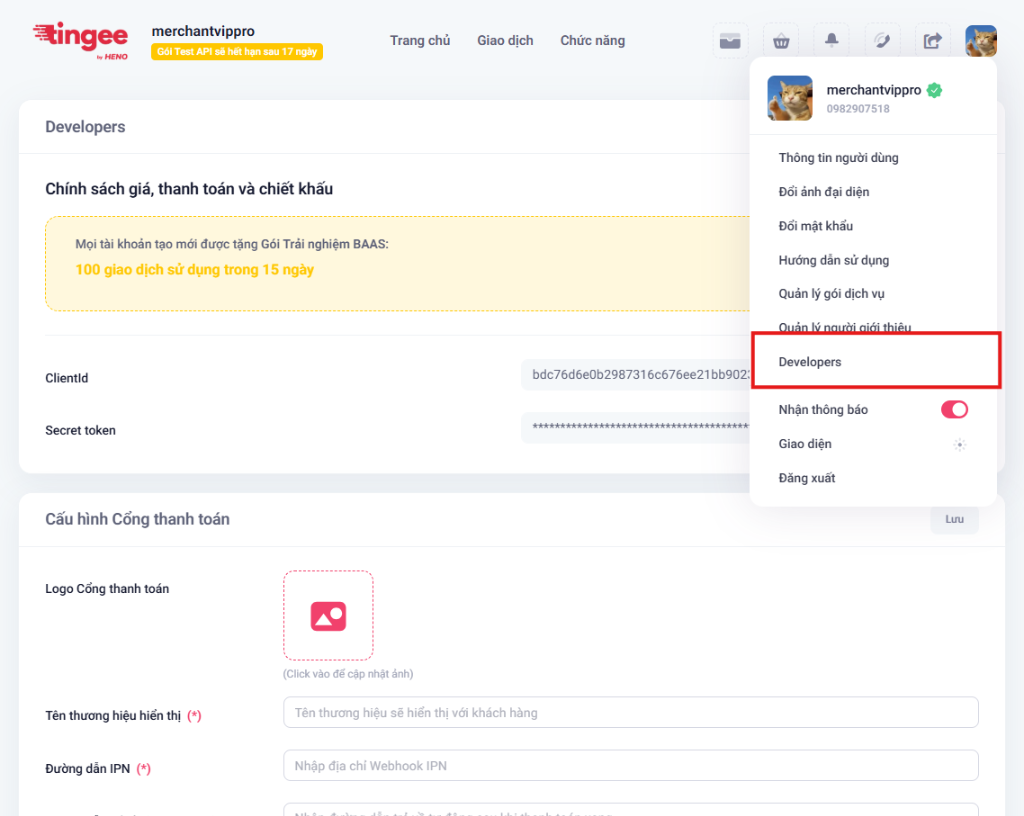
## 2. Settings to configure
Here, you need to set the following parameters for the payment gateway to work:
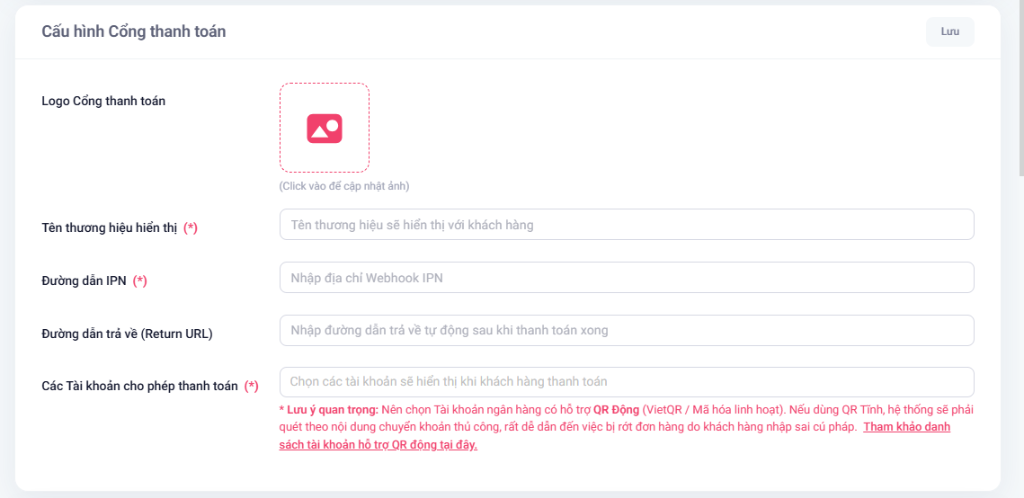
### 2.1. Payment gateway logo
- **Description:** Upload your business's logo image. This logo is displayed prominently on the payment page.
- **Requirements:** `JPG` and `PNG` formats are supported, maximum size 2MB. The recommended aspect ratio is 1:1.
### 2.2. Display brand name (*)
- **Description:** The business or shop name shown on the payment gateway so customers can recognize you.
- **Required:** Yes.
### 2.3. IPN URL (*)
- **Description:** The URL of your server where Tingee sends transaction status notifications (Webhook).
- **How it works:** The Tingee system sends the order data (via HTTP POST) to this address whenever the status changes (Successful, Expired, Cancelled). In particular, for static QR transactions, if the customer transfers money *after* the order has expired or been cancelled, the system still sends a Webhook recording the actual status (Expired-Successful, Cancelled-Successful) or duplicate transfers (Duplicate).
- **Required:** Yes.
- **Note:** The URL must be public and reachable from the Internet (do not use `localhost`). During development, you can use tools such as [webhook.site](https://webhook.site/) to receive test Webhooks.
### 2.4. Return URL
- **Description:** The URL (or App Scheme) that takes the customer back to your website/app after payment.
- **Required:** No (if you send `returnUrl` through the Create payment link API, the system uses the value from the API instead).
### 2.5. Accounts allowed for payment (*)
- **Description:** Select the accounts shown to customers when they pay on the gateway.
- **Required:** Yes.
- **Important:** Choose bank accounts that support **dynamic QR** (VietQR / flexible encoding). With static QR, the system has to match payments by the transfer description, which easily leads to missed orders when customers enter the wrong syntax.
## 3. Save the configuration
After filling in all the information correctly, click **Save**. The system updates immediately, and payment links created afterwards automatically use the latest configuration.
---
# Create a payment link
This API lets you create a payment link (Checkout URL) to send to your customer. When customers open this link, they can pay with any of the methods (VietQR, Card, Pay-by-Bank...) configured for the Merchant.
**POST** `https://open-api.tingee.vn/v1/payment-gateway/create-link`
UAT: `https://uat-open-api.tingee.vn/v1/payment-gateway/create-link`
> Create a payment link (Checkout URL) to send to the customer.
### 1. Request Headers
| Header | Type | Required | Description |
| :--- | :--- | :---: | :--- |
| `x-client-id` | `string` | Yes | The Merchant's Client ID issued by Tingee. |
| `x-request-timestamp` | `string` | Yes | Time the request is sent (UNIX timestamp in milliseconds). |
| `x-signature` | `string` | Yes | Request authentication signature that ensures data integrity. |
### 2. Request Body (JSON)
| Property | Type | Required | Description |
| :--- | :--- | :---: | :--- |
| `requestId` | `string` | Yes | Request identifier. *(Max: 36 chars, UUID v4)* |
| `orderId` | `string` | Yes | Order ID in your system. *(Max: 100 chars; letters, digits, `-` and `_` only)* |
| `amount` | `number` | Yes | Amount to pay. *(Min: 2,000, Max: 10,000,000,000)* |
| `merchantId` | `number` | No | Merchant ID. *(Required if you connect with a Master Merchant account).* |
| `currency` | `string` | No | Currency. Defaults to `VND`. *(Max: 10 chars)* |
| `expireInMinute`| `number` | No | Link expiration time in minutes. Defaults to `30`. *(Min: 5, Max: 30)* |
| `description` | `string` | No | Short transaction description shown on the payment gateway. *(Max: 200 chars)* |
| `orderInfo` | `string` | No | Additional internal order information. *(Max: 1000 chars)* |
| `customerEmail` | `string` | No | Customer email. |
| `vaAccountNumber`| `string` | No | Virtual account number, if you want to receive the payment into a specific account. *(Max: 50 chars)* |
| `returnUrl` | `string` | No | URL (or App Scheme) that takes the customer back to your website/app after payment. *(Max: 500 chars, valid URL)* |
### Sample Request:
```json
{
"requestId": "a0eebc99-9c0b-4ef8-bb6d-6bb9bd380a11",
"orderId": "INV-0012345",
"amount": 500000,
"description": "Thanh toán đơn hàng INV-0012345",
"returnUrl": "https://your-shop.com/checkout/success"
}
```
### 3. Response
The API returns the payment link (`Checkout URL`) in the `data` object.
| Property | Type | Description |
| :--- | :--- | :--- |
| `code` | `string` | Result status code. `00` means success. |
| `message`| `string` | Detailed status message. |
| `data` | `string` | The payment link (Checkout URL) to redirect the customer to. |
#### Sample successful Response (HTTP 200 OK):
```json
{
"code": "00",
"message": "Success",
"data": "https://payment-gateway.tingee.vn/checkout?token=base64urlEncodedToken&s=hmacSha256Signature"
}
```
### 4. Returned IPN (Webhook)
When the customer pays successfully or the order status changes (expired, cancelled), Tingee automatically sends an **HTTP POST** request (Webhook/IPN) with a JSON body to the **IPN URL** you configured on the Tingee Merchant Portal.
| Property | Type | Description |
| :--- | :--- | :--- |
| `requestId` | `string` | Request ID of the webhook (UUID). |
| `orderId` | `string` | The corresponding order ID in your system. |
| `amount` | `number` | The original amount requested for the order. |
| `paidAmount` | `number` | The amount the customer actually paid. |
| `description` | `string` | Transaction description. |
| `orderInfo` | `string` | Additional order information (if any). |
| `status` | `string` | Order status (e.g. `success`, `expired`, `canceled`). |
| `statusCode` | `string` | Result status code (e.g. `00` means success). |
| `billId` | `string` | Transaction ID on the Tingee side (if any). |
| `customerEmail` | `string` | Customer's email. |
| `paymentMethod` | `string` | Payment method the customer used (e.g. `qr`). |
| `providerTransactionCode` | `string` | Transaction code recorded by the partner/bank. |
| `paidAt` | `string` | Time the payment was recorded (ISO 8601). |
| `merchantId` | `number` | Merchant identifier on Tingee. |
#### Sample Webhook payload:
```json
{
"requestId": "e5700594-6c7f-4ce9-91d8-82d4e621ff78",
"orderId": "SDK-1779119517852",
"amount": 2000,
"paidAmount": 2000,
"description": "Thanh toan don hang test SDK",
"orderInfo": null,
"status": "success",
"statusCode": "00",
"billId": null,
"customerEmail": null,
"paymentMethod": "qr",
"providerTransactionCode": "1927ee3a-7778-4500-9b4e-55363fa4a762",
"paidAt": "2026-05-18T15:52:42.315Z",
"merchantId": 29267
}
```
---
# Integrate the UI SDK (Frontend)
Besides redirecting users directly to the `Checkout URL`, Tingee provides a **Frontend SDK** that lets you embed the payment experience directly in your website as a **Popup (Modal)**. This keeps customers on your site and optimizes your conversion rate.
## 1. Install the SDK
Add the SDK with a `` tag in your HTML (e.g. the `index.html` of your React/Vue/Angular app). Use the URL for the environment you are developing against (UAT or PROD):
**UAT environment:**
```html
```
**PROD environment:**
```html
```
---
## 2. Global Setup
For your app to run smoothly, configure the SDK **only once**, right when your app starts.
Use `Tingee.Setup(config)` to define the event listeners (callbacks) shared across your whole website.
```javascript
// Initialize at startup (e.g. in index.js, main.ts, or App.tsx)
window.Tingee.Setup({
// Display settings (optional)
size: 'medium', // 'small' | 'medium' | 'large' (default 'medium')
// Transaction succeeded
onSuccess: function(data) {
console.log("Thanh toán thành công!", data);
window.location.href = "/checkout/success";
},
// Transaction failed / expired
onFailed: function(error) {
console.error("Giao dịch thất bại hoặc hết hạn", error);
},
// The user cancelled (clicked the X button)
onCancelled: function() {
console.log("Người dùng đã hủy thanh toán.");
},
// The payment window closed (whether the payment succeeded or failed)
onClose: function() {
console.log("Popup thanh toán đã được đóng.");
}
});
```
---
## 3. Open the payment window
After your Backend calls the **Create payment link** API and returns the `Checkout URL`, just call `Tingee.Url.Open()` to show the popup.
```javascript
// checkoutUrl comes from your backend API (e.g. https://pay.tingee.vn/checkout?token=xxx&s=yyy)
const checkoutUrl = "https://pay.tingee.vn/checkout?...";
// Show the Popup
window.Tingee.Url.Open(checkoutUrl);
```
*(You can also pass a configuration object as the second argument of `Open` to override the global configuration for this transaction only).*
---
## 4. Framework integration examples
Below are examples of the Global Setup and the Open call for popular frontend frameworks:
**React**
```tsx title="App.tsx"
// If you use TypeScript, you may need a global declaration to avoid errors
// declare global { interface Window { Tingee: any; } }
// 1. Global configuration when the app starts
useEffect(() => {
// Make sure the script in index.html has finished loading
if (window.Tingee) {
window.Tingee.Setup({
size: 'medium',
onSuccess: (data: any) => {
console.log("Thanh toán thành công", data);
// Navigate with React Router
// navigate('/success');
},
onCancelled: () => console.log("Khách hàng hủy"),
});
}
}, []);
// 2. Pay button handler
const handlePayment = async () => {
try {
// Simulate calling your internal API to get the Checkout URL
const response = await fetch('/api/create-payment');
const { checkoutUrl } = await response.json();
// Open the Popup
if (window.Tingee) {
window.Tingee.Url.Open(checkoutUrl);
} else {
alert("Không tìm thấy SDK Tingee!");
}
} catch (error) {
console.error("Lỗi tạo thanh toán", error);
}
};
return (
`
})
// 1. Global configuration when the app starts
ngOnInit() {
if (typeof Tingee !== 'undefined') {
Tingee.Setup({
size: 'medium',
onSuccess: (data: any) => {
console.log("Thanh toán thành công", data);
// this.router.navigate(['/success']);
},
onCancelled: () => console.log("Khách hàng hủy")
});
}
}
// 2. Pay button handler
async handlePayment() {
try {
// Simulate calling your internal API to get the Checkout URL
const checkoutUrl = await this.paymentService.createLink();
// Open the Popup
Tingee.Url.Open(checkoutUrl);
} catch (error) {
console.error("Lỗi tạo thanh toán", error);
}
}
}
```
**Vue 3**
```vue title="App.vue"
Giỏ hàng
```
---
## 5. Benefits of using the SDK
- **Users never leave the page:** The whole QR scan or card entry happens in the popup, and users always see your website in the background.
- **Event-driven:** Your website knows exactly when the user closes the popup or when the payment succeeds, so it can update the interface right away (e.g. cart, notifications) without reloading the page.
---
# Integrate the iOS Native SDK
The **TingeePaySDK** library lets native iOS apps easily embed an intuitive payment screen as a Bottom Sheet or in full screen.
 
---
## 1. Install the SDK
You can install TingeePaySDK in your iOS app in either of the following ways:
**Swift Package Manager (SPM)**
This is the recommended installation method.
1. Open your project in Xcode.
2. Select **File** > **Add Packages...** (or **Add Package Dependencies...**).
3. Enter the URL of the GitHub repository that hosts the TingeePay SDK:
```text
https://github.com/tingeedev/tingee-pay-sdk-ios.git
```
4. Choose a version rule (e.g. **Up to Next Major Version**) and click **Add Package**.
**XCFramework (Manual)**
If you do not use SPM, you can add the XCFramework manually:
1. Download the package: [TingeePaySDK.xcframework.zip](https://developers.tingee.vn/en/docs/sdk/ios/TingeePaySDK.xcframework.zip) (a zip of the `TingeePaySDK.xcframework` folder).
2. Unzip it and drag the `TingeePaySDK.xcframework` folder into your Xcode project (make sure **Copy items if needed** and **Create groups** are selected).
3. Select your app target and go to the **General** tab.
4. Under **Frameworks, Libraries, and Embedded Content**, find `TingeePaySDK.xcframework` and set it to **Embed & Sign**.
---
## 2. Configure system permissions
To support saving the payment QR code to the device's photo album (when the user taps the "Download QR code" button on the gateway interface), you must configure photo library access in the `Info.plist` file.
Open `Info.plist` as **Source Code** and add the following key:
```xml
NSPhotoLibraryAddUsageDescriptionỨng dụng cần quyền để lưu mã QR thanh toán vào thư viện ảnh của bạn.
```
> [!WARNING]
> Without this configuration, the app crashes immediately when the user taps the save QR code button on the payment screen.
---
## 3. Quick integration guide
Depending on whether your project uses UIKit or SwiftUI, follow the corresponding guide:
**UIKit (Swift)**
In the UIViewController where you want to start the payment (e.g. when the pay button is tapped):
```swift title="CheckoutViewController.swift"
class CheckoutViewController: UIViewController {
func openPayment(checkoutUrlString: String) {
guard let checkoutUrl = URL(string: checkoutUrlString) else { return }
// Call the SDK to show the payment gateway
TingeePay.presentCheckout(
from: self,
checkoutUrl: checkoutUrl,
style: .bottomSheet, // Or .fullScreen
delegate: self
)
}
}
```
**SwiftUI**
For SwiftUI, write a wrapper struct conforming to `UIViewControllerRepresentable` so you can easily reuse it and handle the returned events.
#### Step 1: Declare a wrapper for the SDK
```swift title="TingeePayView.swift"
struct TingeePayView: UIViewControllerRepresentable {
let checkoutUrl: URL
var themeColor: String? = nil
var style: TingeePayStyle = .fullScreen
var onFinished: ((TingeePaymentResult) -> Void)?
var onCancelled: (() -> Void)?
var onFailed: ((Error) -> Void)?
class Coordinator: NSObject, TingeePayCheckoutDelegate {
var parent: TingeePayView
init(parent: TingeePayView) {
self.parent = parent
}
func tingeePayCheckoutDidFinish(with result: TingeePaymentResult) {
parent.onFinished?(result)
}
func tingeePayCheckoutDidCancel() {
parent.onCancelled?()
}
func tingeePayCheckoutDidFail(with error: Error) {
parent.onFailed?(error)
}
}
func makeCoordinator() -> Coordinator {
Coordinator(parent: self)
}
func makeUIViewController(context: Context) -> TingeePayCheckoutViewController {
let vc = TingeePayCheckoutViewController(
checkoutUrl: checkoutUrl,
themeColor: themeColor,
style: style
)
vc.delegate = context.coordinator
return vc
}
func updateUIViewController(_ uiViewController: TingeePayCheckoutViewController, context: Context) {}
}
```
#### Step 2: Use the wrapper in your View
```swift title="ContentView.swift"
struct ContentView: View {
@State private var showPayment = false
let checkoutUrl = URL(string: "https://pay.tingee.vn/your-order-id")!
var body: some View {
Button("Thanh toán với Tingee") {
showPayment = true
}
.sheet(isPresented: $showPayment) {
TingeePayView(
checkoutUrl: checkoutUrl,
themeColor: "#FF5733", // Optional color
style: .fullScreen, // Or .bottomSheet
onFinished: { result in
print("Kết quả: \(result.status.rawValue)")
showPayment = false
},
onCancelled: {
print("Người dùng đã huỷ thanh toán")
showPayment = false
},
onFailed: { error in
print("Lỗi tải trang: \(error.localizedDescription)")
showPayment = false
}
)
}
}
}
```
---
## 4. Listen for & handle results
To receive events from the payment screen, you need to conform to the `TingeePayCheckoutDelegate` protocol:
```swift
extension CheckoutViewController: TingeePayCheckoutDelegate {
/// Event: The payment completed or ended (Success, Error, Expired...)
func tingeePayCheckoutDidFinish(with result: TingeePaymentResult) {
print("Trạng thái thanh toán: \(result.status.rawValue)")
print("Mã đơn hàng: \(result.orderId ?? "")")
switch result.status {
case .success:
// Handle a successful payment (e.g. go to a thank-you screen)
print("Thanh toán thành công!")
case .failed:
// The payment transaction failed
print("Lỗi thanh toán: \(result.errorMessage ?? "")")
case .cancelled:
// The transaction was cancelled on the gateway
print("Giao dịch đã bị huỷ.")
case .expired:
// The payment time expired
print("Đơn hàng đã hết hạn thanh toán.")
case .error:
// A system error occurred
print("Lỗi hệ thống cổng thanh toán.")
}
}
/// Event: The user tapped the "Close" (X) button or swiped the Bottom Sheet away to exit
func tingeePayCheckoutDidCancel() {
print("Người dùng đã thoát màn hình thanh toán.")
}
/// Event: An error occurred while the SDK was loading the payment gateway (e.g. invalid URL format, no Internet connection...)
func tingeePayCheckoutDidFail(with error: Error) {
print("Lỗi khởi tạo/tải màn hình thanh toán: \(error.localizedDescription)")
}
}
```
---
## 5. Data models
### TingeePaymentResult
Object containing the transaction result that the SDK returns through the `tingeePayCheckoutDidFinish` callback.
| Property | Data type | Description |
| :--- | :--- | :--- |
| `status` | `TingeePaymentStatus` | Final status of the transaction. |
| `orderId` | `String?` | Order ID in your system (the ID you sent when creating the payment link). |
| `errorMessage` | `String?` | Detailed error message (if any). |
### TingeePaymentStatus
An `Enum` representing the transaction statuses:
* `.success`: The transaction succeeded.
* `.failed`: The transaction failed.
* `.cancelled`: The transaction was cancelled.
* `.expired`: The transaction's payment time expired.
* `.error`: The transaction hit a system error.
---
## 6. Troubleshooting
### The "Download QR code" button does not work
* **Cause:** The `NSPhotoLibraryAddUsageDescription` key is not configured in `Info.plist`.
* **Fix:** Go back to the system permissions step and add this key to your plist file.
### Testing in the Sandbox environment
* The mobile SDK switches environments automatically based on the URL. If `checkoutUrl` starts with Tingee's Sandbox URL, the SDK detects it and shows the Sandbox interface.
---
# Integrate the Android Native SDK
The **TingeePaySDK (AAR)** library lets you integrate the Tingee payment gateway into a native Android app written in Kotlin or Java.
 
---
## 1. Install the SDK
Follow these steps to add the AAR file to your app:
1. Download the library file: [tingeepaysdk-release.aar](https://developers.tingee.vn/en/docs/sdk/android/tingeepaysdk-release.aar).
2. Copy the downloaded `tingeepaysdk-release.aar` file into your project's `app/libs/` folder (create the `libs` folder if it does not exist).
3. Open your app's build configuration file (in the `app` module) and add the dependencies for the Gradle DSL you use:
**Kotlin DSL (build.gradle.kts)**
```kotlin title="app/build.gradle.kts"
dependencies {
// Add the local AAR file
implementation(files("libs/tingeepaysdk-release.aar"))
// Libraries the SDK requires (add them if missing)
implementation("androidx.appcompat:appcompat:1.3.0")
implementation("com.google.android.material:material:1.6.1")
implementation("androidx.constraintlayout:constraintlayout:2.0.0")
implementation("androidx.activity:activity:1.8.0")
}
```
**Groovy DSL (build.gradle)**
```groovy title="app/build.gradle"
dependencies {
// Add the local AAR file
implementation files('libs/tingeepaysdk-release.aar')
// Libraries the SDK requires (add them if missing)
implementation 'androidx.appcompat:appcompat:1.3.0'
implementation 'com.google.android.material:material:1.6.1'
implementation 'androidx.constraintlayout:constraintlayout:2.0.0'
implementation 'androidx.activity:activity:1.8.0'
}
```
4. Sync your project by clicking **File** → **Sync Project with Gradle Files**.
---
## 2. Declare app permissions
The SDK needs an Internet connection to load the payment gateway. Make sure you have declared the `INTERNET` permission in your app's `AndroidManifest.xml` file:
```xml title="app/src/main/AndroidManifest.xml"
...
```
---
## 3. Launch the payment screen
The payment gateway offers two main display modes: **Full screen (FullScreen)** or **Half screen (Bottom Sheet)**.
Before opening the SDK, you need to get the `paymentUrl` from your server (Backend) (via the Create payment link API) and prepare your registered `returnUrl`.
### 3.1. Call from an Activity (recommended)
Use `ActivityResultLauncher` to launch the payment screen and receive the result the modern way.
#### Step 1: Register the Launcher in your Activity
```kotlin
private val paymentResultLauncher = registerForActivityResult(
ActivityResultContracts.StartActivityForResult()
) { result ->
if (result.resultCode == Activity.RESULT_OK) {
val data = result.data
val status = data?.getStringExtra("EXTRA_PAYMENT_STATUS")
val orderId = data?.getStringExtra("EXTRA_ORDER_ID")
val transactionCode = data?.getStringExtra("EXTRA_TRANSACTION_CODE")
val errorCode = data?.getStringExtra("EXTRA_ERROR_CODE")
val errorMessage = data?.getStringExtra("EXTRA_ERROR_MESSAGE")
val rawJson = data?.getStringExtra("EXTRA_PAYMENT_DATA_JSON")
when (status) {
"success" -> { /* Payment succeeded */ }
"failed" -> { /* Payment failed */ }
"cancelled" -> { /* The user cancelled the transaction on the gateway */ }
"expired" -> { /* The payment code expired */ }
"error" -> { /* A system error occurred */ }
}
} else {
// The user closed the SDK screen (by swiping or with the hardware back button) without a result
}
}
```
#### Step 2: Open the payment gateway once you have the URL
```kotlin
val intent = TingeePaySDK.createIntent(
context = this,
paymentUrl = paymentUrl, // Payment URL from your Backend API
returnUrl = returnUrl, // Registered return URL/deep link
isEmbedded = true, // true: Hide the web page's unnecessary header/footer (recommended)
immediateResult = true, // true: Send the result back as soon as it completes
primaryColor = "#1E88E5", // Brand color in Hex (null = use the default)
isFullScreen = true // true: Full screen | false: Show as a Bottom Sheet (half screen)
)
paymentResultLauncher.launch(intent)
```
### 3.2. Call from a Fragment
When you open the SDK from a Fragment, keep these two important points in mind:
1. `registerForActivityResult` **must** be declared as a class-level property of the Fragment. **Do not** declare it inside callbacks such as `onViewCreated()`, `onStart()`, or inside click listeners (doing so throws an `IllegalStateException` at runtime).
2. Use `requireContext()` instead of `this` when passing the context parameter.
```kotlin title="CheckoutFragment.kt"
class CheckoutFragment : Fragment() {
// ✅ Declare the Launcher as a class-level property
private val paymentResultLauncher = registerForActivityResult(
ActivityResultContracts.StartActivityForResult()
) { result ->
if (result.resultCode == Activity.RESULT_OK) {
val status = result.data?.getStringExtra("EXTRA_PAYMENT_STATUS")
val orderId = result.data?.getStringExtra("EXTRA_ORDER_ID")
// Handle the result...
}
}
override fun onViewCreated(view: View, savedInstanceState: Bundle?) {
super.onViewCreated(view, savedInstanceState)
btnPay.setOnClickListener {
// ✅ Create the Intent and launch it from the click event
val intent = TingeePaySDK.createIntent(
context = requireContext(), // Use requireContext()
paymentUrl = paymentUrl,
returnUrl = returnUrl,
isEmbedded = true,
immediateResult = true,
primaryColor = "#1E88E5",
isFullScreen = false // Example: open as a Bottom Sheet
)
paymentResultLauncher.launch(intent)
}
}
}
```
---
## 4. Configuration parameters
`TingeePaySDK.createIntent` supports the following configuration parameters:
| Parameter | Data type | Default | Description |
| :--- | :--- | :---: | :--- |
| `context` | `Context` | — | Context of the calling Activity/Fragment. |
| `paymentUrl` | `String` | — | **Required**. Payment URL created by your Backend API. |
| `returnUrl` | `String?` | `null` | URL or deep link to redirect the app to after completion. |
| `isEmbedded` | `Boolean` | `true` | If `true`, the SDK hides the payment gateway web page's default header and footer for a native feel. |
| `immediateResult`| `Boolean` | `true` | `true` to send the result immediately when the payment gateway finishes processing. |
| `primaryColor` | `String?` | `null` | Primary color of the payment interface as a Hex string (e.g. `"#E53935"`). If `null`, the gateway's default color is used. |
| `isFullScreen` | `Boolean` | `true` | Display mode: - `true`: Full screen. - `false`: Bottom Sheet (about 50% of the screen height, swipe down to close). |
---
## 5. Data returned by the SDK
When the payment screen finishes, the SDK calls `setResult(RESULT_OK, intent)` and closes automatically. You can read the following data from the result `Intent`:
| Data key | Data type | Description |
| :--- | :--- | :--- |
| `EXTRA_PAYMENT_STATUS` | `String` | Returned transaction status: `success` / `failed` / `cancelled` / `expired` / `error` |
| `EXTRA_ORDER_ID` | `String` | The corresponding order ID in your system. |
| `EXTRA_TRANSACTION_CODE`| `String` | Transaction code recorded on the Tingee payment gateway. |
| `EXTRA_ERROR_CODE` | `String` | Detailed error code (if an error occurred). |
| `EXTRA_ERROR_MESSAGE` | `String` | Detailed error message (if an error occurred). |
| `EXTRA_PAYMENT_DATA_JSON`| `String` | The full original JSON payload from the payment gateway. |
> [!NOTE]
> If the user closes the SDK screen (e.g. by swiping the Bottom Sheet down) before a final status is available, `resultCode` is `RESULT_CANCELED` (0) and the Intent contains no extra data.
---
## 6. Minimum system requirements
| Category | Requirement |
| :--- | :--- |
| **Minimum Android SDK** | API 24 (Android 7.0 or later) |
| **Target SDK** | API 36 |
| **Java compatibility** | Java 11 |
| **Network permission** | The `INTERNET` permission is required |
| **Development language** | Kotlin or Java |
---
## 7. Important integration notes
* **Link creation flow:** The mobile SDK does not call the API that creates the payment link. Your app is responsible for calling your own Backend to get the `paymentUrl` before passing it to the SDK.
* **Automatic deep links:** When the user chooses to pay with a banking app, the SDK automatically detects and opens a compatible banking app installed on the device. If that banking app is not installed, the SDK shows a friendly popup so the user can try again or choose another payment method.
* **Memory:** The SDK automatically releases resources and clears the WebView cache when the payment screen closes, to avoid memory leaks.
---
# QR Code overview
QR Code is a modern payment solution that cuts the transaction process down to a few seconds with a single scan in a banking app.
**🏷️ Static QR**
A fixed code printed at the counter. Suitable for small household businesses that do not need much automation.
**🔄 Dynamic QR**
A unique code for each order. Automates bill settlement with 100% accurate reconciliation.
**⚡ One-tap experience**
Customers do not need to type anything, which reduces errors and speeds up payment.
## Static QR
A static QR code is created once and used many times. Although the VietQR standard lets you embed the amount and description, keep the following in mind in practice:
- **User behavior:** Some banks (such as MBBank) still let customers edit the amount or description before confirming the transfer.
- **Reconciliation:** Because the information can be changed, the system must reconcile based on the **actual amount received**, the **actual description** and the **transaction time**.
- **Use cases:** Suitable for small shops or for receiving donations and contributions.
## Dynamic QR
Each transaction generates a unique QR code with an identifier (`billId`/`orderId`).
- **Accuracy:** Dynamic QR codes usually lock the amount. Even if the bank allows editing the description, the system still identifies the correct order thanks to the identifier included in the data returned by the bank.
- **Validity:** You can configure an expiry time so the code is no longer valid after payment or after the set period.
- **Use cases:** Ideal for e-commerce, vending machines and point-of-sale (POS) systems.
---
## Detailed comparison
| Criteria | Static QR | Dynamic QR |
| :--- | :--- | :--- |
| **Creation** | Created once, reused | Created per transaction |
| **Amount & description** | Can be prefilled, but **many banks allow editing** | Prefilled; **some banks still allow editing**, but **reconciliation is by billId** |
| **Usage** | Multiple uses | One-time use or until fully paid |
| **Transaction reconciliation** | Based on **amount + description** → prone to mismatches | Based on **billId/orderId** → fully accurate |
| **Risk of wrong input / edited description** | High | Low (the system reconciles by billId) |
| **Expiry time** | None | Yes |
| **Suitable for** | Small shops, flexible payments | Online sales, restaurants, automated systems |
| **Flexibility** | Medium | High |
---
## Bank support
Static/dynamic QR support depends on each bank and the type of linked account.
👉 See the detailed table in [**Important notes — QR support**](/docs/luu-y-quan-trong#kha-nang-ho-tro-qr.
---
# Static QR code (VietQR)
A static QR code is a flexible payment solution that is created once and tied to the beneficiary account. It is the optimal choice for fixed points of sale or quick transfers that do not need order tracking.
:::tip Before you start
- **Base URL:** `https://uat-open-api.tingee.vn` (UAT) · `https://open-api.tingee.vn` (PROD)
- **Authentication:** Every request must include the `x-client-id` and `x-request-timestamp` headers and the `x-signature` signature (HMAC SHA512). See [Getting an API Key & generating the signature](https://developers.tingee.vn/en/docs/config-info#sinh-ch%E1%BB%AF-k%C3%BD-signature).
- **Result:** The API always returns HTTP `200`; check the `code` field (`00` = success). See [Error codes](https://developers.tingee.vn/en/docs/error-list).
:::
**🖼️ Permanent use**
The QR code never changes, so you can print it on acrylic stands, standees or stick it at the checkout counter.
**⚡ Fast transfers**
Fully compatible with the Napas247 network, receiving money instantly from any bank.
**🏦 Multi-bank support**
Easily link personal, household business or business accounts to receive money.
---
## Detailed flow diagram
```mermaid
%%{init: {"flowchart": {"curve": "basis", "nodeSpacing": 25, "rankSpacing": 30}}}%%
flowchart TD
%% 1. Style definitions
classDef action fill:#0ea5e922,stroke:#0284c7,stroke-width:2px,color:#075985;
classDef decision fill:#f59e0b20,stroke:#d97706,stroke-width:2px,color:#78350f;
classDef startEnd fill:#1f2937,stroke:#1f2937,color:#fff,font-weight:bold;
classDef hidden fill:none,stroke:none,color:transparent;
%% 2. Swimlanes (invisible anchors at the top & bottom)
subgraph S_User [👤 USER]
T_U[ ]:::hidden
U_OTP([Receive OTP from the bank & enter it in the Merchant system])
U1([Scan the QR code at the point of sale])
U2([Receive money notification from the bank])
U3([Receive real-time payment notification])
B_U[ ]:::hidden
end
subgraph S_Merchant [🏪 MERCHANT SYSTEM]
T_M[ ]:::hidden
Start((Start))
M0{VA exists?}
M1([Backend: POST /v1/create-va])
M_OTP([Backend: Get OTP from customer & POST /v1/confirm-va])
M_SaveVA([Backend: Save VA number to database])
M2{How to create the QR code?}
M3([Build the VietQR string yourself])
M4([Print/show the QR code at the point of sale])
M5([Verify Signature & update balance/reconcile])
End(((End)))
B_M[ ]:::hidden
end
subgraph S_Tingee [🛡️ TINGEE SYSTEM]
T_T[ ]:::hidden
T_CreateVA([Receive & send create-va to the bank])
T_ConfirmVA([Send OTP verification & complete VA creation at the bank])
T1([Return vaAccountNumber])
T2([Generate & return qrCode & Image])
T3([Receive IPN from the bank])
B_T[ ]:::hidden
end
subgraph S_Bank [🏦 BANK SYSTEM]
T_B[ ]:::hidden
B_OTP([Core: Receive & send OTP to the customer's phone])
B0([Core: Verify OTP & create VA number])
B1([App: Confirm Napas247 transfer])
B2([Core: Credit transaction to the Virtual Account])
B3([Send IPN/API money received])
B_B[ ]:::hidden
end
%% -------------------------------------------------------------
%% FORCE ALIGNMENT AT THE TOP
%% -------------------------------------------------------------
T_U ~~~ T_M ~~~ T_T ~~~ T_B
T_M ~~~ Start
%% Pull nodes up to the same level for balance
T_U ~~~ U_OTP
T_T ~~~ T_CreateVA
T_B ~~~ B_OTP
%% -------------------------------------------------------------
%% PHASE 0: CHECK & CREATE VA (BANK SENDS OTP)
%% -------------------------------------------------------------
Start --> M0
%% Branch 1: No VA yet -> create it and verify the OTP via the bank
M0 -- "Not yet" --> M1
M1 -- "[API] POST /v1/create-va" --> T_CreateVA
T_CreateVA -- "Send create-va to the bank" --> B_OTP
%% Bank sends OTP to the customer's phone, customer enters it in the Merchant system
B_OTP -. "Send confirmation OTP to phone (SMS)" .-> U_OTP
U_OTP -- "Enter OTP" --> M_OTP
%% Merchant sends confirm-va with the OTP, Tingee forwards it to the bank
M_OTP -- "[API] POST /v1/confirm-va" --> T_ConfirmVA
T_ConfirmVA --> B0
%% Bank verifies the OTP & creates the VA, Tingee returns it to the Merchant to save in the DB
B0 -- "Confirm VA number" --> T1
T1 -- "Return result with vaAccountNumber" --> M_SaveVA
%% Branch 2: VA already exists, or right after linking the VA
M0 -- "VA already exists" ---> M2
M_SaveVA -- "When you need a VietQR code" --> M2
%% -------------------------------------------------------------
%% PHASE 1: CREATE QR
%% -------------------------------------------------------------
M2 -- "Create VietQR yourself" --> M3
M2 -- "[API] POST /v1/generate-viet-qr" --> T2
T2 -- "Return qrCode & Image" --> M4
M3 --> M4
%% -------------------------------------------------------------
%% PHASE 2: SCAN & TRANSFER
%% -------------------------------------------------------------
M4 --> U1
U1 --> B1
B1 --> B2
B2 -- "Bank reports success" --> U2
B2 --> B3
%% -------------------------------------------------------------
%% PHASE 3: BALANCE NOTIFICATION & WEBHOOK
%% -------------------------------------------------------------
B3 --> T3
T3 -- "[WEBHOOK] POST /api/webhook/payment" --> M5
M5 --> U3
U3 --> End
%% -------------------------------------------------------------
%% FORCE ALIGNMENT AT THE BOTTOM
%% -------------------------------------------------------------
End ~~~ B_M
U3 ~~~ B_U
B3 ~~~ B_B
T3 ~~~ B_T
B_U ~~~ B_M ~~~ B_T ~~~ B_B
%% 4. Assign styles
class Start,End startEnd;
class U_OTP,U1,U2,U3,M1,M_OTP,M_SaveVA,M3,M4,M5,T_CreateVA,T_ConfirmVA,T1,T2,T3,B_OTP,B0,B1,B2,B3 action;
class M0,M2 decision;
style S_User fill:#88888814,stroke:#9ca3af,stroke-width:2px,stroke-dasharray: 5 5
style S_Merchant fill:#3b82f614,stroke:#60a5fa,stroke-width:2px,stroke-dasharray: 5 5
style S_Tingee fill:#16a34a14,stroke:#4ade80,stroke-width:2px,stroke-dasharray: 5 5
style S_Bank fill:#ef444414,stroke:#f87171,stroke-width:2px,stroke-dasharray: 5 5
```
---
## Related APIs
| Function | Method | Endpoint |
| :--- | :---: | :--- |
| [**Create static QR code**](https://developers.tingee.vn/en/docs/qr/static/generate-viet-qr) | POST | `/v1/generate-viet-qr` |
---
# Create a static QR code (VietQR)
Use this API to create a static QR code (VietQR) for a fixed bank account. This type of QR suits fixed payment points or models that do not need automatic payment-status tracking for each order.
**POST** `https://open-api.tingee.vn/v1/generate-viet-qr`
UAT: `https://uat-open-api.tingee.vn/v1/generate-viet-qr`
> Create a static QR code in the VietQR standard. Customers can scan it to transfer money manually to your account.
### Header Request
| Header | Required | Description |
| :--- | :---: | :--- |
| `Content-Type` | Yes | `application/json` |
| `x-client-id` | Yes | Partner identifier issued by TINGEE. |
| `x-signature` | Yes | HMAC SHA512 authentication signature. See [How to generate the signature](https://developers.tingee.vn/en/docs/config-info#sinh-ch%E1%BB%AF-k%C3%BD-signature). |
| `x-request-timestamp` | Yes | Time the request is sent (format: `yyyyMMddHHmmssSSS`, UTC+7) |
### Body Parameter
| Field | Type | Required | Description |
| :--- | :---: | :---: | :--- |
| `bankBin` | string | Yes | Bank BIN. See [Supported banks](https://developers.tingee.vn/en/docs/banking/get-banks). |
| `accountNumber` | string | Yes | Receiving account number (original account number or virtual account number). For `bankBin = BAOKIM`, it must be a Bảo Kim virtual account number linked on TINGEE. |
| `amount` | number | No | Default amount (VND, shown when scanned). Leave empty to let the payer enter the amount. |
| `content` | string | No | Default transfer description. |
### Code samples
```bash
curl --request POST 'https://open-api.tingee.vn/v1/generate-viet-qr' \
--header 'x-client-id: YOUR_CLIENT_ID' \
--header 'x-request-timestamp: yyyyMMddHHmmssSSS' \
--header 'x-signature: HMAC_SHA512("{timestamp}:{minified JSON body}", SECRET_KEY)' \
--header 'Content-Type: application/json' \
--data '{
"bankBin": "970418",
"accountNumber": "21510002865945",
"amount": 100000,
"content": "Thanh toan don hang"
}'
```
> NestJS, C#, Java and PHP samples and signature generation: see the original documentation page.
### Sample Response
```json
{
"code": "00",
"message": "Success",
"data": {
"qrCode": "00020101021238540010A0000007270124000697041801102151000286...",
"qrCodeImage": "data:image/png;base64,iVBORw0KGgoAAAANSU..."
}
}
```
| Field | Type | Description |
| :--- | :---: | :--- |
| `code` | string | Result code (`00` = Success). |
| `message` | string | Response message. |
| `data.qrCode` | string | QR code content string in the VietQR (EMVCo) standard. |
| `data.qrCodeImage` | string | PNG QR image as a Base64 Data URL (`data:image/png;base64,...`); you can assign it directly to the `src` attribute of an `` tag. |
---
## Common error codes
| Code | Description | How to handle |
| :--- | :--- | :--- |
| `1010` | Bảo Kim account number not found | Only applies when `bankBin` is Bảo Kim: check that `accountNumber` is a Bảo Kim account linked on TINGEE. |
| `90`, `91`, `92`, `97` | Request authentication error (timestamp, client-id, signature) | See [System error codes](https://developers.tingee.vn/en/docs/error-list#mã-lỗi-hệ-thống). |
| `Others` | Other errors | See [Error codes](https://developers.tingee.vn/en/docs/error-list). |
---
# Dynamic QR code (Dynamic QR)
A dynamic QR code is the optimal payment solution for transactions that require absolute accuracy. Each QR code is generated separately for each order and contains the payment information or a reference code that lets the system identify the transaction.
:::tip Before you start
- **Base URL:** `https://uat-open-api.tingee.vn` (UAT) · `https://open-api.tingee.vn` (PROD)
- **Authentication:** Every request must include the `x-client-id` and `x-request-timestamp` headers and the `x-signature` signature (HMAC SHA512). See [Getting an API Key & generating the signature](https://developers.tingee.vn/en/docs/config-info#sinh-ch%E1%BB%AF-k%C3%BD-signature).
- **Result:** The API always returns HTTP `200`; check the `code` field (`00` = success). See [Error codes](https://developers.tingee.vn/en/docs/error-list).
:::
**🆔 Unique identification**
Each QR is tied to a `billId`, so the system can automatically identify and settle the bill.
**⌛ Flexible validity**
Supports configuring an expiry time (Expire) to keep fast payment transactions safe.
**💯 Automatic reconciliation**
Independent of what the customer types in, the system matches payments automatically based on the QR data.
---
## Detailed flow diagram
```mermaid
%%{init: {"flowchart": {"curve": "basis", "nodeSpacing": 25, "rankSpacing": 30}}}%%
flowchart TD
%% 1. Style definitions
classDef action fill:#0ea5e922,stroke:#0284c7,stroke-width:2px,color:#075985;
classDef decision fill:#f59e0b20,stroke:#d97706,stroke-width:2px,color:#78350f;
classDef startEnd fill:#1f2937,stroke:#1f2937,color:#fff,font-weight:bold;
classDef hidden fill:none,stroke:none,color:transparent;
%% 2. Swimlanes (invisible anchors at the top & bottom)
subgraph S_User ["👤 USER"]
T_U[" "]:::hidden
U_OTP(["Receive OTP from the bank & enter it in the Merchant system"])
U1(["Open the bank app & scan the QR code"])
U_Result(["View the transaction result notification"])
B_U[" "]:::hidden
end
subgraph S_Merchant ["🏪 MERCHANT SYSTEM"]
T_M[" "]:::hidden
Start(("Start"))
M1{"Check: VA exists?"}
M2(["Backend: POST /v1/create-va"])
M_OTP(["Backend: Get OTP from customer & POST /v1/confirm-va"])
M_SaveVA(["Backend: Save VA number to database"])
M3(["Backend: Get VA from database"])
M4(["POST /v1/generate-dynamic-qr with amount, billId, va..."])
M5(["Frontend: Show QR & countdown"])
M6(["Backend: Verify Signature & settle the order"])
%% THE 2 FRONTEND NODES HAVE BEEN MERGED INTO 1
M7(["Frontend: Handle & show result (Socket/Timeout)"])
End(((End)))
B_M[" "]:::hidden
end
subgraph S_Tingee ["🛡️ TINGEE SYSTEM"]
T_T[" "]:::hidden
T_CreateVA(["Receive & send create-va to the bank"])
T_ConfirmVA(["Send OTP verification & complete VA creation at the bank"])
T2(["Return vaAccountNumber"])
T3(["Request to create/link dynamic QR"])
T4(["Return qrCode, billId"])
T5{"Check code status?"}
T6(["Match amount + billId Mark as: EXPIRED ⛔"])
B_T[" "]:::hidden
end
subgraph S_Bank ["🏦 BANK SYSTEM"]
T_B[" "]:::hidden
B_OTP(["Core: Receive & send OTP to the customer's phone"])
B1(["Core: Verify OTP & create VA number"])
B2(["Core: Confirm QR link"])
B3(["App: Send request to check the QR code"])
B4(["App: Return QR expired error"])
B5(["App: Confirm payment OTP/FaceID"])
B6(["Core: Credit transaction to the Virtual Account"])
B7(["Send IPN/API money received"])
B_B[" "]:::hidden
end
%% -------------------------------------------------------------
%% FORCE ALIGNMENT AT THE TOP
%% -------------------------------------------------------------
T_U ~~~ T_M ~~~ T_T ~~~ T_B
T_M ~~~ Start
T_U ~~~ U_OTP
T_T ~~~ T_CreateVA
T_B ~~~ B_OTP
%% -------------------------------------------------------------
%% PHASE 0: CREATE VA (BANK SENDS CONFIRMATION OTP)
%% -------------------------------------------------------------
Start --> M1
%% No VA yet -> create VA via Tingee & the bank
M1 -- "Not yet" --> M2
M2 -- "[API] POST /v1/create-va" --> T_CreateVA
T_CreateVA -- "Send create-va to the bank" --> B_OTP
%% Bank sends OTP to the customer's phone, customer enters it in the Merchant system
B_OTP -. "Send confirmation OTP to phone (SMS)" .-> U_OTP
U_OTP -- "Enter OTP" --> M_OTP
%% Merchant sends confirm-va, Tingee forwards it to the bank
M_OTP -- "[API] POST /v1/confirm-va with OTP" --> T_ConfirmVA
T_ConfirmVA --> B1
%% Bank creates the VA, Tingee returns it to the Merchant to save in the DB
B1 -- "Confirm VA number" --> T2
T2 -- "Return result with vaAccountNumber" --> M_SaveVA
%% VA already exists, or right after linking the VA
M1 -- "Already exists" ---> M3
M_SaveVA -- "When there is an order to pay" --> M3
%% -------------------------------------------------------------
%% PHASE 1: CREATE DYNAMIC QR (VA ALREADY EXISTS)
%% -------------------------------------------------------------
M3 --> M4
M4 --> T3
T3 --> B2
B2 -- "Confirm link" --> T4
T4 --> M5
%% -------------------------------------------------------------
%% PHASE 2: SCAN & CHECK
%% -------------------------------------------------------------
M5 --> U1
%% Local Timeout flow goes to M7 (handled by the frontend)
M5 -. "Countdown ends (Local Timeout)" .-> M7
U1 --> B3
B3 --> T5
%% --- BRANCH 1: EXPIRED ERROR ---
T5 -- "Expired/ Already used" --> B4
B4 --> U_Result
%% --- BRANCH 2: VALID ---
T5 -- "Valid" ---> B5
B4 ~~~ B5
B5 --> B6
B6 -- "App shows success" --> U_Result
B6 --> B7
B7 --> T6
%% -------------------------------------------------------------
%% PHASE 3: RECONCILIATION & WEBHOOK
%% -------------------------------------------------------------
T6 -- "[WEBHOOK] POST /api/webhook/payment" --> M6
%% Webhook status flow goes to M7 (handled by the frontend)
M6 -. "Socket/Polling reports status" .-> M7
M7 --> U_Result
U_Result --> End
%% -------------------------------------------------------------
%% FORCE ALIGNMENT AT THE BOTTOM
%% -------------------------------------------------------------
End ~~~ B_M
U_Result ~~~ B_U
M7 ~~~ B_M
T6 ~~~ B_T
B7 ~~~ B_B
B_U ~~~ B_M ~~~ B_T ~~~ B_B
%% 4. Assign styles
class Start,End startEnd;
class U_OTP,U1,U_Result,M2,M_OTP,M3,M4,M5,M6,M7,T_OTP,T1,T2,T3,T4,T6,B1,B2,B3,B4,B5,B6,B7 action;
class M1,T5 decision;
style S_User fill:#88888814,stroke:#9ca3af,stroke-width:2px,stroke-dasharray: 5 5
style S_Merchant fill:#3b82f614,stroke:#60a5fa,stroke-width:2px,stroke-dasharray: 5 5
style S_Tingee fill:#16a34a14,stroke:#4ade80,stroke-width:2px,stroke-dasharray: 5 5
style S_Bank fill:#ef444414,stroke:#f87171,stroke-width:2px,stroke-dasharray: 5 5
```
---
## Related APIs
| Function | Method | Endpoint |
| :--- | :---: | :--- |
| [**Create dynamic QR code**](https://developers.tingee.vn/en/docs/qr/dynamic/generate-dynamic-qr) | POST | `/v1/generate-dynamic-qr` |
| [**Dynamic QR code status**](https://developers.tingee.vn/en/docs/qr/dynamic/get-status-dynamic-qr) | POST | `/v1/get-status-dynamic-qr` |
| [**Delete dynamic QR code**](https://developers.tingee.vn/en/docs/qr/dynamic/delete-dynamic-qr) | POST | `/v1/delete-dynamic-qr` |
---
# Create a Tingee dynamic QR code (Dynamic QR)
Use this API to create a dynamic QR code for a specific transaction, supporting one-time or recurring payment depending on the configuration.
**POST** `https://open-api.tingee.vn/v1/generate-dynamic-qr`
UAT: `https://uat-open-api.tingee.vn/v1/generate-dynamic-qr`
> Create a dynamic QR code for each transaction. The result includes the QR code string and the bill information in the system.
### Header Request
| Header | Required | Description |
| :--- | :---: | :--- |
| `Content-Type` | Yes | `application/json` |
| `x-client-id` | Yes | Partner identifier issued by TINGEE. |
| `x-signature` | Yes | HMAC SHA512 authentication signature. See [How to generate the signature](https://developers.tingee.vn/en/docs/config-info#sinh-ch%E1%BB%AF-k%C3%BD-signature). |
| `x-request-timestamp` | Yes | Time the request is sent (format: `yyyyMMddHHmmssSSS`, UTC+7) |
### Body Parameter
| Field | Type | Required | Description |
| :--- | :---: | :---: | :--- |
| `merchantId` | number | Conditional | Merchant ID (Required if you connect with a Master Merchant account). |
| `vaAccountNumber` | string | Yes | The Merchant's linked virtual account (VA) number, up to 50 characters. |
| `qrCodeType` | string | Yes | QR type: - `dynamic-one-time-payment`: one-time payment QR. - `dynamic-recurring-payment`: recurring payment QR. |
| `bankBin` | string | Yes | Bank BIN of the `vaAccountNumber`. Supported: **OCB** (`970448`), **MB** (`970422`), **BIDV** (`970418`), **VietinBank** (`970415`), **Vietcombank** (`970436`), **VPBank** (`970432`), **Bảo Kim** (`BAOKIM`). See [Supported banks](https://developers.tingee.vn/en/docs/banking/get-banks). |
| `amount` | number | Yes | Amount to pay (VND, minimum `1`). |
| `name` | string | No | Display name of the dynamic QR. Applies to **Bảo Kim** only; if left empty, the system uses the account holder name. |
| `purpose` | string | No | Payment description. |
| `expireInMinute` | number | Conditional | Dynamic QR expiry time (minutes), from `1` to `43200` (30 days). Default `43200`. Required for **OCB** (`970448`). |
| `extraInfo` | string | No | Additional partner-defined information, up to 200 characters. Returned in the [Get dynamic QR status](https://developers.tingee.vn/en/docs/qr/dynamic/get-status-dynamic-qr) API. |
### Code samples
```bash
curl --request POST 'https://open-api.tingee.vn/v1/generate-dynamic-qr' \
--header 'x-client-id: YOUR_CLIENT_ID' \
--header 'x-request-timestamp: yyyyMMddHHmmssSSS' \
--header 'x-signature: HMAC_SHA512("{timestamp}:{minified JSON body}", SECRET_KEY)' \
--header 'Content-Type: application/json' \
--data '{
"vaAccountNumber": "V1T199988811",
"qrCodeType": "dynamic-one-time-payment",
"bankBin": "970418",
"amount": 500000,
"purpose": "Thanh toan cho hoa don HD2918732312"
}'
```
> NestJS, C#, Java and PHP samples and signature generation: see the original documentation page.
### Sample Response
```json
{
"code": "00",
"message": "Success",
"data": {
"qrCode": "00020101021238570010A000000727012700069704180113V1TQRD7F3A9C1B2E40208QRIBFTTA53037045406500000...",
"qrAccount": "V1TQRD7F3A9C1B2E4",
"billId": "V1TQRD7F3A9C1B2E4"
}
}
```
| Field | Type | Description |
| :--- | :---: | :--- |
| `code` | string | Result code (`00` = Success). |
| `message` | string | Response message. |
| `data.qrCode` | string | QR code content string in the VietQR standard (use a library to render it as a QR image). |
| `data.qrAccount` | string | Receiving account number encoded in the QR (QR account). Use it together with `billId` when calling the get-status / delete dynamic QR APIs. |
| `data.billId` | string | Dynamic QR (bill) identifier in the TINGEE system. The format depends on the bank, e.g.: - BIDV, VietinBank: `{VA prefix}QRD{random code}` (same as `qrAccount`). - MB, Vietcombank, VPBank: starts with `QRD`. - OCB: code returned by the bank. - Bảo Kim: same as `qrAccount`. |
---
## Common error codes
| Code | Description | How to handle |
| :--- | :--- | :--- |
| `1024` | Virtual account number does not exist | Check that `vaAccountNumber` and `bankBin` match the Merchant's linked account. |
| `1018` | This account type does not support dynamic QR yet | OCB: personal or business accounts; BIDV, VietinBank, VPBank: business accounts only; Vietcombank: personal accounts not supported. Use a suitable account or a [static QR](https://developers.tingee.vn/en/docs/qr/static/generate-viet-qr). |
| `1013`, `1014` | Business account is not configured for dynamic QR | Contact TINGEE to set up the configuration for the business account (OCB, Vietcombank, VPBank). |
| `1082` | Invalid display name (`name`) | For Bảo Kim, `name` must start with the registered account name; or leave `name` empty. |
| `1086`, `1087`, `1088` | Bảo Kim wallet is not configured or not synchronized | Complete the Bảo Kim wallet configuration before creating a dynamic QR. |
| `1095`, `1096` | Master Merchant `merchantId` error | Pass the `merchantId` of a sub-Merchant that belongs to the Master Merchant calling the API. |
| `90`, `91`, `92`, `97` | Request authentication error (timestamp, client-id, signature) | See [System error codes](https://developers.tingee.vn/en/docs/error-list#mã-lỗi-hệ-thống). |
| `Others` | Other errors | See [Error codes](https://developers.tingee.vn/en/docs/error-list). |
---
# Delete a dynamic QR code (Dynamic QR)
Use this API to delete or deactivate a dynamic QR code you have created. It is typically used when an order is cancelled or the customer changes payment method.
**POST** `https://open-api.tingee.vn/v1/delete-dynamic-qr`
UAT: `https://uat-open-api.tingee.vn/v1/delete-dynamic-qr`
> Deactivate a dynamic QR code. After deletion, customers can no longer pay with this QR code.
### Header Request
| Header | Required | Description |
| :--- | :---: | :--- |
| `Content-Type` | Yes | `application/json` |
| `x-client-id` | Yes | Partner identifier issued by TINGEE. |
| `x-signature` | Yes | HMAC SHA512 authentication signature. See [How to generate the signature](https://developers.tingee.vn/en/docs/config-info#sinh-ch%E1%BB%AF-k%C3%BD-signature). |
| `x-request-timestamp` | Yes | Time the request is sent (format: `yyyyMMddHHmmssSSS`, UTC+7) |
### Body Parameter
| Field | Type | Required | Description |
| :--- | :---: | :---: | :--- |
| `merchantId` | number | No | Merchant ID (Required if you connect with a Master Merchant account). |
| `qrAccount` | string | Yes | QR account (`data.qrAccount`) returned by the [Create dynamic QR](https://developers.tingee.vn/en/docs/qr/dynamic/generate-dynamic-qr) API. |
| `billId` | string | Yes | Dynamic QR ID (`data.billId`) returned by the [Create dynamic QR](https://developers.tingee.vn/en/docs/qr/dynamic/generate-dynamic-qr) API. |
:::note
Only dynamic QR codes from **MB**, **BIDV** and **VietinBank** can be deleted. If the QR code is no longer `active` (already paid, cancelled...), the API returns success but makes no changes.
:::
### Code samples
```bash
curl --request POST 'https://open-api.tingee.vn/v1/delete-dynamic-qr' \
--header 'x-client-id: YOUR_CLIENT_ID' \
--header 'x-request-timestamp: yyyyMMddHHmmssSSS' \
--header 'x-signature: HMAC_SHA512("{timestamp}:{minified JSON body}", SECRET_KEY)' \
--header 'Content-Type: application/json' \
--data '{
"qrAccount": "V1TQRD7F3A9C1B2E4",
"billId": "V1TQRD7F3A9C1B2E4"
}'
```
> NestJS, C#, Java and PHP samples and signature generation: see the original documentation page.
### Sample Response
```json
{
"code": "00",
"message": "Success",
"data": null
}
```
| Field | Type | Description |
| :--- | :---: | :--- |
| `code` | string | Result code (`00` = Success). |
| `message` | string | Response message. |
| `data` | null | The API returns no data. |
---
## Common error codes
| Code | Description | How to handle |
| :--- | :--- | :--- |
| `1076` | Dynamic QR not found | Check the `billId` and `qrAccount` from the [Create dynamic QR](https://developers.tingee.vn/en/docs/qr/dynamic/generate-dynamic-qr) result. |
| `1041` | This QR code's bank does not support deleting dynamic QR codes yet | Only dynamic QR codes from MB, BIDV and VietinBank can be deleted; for other banks, let the QR code expire on its own. |
| `1095`, `1096` | Master Merchant `merchantId` error | Pass the `merchantId` of a sub-Merchant that belongs to the Master Merchant calling the API. |
| `90`, `91`, `92`, `97` | Request authentication error (timestamp, client-id, signature) | See [System error codes](https://developers.tingee.vn/en/docs/error-list#mã-lỗi-hệ-thống). |
| `Others` | Other errors | See [Error codes](https://developers.tingee.vn/en/docs/error-list). |
---
# Get dynamic QR code status
Use this API to query the detailed status of a dynamic QR code you have created, so you can check its payment status in real time.
**POST** `https://open-api.tingee.vn/v1/get-status-dynamic-qr`
UAT: `https://uat-open-api.tingee.vn/v1/get-status-dynamic-qr`
> Check the status of a dynamic QR code. The result includes the bill information and related transactions (if any).
### Header Request
| Header | Required | Description |
| :--- | :---: | :--- |
| `Content-Type` | Yes | `application/json` |
| `x-client-id` | Yes | Partner identifier issued by TINGEE. |
| `x-signature` | Yes | HMAC SHA512 authentication signature. See [How to generate the signature](https://developers.tingee.vn/en/docs/config-info#sinh-ch%E1%BB%AF-k%C3%BD-signature). |
| `x-request-timestamp` | Yes | Time the request is sent (format: `yyyyMMddHHmmssSSS`, UTC+7) |
### Body Parameter
| Field | Type | Required | Description |
| :--- | :---: | :---: | :--- |
| `merchantId` | number | No | Merchant ID (Required if you connect with a Master Merchant account). |
| `qrAccount` | string | Yes | QR account (`data.qrAccount`) returned by the [Create dynamic QR](https://developers.tingee.vn/en/docs/qr/dynamic/generate-dynamic-qr) API. |
| `billId` | string | Yes | Dynamic QR ID (`data.billId`) returned by the [Create dynamic QR](https://developers.tingee.vn/en/docs/qr/dynamic/generate-dynamic-qr) API. |
### Code samples
```bash
curl --request POST 'https://open-api.tingee.vn/v1/get-status-dynamic-qr' \
--header 'x-client-id: YOUR_CLIENT_ID' \
--header 'x-request-timestamp: yyyyMMddHHmmssSSS' \
--header 'x-signature: HMAC_SHA512("{timestamp}:{minified JSON body}", SECRET_KEY)' \
--header 'Content-Type: application/json' \
--data '{
"qrAccount": "V1TQRD7F3A9C1B2E4",
"billId": "V1TQRD7F3A9C1B2E4"
}'
```
> NestJS, C#, Java and PHP samples and signature generation: see the original documentation page.
### Sample Response
```json
{
"code": "00",
"message": "Success",
"data": {
"billInfo": {
"billId": "V1TQRD7F3A9C1B2E4",
"qrCodeType": "dynamic-one-time-payment",
"bankBin": "970418",
"accountNumber": "21510002865945",
"vaAccountNumber": "V1T199988811",
"qrAccount": "V1TQRD7F3A9C1B2E4",
"amount": 500000,
"purpose": "Thanh toan cho hoa don HD2918732312",
"totalAmountPaid": 500000,
"totalPaymentsCount": 1,
"expireInMinute": 43185,
"extraInfo": null,
"status": "fully-paid"
},
"transactionInfos": [
{
"transactionId": "3f1c2a9e-8b4d-4e57-9a61-2c7d5b0e8f14",
"merchantId": 1001,
"shopId": 1024,
"bankBin": "970418",
"cashFlowSource": "bank-transfer",
"code": "FT25283123456",
"amount": 500000,
"type": "credit",
"content": "Thanh toan cho hoa don HD2918732312",
"currency": "VND",
"accountNumber": "21510002865945",
"vaAccountNumber": "V1TQRD7F3A9C1B2E4",
"transactionDate": "20251010103000",
"billId": "V1TQRD7F3A9C1B2E4"
}
]
}
}
```
| Field | Type | Description |
| :--- | :---: | :--- |
| `code` | string | Result code (`00` = Success). |
| `message` | string | Response message. |
| `data.billInfo` | object | Dynamic QR information. |
| `data.billInfo.billId` | string | Dynamic QR ID. |
| `data.billInfo.qrCodeType` | string | QR type: `dynamic-one-time-payment` or `dynamic-recurring-payment`. |
| `data.billInfo.bankBin` | string | Bank BIN. |
| `data.billInfo.accountNumber` | string | Source account number that receives the money. |
| `data.billInfo.vaAccountNumber` | string | Virtual account (VA) number used to create the dynamic QR. |
| `data.billInfo.qrAccount` | string | QR account encoded in the dynamic QR. |
| `data.billInfo.amount` | number | Amount to pay. |
| `data.billInfo.purpose` | string | Payment description. |
| `data.billInfo.totalAmountPaid` | number | Total amount paid for this QR. |
| `data.billInfo.totalPaymentsCount` | number | Number of payments recorded for this QR. |
| `data.billInfo.expireInMinute` | number | Difference in minutes between the QR's expiry time and the query time (absolute value); `null` if the QR has no expiry. |
| `data.billInfo.extraInfo` | string | Additional information passed when creating the QR (`null` if none). |
| `data.billInfo.status` | string | Dynamic QR status: - `active`: Active, not yet paid. - `partially-paid`: Partially paid (total paid is less than `amount`). - `fully-paid`: Fully paid. - `expired`: Expired. - `cancelled`: Cancelled. |
| `data.transactionInfos` | array | List of transactions paid for this QR; `null` if there are no transactions yet. Each item has the same structure as `data.items[]` of the [Transaction history](https://developers.tingee.vn/en/docs/banking/get-paging-transaction) API. |
| `data.transactionInfos[].transactionId` | string | Transaction ID in the TINGEE system (UUID). |
| `data.transactionInfos[].amount` | number | Transaction amount. |
| `data.transactionInfos[].code` | string | Transaction code on the bank side. |
| `data.transactionInfos[].content` | string | Transfer description. |
| `data.transactionInfos[].transactionDate` | string | Transaction time (format: `yyyyMMddHHmmss`, UTC+7). |
---
## Common error codes
| Code | Description | How to handle |
| :--- | :--- | :--- |
| `1076` | Dynamic QR not found | Check the `billId` and `qrAccount` from the [Create dynamic QR](https://developers.tingee.vn/en/docs/qr/dynamic/generate-dynamic-qr) result. |
| `1095`, `1096` | Master Merchant `merchantId` error | Pass the `merchantId` of a sub-Merchant that belongs to the Master Merchant calling the API. |
| `90`, `91`, `92`, `97` | Request authentication error (timestamp, client-id, signature) | See [System error codes](https://developers.tingee.vn/en/docs/error-list#mã-lỗi-hệ-thống). |
| `Others` | Other errors | See [Error codes](https://developers.tingee.vn/en/docs/error-list). |
---
# Pay by Bank Tingee
**Pay by Bank** is a powerful solution that shortens the customer journey by opening the banking app directly from the payment screen on a mobile device.
:::tip Before you start
- **Base URL:** `https://uat-open-api.tingee.vn` (UAT) · `https://open-api.tingee.vn` (PROD)
- **Authentication:** Every request must include the `x-client-id` and `x-request-timestamp` headers and the `x-signature` signature (HMAC SHA512). See [How to get the API Key & generate the signature](https://developers.tingee.vn/en/docs/config-info#sinh-ch%E1%BB%AF-k%C3%BD-signature).
- **Result:** The API always returns HTTP `200`; check the `code` field (`00` = success). See [Error codes](https://developers.tingee.vn/en/docs/error-list).
:::
**🚀 Better experience**
Users don't need to switch tabs, copy the account number or enter the amount manually.
**✅ High success rate**
Fewer data-entry mistakes, which increases the payment success rate.
**🛠️ Flexible integration**
Supports multiple payment types, from QR Code and bank transfer to bill payment.
---
## Detailed flow diagram
```mermaid
%%{init: {"flowchart": {"curve": "basis", "nodeSpacing": 30, "rankSpacing": 35, "padding": 18}, "fontSize": 15}}%%
flowchart TD
%% 1. Style definitions
classDef action fill:#0ea5e922,stroke:#0284c7,stroke-width:2px,color:#075985;
classDef startEnd fill:#1f2937,stroke:#1f2937,color:#fff,font-weight:bold;
classDef hidden fill:none,stroke:none,color:transparent;
%% 2. Swimlanes (invisible nodes anchored at both TOP and BOTTOM)
subgraph S_User [👤 USER]
T_U[ ]:::hidden
U1([Select product & Pay])
U2([Click Open Banking App])
U3([View Success screen])
B_U[ ]:::hidden
end
subgraph S_Merchant [🏪 MERCHANT SYSTEM]
T_M[ ]:::hidden
Start((Start))
M1([Initiate transaction])
M2([Receive DeepLink URL])
M3([Backend: Verify & Update DB])
M4([Frontend: Socket waits for result])
End(((End)))
B_M[ ]:::hidden
end
subgraph S_Tingee [🛡️ TINGEE SYSTEM]
T_T[ ]:::hidden
T1([Receive request])
T2([Return Link & TransactionId])
T3([Receive IPN & Send Webhook])
T4([Redirect back to Merchant])
B_T[ ]:::hidden
end
subgraph S_Bank [🏦 BANK SYSTEM]
T_B[ ]:::hidden
B1([Create Deep Link])
B2([App: Authenticate & Confirm])
B3([Core: Debit account])
B4([Core: Send IPN notification])
B5([App: Redirect back to Tingee])
B_B[ ]:::hidden
end
%% -------------------------------------------------------------
%% ALIGN LANES AT THE TOP
%% -------------------------------------------------------------
T_U ~~~ T_M ~~~ T_T ~~~ T_B
T_U ~~~ U1
T_M ~~~ Start
T_T ~~~ T1
T_B ~~~ B1
%% 3. Data flow links (business logic)
Start --> U1
U1 --> M1
M1 -- "POST /v1/ deep-link" --> T1
T1 --> B1
B1 -- "Return URL" --> T2
T2 --> M2
M2 --> U2
U2 -- "Open DeeplinkUrl" --> B2
B2 --> B3
%% Split into 2 parallel branches
B3 --> B4
B4 --> T3
T3 -- "POST /webhook" --> M3
B3 --> B5
B5 --> T4
T4 --> M4
%% Frontend - Backend sync
M3 -. "Socket/Polling reports status" .-> M4
M4 --> U3
U3 --> End
%% -------------------------------------------------------------
%% ALIGN LANES AT THE BOTTOM (KEEP FRAMES EVEN)
%% -------------------------------------------------------------
U3 ~~~ B_U
End ~~~ B_M
T4 ~~~ B_T
B5 ~~~ B_B
B_U ~~~ B_M ~~~ B_T ~~~ B_B
%% 4. Apply styles
class Start,End startEnd;
class U1,U2,U3,M1,M2,M3,M4,T1,T2,T3,T4,B1,B2,B3,B4,B5 action;
style S_User fill:#88888814,stroke:#9ca3af,stroke-width:2px,stroke-dasharray: 5 5
style S_Merchant fill:#3b82f614,stroke:#60a5fa,stroke-width:2px,stroke-dasharray: 5 5
style S_Tingee fill:#16a34a14,stroke:#4ade80,stroke-width:2px,stroke-dasharray: 5 5
style S_Bank fill:#ef444414,stroke:#f87171,stroke-width:2px,stroke-dasharray: 5 5
```
---
## API list
| Function | Method | Endpoint |
| :--- | :---: | :--- |
| [**Create Deep Link**](https://developers.tingee.vn/en/docs/deeplink/deep-link) | POST | `/v1/deep-link/generate` |
| [**Redirect Callback**](https://developers.tingee.vn/en/docs/deeplink/deep-link-callback) | — | Receive the result from the banking app via `redirectUrl` |
:::warning Important note
Deep Link only opens the app and redirects the result of the user's action. The final transaction status (success, failure, ...) must be verified through reconciliation or the **Tingee Webhook** sent to the partner (if any).
:::
---
# Create a Deep Link
This API lets partners create a Deep Link that opens the banking app on a mobile device directly with the transaction details prefilled, shortening the user's steps and increasing the conversion rate.
**POST** `https://open-api.tingee.vn/v1/deep-link/generate`
UAT: `https://uat-open-api.tingee.vn/v1/deep-link/generate`
> Create a Deep Link for opening a payment app, making a transfer or paying a bill.
### Header Request
| Header | Required | Description |
| :--- | :---: | :--- |
| `Content-Type` | Yes | `application/json` |
| `x-client-id` | Yes | Partner identifier issued by TINGEE. |
| `x-signature` | Yes | HMAC SHA512 authentication signature. See [How to generate the signature](https://developers.tingee.vn/en/docs/config-info#sinh-ch%E1%BB%AF-k%C3%BD-signature). |
| `x-request-timestamp` | Yes | Time the request is sent (format: `yyyyMMddHHmmssSSS`, UTC+7) |
### Body Parameter
| Field | Type | Required | Description |
| :--- | :---: | :---: | :--- |
| `merchantId` | number | No | Merchant ID (Required if you connect with a Master Merchant account). |
| `type` | string | Yes | Deep Link type (`qr-code`, `payment-with-bank-account`, `bill-payment`). Currently the system only processes `qr-code` and `payment-with-bank-account`; `bill-payment` is not supported yet. |
| `qrCode` | string | Conditional | VietQR (EMVCo) data string to pay (Required if type is `qr-code`). |
| `redirectUrl` | string | Conditional | URL to redirect to after the user finishes in the app. Required for all banks except **MB Bank** (`970422`). |
| `bankBin` | string | Yes | BIN of the bank (app) used to pay. Supported banks: ACB (`970416`), Sacombank (`970403`), BIDV (`970418`), OCB (`970448`), MB Bank (`970422`), VPBank (`970432`). |
| `destinationBankBin` | string | Conditional | Beneficiary bank BIN. See [Supported banks](https://developers.tingee.vn/en/docs/banking/get-banks). (Required if type is `payment-with-bank-account`). |
| `accountNumber` | string | Conditional | Beneficiary account number. (Required if type is `payment-with-bank-account` or `bill-payment`). |
| `accountName` | string | Conditional | Beneficiary account holder name. (Required if type is `bill-payment`). |
| `billNumber` | string | Conditional | Bill number (Required if type is `bill-payment`). |
| `amount` | number | No | Transaction amount (used when type is `payment-with-bank-account`). |
| `content` | string | No | Transfer description (used when type is `payment-with-bank-account`). |
### Code samples
```bash
curl --request POST 'https://open-api.tingee.vn/v1/deep-link/generate' \
--header 'x-client-id: YOUR_CLIENT_ID' \
--header 'x-request-timestamp: yyyyMMddHHmmssSSS' \
--header 'x-signature: HMAC_SHA512("{timestamp}:{minified JSON body}", SECRET_KEY)' \
--header 'Content-Type: application/json' \
--data '{
"type": "qr-code",
"qrCode": "base64_data",
"redirectUrl": "https://your-app.com/callback",
"bankBin": "970422",
"accountNumber": "0123456789",
"amount": 50000,
"content": "Thanh toan don hang"
}'
```
> NestJS, C#, Java and PHP samples and signature generation: see the original documentation page.
### Sample Response
```json
{
"code": "00",
"message": "Success",
"data": "mbbank://applink?targetPage=QRPay&source=HENO&qrContent=00020101021238..."
}
```
| Field | Type | Description |
| :--- | :---: | :--- |
| `code` | string | Result code (`00` = success). |
| `message` | string | Response message. |
| `data` | string | Deep Link that opens the banking app matching `bankBin` (in each bank's own URL scheme format). |
---
## Common error codes
| Code | Description | How to handle |
| :--- | :--- | :--- |
| `1063` | Bank does not support Deep Link yet | Use the `bankBin` of a supported bank: ACB, Sacombank, BIDV, OCB, MB, VPBank. |
| `1064` | Deep Link type is not supported yet | Set `type` to `qr-code` or `payment-with-bank-account`. |
| `1095`, `1096` | Master Merchant `merchantId` error | Pass the `merchantId` of a sub-Merchant that belongs to the calling Master Merchant. |
| `90`, `91`, `92`, `97` | Request authentication error (timestamp, client-id, signature) | See [System error codes](https://developers.tingee.vn/en/docs/error-list#mã-lỗi-hệ-thống). |
| `Others` | Other errors | See [Error codes](https://developers.tingee.vn/en/docs/error-list). |
---
# Deep Link transaction result redirect
After the user completes the steps in the banking app, Tingee automatically redirects the user back to the partner's app or website along with the transaction result.
Tingee appends the transaction result directly to `redirectUrl` as a query string.
### Query Parameters
The parameters appended to the redirect URL.
| Parameter | Type | Description |
| :--- | :---: | :--- |
| `amount` | number | Amount in the transaction's QR code. |
| `bankName` | string | Receiving bank code (e.g. `MBB`). |
| `bankBin` | string | Receiving bank BIN. |
| `accountNumber` | string | Recipient account number. |
| `content` | string | Transfer description. |
| `deepLinkStatus` | string | Status: `success`, `pending` (processing), `failed`. |
| `transactionDate` | number | Redirect time (timestamp in ms). |
| `clientId` | string | Partner client ID. |
| `signature` | string | HMAC SHA512 signature that ensures the data has not been tampered with. |
### Verification rules
For security, the partner **must** verify the received `signature`. The signature is generated as follows:
1. Take all URL parameters (except `signature`), with `amount` and `transactionDate` as **numbers** and the remaining parameters as strings.
2. Sort the keys alphabetically and serialize them to a JSON string (no whitespace, no escaping of unicode characters or `/`). Example: `{"accountNumber":"0123456789","amount":100000,"bankBin":"970422","bankName":"MBB","clientId":"YOUR_CLIENT_ID","content":"Thanh toan don hang","deepLinkStatus":"success","transactionDate":1736930449000}`.
3. Sign that JSON string with HMAC SHA512 using the partner's `secretKey`; the result is hex-encoded.
### Verification code samples
**NestJS**
```ts
function verifySignature(query: Record, secretKey: string): boolean {
const { signature, ...data } = query;
// Sort keys alphabetically; amount and transactionDate are numbers
const sorted: Record = {};
for (const key of Object.keys(data).sort()) {
sorted[key] = key === 'amount' || key === 'transactionDate' ? Number(data[key]) : data[key];
}
const computedSig = createHmac('sha512', secretKey)
.update(JSON.stringify(sorted))
.digest('hex');
return computedSig === signature;
}
```
**C#**
```csharp
using System;
using System.Collections.Generic;
using System.Security.Cryptography;
using System.Text;
using System.Text.Encodings.Web;
using System.Text.Json;
public static bool VerifySignature(IDictionary query, string secretKey)
{
if (!query.ContainsKey("signature")) return false;
var signature = query["signature"];
// Sort keys alphabetically; amount and transactionDate are numbers
var data = new SortedDictionary(StringComparer.Ordinal);
foreach (var item in query)
{
if (item.Key == "signature") continue;
if (item.Key == "amount" || item.Key == "transactionDate")
data[item.Key] = long.Parse(item.Value);
else
data[item.Key] = item.Value;
}
var canonicalString = JsonSerializer.Serialize(data, new JsonSerializerOptions
{
Encoder = JavaScriptEncoder.UnsafeRelaxedJsonEscaping
});
var keyBytes = Encoding.UTF8.GetBytes(secretKey);
var messageBytes = Encoding.UTF8.GetBytes(canonicalString);
using (var hmac = new HMACSHA512(keyBytes))
{
var hash = hmac.ComputeHash(messageBytes);
var computedSig = BitConverter.ToString(hash).Replace("-", "").ToLower();
return computedSig == signature;
}
}
```
**Java**
```java
public class SignatureUtil {
public static boolean verifySignature(Map query, String secretKey) throws Exception {
String signature = query.get("signature");
if (signature == null) return false;
// Sort keys alphabetically; amount and transactionDate are numbers
Map data = new TreeMap<>();
for (Map.Entry entry : query.entrySet()) {
String key = entry.getKey();
if (key.equals("signature")) continue;
if (key.equals("amount") || key.equals("transactionDate")) {
data.put(key, Long.parseLong(entry.getValue()));
} else {
data.put(key, entry.getValue());
}
}
String canonicalString = new ObjectMapper().writeValueAsString(data);
Mac sha512_HMAC = Mac.getInstance("HmacSHA512");
SecretKeySpec secret_key = new SecretKeySpec(secretKey.getBytes(StandardCharsets.UTF_8), "HmacSHA512");
sha512_HMAC.init(secret_key);
byte[] hash = sha512_HMAC.doFinal(canonicalString.getBytes(StandardCharsets.UTF_8));
StringBuilder sb = new StringBuilder();
for (byte b : hash) sb.append(String.format("%02x", b));
return sb.toString().equals(signature);
}
}
```
**PHP**
```php
function verifySignature($query, $secretKey) {
$signature = $query['signature'] ?? '';
unset($query['signature']);
// amount and transactionDate are numbers
foreach (['amount', 'transactionDate'] as $numberKey) {
if (isset($query[$numberKey])) {
$query[$numberKey] = (int) $query[$numberKey];
}
}
// Sort keys alphabetically
ksort($query, SORT_STRING);
$canonicalString = json_encode($query, JSON_UNESCAPED_SLASHES | JSON_UNESCAPED_UNICODE);
$computedSig = hash_hmac('sha512', $canonicalString, $secretKey);
return hash_equals($computedSig, $signature);
}
```
### Sample redirect URL
Tingee redirects the user to the following URL:
```text
https://partner.vn/callback?deepLinkStatus=success&transactionDate=1736930449000&clientId=YOUR_CLIENT_ID&amount=100000&bankName=MBB&bankBin=970422&accountNumber=0123456789&content=Thanh%20toan%20don%20hang&signature=91a2a8b7d...
```
---
:::caution Important notes
- If your original `redirectUrl` already contains a query string, Tingee automatically adds `&` so that your existing URL structure is not broken.
- Always check the `deepLinkStatus` field to know whether the transaction succeeded or failed before continuing your business logic.
- We recommend logging the full callback URL for auditing when needed.
:::
---
# POS terminal payments
This set of APIs lets partners create **payment orders (POS bills)** and push them directly to a POS terminal. The customer pays right on the POS terminal by card or QR code; TINGEE sends the payment result via Webhook.
:::info Supported partners
The API currently only supports **Payoo POS** terminals (`bankBin = "PAYOO"`).
:::
:::tip Before you start
- **Base URL:** `https://uat-open-api.tingee.vn` (UAT) · `https://open-api.tingee.vn` (PROD)
- **Authentication:** Every request must include the `x-client-id` and `x-request-timestamp` headers and the `x-signature` signature (HMAC SHA512). See [How to get an API Key & generate the signature](https://developers.tingee.vn/en/docs/config-info#sinh-ch%E1%BB%AF-k%C3%BD-signature).
- **Result:** The API always returns HTTP `200`; check the `code` field (`00` = success). See [Error codes](https://developers.tingee.vn/en/docs/error-list).
:::
## Integration flow
**1. Link the POS terminal**
Call the [Create/Link account number](https://developers.tingee.vn/en/docs/banking/create-va) API with `bankBin = "PAYOO"` and `accountNumber` set to the **Payoo POS device code**. The POS terminal is linked immediately, with no OTP verification step.
**2. Create an order**
Call the `create-pos-bill` API with the amount to pay. The order is pushed to the POS terminal and a `billId` is returned.
**3. Customer pays on the POS terminal**
The customer swipes a card or scans the QR code on the POS terminal.
**4. Receive the result**
TINGEE sends the [payment Webhook](https://developers.tingee.vn/en/docs/webhook/webhook-payment-callback) when the transaction succeeds. You can look up the status with `get-detail-pos-bill` or cancel the order with `update-pos-bill`.
## Flow diagram
```mermaid
sequenceDiagram
autonumber
participant Client as Partner system
participant Tingee as Tingee Open API
participant POS as Payoo POS terminal
actor Customer as Customer
Client->>Tingee: Link POS terminal (POST /v1/create-va, bankBin = PAYOO)
Tingee-->>Client: Linked successfully
Client->>Tingee: Create order (POST /v1/create-pos-bill)
Tingee->>POS: Push order to the POS terminal
Tingee-->>Client: Return billId
Customer->>POS: Pay by card / QR
POS->>Tingee: Notify payment result
Tingee->>Client: Transaction webhook (POST to Webhook URL)
opt Look up status
Client->>Tingee: GET /v1/get-detail-pos-bill
end
```
## Transaction reconciliation
The payment Webhook for a POS order has the following characteristics:
| Field | Value |
| :--- | :--- |
| `bankBin` | `PAYOO` |
| `accountNumber`, `vaAccountNumber` | POS device code. |
| `transactionCode` | The order's `billId`. |
| `content` | Empty. |
| `additionalData` | Contains `billId`, `qrAccount` (= `billId`) and `extraInfo` (if provided when creating the order). |
Use `billId` to match the payment result with the order you created.
## API catalog
| Function | Method | Endpoint |
| :--- | :---: | :--- |
| [**Create POS order**](https://developers.tingee.vn/en/docs/pos-bill/create-pos-bill) | POST | `/v1/create-pos-bill` |
| [**POS order details**](https://developers.tingee.vn/en/docs/pos-bill/get-detail-pos-bill) | GET | `/v1/get-detail-pos-bill` |
| [**Cancel POS order**](https://developers.tingee.vn/en/docs/pos-bill/update-pos-bill) | PUT | `/v1/update-pos-bill` |
---
# Create a POS order
Use this API to create a payment order and push it to a linked POS terminal. The customer pays the order directly on the POS terminal by card or QR code.
**POST** `https://open-api.tingee.vn/v1/create-pos-bill`
UAT: `https://uat-open-api.tingee.vn/v1/create-pos-bill`
> Create a payment order on a Payoo POS terminal. The returned billId is used for lookup, cancellation and Webhook reconciliation.
### Header Request
| Header | Required | Description |
| :--- | :---: | :--- |
| `Content-Type` | Yes | `application/json` |
| `x-client-id` | Yes | Partner identifier issued by TINGEE. |
| `x-signature` | Yes | HMAC SHA512 authentication signature. See [How to generate the signature](https://developers.tingee.vn/en/docs/config-info#sinh-ch%E1%BB%AF-k%C3%BD-signature). |
| `x-request-timestamp` | Yes | Time the request is sent (format: `yyyyMMddHHmmssSSS`, UTC+7) |
### Body Parameter
| Field | Type | Required | Description |
| :--- | :---: | :---: | :--- |
| `merchantId` | number | Conditional | ID of the Merchant that owns the POS terminal. Required if you connect with a Master Merchant account. |
| `bankBin` | string | Yes | Always pass `PAYOO`. |
| `vaAccountNumber` | string | Yes | Device code of the linked Payoo POS terminal (up to 50 characters). |
| `amount` | number | Yes | Amount to pay (VND, positive integer). |
| `paymentMethod` | string | No | Payment method shown on the POS terminal: - `card`: Card payment - `qr`: QR code payment Leave empty (or any other value) to let the customer choose on the POS terminal. |
| `purpose` | string | No | Payment description, shown on the POS terminal. |
| `expireInMinute` | number | No | Order validity period (minutes), from `1` to `43200`. Default `43200` (30 days). |
| `extraInfo` | string | No | Additional partner information (up to 200 characters), included in the payment Webhook. |
### Code samples
```bash
curl --request POST 'https://open-api.tingee.vn/v1/create-pos-bill' \
--header 'x-client-id: YOUR_CLIENT_ID' \
--header 'x-request-timestamp: yyyyMMddHHmmssSSS' \
--header 'x-signature: HMAC_SHA512("{timestamp}:{minified JSON body}", SECRET_KEY)' \
--header 'Content-Type: application/json' \
--data '{
"bankBin": "PAYOO",
"vaAccountNumber": "POS00012345",
"amount": 150000,
"paymentMethod": "card",
"purpose": "Thanh toan don hang DH001",
"expireInMinute": 30,
"extraInfo": "DH001"
}'
```
> NestJS, C#, Java and PHP samples and signature generation: see the original documentation page.
### Sample Response
```json
{
"code": "00",
"message": "Success",
"data": {
"billId": "9f1c2b7e4a5d4c3b8e2f1a0b9c8d7e6f",
"amount": 150000,
"expireInMinute": 30,
"purpose": "Thanh toan don hang DH001"
}
}
```
| Field | Type | Description |
| :--- | :---: | :--- |
| `code` | string | Result code (`00` = Success). |
| `message` | string | Response message. |
| `data.billId` | string | Order ID (32 characters). Used for lookup, cancellation and payment Webhook reconciliation. |
| `data.amount` | number | Order amount. |
| `data.expireInMinute` | number | Order validity period (minutes); `43200` if not passed at creation. |
| `data.purpose` | string | Payment description (not returned if not passed at creation). |
---
## Common error codes
| Code | Description | How to handle |
| :--- | :--- | :--- |
| `1024` | The virtual account number does not exist | The POS terminal is not linked to the Merchant. Link it with [Create/Link account number](https://developers.tingee.vn/en/docs/banking/create-va) using `bankBin = "PAYOO"`. |
| `1096` | Merchant ID must not be empty | Master Merchant accounts must pass `merchantId`. |
| `1095` | The Merchant does not belong to the Master Merchant | Check that `merchantId` belongs to the Master Merchant calling the API. |
| `400` | Error from Payoo or invalid data | `message` contains the detailed error from Payoo or from data validation. |
| `90`, `91`, `92`, `97` | Request authentication error (timestamp, client-id, signature) | See [System error codes](https://developers.tingee.vn/en/docs/error-list#mã-lỗi-hệ-thống). |
| `Others` | Other errors | See [Error codes](https://developers.tingee.vn/en/docs/error-list). |
---
# POS order details
Use this API to look up the information and payment status of a POS order you created. The data is fetched directly from the Payoo system.
**GET** `https://open-api.tingee.vn/v1/get-detail-pos-bill`
UAT: `https://uat-open-api.tingee.vn/v1/get-detail-pos-bill`
> Look up POS order details by billId.
### Header Request
| Header | Required | Description |
| :--- | :---: | :--- |
| `x-client-id` | Yes | Partner identifier issued by TINGEE. |
| `x-signature` | Yes | HMAC SHA512 authentication signature. For GET requests, the string to sign is `{x-request-timestamp}:{}`. See [How to generate the signature](https://developers.tingee.vn/en/docs/config-info#sinh-ch%E1%BB%AF-k%C3%BD-signature). |
| `x-request-timestamp` | Yes | Time the request is sent (format: `yyyyMMddHHmmssSSS`, UTC+7) |
### Query Parameters
| Field | Type | Required | Description |
| :--- | :---: | :---: | :--- |
| `bankBin` | string | Yes | Always pass `PAYOO`. |
| `vaAccountNumber` | string | Yes | Payoo POS device code. |
| `billId` | string | Yes | Order ID received from the [Create a POS order](https://developers.tingee.vn/en/docs/pos-bill/create-pos-bill) API. |
### Code samples
```bash
curl --request GET 'https://open-api.tingee.vn/v1/get-detail-pos-bill?bankBin=PAYOO&vaAccountNumber=POS00012345&billId=9f1c2b7e4a5d4c3b8e2f1a0b9c8d7e6f' \
--header 'x-client-id: YOUR_CLIENT_ID' \
--header 'x-request-timestamp: yyyyMMddHHmmssSSS' \
--header 'x-signature: HMAC_SHA512("{timestamp}:{}", SECRET_KEY)'
```
> NestJS, C#, Java and PHP samples and signature generation: see the original documentation page.
### Sample Response
```json
{
"code": "00",
"message": "Success",
"data": {
"orderId": "9f1c2b7e4a5d4c3b8e2f1a0b9c8d7e6f",
"amount": 150000,
"expirationTime": "20261014153000",
"createTime": "20261014150000",
"status": 1,
"transactionCode": "PY123456789"
}
}
```
| Field | Type | Description |
| :--- | :---: | :--- |
| `code` | string | Result code (`00` = Success). |
| `message` | string | Response message. |
| `data.orderId` | string | Order ID (the same as `billId`). |
| `data.amount` | number | Order amount. |
| `data.expirationTime` | string | Order expiration time. |
| `data.createTime` | string | Order creation time. |
| `data.status` | number | Order status according to Payoo's conventions. |
| `data.transactionCode` | string | Payoo payment transaction code (once the order has been paid). |
---
## Common error codes
| Code | Description | How to handle |
| :--- | :--- | :--- |
| `1010` | The Merchant's account number was not found | Check the `vaAccountNumber` and `bankBin` of the linked POS terminal. |
| `1063` | Not supported for this bank | The API only applies to `bankBin = "PAYOO"`. |
| `400` | Error from Payoo or invalid data | `message` contains the detailed error (e.g. `billId` does not exist at Payoo). |
| `90`, `91`, `92`, `97` | Request authentication error (timestamp, client-id, signature) | See [System error codes](https://developers.tingee.vn/en/docs/error-list#mã-lỗi-hệ-thống). |
| `Others` | Other errors | See [Error codes](https://developers.tingee.vn/en/docs/error-list). |
---
# Cancel a POS order
Use this API to cancel a POS order created on a Payoo POS terminal, for example when the customer does not continue with the payment.
**PUT** `https://open-api.tingee.vn/v1/update-pos-bill`
UAT: `https://uat-open-api.tingee.vn/v1/update-pos-bill`
> Cancel a POS order by billId on the Payoo system.
### Header Request
| Header | Required | Description |
| :--- | :---: | :--- |
| `Content-Type` | Yes | `application/json` |
| `x-client-id` | Yes | Partner identifier issued by TINGEE. |
| `x-signature` | Yes | HMAC SHA512 authentication signature. See [How to generate the signature](https://developers.tingee.vn/en/docs/config-info#sinh-ch%E1%BB%AF-k%C3%BD-signature). |
| `x-request-timestamp` | Yes | Time the request is sent (format: `yyyyMMddHHmmssSSS`, UTC+7) |
### Body Parameter
| Field | Type | Required | Description |
| :--- | :---: | :---: | :--- |
| `bankBin` | string | Yes | Always pass `PAYOO`. |
| `vaAccountNumber` | string | Yes | Payoo POS device code. |
| `billId` | string | Yes | ID of the order to cancel, received from the [Create a POS order](https://developers.tingee.vn/en/docs/pos-bill/create-pos-bill) API. |
### Code samples
```bash
curl --request PUT 'https://open-api.tingee.vn/v1/update-pos-bill' \
--header 'x-client-id: YOUR_CLIENT_ID' \
--header 'x-request-timestamp: yyyyMMddHHmmssSSS' \
--header 'x-signature: HMAC_SHA512("{timestamp}:{minified JSON body}", SECRET_KEY)' \
--header 'Content-Type: application/json' \
--data '{
"bankBin": "PAYOO",
"vaAccountNumber": "POS00012345",
"billId": "9f1c2b7e4a5d4c3b8e2f1a0b9c8d7e6f"
}'
```
> NestJS, C#, Java and PHP samples and signature generation: see the original documentation page.
### Sample Response
```json
{
"code": "00",
"message": "Success",
"data": {
"ReturnCode": "0",
"Description": "Success"
}
}
```
| Field | Type | Description |
| :--- | :---: | :--- |
| `code` | string | Result code (`00` = Success). |
| `message` | string | Response message. |
| `data` | object | Raw response from Payoo. `ReturnCode = "0"` means the order was cancelled successfully. |
:::caution
A cancelled order can no longer be paid on the POS terminal. If you need to collect the payment again, create a new order with the [Create a POS order](https://developers.tingee.vn/en/docs/pos-bill/create-pos-bill) API.
:::
---
## Common error codes
| Code | Description | How to handle |
| :--- | :--- | :--- |
| `1010` | The Merchant's account number was not found | Check the `vaAccountNumber` and `bankBin` of the linked POS terminal. |
| `1063` | Not supported for this bank | The API only applies to `bankBin = "PAYOO"`. |
| `400` | Error from Payoo or invalid data | `message` contains the detailed error from Payoo (e.g. the order does not exist or has already been cancelled). |
| `90`, `91`, `92`, `97` | Request authentication error (timestamp, client-id, signature) | See [System error codes](https://developers.tingee.vn/en/docs/error-list#mã-lỗi-hệ-thống). |
| `Others` | Other errors | See [Error codes](https://developers.tingee.vn/en/docs/error-list). |
---
# Direct Debit
**Direct Debit** is a payment method that lets partners automatically debit a customer's bank account after receiving valid authorization. It is the ideal solution for recurring billing, subscription renewals or automatic bill payments.
:::tip Before you start
- **Base URL:** `https://uat-open-api.tingee.vn` (UAT) · `https://open-api.tingee.vn` (PROD)
- **Authentication:** Every request must include the `x-client-id` and `x-request-timestamp` headers and the `x-signature` signature (HMAC SHA512). See [Get an API key & generate the signature](https://developers.tingee.vn/en/docs/config-info#sinh-ch%E1%BB%AF-k%C3%BD-signature).
- **Result:** The API always returns HTTP `200`; check the `code` field (`00` = success). See [Error codes](https://developers.tingee.vn/en/docs/error-list).
:::
> Try it in the Sandbox: https://developers.tingee.vn/sandbox/direct-debit
**🔄 Recurring billing**
Debit automatically when a bill is due, with no manual action from the customer.
**🛡️ Full security**
The authorization flow strictly follows the banking system's security standards.
**📈 Optimized cash flow**
Reduce overdue payments and improve the customer experience with a contactless payment flow.
---
## Detailed flow diagram
```mermaid
%%{init: {"flowchart": {"curve": "basis", "nodeSpacing": 20, "rankSpacing": 25}}}%%
flowchart TD
%% 1. Define styles
classDef action fill:#0ea5e922,stroke:#0284c7,stroke-width:2px,color:#075985;
classDef decision fill:#f59e0b20,stroke:#d97706,stroke-width:2px,color:#78350f;
classDef startEnd fill:#1f2937,stroke:#1f2937,color:#fff,font-weight:bold;
classDef hidden fill:none,stroke:none,color:transparent;
%% 2. Swimlanes
subgraph S_User ["👤 USER"]
T_U[" "]:::hidden
Start(("Start"))
U1(["Choose to register Auto-pay"])
U2(["Verify at the bank"])
U_Linked(["See the Link successful screen"])
U3{"Respond to the notification?"}
U4(["See the payment result"])
End(("End"))
B_U[" "]:::hidden
end
subgraph S_Merchant ["🏪 MERCHANT SYSTEM"]
T_M[" "]:::hidden
M0{"Check: Already linked?"}
M1(["Initiate Direct Debit registration"])
M2(["Receive authUrl & redirect the user"])
M3(["Backend: Receive Webhook Link successful"])
M_Redir(["Frontend: Handle redirect from Tingee"])
M4(["Due date: Request a debit"])
M5(["Update DB: PAID & notify Frontend"])
M6(["Log: FAILED & notify Frontend"])
B_M[" "]:::hidden
end
subgraph S_Tingee ["🛡️ TINGEE SYSTEM"]
T_T[" "]:::hidden
T1(["Create a Subscription request"])
T2(["Receive response & generate authUrl"])
T3(["Receive IPN from the bank"])
T4(["Check status & bank limits"])
T5{"Check notification preference?"}
T6(["Send Zalo/Email"])
T7(["Request the bank to debit"])
T8(["Send Webhook SUCCESS"])
T9(["Send Webhook FAILED"])
B_T[" "]:::hidden
end
subgraph S_Bank ["🏦 BANK SYSTEM"]
T_B[" "]:::hidden
B1(["Create Subscription"])
B2(["Show the UI & verify OTP/biometrics"])
B3(["Notify link successful"])
B4(["Debit the account"])
B_B[" "]:::hidden
end
%% -------------------------------------------------------------
%% ALIGN TOPS HORIZONTALLY
%% -------------------------------------------------------------
T_U ~~~ T_M ~~~ T_T ~~~ T_B
T_U ~~~ Start
T_M ~~~ M0
T_T ~~~ T1
T_B ~~~ B1
%% -------------------------------------------------------------
%% STAGE 1: LINK REGISTRATION
%% -------------------------------------------------------------
Start --> U1
U1 --> M0
M0 -- "Not linked" --> M1
M1 -- "POST /v1/ direct-debit/register" --> T1
T1 --> B1
B1 -- "Return result" --> T2
T2 -- "Return authUrl" --> M2
%% Open the app & verify
M2 --> U2
U2 --> B2
B2 --> B3
B3 -- "Notify" --> T3
%% -------------------------------------------------------------
%% PARALLEL BRANCHES
%% -------------------------------------------------------------
T3 -- "[WEBHOOK]" --> M3
T3 -- "Redirect URL" --> M_Redir
M_Redir --> U_Linked
%% -------------------------------------------------------------
%% STAGE 2: DEBIT
%% -------------------------------------------------------------
M0 -- "Already linked" --> M4
M_Redir ~~~ M4
M3 -. "Wait for the due date" .-> M4
M4 -- "POST /v1/ payment-bill" --> T4
T4 --> T5
T5 -- "Opted out" --> T7
T5 -- "Opted in" --> T6
T6 --> U3
U3 -- "Accept" --> T7
U3 -- "Reject" --> T9
T7 --> B4
B4 -- "Debit completed" --> T8
T8 -- "[WEBHOOK] SUCCESS" --> M5
M5 --> U4
T9 -- "[WEBHOOK] FAILED" --> M6
M6 --> U4
U4 --> End
%% -------------------------------------------------------------
%% ALIGN BOTTOMS
%% -------------------------------------------------------------
End ~~~ B_U
M5 ~~~ B_M
M6 ~~~ B_M
T8 ~~~ B_T
T9 ~~~ B_T
B4 ~~~ B_B
B_U ~~~ B_M ~~~ B_T ~~~ B_B
%% 4. Apply styles
class Start,End startEnd;
class U1,U2,U_Linked,U4,M1,M2,M3,M_Redir,M4,M5,M6,T1,T2,T3,T4,T6,T7,T8,T9,B1,B2,B3,B4 action;
class M0,T5,U3 decision;
style S_User fill:#88888814,stroke:#9ca3af,stroke-width:2px,stroke-dasharray: 5 5
style S_Merchant fill:#3b82f614,stroke:#60a5fa,stroke-width:2px,stroke-dasharray: 5 5
style S_Tingee fill:#16a34a14,stroke:#4ade80,stroke-width:2px,stroke-dasharray: 5 5
style S_Bank fill:#ef444414,stroke:#f87171,stroke-width:2px,stroke-dasharray: 5 5
```
---
## Transaction limits
Under the general rules of the linked banks, the Direct Debit service applies these limits:
- **Maximum per bill:** `2.000.000 VNĐ`
- **Maximum per day:** `5.000.000 VNĐ`
---
## API list
| Function | Method | Endpoint |
| :--- | :---: | :--- |
| [**Link an account**](https://developers.tingee.vn/en/docs/direct-debit/register) | POST | `/v1/direct-debit/register` |
| [**Pay a bill**](https://developers.tingee.vn/en/docs/direct-debit/payment-bill) | POST | `/v1/direct-debit/payment-bill` |
| [**Query account status**](https://developers.tingee.vn/en/docs/direct-debit/get-subscription-status) | GET | `/v1/direct-debit/get-subscription-status` |
| [**Query transaction status**](https://developers.tingee.vn/en/docs/direct-debit/get-transaction-status) | GET | `/v1/direct-debit/get-transaction-status` |
| [**Query transaction history**](https://developers.tingee.vn/en/docs/direct-debit/get-paging-transactions) | GET | `/v1/direct-debit/get-paging-transactions` |
| [**Refund a transaction**](https://developers.tingee.vn/en/docs/direct-debit/refund) | POST | `/v1/direct-debit/refund` |
| [**Update confirmation method**](https://developers.tingee.vn/en/docs/direct-debit/edit-confirm-payment-method) | PUT | `/v1/direct-debit/edit-confirm-payment-method` |
| [**Unlink an account**](https://developers.tingee.vn/en/docs/direct-debit/delete-subscription) | DELETE | `/v1/direct-debit/delete-subscription` |
---
# Link an account
Use this API to **let a user register for and authorize linking a bank account**.
After the request is created successfully, Tingee sends you a link to a web page where the customer enters the details of the account to link.
**POST** `https://open-api.tingee.vn/v1/direct-debit/register`
UAT: `https://uat-open-api.tingee.vn/v1/direct-debit/register`
> Create a request to link a bank account. Returns a URL where the user completes the verification steps on the Tingee interface.
### Header Request
| Header | Required | Description |
| :--- | :---: | :--- |
| `Content-Type` | Yes | `application/json` |
| `x-client-id` | Yes | Partner identifier issued by TINGEE. |
| `x-signature` | Yes | HMAC SHA512 authentication signature. See [How to generate the signature](https://developers.tingee.vn/en/docs/config-info#sinh-ch%E1%BB%AF-k%C3%BD-signature). |
| `x-request-timestamp` | Yes | Time the request is sent (format: `yyyyMMddHHmmssSSS`, UTC+7) |
### Body Parameter
| Field | Type | Required | Description |
| :--- | :---: | :---: | :--- |
| `requestId` | string | Yes | Unique identifier for each request, in UUID format. Reuse this `requestId` to look up the result with the [Query account status](https://developers.tingee.vn/en/docs/direct-debit/get-subscription-status) API. |
| `phone` | string | Yes | Phone number registered with the bank account. |
| `returnUrl` | string | Yes | URL to return to your application after completion. |
| `bankBin` | string | No | Bank BIN. See [Supported banks](https://developers.tingee.vn/en/docs/banking/get-banks). |
| `accountName` | string | No | Account holder name (prefilled as a suggestion for the user). |
| `email` | string | No | Customer's email. |
### Code samples
```bash
curl --request POST 'https://open-api.tingee.vn/v1/direct-debit/register' \
--header 'x-client-id: YOUR_CLIENT_ID' \
--header 'x-request-timestamp: yyyyMMddHHmmssSSS' \
--header 'x-signature: HMAC_SHA512("{timestamp}:{minified JSON body}", SECRET_KEY)' \
--header 'Content-Type: application/json' \
--data '{
"requestId": "550760e0-1cc2-44b9-85ba-eb318e228b4d",
"phone": "0974444479",
"returnUrl": "https://example.com"
}'
```
> NestJS, C#, Java and PHP samples and signature generation: see the original documentation page.
### Sample Response
```json
{
"code": "00",
"message": "Success",
"data": "https://direct-debit.tingee.vn/direct-debit?requestId=..."
}
```
| Field | Type | Description |
| :--- | :---: | :--- |
| `code` | string | Response code (`00` means success). |
| `message` | string | Detailed message. |
| `data` | string | URL to redirect the user to for linking the account. The URL is valid for 30 minutes. |
---
## Common error codes
| Code | Description | How to handle |
| :--- | :--- | :--- |
| `90`, `91`, `92`, `97` | Request authentication error (timestamp, client-id, signature) | See [System error codes](https://developers.tingee.vn/en/docs/error-list#mã-lỗi-hệ-thống). |
| `Others` | Other errors | See [Error codes](https://developers.tingee.vn/en/docs/error-list). |
---
# Pay a bill
Use this API to **create a bill payment request**.
- If the customer requires confirmation before automatic payment, Tingee sends an Email/Zalo notification to the customer.
- If the customer does not require payment confirmation, the bill is debited automatically from the customer's account.
**POST** `https://open-api.tingee.vn/v1/direct-debit/payment-bill`
UAT: `https://uat-open-api.tingee.vn/v1/direct-debit/payment-bill`
> Request a bill payment from a linked customer account. Supports automatic payment or payment with confirmation.
### Header Request
| Header | Required | Description |
| :--- | :---: | :--- |
| `Content-Type` | Yes | `application/json` |
| `x-client-id` | Yes | Partner identifier issued by TINGEE. |
| `x-signature` | Yes | HMAC SHA512 authentication signature. See [How to generate the signature](https://developers.tingee.vn/en/docs/config-info#sinh-ch%E1%BB%AF-k%C3%BD-signature). |
| `x-request-timestamp` | Yes | Time the request is sent (format: `yyyyMMddHHmmssSSS`, UTC+7) |
### Body Parameter
| Field | Type | Required | Description |
| :--- | :---: | :---: | :--- |
| `requestId` | string | Yes | ID of the request to Tingee (UUID), unique for each payment. This value is used as the `transactionId` of the debit transaction on TINGEE. |
| `subscriptionId` | string | Yes | ID of the linked bank account (UUID). The account must be `active`. |
| `tokenRef` | string | Yes | Reference code of the customer's account. |
| `amount` | string | Yes | Bill amount to pay (VND), sent as a numeric string. Example: `"500000"`. |
| `description` | string | Yes | Payment description. |
| `partnerCode` | string | Yes | Debit partner. Valid value: `one-pay`. |
| `serviceProviderName`| string | Yes | Name of the partner using the service (shown in the confirmation notification sent to the customer). |
| `returnUrl` | string | Yes | URL to redirect back to the partner after completion. |
| `accountNumber` | string | No | Customer's account number. The system always debits the account linked to `subscriptionId`. |
| `additionalData` | object | No | Additional data (bill number, customer name, ...). The object's JSON string is at most 500 characters. The `billNumber` field (if any) is shown as the bill number in the Email/Zalo confirmation. |
### Code samples
```bash
curl --request POST 'https://open-api.tingee.vn/v1/direct-debit/payment-bill' \
--header 'x-client-id: YOUR_CLIENT_ID' \
--header 'x-request-timestamp: yyyyMMddHHmmssSSS' \
--header 'x-signature: HMAC_SHA512("{timestamp}:{minified JSON body}", SECRET_KEY)' \
--header 'Content-Type: application/json' \
--data '{
"requestId": "550760e0-1cc2-44b9-85ba-eb318e228b4f",
"subscriptionId": "89188e53-eba3-40fa-9323-04422ced3637",
"tokenRef": "TKN-123456789",
"amount": "500000",
"description": "THANH TOAN HOA DON DV HD123456",
"partnerCode": "one-pay",
"serviceProviderName": "Công ty TMCP ABC",
"returnUrl": "https://example.com"
}'
```
> NestJS, C#, Java and PHP samples and signature generation: see the original documentation page.
### Sample Response
**Automatic payment** (the customer does not require confirmation):
```json
{
"code": "00",
"message": "Success",
"data": {
"code": "00",
"status": "success",
"transactionCode": "TXN-0123456789",
"returnUrl": "https://example.com?message=Success&type=direct-debit-transaction"
}
}
```
**Customer confirmation required** (Email/Zalo confirmation is enabled):
```json
{
"code": "00",
"message": "Success",
"data": {
"code": "00",
"isSentConfirmEmail": true,
"isSentConfirmZalo": false
}
}
```
| Field | Type | Description |
| :--- | :---: | :--- |
| `code` | string | Response code (`00` means success). |
| `message` | string | Detailed message. |
| `data.code` | string | Result of the payment request: - `00`: Successful (or the confirmation request was sent to the customer). - `01`: Failed. - `02`: Processing. - `03`: Unknown. |
| `data.status` | string | Transaction status (automatic payment only): `success`, `failure`, `pending`, `insufficient-balance` (insufficient balance), `exceed-daily-limit` (limit exceeded). |
| `data.transactionCode` | string | Transaction code at the debit gateway (automatic payment only). |
| `data.returnUrl` | string | `returnUrl` with the result parameter `message` (`Success`/`Failed`) and `type=direct-debit-transaction` appended (automatic payment only). |
| `data.isSentConfirmEmail` | boolean | `true` if a payment confirmation Email was sent to the customer (confirmation required only). |
| `data.isSentConfirmZalo` | boolean | `true` if a payment confirmation Zalo notification was sent to the customer (confirmation required only). |
The final result of the transaction is sent via [Webhook](https://developers.tingee.vn/en/docs/direct-debit/webhook), or you can look it up with the [Query transaction status](https://developers.tingee.vn/en/docs/direct-debit/get-transaction-status) API.
---
## Common error codes
| Code | Description | How to handle |
| :--- | :--- | :--- |
| `1067` | No active automatic payment subscription was found | Check that the subscription's `subscriptionId` and `tokenRef` are still valid; if the customer has cancelled, ask them to register again via [Register](https://developers.tingee.vn/en/docs/direct-debit/register). |
| `1124` | `requestId` has already been used for a previous transaction | Generate a new `requestId` (UUID) for each debit; look up the earlier transaction instead of resending it. |
| `1121` | Missing `returnUrl` | Send a valid `returnUrl` so TINGEE can redirect the customer after payment. |
| `1120` | Missing `tokenRef` | Send the `tokenRef` you received when registration succeeded. |
| `1068`, `1009` | Direct Debit is not configured for the Merchant, or the payment platform is not supported | Contact TINGEE to check the Merchant's Direct Debit configuration. |
| `90`, `91`, `92`, `97` | Request authentication error (timestamp, client-id, signature) | See [System error codes](https://developers.tingee.vn/en/docs/error-list#mã-lỗi-hệ-thống). |
| `Others` | Other errors | See [Error codes](https://developers.tingee.vn/en/docs/error-list). |
---
# Unlink an account
Use this API to **unlink an account from the Direct Debit service**.
> If the customer's account requires verification before unlinking, Tingee returns a link to a web page where the customer enters an OTP.
**DELETE** `https://open-api.tingee.vn/v1/direct-debit/delete-subscription`
UAT: `https://uat-open-api.tingee.vn/v1/direct-debit/delete-subscription`
> Create a request to unlink a bank account. The unlinking either completes immediately or returns an OTP verification URL.
### Header Request
| Header | Required | Description |
| :--- | :---: | :--- |
| `Content-Type` | Yes | `application/json` |
| `x-client-id` | Yes | Partner identifier issued by TINGEE. |
| `x-signature` | Yes | HMAC SHA512 authentication signature. See [How to generate the signature](https://developers.tingee.vn/en/docs/config-info#sinh-ch%E1%BB%AF-k%C3%BD-signature). |
| `x-request-timestamp` | Yes | Time the request is sent (format: `yyyyMMddHHmmssSSS`, UTC+7) |
### Body Parameter
| Field | Type | Required | Description |
| :--- | :---: | :---: | :--- |
| `requestId` | string | Yes | ID of the request to Tingee (UUID). |
| `subscriptionId` | string | Yes | ID of the linked bank account (UUID). The account must be `active`. |
| `tokenRef` | string | Yes | Reference code of the customer's account. |
| `returnUrl` | string | Yes | URL to redirect back to the partner after completion. |
### Code samples
```bash
curl --request DELETE 'https://open-api.tingee.vn/v1/direct-debit/delete-subscription' \
--header 'x-client-id: YOUR_CLIENT_ID' \
--header 'x-request-timestamp: yyyyMMddHHmmssSSS' \
--header 'x-signature: HMAC_SHA512("{timestamp}:{minified JSON body}", SECRET_KEY)' \
--header 'Content-Type: application/json' \
--data '{
"requestId": "550760e0-1cc2-44b9-85ba-eb318e228b4f",
"subscriptionId": "89188e53-eba3-40fa-9323-04422ced3637",
"tokenRef": "TKN-12345678",
"returnUrl": "https://example.com"
}'
```
> NestJS, C#, Java and PHP samples and signature generation: see the original documentation page.
### Sample Response
**When the unlinking completes immediately:**
```json
{
"code": "00",
"message": "Success",
"data": {
"code": "00"
}
}
```
**When the customer must verify with an OTP:**
```json
{
"code": "00",
"message": "Success",
"data": {
"code": "01",
"confirmUrl": "https://direct-debit.tingee.vn/confirm-delete-subscription?requestId=550760e0-1cc2-44b9-85ba-eb318e228b4f&clientId=...&subscriptionId=89188e53-eba3-40fa-9323-04422ced3637&signature=...&expirationTime=20260115124049"
}
}
```
| Field | Type | Description |
| :--- | :---: | :--- |
| `code` | string | Response code (`00` means success). |
| `message` | string | Detailed message. |
| `data.code` | string | Unlinking result: - `00`: The account was unlinked successfully. - `01`: The customer must verify with an OTP via `confirmUrl`. |
| `data.confirmUrl` | string | URL of the OTP verification page to redirect the customer to (only present when `data.code` = `01`). The URL is valid for 30 minutes. |
---
## Common error codes
| Code | Description | How to handle |
| :--- | :--- | :--- |
| `1067` | No active subscription to unlink was found | Check `subscriptionId` and `tokenRef`; the subscription may have been unlinked already — use [Query account status](https://developers.tingee.vn/en/docs/direct-debit/get-subscription-status) to confirm. |
| `1068`, `1009` | Direct Debit is not configured for the Merchant, or the payment platform is not supported | Contact TINGEE to check the Merchant's Direct Debit configuration. |
| `90`, `91`, `92`, `97` | Request authentication error (timestamp, client-id, signature) | See [System error codes](https://developers.tingee.vn/en/docs/error-list#mã-lỗi-hệ-thống). |
| `Others` | Other errors | See [Error codes](https://developers.tingee.vn/en/docs/error-list). |
---
# Refund a transaction
Use this API to **refund a transaction paid via the Direct Debit service**.
The customer can request a full or partial refund of the transaction amount.
**POST** `https://open-api.tingee.vn/v1/direct-debit/refund`
UAT: `https://uat-open-api.tingee.vn/v1/direct-debit/refund`
> Request a refund for a successful transaction. Supports partial or full refunds.
### Header Request
| Header | Required | Description |
| :--- | :---: | :--- |
| `Content-Type` | Yes | `application/json` |
| `x-client-id` | Yes | Partner identifier issued by TINGEE. |
| `x-signature` | Yes | HMAC SHA512 authentication signature. See [How to generate the signature](https://developers.tingee.vn/en/docs/config-info#sinh-ch%E1%BB%AF-k%C3%BD-signature). |
| `x-request-timestamp` | Yes | Time the request is sent (format: `yyyyMMddHHmmssSSS`, UTC+7) |
### Body Parameter
| Field | Type | Required | Description |
| :--- | :---: | :---: | :--- |
| `subscriptionId` | string | Yes | ID of the linked bank account (UUID). |
| `tokenRef` | string | Yes | Reference code of the customer's account. |
| `transactionId` | string | Yes | ID of the transaction to refund (the RequestId of the payment order). |
| `amount` | number | Yes | Amount to refund. |
### Code samples
```bash
curl --request POST 'https://open-api.tingee.vn/v1/direct-debit/refund' \
--header 'x-client-id: YOUR_CLIENT_ID' \
--header 'x-request-timestamp: yyyyMMddHHmmssSSS' \
--header 'x-signature: HMAC_SHA512("{timestamp}:{minified JSON body}", SECRET_KEY)' \
--header 'Content-Type: application/json' \
--data '{
"subscriptionId": "89188e53-eba3-40fa-9323-04422ced3637",
"tokenRef": "TKN-12345678",
"transactionId": "550760e0-1cc2-44b9-85ba-eb318e228b4f",
"amount": 50000
}'
```
> NestJS, C#, Java and PHP samples and signature generation: see the original documentation page.
### Sample Response
```json
{
"code": "00",
"message": "Success",
"data": {
"status": "success",
"transactionId": "550760e0-1cc2-44b9-85ba-eb318e228b4f",
"refundAmount": 50000
}
}
```
| Field | Type | Description |
| :--- | :---: | :--- |
| `code` | string | Response code (`00` means success). |
| `message` | string | Detailed message. |
| `data.status` | string | Refund status: `success`, `failure`, `Pending`. |
| `data.transactionId` | string | ID of the refunded debit transaction. |
| `data.refundAmount` | number | Refunded amount. |
---
## Common error codes
| Code | Description | How to handle |
| :--- | :--- | :--- |
| `1030` | No matching successful payment transaction was found | Check `transactionId`, `subscriptionId` and `tokenRef`; you can only refund transactions that were paid successfully. |
| `1125` | The refund amount exceeds the remaining refundable amount | Lower `amount` so it does not exceed the transaction amount minus the total already refunded. |
| `1068`, `1009` | Direct Debit is not configured for the Merchant, or the payment platform is not supported | Contact TINGEE to check the Merchant's Direct Debit configuration. |
| `90`, `91`, `92`, `97` | Request authentication error (timestamp, client-id, signature) | See [System error codes](https://developers.tingee.vn/en/docs/error-list#mã-lỗi-hệ-thống). |
| `Others` | Other errors | See [Error codes](https://developers.tingee.vn/en/docs/error-list). |
---
# Update the payment confirmation method
Use this API to **update how the customer confirms a bill payment before it is charged via the Direct Debit service**.
If the customer uses this feature, Tingee sends a confirmation email or a confirmation message to the customer's phone number before debiting the money.
**PUT** `https://open-api.tingee.vn/v1/direct-debit/edit-confirm-payment-method`
UAT: `https://uat-open-api.tingee.vn/v1/direct-debit/edit-confirm-payment-method`
> Create a request to change the payment confirmation method (Email/Zalo). Returns a URL where the customer completes the configuration.
### Header Request
| Header | Required | Description |
| :--- | :---: | :--- |
| `Content-Type` | Yes | `application/json` |
| `x-client-id` | Yes | Partner identifier issued by TINGEE. |
| `x-signature` | Yes | HMAC SHA512 authentication signature. See [How to generate the signature](https://developers.tingee.vn/en/docs/config-info#sinh-ch%E1%BB%AF-k%C3%BD-signature). |
| `x-request-timestamp` | Yes | Time the request is sent (format: `yyyyMMddHHmmssSSS`, UTC+7) |
### Body Parameter
| Field | Type | Required | Description |
| :--- | :---: | :---: | :--- |
| `requestId` | string | Yes | ID of the request to Tingee (UUID). |
| `subscriptionId` | string | Yes | ID of the linked bank account (UUID). |
| `returnUrl` | string | Yes | URL to redirect back to the partner after completion. |
### Code samples
```bash
curl --request PUT 'https://open-api.tingee.vn/v1/direct-debit/edit-confirm-payment-method' \
--header 'x-client-id: YOUR_CLIENT_ID' \
--header 'x-request-timestamp: yyyyMMddHHmmssSSS' \
--header 'x-signature: HMAC_SHA512("{timestamp}:{minified JSON body}", SECRET_KEY)' \
--header 'Content-Type: application/json' \
--data '{
"requestId": "550760e0-1cc2-44b9-85ba-eb318e228b4f",
"subscriptionId": "89188e53-eba3-40fa-9323-04422ced3637",
"returnUrl": "https://example.com"
}'
```
> NestJS, C#, Java and PHP samples and signature generation: see the original documentation page.
### Sample Response
```json
{
"code": "00",
"message": "Success",
"data": "https://direct-debit.tingee.vn/edit-confirm-payment-method?requestId=..."
}
```
| Field | Type | Description |
| :--- | :---: | :--- |
| `code` | string | Response code (`00` means success). |
| `message` | string | Detailed message. |
| `data` | string | URL to redirect the user to for updating the confirmation method. |
---
## Common error codes
| Code | Description | How to handle |
| :--- | :--- | :--- |
| `1067` | No active subscription was found | Check that `subscriptionId` belongs to the Merchant and that the subscription has not been cancelled. |
| `90`, `91`, `92`, `97` | Request authentication error (timestamp, client-id, signature) | See [System error codes](https://developers.tingee.vn/en/docs/error-list#mã-lỗi-hệ-thống). |
| `Others` | Other errors | See [Error codes](https://developers.tingee.vn/en/docs/error-list). |
---
# Query account status
Use this API to **query the link status of an account**.
Use it when you want to query the status of registered customer accounts and sync it with the data on Tingee.
**GET** `https://open-api.tingee.vn/v1/direct-debit/get-subscription-status`
UAT: `https://uat-open-api.tingee.vn/v1/direct-debit/get-subscription-status`
> Get the details and current status (active/inactive) of a linked account.
### Header Request
| Header | Required | Description |
| :--- | :---: | :--- |
| `Content-Type` | Yes | `application/json` |
| `x-client-id` | Yes | Partner identifier issued by TINGEE. |
| `x-signature` | Yes | HMAC SHA512 authentication signature. See [How to generate the signature](https://developers.tingee.vn/en/docs/config-info#sinh-ch%E1%BB%AF-k%C3%BD-signature). |
| `x-request-timestamp` | Yes | Time the request is sent (format: `yyyyMMddHHmmssSSS`, UTC+7) |
### Query Parameter
| Field | Type | Required | Description |
| :--- | :---: | :---: | :--- |
| `requestId` | string | Conditional | ID of the request used when registering (UUID). Send `requestId`, **or** the `subscriptionId` + `tokenRef` pair. |
| `subscriptionId` | string | Conditional | ID of the linked bank account (UUID). Required when `requestId` is not sent. |
| `tokenRef` | string | Conditional | Reference code of the customer's account. Required when `requestId` is not sent. |
### Code samples
```bash
curl --request GET 'https://open-api.tingee.vn/v1/direct-debit/get-subscription-status?requestId=550760e0-1cc2-44b9-85ba-eb318e228b4f&subscriptionId=89188e53-eba3-40fa-9323-04422ced3637&tokenRef=TKN-12345678' \
--header 'x-client-id: YOUR_CLIENT_ID' \
--header 'x-request-timestamp: yyyyMMddHHmmssSSS' \
--header 'x-signature: HMAC_SHA512("{timestamp}:{}", SECRET_KEY)'
```
> NestJS, C#, Java and PHP samples and signature generation: see the original documentation page.
### Sample Response
```json
{
"code": "00",
"message": "Success",
"data": {
"tokenRef": "TKN-12345678",
"bankName": "VCB",
"bankBin": "970436",
"accountName": "NGUYEN VAN A",
"accountNumber": "0123456789",
"phone": "0974444479",
"email": "nguyenvana@example.com",
"confirmPaymentByEmail": true,
"confirmEmail": "nguyenvana@example.com",
"confirmPaymentByZalo": false,
"confirmPhoneNumber": null,
"customerKey": null,
"status": "active",
"lastModificationTime": "2026-01-15T05:20:49.000Z",
"lastModifierUserId": null
}
}
```
| Field | Type | Description |
| :--- | :---: | :--- |
| `code` | string | Response code (`00` means success). |
| `message` | string | Detailed message. |
| `data.tokenRef` | string | Reference code of the customer's account. |
| `data.bankName` | string | Bank code of the linked account (e.g. `VCB`). |
| `data.bankBin` | string | Bank BIN. |
| `data.accountName` | string | Account holder name. |
| `data.accountNumber` | string | Linked account number. |
| `data.phone` | string | Registered phone number. |
| `data.email` | string | Customer's email (if any). |
| `data.confirmPaymentByEmail` | boolean | `true` if the customer requires payment confirmation by Email. |
| `data.confirmEmail` | string | Email that receives payment confirmation requests. |
| `data.confirmPaymentByZalo` | boolean | `true` if the customer requires payment confirmation via Zalo. |
| `data.confirmPhoneNumber` | string | Phone number that receives payment confirmation requests via Zalo. |
| `data.customerKey` | string | Customer identifier key on TINGEE (if any). |
| `data.status` | string | Link status: `active` (active), `inactive` (inactive). |
| `data.lastModificationTime` | string | Last update time (ISO 8601). |
| `data.lastModifierUserId` | number | ID of the user who last updated it (if any). |
---
## Common error codes
| Code | Description | How to handle |
| :--- | :--- | :--- |
| `1067` | Subscription not found | Check the `requestId` used when registering, or the `subscriptionId` + `tokenRef` pair. |
| `90`, `91`, `92`, `97` | Request authentication error (timestamp, client-id, signature) | See [System error codes](https://developers.tingee.vn/en/docs/error-list#mã-lỗi-hệ-thống). |
| `Others` | Other errors | See [Error codes](https://developers.tingee.vn/en/docs/error-list). |
---
# Query transaction status
Use this API to **query the status of a transaction**.
Use it when you want to query and sync transaction details for customer accounts registered for the Direct Debit service.
**GET** `https://open-api.tingee.vn/v1/direct-debit/get-transaction-status`
UAT: `https://uat-open-api.tingee.vn/v1/direct-debit/get-transaction-status`
> Get the detailed status of a specific transaction by transactionId (the transaction ID on the TINGEE system).
### Header Request
| Header | Required | Description |
| :--- | :---: | :--- |
| `Content-Type` | Yes | `application/json` |
| `x-client-id` | Yes | Partner identifier issued by TINGEE. |
| `x-signature` | Yes | HMAC SHA512 authentication signature. See [How to generate the signature](https://developers.tingee.vn/en/docs/config-info#sinh-ch%E1%BB%AF-k%C3%BD-signature). |
| `x-request-timestamp` | Yes | Time the request is sent (format: `yyyyMMddHHmmssSSS`, UTC+7) |
### Query Parameter
| Field | Type | Required | Description |
| :--- | :---: | :---: | :--- |
| `transactionId` | string | Yes | ID of the debit transaction on the TINGEE system (UUID), taken from the `transactionId` field of the [Transaction history](https://developers.tingee.vn/en/docs/direct-debit/get-paging-transactions) API. |
| `subscriptionId` | string | Yes | ID of the linked bank account (UUID). |
| `tokenRef` | string | Yes | Reference code of the customer's account. |
### Code samples
```bash
curl --request GET 'https://open-api.tingee.vn/v1/direct-debit/get-transaction-status?transactionId=550760e0-1cc2-44b9-85ba-eb318e228b4f&subscriptionId=89188e53-eba3-40fa-9323-04422ced3637&tokenRef=TKN-12345678' \
--header 'x-client-id: YOUR_CLIENT_ID' \
--header 'x-request-timestamp: yyyyMMddHHmmssSSS' \
--header 'x-signature: HMAC_SHA512("{timestamp}:{}", SECRET_KEY)'
```
> NestJS, C#, Java and PHP samples and signature generation: see the original documentation page.
### Sample Response
```json
{
"code": "00",
"message": "Success",
"data": {
"transactionId": "550760e0-1cc2-44b9-85ba-eb318e228b4f",
"subscriptionId": "89188e53-eba3-40fa-9323-04422ced3637",
"tokenRef": "TKN-12345678",
"bankBin": "970436",
"customer": {
"name": "NGUYEN VAN A",
"phone": "0974444479",
"email": "nguyenvana@example.com"
},
"accountNumber": "0123456789",
"accountName": "NGUYEN VAN A",
"code": "DD-20260113001",
"amount": "200000",
"currency": "VND",
"content": "THANH TOAN HOA DON DV HD123456",
"transactionDate": "2026-01-13T09:30:00.000Z",
"status": "success"
}
}
```
| Field | Type | Description |
| :--- | :---: | :--- |
| `code` | string | Response code (`00` means success). |
| `message` | string | Detailed message. |
| `data.transactionId` | string | ID of the debit transaction on TINGEE (the `requestId` you sent when calling [Pay a bill](https://developers.tingee.vn/en/docs/direct-debit/payment-bill)). |
| `data.subscriptionId` | string | ID of the linked bank account. |
| `data.tokenRef` | string | Reference code of the customer's account. |
| `data.bankBin` | string | Bank BIN. |
| `data.customer` | object | Customer details: `name` (account holder name), `phone` (phone number), `email` (email, if any). |
| `data.accountNumber` | string | Linked account number. |
| `data.accountName` | string | Account holder name. |
| `data.code` | string | Transaction code at the debit gateway (may be empty if the transaction has not been processed yet). |
| `data.amount` | string | Transaction amount (VND). |
| `data.currency` | string | Currency (e.g. `VND`). |
| `data.content` | string | Payment description. |
| `data.transactionDate` | string | Transaction time (ISO 8601). |
| `data.status` | string | Transaction status: - `success`: Successful. - `failed`: Not successful (includes failed, pending verification / processing, or refunded). |
---
## Common error codes
| Code | Description | How to handle |
| :--- | :--- | :--- |
| `1067` | Subscription not found | Check that `subscriptionId` and `tokenRef` are correct and belong to the Merchant calling the API. |
| `1118` | Debit transaction not found | Check that `transactionId` belongs to the given `subscriptionId` / `tokenRef`. |
| `90`, `91`, `92`, `97` | Request authentication error (timestamp, client-id, signature) | See [System error codes](https://developers.tingee.vn/en/docs/error-list#mã-lỗi-hệ-thống). |
| `Others` | Other errors | See [Error codes](https://developers.tingee.vn/en/docs/error-list). |
---
# Query transaction history
Use this API to **query a customer's transaction history** by time range or with pagination.
Use it when you want to query and sync the transaction history of customer accounts registered for the Direct Debit service.
**GET** `https://open-api.tingee.vn/v1/direct-debit/get-paging-transactions`
UAT: `https://uat-open-api.tingee.vn/v1/direct-debit/get-paging-transactions`
> Get the list of completed payment transactions, with time filtering and pagination.
### Header Request
| Header | Required | Description |
| :--- | :---: | :--- |
| `Content-Type` | Yes | `application/json` |
| `x-client-id` | Yes | Partner identifier issued by TINGEE. |
| `x-signature` | Yes | HMAC SHA512 authentication signature. See [How to generate the signature](https://developers.tingee.vn/en/docs/config-info#sinh-ch%E1%BB%AF-k%C3%BD-signature). |
| `x-request-timestamp` | Yes | Time the request is sent (format: `yyyyMMddHHmmssSSS`, UTC+7) |
### Query Parameter
| Field | Type | Required | Description |
| :--- | :---: | :---: | :--- |
| `subscriptionId`| string | Yes | ID of the linked bank account (UUID). |
| `tokenRef` | string | Yes | Reference code of the customer's account. |
| `startTime` | string | No | Start time (yyyy-MM-dd HH:mm:ss). Default: 30 days before the API call. The system filters from the start of the `startTime` day. |
| `endTime` | string | No | End time (yyyy-MM-dd HH:mm:ss). Default: the time of the API call. The system filters up to the end of the `endTime` day. The `startTime` – `endTime` range is at most 30 days. |
| `skipCount` | number | No | Number of transactions to skip (default: 0). |
| `maxResultCount`| number | No | Number of transactions to return (default: 10). |
### Code samples
```bash
curl --request GET 'https://open-api.tingee.vn/v1/direct-debit/get-paging-transactions?subscriptionId=89188e53-eba3-40fa-9323-04422ced3637&tokenRef=TKN-12345678&startTime=2025-12-16%2012%3A20%3A49&endTime=2026-01-15%2012%3A20%3A49&skipCount=0&maxResultCount=10' \
--header 'x-client-id: YOUR_CLIENT_ID' \
--header 'x-request-timestamp: yyyyMMddHHmmssSSS' \
--header 'x-signature: HMAC_SHA512("{timestamp}:{}", SECRET_KEY)'
```
> NestJS, C#, Java and PHP samples and signature generation: see the original documentation page.
### Sample Response
```json
{
"code": "00",
"message": "Success",
"data": {
"totalCount": 1,
"items": [
{
"transactionId": "550760e0-1cc2-44b9-85ba-eb318e228b4f",
"code": "FT123372233",
"bankName": "VCB",
"bankBin": "970436",
"amount": "150000",
"content": "Thanh toan don hang #12345",
"accountNumber": "0123456789",
"transactionDate": "2026-01-15T05:20:49.000Z",
"subscriptionId": "89188e53-eba3-40fa-9323-04422ced3637",
"tokenRef": "TKN-12345678",
"status": "success",
"additionalData": {
"billNumber": "HD123456"
}
}
]
}
}
```
| Field | Type | Description |
| :--- | :---: | :--- |
| `code` | string | Response code (`00` means success). |
| `message` | string | Detailed message. |
| `data.totalCount` | number | Total number of transactions found. |
| `data.items` | array | List of **successful** transactions, sorted by `transactionDate` in descending order. |
| `data.items[].transactionId` | string | ID of the debit transaction on TINGEE (the `requestId` you sent when calling [Pay a bill](https://developers.tingee.vn/en/docs/direct-debit/payment-bill)). |
| `data.items[].code` | string | Transaction code at the debit gateway. |
| `data.items[].bankName` | string | Bank code (e.g. `VCB`). |
| `data.items[].bankBin` | string | Bank BIN. |
| `data.items[].amount` | string | Transaction amount (VND). |
| `data.items[].content` | string | Payment description. |
| `data.items[].accountNumber` | string | Debited account number. |
| `data.items[].transactionDate` | string | Transaction time (ISO 8601). |
| `data.items[].subscriptionId` | string | ID of the linked bank account. |
| `data.items[].tokenRef` | string | Reference code of the customer's account. |
| `data.items[].status` | string | Transaction status (the API only returns `success` transactions). |
| `data.items[].additionalData` | object | Additional data you sent when calling [Pay a bill](https://developers.tingee.vn/en/docs/direct-debit/payment-bill). |
---
## Common error codes
| Code | Description | How to handle |
| :--- | :--- | :--- |
| `1126` | The query time range is too large (more than 30 days) | Keep `startTime` – `endTime` within 30 days; split the range and make several calls if needed. |
| `90`, `91`, `92`, `97` | Request authentication error (timestamp, client-id, signature) | See [System error codes](https://developers.tingee.vn/en/docs/error-list#mã-lỗi-hệ-thống). |
| `Others` | Other errors | See [Error codes](https://developers.tingee.vn/en/docs/error-list). |
---
# Webhook
Tingee sends a webhook to your endpoint when important events occur while you use the Direct Debit service.
Webhooks help you:
- **Sync status**: Update payment and account linking results in real time.
- **Automate**: Handle your business logic as soon as the system notifies you.
> You need to provide your webhook URL to the Tingee technical team for configuration before you start the integration.
---
## Webhook flow
1. **Event**: An action occurs, such as account linking, payment, unlinking, or a confirmation method update.
2. **Notification**: Tingee sends a POST request with the data payload to the configured URL.
3. **Verification**: You check the `x-signature` signature in the header to make sure the data comes from Tingee.
4. **Handling & response**: You process the data and respond to Tingee (status code 200).
5. **Retry**: If delivery fails, the Tingee system retries automatically according to the retry mechanism.
---
## Payload structure
### 1. Account registration result (type: "register")
Sent after the customer completes the account linking flow on the Tingee interface.
```json
{
"type": "register",
"partnerCode": "one-pay",
"payload": {
"requestId": "3086f1f9-e2f5-4549-83a6-b80b2b89138a",
"clientId": "YOUR_CLIENT_ID",
"subscriptionId": "550760e0-1cc2-44b9-85ba-eb318e228b4f",
"tokenRef": "TKN-12345678",
"bankBin": "970415",
"customer": {
"name": "Nguyen Van A",
"phone": "0912345678",
"email": "customer@example.com"
},
"accountNumber": "123456789012",
"confirmPaymentByEmail": true,
"confirmPaymentByZalo": false,
"confirmPhoneNumber": "0909123456",
"confirmEmail": "nguyenvana@example.com",
"status": "success"
}
}
```
### 2. Payment result (type: "transaction")
Sent after the system finishes processing a request to debit the customer's account.
```json
{
"type": "transaction",
"partnerCode": "one-pay",
"payload": {
"clientId": "YOUR_CLIENT_ID",
"requestId": "00000198-1f93-4338-94bb-ffc0829d5e9d",
"customer": {
"name": "Nguyen Van A",
"phone": "0912345678",
"email": "customer@example.com"
},
"code": "DD-20260115001",
"amount": 150000,
"currency": "VND",
"content": "Thanh toan don hang #12345",
"transactionDate": "2026-01-15T12:20:49Z",
"status": "SUCCESS",
"additionalData": {
"billId": "HD12345677"
}
}
}
```
### 3. Confirmation method update result (type: "edit")
Sent after the customer finishes changing the payment confirmation method.
```json
{
"type": "edit",
"partnerCode": "one-pay",
"payload": {
"requestId": "00000198-1f93-4338-94bb-ffc0829d5e9d",
"clientId": "63b7eefd1bd3f003a2c3950857d2fd90",
"subscriptionId": "550760e0-1cc2-44b9-85ba-eb318e228b4f",
"tokenRef": "TKN-12345678",
"confirmPaymentByEmail": true,
"confirmPaymentByZalo": false,
"confirmPhoneNumber": "0909123456",
"confirmEmail": "nguyenvana@example.com",
"status": "success"
}
}
```
### 4. Account unlinking result (type: "delete")
Sent after the account unlinking request has been fully processed.
```json
{
"type": "delete",
"partnerCode": "one-pay",
"payload": {
"requestId": "00000198-1f93-4338-94bb-ffc0829d5e9d",
"clientId": "63b7eefd1bd3f003a2c3950857d2fd90",
"subscriptionId": "550760e0-1cc2-44b9-85ba-eb318e228b4f",
"tokenRef": "TKN-12345678",
"status": "success"
}
}
```
---
## Security & verification
| Topic | Guide |
| :--- | :--- |
| **Webhook headers** | [See details](https://developers.tingee.vn/en/docs/webhook/webhook-payment-callback#header-gửi-kèm) |
| **Generate the SHA512 signature** | [See details](https://developers.tingee.vn/en/docs/webhook/webhook-payment-callback#xác-thực-webhook) |
| **Verify the webhook** | [See details](https://developers.tingee.vn/en/docs/webhook/webhook-payment-callback#xác-thực-webhook) |
| **Retry mechanism** | [See details](https://developers.tingee.vn/en/docs/webhook/webhook-payment-callback#cơ-chế-retry--logging) |
---
# Introduction to the Disbursement Solution
**Disbursement (Direct Link)** is an automated payment solution that lets businesses create and manage money transfers directly to recipients' accounts/cards from the partner's system through TINGEE.
:::tip Before you start
- **Base URL:** `https://uat-open-api.tingee.vn` (UAT) · `https://open-api.tingee.vn` (PROD)
- **Authentication:** Every request must include the `x-client-id` and `x-request-timestamp` headers and the `x-signature` signature (HMAC SHA512). See [How to get the API Key & generate the signature](https://developers.tingee.vn/en/docs/config-info#sinh-ch%E1%BB%AF-k%C3%BD-signature).
- **Result:** The API always returns HTTP `200`; check the `code` field (`00` = success). See [Error codes](https://developers.tingee.vn/en/docs/error-list).
:::
TINGEE's disbursement API is designed to be streamlined, so partners can easily integrate a wide range of operations depending on what each bank supports.
> Try it in the Sandbox: https://developers.tingee.vn/sandbox/direct-link
**⚡ Fast 24/7 transfers**
Instant transfers to more than 50 banks in the NAPAS network at any time, including public holidays.
**🛡️ Secure**
Supports two-level approval (Maker - Checker) and transaction encryption with bank-grade digital signatures.
**🤖 Automation & batch transactions**
Process thousands of transactions automatically in a single request, eliminating manual work and reducing errors.
**📊 Real-time inquiry & statements**
Track balance changes, look up transaction logs and payment history in real time.
**🎯 Centralized cash flow management**
Track, control and reconcile payout transactions consistently on a single platform.
**🔌 "One-touch" integration**
Connect once with TINGEE to use the disbursement services of multiple banks, with no re-integration effort.
---
## 🚀 Which flow do you need to integrate?
Choose the flow that matches the partner bank you are connecting to:
**⚡ Automatic disbursement flow**
Applies to **VietinBank, BaoKim**.
Orders are processed straight through immediately, with no SmartOTP authentication or multi-level approval.
[View the flow diagram →](https://developers.tingee.vn/en/docs/direct-link/workflow-direct)
**🛡️ Maker / Checker approval flow**
Applies to **BIDV**.
Orders are saved as drafts or submitted for approval, then must be approved via the SmartOTP app.
[View the flow diagram →](https://developers.tingee.vn/en/docs/direct-link/workflow-maker-checker)
:::info Operation types by bank
Each bank has different requirements for classifying disbursement operations:
- **BIDV**: Requires a clear split into 3 separate operation types: **Domestic transfer**, **Salary payment** and **Payment list (bill payment)**.
- **VietinBank, BaoKim**: **No classification required**; all transactions are processed in a single flow.
:::
---
## 🛤️ Basic integration path (Quick Start)
Instead of learning dozens of APIs, you only need to master these 3 core steps to complete a payout cycle:
### Step 1: Create a payment order
The partner system calls the API to order a transfer (either a single transfer or a batch with multiple recipients).
👉 See API: **[Create a Maker/Checker order](https://developers.tingee.vn/en/docs/direct-link/create-transfer-maker-checker)** or **[Create an automatic disbursement order](https://developers.tingee.vn/en/docs/direct-link/create-transfer-direct)**
### Step 2: Authenticate & complete
For flows that require higher security (such as Maker/Checker), use the bank app to scan the QR code to get a SmartOTP, then call the Confirm API to complete the order.
👉 **[See the Confirm order API](https://developers.tingee.vn/en/docs/direct-link/confirm-transfer)**
### Step 3: Check the status (inquiry)
If a transaction does not have a result right away and returns a pending status (PENDING), the partner should proactively call the inquiry API periodically to get the final result (Success / Failed).
👉 **[See the Transaction log inquiry API](https://developers.tingee.vn/en/docs/direct-link/transaction-log-inquiry)**
---
## 🔍 Utilities & advanced operations
Besides the core flow above, Tingee provides a range of advanced banking utilities to help you manage your cash flow end to end:
- Get the list of supported banks / branches.
- Look up the beneficiary account holder before transferring.
- Check the available balance of the business account in real time.
- View statements, query transaction history and download Excel reports.
👉 **Explore the full list of APIs under the "API Reference" menu in the left navigation.**
---
## API catalog
| Function | Method | Endpoint |
| :--- | :---: | :--- |
| [**Get the authorization URL**](https://developers.tingee.vn/en/docs/direct-link/get-authorization-url) | GET | `/v1/direct-link/get-authorization-url` |
| [**Create a disbursement order**](https://developers.tingee.vn/en/docs/direct-link/create-transfer-maker-checker) | POST | `/v1/direct-link/create-transfer` |
| [**Create a disbursement order**](https://developers.tingee.vn/en/docs/direct-link/create-transfer-direct) | POST | `/v1/direct-link/create-transfer` |
| [**Submit a saved disbursement order for approval**](https://developers.tingee.vn/en/docs/direct-link/process-transaction) | POST | `/v1/direct-link/process-transaction` |
| [**Confirm submission of a disbursement order**](https://developers.tingee.vn/en/docs/direct-link/confirm-transfer) | PUT | `/v1/direct-link/confirm-transfer` |
| [**Initiate approval of a disbursement order**](https://developers.tingee.vn/en/docs/direct-link/approve-transfer) | POST | `/v1/direct-link/approve-transfer` |
| [**Confirm approval of a disbursement order**](https://developers.tingee.vn/en/docs/direct-link/approve-confirm) | PUT | `/v1/direct-link/approve-confirm` |
| [**Reject a disbursement order**](https://developers.tingee.vn/en/docs/direct-link/reject-transaction) | DELETE | `/v1/direct-link/reject-transaction` |
| [**Delete a disbursement order**](https://developers.tingee.vn/en/docs/direct-link/delete-transfer) | DELETE | `/v1/direct-link/delete-transfer` |
| [**Transaction inquiry**](https://developers.tingee.vn/en/docs/direct-link/transaction-inquiry-maker-checker) | POST | `/v1/direct-link/transaction-inquiry` |
| [**Transaction inquiry**](https://developers.tingee.vn/en/docs/direct-link/transaction-inquiry-direct) | POST | `/v1/direct-link/transaction-inquiry` |
| [**Transaction log inquiry**](https://developers.tingee.vn/en/docs/direct-link/transaction-log-inquiry) | GET | `/v1/direct-link/financial-utility/transaction-log-inquiry` |
| [**Bank list**](https://developers.tingee.vn/en/docs/direct-link/get-domestic-bank-list) | GET | `/v1/direct-link/financial-utility/get-domestic-bank-list` |
| [**Bank branch list**](https://developers.tingee.vn/en/docs/direct-link/bank-branches) | GET | `/v1/direct-link/bank-branches` |
| [**Download the batch transfer result Excel file**](https://developers.tingee.vn/en/docs/direct-link/batch-result-download) | GET | `/v1/direct-link/batch-result-download` |
| [**Account inquiry**](https://developers.tingee.vn/en/docs/direct-link/account-inquiry) | GET | `/v1/direct-link/financial-utility/account-inquiry` |
| [**Account balance details**](https://developers.tingee.vn/en/docs/direct-link/account-balance-detail) | GET | `/v1/direct-link/financial-utility/account-balance-detail` |
| [**Validate the fee account**](https://developers.tingee.vn/en/docs/direct-link/validate-charge-account) | POST | `/v1/direct-link/financial-utility/validate-charge-account` |
| [**Payment transaction details**](https://developers.tingee.vn/en/docs/direct-link/payment-detail) | GET | `/v1/direct-link/account-statement/payment-account-detail` |
| [**Payment transaction history**](https://developers.tingee.vn/en/docs/direct-link/payment-transaction-history) | GET | `/v1/direct-link/account-statement/payment-transaction-history` |
---
# Maker/Checker approval flow
The Maker/Checker approval flow applies to **BIDV**, which requires a high-security process and multi-level order approval. In this flow, a disbursement order can be saved as a draft (INIT) or submitted for approval directly (REQUEST_APPROVAL), and must then pass SmartOTP authentication on a device.
## Flow characteristics
- **Save as draft (INIT)**: The transaction is saved in the system and not yet sent to the bank. An order in this status can be deleted with the [Delete a disbursement order](https://developers.tingee.vn/en/docs/direct-link/delete-transfer) API, or submitted for approval later with the [Submit a saved disbursement order for approval](https://developers.tingee.vn/en/docs/direct-link/process-transaction) API.
- **Submit for approval (REQUEST_APPROVAL)**: The transaction is sent to the bank's system immediately to get the authentication data (QR code/SmartOTP). An order in this status **cannot be deleted** and must be confirmed with the [Confirm payment order](https://developers.tingee.vn/en/docs/direct-link/confirm-transfer) API.
- Requires two-factor security authentication via **SmartOTP**.
## Flow diagram (Sequence Diagram)
The diagram below shows how payment orders are processed in the Maker/Checker model:
```mermaid
sequenceDiagram
autonumber
participant Maker as Maker (Partner system)
participant Checker as Checker (Partner system)
participant Tingee as Tingee API Gateway
participant Bank as BIDV
Note over Maker, Bank: [Phase 1] Maker logs in & creates the payment order
Maker->>Tingee: Get the authorization URL (GET /get-authorization-url)
activate Tingee
Tingee-->>Maker: Return the BIDV login URL
deactivate Tingee
Note over Maker, Bank: Maker opens the URL in a browser and logs in to BIDV
Bank-->>Maker: Authentication succeeded (redirect to returnUrl)
alt Case: Save as draft (INIT)
Maker->>Tingee: Create a disbursement order (POST /create-transfer)
activate Tingee
Tingee->>Bank: Forward the request to create a draft order
activate Bank
Bank-->>Tingee: Response: draft saved successfully
deactivate Bank
Tingee-->>Maker: Response: draft order saved successfully
deactivate Tingee
Maker->>Tingee: Submit the draft order for approval (POST /process-transaction)
activate Tingee
Tingee->>Bank: Forward the approval submission request
activate Bank
Bank-->>Tingee: Response: Maker OTP authentication required
deactivate Bank
Tingee-->>Maker: Response: Maker OTP authentication required (with qrData)
deactivate Tingee
else Case: Submit for approval immediately (REQUEST_APPROVAL)
Maker->>Tingee: Create a disbursement order (POST /create-transfer)
activate Tingee
Tingee->>Bank: Forward the create & submit request
activate Bank
Bank-->>Tingee: Response: Maker OTP authentication required
deactivate Bank
Tingee-->>Maker: Response: Maker OTP authentication required (with qrData)
deactivate Tingee
end
Note over Maker, Tingee: Maker renders a QR image from qrData and scans it in the BIDV Direct app to get the SmartOTP
Maker->>Tingee: Confirm the submission with OTP (PUT /confirm-transfer)
activate Tingee
Tingee->>Bank: Forward the confirmation OTP
activate Bank
Bank-->>Tingee: Response: order submitted for approval (awaiting Checker)
deactivate Bank
Tingee-->>Maker: Response: order submitted for approval (awaiting Checker approval)
deactivate Tingee
Note over Checker, Bank: [Phase 2] Checker logs in & approves the payment order
Checker->>Tingee: Get the authorization URL (GET /get-authorization-url)
activate Tingee
Tingee-->>Checker: Return the BIDV login URL
deactivate Tingee
Note over Checker, Bank: Checker opens the URL in a browser and logs in to BIDV
Bank-->>Checker: Authentication succeeded (redirect to returnUrl)
Checker->>Tingee: Initiate order approval (POST /approve-transfer)
activate Tingee
Tingee->>Bank: Forward the approval initiation request
activate Bank
Bank-->>Tingee: Response: Checker OTP required
deactivate Bank
Tingee-->>Checker: Response: Checker OTP required (with qrData)
deactivate Tingee
Note over Checker, Tingee: Checker renders a QR image from qrData and scans it in the BIDV Direct app to get the SmartOTP
Checker->>Tingee: Confirm the approval with OTP (PUT /approve-confirm)
activate Tingee
Tingee->>Bank: Forward the OTP & request order execution
activate Bank
Bank-->>Bank: Process the debit & post the transaction
Bank-->>Tingee: Return result (Success / Failed / Pending)
deactivate Bank
Tingee-->>Checker: Return the request result (Success / Failed / Pending)
deactivate Tingee
opt If the result is Pending
Checker->>Tingee: Periodically check the transaction status (GET API check)
activate Tingee
Tingee->>Bank: Query status
activate Bank
Bank-->>Tingee: Return final result
deactivate Bank
Tingee-->>Checker: Return final status
deactivate Tingee
end
```
## APIs in the flow
To fully integrate the Maker/Checker flow, you use the following APIs:
1. **[Get the authorization URL](https://developers.tingee.vn/en/docs/direct-link/get-authorization-url)**:
- Gets the BIDV account login link. This step is required (for both Maker and Checker) before you can call the subsequent APIs.
2. **[Create a disbursement order](https://developers.tingee.vn/en/docs/direct-link/create-transfer-maker-checker)**:
- Saves a draft (`action="INIT"`) or submits for approval immediately (`action="REQUEST_APPROVAL"`).
3. **[Delete a payment order](https://developers.tingee.vn/en/docs/direct-link/delete-transfer)**:
- Only works for transactions in draft status (`INIT`).
4. **[Submit a saved disbursement order for approval](https://developers.tingee.vn/en/docs/direct-link/process-transaction)**:
- Moves a draft order (`INIT`) to pending approval (`REQUEST_APPROVAL`).
5. **[Confirm submission of a payment order](https://developers.tingee.vn/en/docs/direct-link/confirm-transfer)**:
- The final step to complete the transaction. You must pass the SmartOTP from the BIDV disbursement app in the `otp` parameter to approve the order.
6. **[Approve a disbursement order](https://developers.tingee.vn/en/docs/direct-link/approve-transfer)**:
- Used by the Checker role to start approving a payment order. The API returns `qrData` for the Checker to scan with the BIDV disbursement app to get the OTP.
7. **[Confirm approval of a disbursement order](https://developers.tingee.vn/en/docs/direct-link/approve-confirm)**:
- Used by the Checker to confirm the approval; you must pass the OTP obtained in the previous step to complete the approval.
8. **[Reject a payment order](https://developers.tingee.vn/en/docs/direct-link/reject-transaction)**:
- Used when the Checker wants to reject a disbursement order. The order is cancelled immediately and **does not require** OTP authentication.
9. **[Transaction inquiry](https://developers.tingee.vn/en/docs/direct-link/transaction-inquiry-maker-checker)**:
- Used by the Maker/Checker to check and track the status of disbursement orders (pending approval, approved, posted, rejected...) or to get the child transactions in a batch by valid or invalid status.
---
## Specifics of the Maker/Checker flow
> **💡 Processing by operation type (`actionType`)**
> - For **Salary payment (`SALARY`)** and **Bill payment (`BILL_PAYMENT`)**: Disbursement orders are always processed as a **Batch** and share a single ID. Creating and submitting for approval (by the Maker) or approving and rejecting (by the Checker) apply to the **entire batch of transactions**.
> - For **Domestic transfer (`INTERNAL_TRANSFER`)**: Disbursement orders can be processed as a single order or a batch. In a batch, each record works fully independently with its own ID. As a result, the system supports flexible **partial** processing: the Maker can choose to submit or delete only some specific transactions; likewise, the Checker can approve or reject part of the list of transactions the Maker submitted instead of processing the whole batch.
> **💡 Posting time by transfer method**
> - **NAPAS 24/7 fast transfer**: As soon as the Checker successfully approves the order, BIDV **posts the transaction immediately**.
> - **Internal BIDV transfer** and **Regular interbank transfer**: After the Checker approves, the transaction moves to pending (Pending) and BIDV needs some time to post it. You should proactively call the Transaction inquiry API to update the final status.
---
# Automatic disbursement flow
The automatic disbursement flow is a minimal, fast transaction processing flow. The partner does not need to go through the multi-level security authentication steps of Maker/Checker; it only needs to send the payment order information to the bank / e-wallet through Tingee's APIs to have it processed immediately.
This flow currently applies to **VietinBank** and the **BaoKim** e-wallet.
## Flow characteristics
- Payment orders are processed immediately (Straight-Through Processing).
- No draft-saving step and no approval via OTP/SmartOTP.
- Suitable for businesses that need high transaction throughput and full automation.
## Flow diagram (Sequence Diagram)
The diagram below shows how the Partner system, Tingee and the Bank system interact:
```mermaid
sequenceDiagram
autonumber
participant Client as Partner system
participant Tingee as Tingee API Gateway
participant Bank as Bank (Core Banking)
Client->>Tingee: Create a disbursement order (POST /create-transfer)
activate Tingee
Tingee-->>Tingee: Verify API Signature (HMAC) & data
Tingee->>Bank: Encrypt & forward the order to the bank
activate Bank
Bank-->>Bank: Process the debit & post the transaction
Bank-->>Tingee: Return result (Success / Failed / Pending)
deactivate Bank
Tingee-->>Client: Return the request result (Success / Failed / Pending)
deactivate Tingee
opt If the result is Pending
Client->>Tingee: Periodically check the transaction status (GET API check)
activate Tingee
Tingee->>Bank: Query status
activate Bank
Bank-->>Tingee: Return final result
deactivate Bank
Tingee-->>Client: Return final status
deactivate Tingee
end
```
## APIs in the flow
In the automatic disbursement flow, you only need these core APIs:
1. **[Create an automatic disbursement order](https://developers.tingee.vn/en/docs/direct-link/create-transfer-direct)**:
- Pass all the disbursement order information as described in the API documentation. The system accepts it and pushes the transaction to the bank / e-wallet for processing.
2. **[Query batch / transaction status](https://developers.tingee.vn/en/docs/direct-link/transaction-log-inquiry)**:
- Use it to check the transaction status periodically when the initial result is Pending (PENDING).
---
# Get authorization URL
**GET** `https://open-api.tingee.vn/v1/direct-link/get-authorization-url`
UAT: `https://uat-open-api.tingee.vn/v1/direct-link/get-authorization-url`
> Get the account authorization URL (BIDV only)
### Header Request
| Header | Required | Description |
| :--- | :---: | :--- |
| `Content-Type` | Yes | `application/json` |
| `x-client-id` | Yes | Partner identifier issued by TINGEE. |
| `x-signature` | Yes | HMAC SHA512 authentication signature. |
| `x-request-timestamp` | Yes | Time the request is sent (format: `yyyyMMddHHmmssSSS`, UTC+7) |
### Query Parameters
| Field | Type | Required | Description |
| :--- | :---: | :---: | :--- |
| `bankBin` | string | Yes | Bank BIN. Pass **970418**, the BIN of BIDV, by default |
| `role` | string | Yes | Role of the account to authorize - **Maker**: Account that creates disbursement payment orders - **Checker**: Account that approves disbursement payment orders |
| `returnUrl` | string | Yes | URL the user is redirected back to after signing in and authorizing successfully on BIDV (TINGEE redirects to exactly this URL, without adding any parameters). |
### Code samples
```bash
curl --request GET 'https://open-api.tingee.vn/v1/direct-link/get-authorization-url?bankBin=970418&role=Maker&returnUrl=https%3A%2F%2Fyourdomain.com%2Fcallback' \
--header 'x-client-id: YOUR_CLIENT_ID' \
--header 'x-request-timestamp: yyyyMMddHHmmssSSS' \
--header 'x-signature: HMAC_SHA512("{timestamp}:{}", SECRET_KEY)'
```
> NestJS, C#, Java and PHP samples and signature generation: see the original documentation page.
### Sample Response
```json
{
"code": "00",
"message": "Success",
"data": "https://www.bidv.net/bidvdirectuat/auth/realms/ibank/protocol/openid-connect/auth?client_id=a2910ceecf2841ac9797aff5312e5530&redirect_uri=https%3A%2F%2Fuat-open-api.tingee.vn%2Fv1%2Fdirect-link%2Fcallback&response_type=code&scope=openid&code_challenge=pqnBhc_OSs0P-GrSa26mNI5dE7kVfACuOgyfngO4JsM&code_challenge_method=S256&app_code=25607354&device_id=f7a3b2c1-9d4e-4f8b-a6c5-3e2d1b0a9f8e&ui_locales=vi-vn&state=4c951682-2285-473c-98e3-0f1a7901c04c"
}
```
| Field | Type | Description |
| :--- | :---: | :--- |
| `code` | string | Result code (`00` = Success). |
| `message` | string | Response message. |
| `data` | string | URL to redirect the user to the BIDV authentication page. The authentication session tied to this URL is only valid for about **5 minutes**; after that, call the API again to get a new URL. |
---
## Common error codes
| Code | Description | How to handle |
| :--- | :--- | :--- |
| `1021` | The bank does not support authorization | Check `bankBin`; currently only BIDV (`970418`) requires authorization through this API. |
| `90`, `91`, `92`, `97` | Request authentication error (timestamp, client-id, signature) | See [System error codes](https://developers.tingee.vn/en/docs/error-list#mã-lỗi-hệ-thống). |
| `Others` | Other errors | See [Error codes](https://developers.tingee.vn/en/docs/error-list). |
---
# Create payment order
**POST** `https://open-api.tingee.vn/v1/direct-link/create-transfer`
UAT: `https://uat-open-api.tingee.vn/v1/direct-link/create-transfer`
> Create a disbursement payment order using the Maker/Checker model (BIDV only)
### Header Request
| Header | Required | Description |
| :--- | :---: | :--- |
| `Content-Type` | Yes | `application/json` |
| `x-client-id` | Yes | Partner identifier issued by TINGEE. |
| `x-signature` | Yes | HMAC SHA512 authentication signature. |
| `x-request-timestamp` | Yes | Time the request is sent (format: `yyyyMMddHHmmssSSS`, UTC+7) |
### Body Parameter
> **💡 How transaction parameters are applied (Global vs Record-level)**
>
> The system accepts parameters at two levels to streamline creating single and batch disbursement orders:
> - **Global level:** Fields such as `transactionType`, `feeMethod`, `effectiveDate` and `creditAccountType`, when passed at the top level of the payload, act as **default values** for all transactions in the \`records\` list.
> - **Record level:** If these fields are set for an individual item in the \`records\` array, the system uses that value instead, overriding the global default.
| Field | Type | Required | Description |
| :--- | :---: | :---: | :--- |
| `bankBin` | string | Yes | Bank BIN. Always pass **970418** (BIDV's BIN) |
| `action` | string | Yes | Action performed by the maker of the disbursement order - `REQUEST_APPROVAL`: Save and submit the disbursement transaction for approval immediately - `INIT`: Save the disbursement transaction as a draft to submit for approval later |
| `actionType` | string | Yes | Purpose of the disbursement order - `INTERNAL_TRANSFER`: Domestic transfer - `SALARY`: Salary payment - `BILL_PAYMENT`: Bill / statement payment |
| `debitAccountNumber` | string | Yes | Payment (debit) account number |
| `debitAccountName` | string | No | Payment account holder name (for reference only, not sent to BIDV). |
| `transactionType` | string | Conditional | Transaction type *(global)* - `in-bank` : Within the bank - `fast-out`: NAPAS 247 fast transfer - `regular-out`: Standard interbank transfer ***Required if not passed at the record level.*** |
| `feeMethod` | string | Conditional | Fee method *(global)* - `O` : The payment account pays the fee - `B`: The receiving account pays the fee ***Required, except for `INTERNAL_TRANSFER` batch orders (`records` has more than 1 item) — in that case you can pass it per record via `records[].feeMethod` (default `O`).*** For `SALARY` / `BILL_PAYMENT`, only this global value is used. |
| `effectiveDate` | string | Conditional | Posting date of the transaction at the bank (format: `yyyy-MM-dd`) *(global)* ***Required when `action = REQUEST_APPROVAL` and `actionType` is not `INTERNAL_TRANSFER`.*** |
| `remark` | string | Conditional | Transfer description / general description of the batch (used for `SALARY` / `BILL_PAYMENT`; for `INTERNAL_TRANSFER` the system uses `records[].remark`). ***Required when `action = REQUEST_APPROVAL` and `actionType` is not `INTERNAL_TRANSFER`.*** |
| `approvalNote` | string | No | Note from the maker sent along when submitting for approval (`action = REQUEST_APPROVAL`). Currently only applies to `SALARY` / `BILL_PAYMENT`. |
| `currency` | string | No | Posting currency of the payment account (default: VND) |
| `creditAccountType` | string | No | How the recipient receives the money *(global)*, used when a record does not pass `records[].creditAccountType`: - `ACCOUNT`: Receive to an account number - `ID`: Receive in cash at the counter with an identity document |
| `records` | array | Yes | List of transaction records to create - Single order: array with 1 item - Batch order: array with n items (`INTERNAL_TRANSFER`: up to **500** items) |
#### Items in `records`
| Field | Type | Required | Description |
| :--- | :---: | :---: | :--- |
| `requestId` | string | Yes | Transaction reference generated by the partner, used to match results (returned in the `originId` field when querying). Must be unique per transaction. Up to 50 characters (batch orders: up to 30 characters per BIDV rules). |
| `creditAccountNumber` | string | Yes | Recipient account number. |
| `creditAccountType` | string | No | How the recipient receives the money: - `ACCOUNT`: Receive to an account number (default) - `ID`: Receive in cash at the counter with an identity document If omitted, the global `creditAccountType` value is used. |
| `creditId` | string | Conditional | Recipient identity document number (ID card / citizen ID / passport) ***Required when `creditAccountType = ID`.*** |
| `creditIssueDate` | string | Conditional | Identity document issue date (format: `yyyy-MM-dd`) ***Required when `creditAccountType = ID`.*** |
| `creditIssueAddress` | string | Conditional | Identity document place of issue ***Required when `creditAccountType = ID`.*** |
| `creditBranchCode` | string | Conditional | Recipient bank branch code ***Required when `creditAccountType = ID`.*** |
| `creditAccountName` | string | Yes | Recipient account holder name (without diacritics, in UPPERCASE, up to 70 characters) |
| `amount` | number | Yes | Transaction amount (minimum 2,000 VND). |
| `creditBankBin` | string | Yes | Recipient bank BIN. See [Supported banks](https://developers.tingee.vn/en/docs/banking/get-banks). |
| `remark` | string | Yes | Transfer description / transaction details. |
| `creditCurrency` | string | No | Currency of the recipient account (default: VND) |
| `transactionType` | string | Conditional | Transaction type *(per record)* - `in-bank`: Within the bank - `fast-out`: NAPAS 247 fast transfer - `regular-out`: Standard interbank transfer If passed, it takes precedence (overrides the global value). Required if not set at the global level. *Note: for a single `INTERNAL_TRANSFER` order, if it is passed at both levels the system uses the global value.* |
| `effectiveDate` | string | Conditional | Transaction posting date *(per record)* Format: `yyyy-MM-dd`. If passed, it takes precedence (overrides the global value). |
| `feeMethod` | string | No | Fee method *(per record, `INTERNAL_TRANSFER` only)* - `O`: The payment account pays the fee - `B`: The receiving account pays the fee If passed, it takes precedence (overrides the global value); if neither level passes it, the default is `O`. |
### Sample Request Payload
To match the 4 scenarios in the Response section, below are the corresponding payloads you need to send (they differ only in the `action` field and the `records` array).
**Click any tab below — all the Code samples and Sample Response sections further down sync automatically to the scenario you pick!**
**INIT (Single)**
```json
{
"actionType": "INTERNAL_TRANSFER",
"transactionType": "in-bank",
"action": "INIT",
"bankBin": "970418",
"debitAccountNumber": "8600007007",
"currency": "VND",
"feeMethod": "O",
"effectiveDate": "2026-06-04",
"records": [
{
"requestId": "TRANS_1006_A04",
"creditAccountType": "ACCOUNT",
"creditAccountNumber": "2220366666",
"creditAccountName": "NGUYEN VAN A",
"amount": 32987,
"creditBankBin": "970418",
"remark": "Chuyen tien"
}
]
}
```
**INIT (Batch)**
```json
{
"actionType": "INTERNAL_TRANSFER",
"action": "INIT",
"bankBin": "970418",
"debitAccountNumber": "8600007007",
"currency": "VND",
"feeMethod": "O",
"effectiveDate": "2026-06-04",
"remark": "Chuyen tien nhieu nguoi",
"records": [
{
"requestId": "TRANS_0406_A04",
"creditAccountType": "ACCOUNT",
"creditAccountNumber": "2220366666",
"creditAccountName": "NGUYEN VAN A",
"amount": 32987,
"creditBankBin": "970418",
"transactionType": "in-bank",
"remark": "Thanh toan 1"
},
{
"requestId": "TRANS_0406_A05",
"creditAccountType": "ACCOUNT",
"creditAccountNumber": "6666688822",
"creditAccountName": "NGUYEN LOC PHAT",
"amount": 12098,
"creditBankBin": "970406",
"transactionType": "fast-out",
"remark": "Thanh toan 2"
},
{
"requestId": "TRANS_0406_A06",
"creditId": "034201000243",
"creditAccountType": "ID",
"creditAccountName": "TRAN NHAT LE",
"amount": 32987,
"creditBankBin": "970406",
"transactionType": "fast-out",
"creditIssueDate": "2022-06-02",
"creditIssueAddress": "Ha Noi",
"creditBranchCode": "96304004",
"remark": "Thanh toan 3"
}
]
}
```
**REQUEST_APPROVAL (Single)**
```json
{
"actionType": "INTERNAL_TRANSFER",
"action": "REQUEST_APPROVAL",
"bankBin": "970418",
"debitAccountNumber": "8600007007",
"currency": "VND",
"feeMethod": "O",
"approvalNote": "Duyet gap",
"effectiveDate": "2026-06-04",
"records": [
{
"requestId": "TRANS_1006_A04",
"creditAccountType": "ACCOUNT",
"creditAccountNumber": "2220366666",
"creditAccountName": "NGUYEN VAN A",
"amount": 32987,
"creditBankBin": "970418",
"remark": "Chuyen tien"
}
]
}
```
**REQUEST_APPROVAL (Batch)**
```json
{
"actionType": "INTERNAL_TRANSFER",
"action": "REQUEST_APPROVAL",
"bankBin": "970418",
"debitAccountNumber": "8600007007",
"currency": "VND",
"feeMethod": "O",
"approvalNote": "Duyet gap",
"effectiveDate": "2026-06-04",
"remark": "Chuyen tien nhieu nguoi",
"records": [
{
"requestId": "TRANS_0406_A04",
"creditAccountType": "ACCOUNT",
"creditAccountNumber": "2220366666",
"creditAccountName": "NGUYEN VAN A",
"amount": 32987,
"creditBankBin": "970418",
"transactionType": "in-bank",
"remark": "Thanh toan 1"
},
{
"requestId": "TRANS_0406_A05",
"creditAccountType": "ACCOUNT",
"creditAccountNumber": "6666688822",
"creditAccountName": "NGUYEN LOC PHAT",
"amount": 12098,
"creditBankBin": "970406",
"transactionType": "fast-out",
"remark": "Thanh toan 2"
},
{
"requestId": "TRANS_0406_A06",
"creditId": "034201000243",
"creditAccountType": "ID",
"creditAccountName": "TRAN NHAT LE",
"amount": 32987,
"creditBankBin": "970406",
"transactionType": "fast-out",
"creditIssueDate": "2022-06-02",
"creditIssueAddress": "Ha Noi",
"creditBranchCode": "96304004",
"remark": "Thanh toan 3"
}
]
}
```
### Code samples
**INIT (Single)**
```bash
curl --request POST 'https://open-api.tingee.vn/v1/direct-link/create-transfer' \
--header 'x-client-id: YOUR_CLIENT_ID' \
--header 'x-request-timestamp: yyyyMMddHHmmssSSS' \
--header 'x-signature: HMAC_SHA512("{timestamp}:{minified JSON body}", SECRET_KEY)' \
--header 'Content-Type: application/json' \
--data '{
"actionType": "INTERNAL_TRANSFER",
"action": "INIT",
"bankBin": "970418",
"debitAccountNumber": "8600007007",
"currency": "VND",
"feeMethod": "O",
"effectiveDate": "2026-06-04",
"records": [
{
"requestId": "TRANS_1006_A04",
"creditAccountType": "ACCOUNT",
"creditAccountNumber": "2220366666",
"creditAccountName": "NGUYEN VAN A",
"amount": 32987,
"creditBankBin": "970418",
"remark": "Chuyen tien"
}
]
}'
```
> NestJS, C#, Java and PHP samples and signature generation: see the original documentation page.
**INIT (Batch)**
```bash
curl --request POST 'https://open-api.tingee.vn/v1/direct-link/create-transfer' \
--header 'x-client-id: YOUR_CLIENT_ID' \
--header 'x-request-timestamp: yyyyMMddHHmmssSSS' \
--header 'x-signature: HMAC_SHA512("{timestamp}:{minified JSON body}", SECRET_KEY)' \
--header 'Content-Type: application/json' \
--data '{
"actionType": "INTERNAL_TRANSFER",
"action": "INIT",
"bankBin": "970418",
"debitAccountNumber": "8600007007",
"currency": "VND",
"feeMethod": "O",
"effectiveDate": "2026-06-04",
"remark": "Chuyen tien nhieu nguoi",
"records": [
{
"requestId": "TRANS_0406_A04",
"creditAccountType": "ACCOUNT",
"creditAccountNumber": "2220366666",
"creditAccountName": "NGUYEN VAN A",
"amount": 32987,
"creditBankBin": "970418",
"transactionType": "in-bank",
"remark": "Thanh toan 1"
},
{
"requestId": "TRANS_0406_A05",
"creditAccountType": "ACCOUNT",
"creditAccountNumber": "6666688822",
"creditAccountName": "NGUYEN LOC PHAT",
"amount": 12098,
"creditBankBin": "970406",
"transactionType": "fast-out",
"remark": "Thanh toan 2"
},
{
"requestId": "TRANS_0406_A06",
"creditId": "034201000243",
"creditAccountType": "ID",
"creditAccountName": "TRAN NHAT LE",
"amount": 32987,
"creditBankBin": "970406",
"transactionType": "fast-out",
"creditIssueDate": "2022-06-02",
"creditIssueAddress": "Ha Noi",
"creditBranchCode": "96304004",
"remark": "Thanh toan 3"
}
]
}'
```
> NestJS, C#, Java and PHP samples and signature generation: see the original documentation page.
**REQUEST_APPROVAL (Single)**
```bash
curl --request POST 'https://open-api.tingee.vn/v1/direct-link/create-transfer' \
--header 'x-client-id: YOUR_CLIENT_ID' \
--header 'x-request-timestamp: yyyyMMddHHmmssSSS' \
--header 'x-signature: HMAC_SHA512("{timestamp}:{minified JSON body}", SECRET_KEY)' \
--header 'Content-Type: application/json' \
--data '{
"actionType": "INTERNAL_TRANSFER",
"action": "REQUEST_APPROVAL",
"bankBin": "970418",
"debitAccountNumber": "8600007007",
"currency": "VND",
"feeMethod": "O",
"approvalNote": "Duyet gap",
"effectiveDate": "2026-06-04",
"records": [
{
"requestId": "TRANS_1006_A04",
"creditAccountType": "ACCOUNT",
"creditAccountNumber": "2220366666",
"creditAccountName": "NGUYEN VAN A",
"amount": 32987,
"creditBankBin": "970418",
"remark": "Chuyen tien"
}
]
}'
```
> NestJS, C#, Java and PHP samples and signature generation: see the original documentation page.
**REQUEST_APPROVAL (Batch)**
```bash
curl --request POST 'https://open-api.tingee.vn/v1/direct-link/create-transfer' \
--header 'x-client-id: YOUR_CLIENT_ID' \
--header 'x-request-timestamp: yyyyMMddHHmmssSSS' \
--header 'x-signature: HMAC_SHA512("{timestamp}:{minified JSON body}", SECRET_KEY)' \
--header 'Content-Type: application/json' \
--data '{
"actionType": "INTERNAL_TRANSFER",
"action": "REQUEST_APPROVAL",
"bankBin": "970418",
"debitAccountNumber": "8600007007",
"currency": "VND",
"feeMethod": "O",
"approvalNote": "Duyet gap",
"effectiveDate": "2026-06-04",
"remark": "Chuyen tien nhieu nguoi",
"records": [
{
"requestId": "TRANS_0406_A04",
"creditAccountType": "ACCOUNT",
"creditAccountNumber": "2220366666",
"creditAccountName": "NGUYEN VAN A",
"amount": 32987,
"creditBankBin": "970418",
"transactionType": "in-bank",
"remark": "Thanh toan 1"
},
{
"requestId": "TRANS_0406_A05",
"creditAccountType": "ACCOUNT",
"creditAccountNumber": "6666688822",
"creditAccountName": "NGUYEN LOC PHAT",
"amount": 12098,
"creditBankBin": "970406",
"transactionType": "fast-out",
"remark": "Thanh toan 2"
},
{
"requestId": "TRANS_0406_A06",
"creditId": "034201000243",
"creditAccountType": "ID",
"creditAccountName": "TRAN NHAT LE",
"amount": 32987,
"creditBankBin": "970406",
"transactionType": "fast-out",
"creditIssueDate": "2022-06-02",
"creditIssueAddress": "Ha Noi",
"creditBranchCode": "96304004",
"remark": "Thanh toan 3"
}
]
}'
```
> NestJS, C#, Java and PHP samples and signature generation: see the original documentation page.
### Sample Response
Depending on the `action` parameter (save as draft or submit for approval) and the number of transactions (single or batch), the API returns the structure for one of the 4 cases below:
**INIT (Single)**
*Response when saving a draft (`action="INIT"`) for a single transaction.*
```json
{
"code": "00",
"message": "Success",
"data": {
"status": "SUCCESS",
"totalRecords": 1,
"validRecords": 1,
"invalidRecords": 0,
"requireAuth": false,
"transAuth": null,
"records": [
{
"requestId": "TRANS_1006_A04",
"status": "INIT",
"transactionId": "PM0226061000074420",
"transactionCode": "PM02",
"message": null,
"feeTotal": 11000
}
]
}
}
```
**INIT (Batch)**
*Response when saving a draft (`action="INIT"`) for a batch of multiple transactions.*
```json
{
"code": "00",
"message": "Success",
"data": {
"status": "SUCCESS",
"batchId": "0000009b-c09c-403b-b2bc-19a35a6845a4",
"totalRecords": 3,
"validRecords": 3,
"invalidRecords": 0,
"requireAuth": false,
"transAuth": null,
"records": [
{
"requestId": "TRANS_2026_0047",
"status": "INIT",
"transactionId": "PM0226050800069511",
"transactionCode": "PM02",
"message": null,
"feeTotal": 22000
},
{
"requestId": "TRANS_2026_0048",
"status": "INIT",
"transactionId": "PM1126050800069512",
"transactionCode": "PM11",
"message": null,
"feeTotal": 11000
},
{
"requestId": "TRANS_2026_0049",
"status": "INIT",
"transactionId": "PM1326050800069513",
"transactionCode": "PM13",
"message": null,
"feeTotal": 5500
}
]
}
}
```
**REQUEST_APPROVAL (Single)**
*Response when submitting a single transaction for approval directly (`action="REQUEST_APPROVAL"`).*
```json
{
"code": "00",
"message": "Success",
"data": {
"status": "PENDING_CONFIRMATION",
"confirmId": "TXNKEY_INIT_PM13_25607354makerotv_2827594e-037d-434b-b534-b1ff52adad4a",
"totalRecords": 1,
"validRecords": 1,
"invalidRecords": 0,
"requireAuth": true,
"transAuth": {
"authType": "SMARTOTP",
"expTime": 120,
"qrData": "OTkwMDVCMDUwMDMyMTc4MDU1ODgzOTU2MS01MGQzNDM3Ni1iMGVlLTQ2NTEtOWMxMC1iNDMxZDYwYTI0M2QwNjAwMDQ3OTczMjAwMDEzQklEVklCQU5LX1RSQU5TX09UUA=="
},
"records": [
{
"requestId": "TRANS_0406_A08",
"status": "REQUEST_APPROVAL",
"transactionId": "PM1326050800069513",
"transactionCode": "PM13",
"message": null,
"feeTotal": 11000
}
]
}
}
```
**REQUEST_APPROVAL (Batch)**
*Response when submitting a batch of multiple transactions for approval directly (`action="REQUEST_APPROVAL"`).*
```json
{
"code": "00",
"message": "Success",
"data": {
"status": "PENDING_CONFIRMATION",
"confirmId": "TXNKEY_APPROVAL_25607354makerotv_a8993883-d5fe-4ced-a0c0-20cff5b5120b",
"batchId": "2667c208-a5ab-4c9c-af4d-cbd4de24b817",
"totalRecords": 3,
"validRecords": 3,
"invalidRecords": 0,
"requireAuth": true,
"transAuth": {
"authType": "SMARTOTP",
"expTime": 120,
"qrData": "OTkwMDVCMDUwMDMyMTc4MTE0MjI4NDkwNS1kYjdjZWU3NC1hNTdjLTQxMjItODljZi1jZmEyYWNjMDkyZjgwNjAwMDQ3OTczMjAwMDEzQklEVklCQU5LX1RSQU5TX09UUA=="
},
"records": []
}
}
```
### Response `data` structure
| Field | Type | Description |
| :--- | :---: | :--- |
| `status` | string | Disbursement order status: - `SUCCESS`: Draft saved successfully (`action = INIT`) - `PENDING_CONFIRMATION`: Approval request created, awaiting OTP confirmation via the [Confirm payment order](https://developers.tingee.vn/en/docs/direct-link/confirm-transfer) API with `confirmId` - `PARTIALLY_VALID`: Draft saved successfully but the batch contains invalid records *(`SALARY` / `BILL_PAYMENT` only)* - `REQUIRES_CONFIRMATION`: BIDV returned a warning that must be confirmed before continuing *(`SALARY` / `BILL_PAYMENT` only)*; the warning text is in `message`. Resend **exactly the same payload** within 5 minutes to confirm and continue creating the order. |
| `message` | string | Warning text from BIDV *(only returned when `status = REQUIRES_CONFIRMATION`)*. |
| `batchId` | string | Transaction batch ID *(only returned when creating an `INTERNAL_TRANSFER` batch order or a `SALARY` / `BILL_PAYMENT` order)*. Used for the [Download batch result file](https://developers.tingee.vn/en/docs/direct-link/batch-result-download) API and `BATCH_UPLOAD_INQUIRY` queries. |
| `confirmId` | string | Transaction confirmation key *(only returned when submitting for approval with `REQUEST_APPROVAL`)*. |
| `transactionId` | string | Batch-level transaction ID *(`SALARY` / `BILL_PAYMENT` only)* — used for the submit-for-approval, approve, reject, delete and detail inquiry APIs. |
| `transactionCode` | string | Bank-side transaction type code *(`SALARY` / `BILL_PAYMENT` only)*. |
| `totalRecords` | number | Total number of transactions. |
| `validRecords` | number | Number of valid transactions. |
| `invalidRecords` | number | Number of invalid transactions. |
| `requireAuth` | boolean | Whether additional transaction authentication is required (e.g. SmartOTP) *(`INTERNAL_TRANSFER` only)*. |
| `transAuth` | object | Authentication configuration (set when additional authentication is needed, otherwise `null`). |
| `records` | array | Detailed result of each transaction *(for a batch order submitted with `REQUEST_APPROVAL`, this array is empty because the individual child orders have no processing result yet)*. |
:::warning Batch with invalid records
For `INTERNAL_TRANSFER` batch orders and `SALARY` / `BILL_PAYMENT` orders, if BIDV checks the batch file and finds invalid records, the API returns `code = "400"` with `data` containing `batchId`, `validRecords` and `invalidRecords`. Use [Query transactions](https://developers.tingee.vn/en/docs/direct-link/transaction-inquiry-maker-checker) with `inquiryType = BATCH_UPLOAD_INQUIRY`, the matching `batchId` and `status = INVALID` to see the error for each record.
:::
#### `data.transAuth` details (if additional authentication is required)
| Field | Type | Description |
| :--- | :---: | :--- |
| `authType` | string | Authentication method (e.g. `SMARTOTP`). |
| `expTime` | number | Validity period of the QR code (in seconds). |
| `qrData` | string | Data string used to render the QR code image. Scan it in the bank app to get the OTP. |
#### Items in `data.records`
| Field | Type | Description |
| :--- | :---: | :--- |
| `requestId` | string | The transaction reference you sent. |
| `status` | string | Transaction status returned by BIDV; by default `INIT` (draft) or `REQUEST_APPROVAL` (submitted for approval). |
| `transactionId` | string | Transaction ID in the BIDV system *(`INTERNAL_TRANSFER` only)* — used for the submit-for-approval, approve, reject, delete and `TRANSFER_DETAIL` inquiry APIs (the `id` field). |
| `transactionSubId` | string | Child transaction ID within the batch *(`SALARY` / `BILL_PAYMENT` only)*. |
| `transactionCode` | string | Bank-side transaction type code *(`INTERNAL_TRANSFER` only)*. |
| `message` | string | Error message (if any). |
| `feeTotal` | number | Total transaction fee. |
:::info SmartOTP authentication guide (BIDV approval submission)
When you submit transactions for approval and the system returns `requireAuth: true` along with `transAuth.qrData`, follow these steps to get the OTP:
1. Convert the string in `qrData` into a QR code image.
2. Open the **BIDV Direct** app on a device (that has been granted approval rights).
3. Use the app's QR scanner to scan the QR image you just generated.
4. Carefully check the transaction details on the app screen and **confirm with your BIDV Direct PIN**.
5. After you confirm the PIN, a SmartOTP is displayed on the screen.
6. Pass this SmartOTP in the `otp` parameter of the **[Confirm transfer order](https://developers.tingee.vn/en/docs/direct-link/confirm-transfer)** API to complete the transaction.
:::
---
## Common error codes
| Code | Description | How to handle |
| :--- | :--- | :--- |
| `1112` | The transaction list (`records`) is empty | Pass at least one record in `records`, then resend. |
| `1077` | The BIDV authorization session of the maker (Maker) has expired or has not been granted | Call [Get authorization URL](https://developers.tingee.vn/en/docs/direct-link/get-authorization-url) with `role = Maker` to re-authorize, then create the transaction again. |
| `1021` | The bank is not supported for the Maker/Checker flow | Check `bankBin`; the Maker/Checker flow applies to BIDV (`970418`). |
| `90`, `91`, `92`, `97` | Request authentication error (timestamp, client-id, signature) | See [System error codes](https://developers.tingee.vn/en/docs/error-list#mã-lỗi-hệ-thống). |
| `Others` | Other errors | See [Error codes](https://developers.tingee.vn/en/docs/error-list). |
---
# Delete payment order
**DELETE** `https://open-api.tingee.vn/v1/direct-link/delete-transfer`
UAT: `https://uat-open-api.tingee.vn/v1/direct-link/delete-transfer`
> Delete a disbursement payment order you created (Maker)
### Header Request
| Header | Required | Description |
| :--- | :---: | :--- |
| `Content-Type` | Yes | `application/json` |
| `x-client-id` | Yes | Partner identifier issued by TINGEE. |
| `x-signature` | Yes | HMAC SHA512 authentication signature. |
| `x-request-timestamp` | Yes | Time the request is sent (format: `yyyyMMddHHmmssSSS`, UTC+7) |
### Body Parameter
| Field | Type | Required | Description |
| :--- | :---: | :---: | :--- |
| `bankBin` | string | Yes | Bank BIN. Currently only **970418** (BIDV) is supported. The API uses the BIDV authorization session of the `Maker` role. |
| `actionType` | string | Yes | Disbursement order type - `INTERNAL_TRANSFER`: Domestic transfer - `SALARY`: Salary payment - `BILL_PAYMENT`: Bill / statement payment |
| `ids` | array | Yes | List of transaction IDs to delete. - `INTERNAL_TRANSFER`: the `records[].transactionId` values returned by [Create payment order](https://developers.tingee.vn/en/docs/direct-link/create-transfer-maker-checker); every ID must be a transaction created through TINGEE — if any ID is not found, the whole request is rejected. - `SALARY` / `BILL_PAYMENT`: the `data.transactionId` value (batch-level transaction ID). |
### Code samples
```bash
curl --request DELETE 'https://open-api.tingee.vn/v1/direct-link/delete-transfer' \
--header 'x-client-id: YOUR_CLIENT_ID' \
--header 'x-request-timestamp: yyyyMMddHHmmssSSS' \
--header 'x-signature: HMAC_SHA512("{timestamp}:{minified JSON body}", SECRET_KEY)' \
--header 'Content-Type: application/json' \
--data '{
"bankBin": "970418",
"actionType": "INTERNAL_TRANSFER",
"ids": [
"PM0226061000074420"
]
}'
```
> NestJS, C#, Java and PHP samples and signature generation: see the original documentation page.
### Sample Response
```json
{
"code": "00",
"message": "Success",
"data": {
"listIdSuccess": [
"PM0226061000074420"
]
}
}
```
| Field | Type | Description |
| :--- | :---: | :--- |
| `code` | string | Result code (`00` = Success). |
| `message` | string | Response message. |
| `data` | object | Object containing the deletion result. |
| `data.listIdSuccess` | array | Transaction IDs deleted successfully. IDs not in this list failed to delete. |
---
## Common error codes
| Code | Description | How to handle |
| :--- | :--- | :--- |
| `1111` | The list of transaction IDs to delete is empty | Pass at least one transaction ID to delete. |
| `1077` | The BIDV authorization session has expired or has not been granted | Call [Get authorization URL](https://developers.tingee.vn/en/docs/direct-link/get-authorization-url) (`role = Maker`) to re-authorize, then delete again. |
| `1021` | The bank is not supported for this API | Check `bankBin`; this API only supports BIDV (`970418`). |
| `90`, `91`, `92`, `97` | Request authentication error (timestamp, client-id, signature) | See [System error codes](https://developers.tingee.vn/en/docs/error-list#mã-lỗi-hệ-thống). |
| `Others` | Other errors | See [Error codes](https://developers.tingee.vn/en/docs/error-list). |
---
# Submit a saved disbursement order for approval
**POST** `https://open-api.tingee.vn/v1/direct-link/process-transaction`
UAT: `https://uat-open-api.tingee.vn/v1/direct-link/process-transaction`
> Submit a saved disbursement order for approval
### Header Request
| Header | Required | Description |
| :--- | :---: | :--- |
| `Content-Type` | Yes | `application/json` |
| `x-client-id` | Yes | Partner identifier issued by TINGEE. |
| `x-signature` | Yes | HMAC SHA512 authentication signature. |
| `x-request-timestamp` | Yes | Time the request is sent (format: `yyyyMMddHHmmssSSS`, UTC+7) |
### Body Parameter
| Field | Type | Required | Description |
| :--- | :---: | :---: | :--- |
| `bankBin` | string | Yes | Bank BIN. Currently only **970418** (BIDV) is supported. The API uses the BIDV authorization session of the `Maker` role. |
| `actionType` | string | Yes | Disbursement order type - `INTERNAL_TRANSFER`: Domestic transfer - `SALARY`: Salary payment - `BILL_PAYMENT`: Bill payment (payment list) |
| `transactionIds` | array | Yes | List of transaction IDs (in draft status `INIT`) to submit for approval. - `INTERNAL_TRANSFER`: the `records[].transactionId` value returned when you [Create a disbursement order](https://developers.tingee.vn/en/docs/direct-link/create-transfer-maker-checker) with `action = INIT` - `SALARY` / `BILL_PAYMENT`: the `data.transactionId` value (batch-level transaction ID) |
### Code samples
```bash
curl --request POST 'https://open-api.tingee.vn/v1/direct-link/process-transaction' \
--header 'x-client-id: YOUR_CLIENT_ID' \
--header 'x-request-timestamp: yyyyMMddHHmmssSSS' \
--header 'x-signature: HMAC_SHA512("{timestamp}:{minified JSON body}", SECRET_KEY)' \
--header 'Content-Type: application/json' \
--data '{
"bankBin": "970418",
"actionType": "INTERNAL_TRANSFER",
"transactionIds": [
"PM0226061000074420"
]
}'
```
> NestJS, C#, Java and PHP samples and signature generation: see the original documentation page.
### Sample Response
```json
{
"code": "00",
"message": "Success",
"data": {
"successfulTransactions": [],
"failedTransactions": [],
"requireAuth": true,
"transAuth": {
"authType": "SMARTOTP",
"expTime": 120,
"qrData": "OTkwMDVCMDUwMDMyMTc4MTE0MjI4NDkwNS1kYjdjZWU3NC1hNTdjLTQxMjItODljZi1jZmEyYWNjMDkyZjgwNjAwMDQ3OTczMjAwMDEzQklEVklCQU5LX1RSQU5TX09UUA=="
},
"confirmId": "TXNKEY_APPROVAL_25607354makerotv_a8993883-d5fe-4ced-a0c0-20cff5b5120b",
"confirmUrl": null
}
}
```
| Field | Type | Description |
| :--- | :---: | :--- |
| `code` | string | Result code (`00` = Success). |
| `message` | string | Response message. |
| `data` | object | Object containing the result of the approval submission. |
| `data.successfulTransactions` | array | List of transactions successfully submitted for approval (each element has `transactionId`, the transaction ID). Usually empty when `requireAuth = true` — the final result is returned at the OTP confirmation step. |
| `data.failedTransactions` | array | List of transactions that failed to be submitted for approval. |
| `data.requireAuth` | boolean | Flag indicating whether additional authentication is required (e.g. SmartOTP). |
| `data.transAuth` | object | Additional authentication information (only set when `requireAuth = true`, otherwise `null`). |
| `data.confirmId` | string | Confirmation key. When `requireAuth = true`, pass this value together with the OTP to the [Confirm disbursement order](https://developers.tingee.vn/en/docs/direct-link/confirm-transfer) API to complete the submission. |
| `data.confirmUrl` | string | URL for the user to confirm the transaction (if returned by BIDV). |
#### `data.transAuth` details (when `requireAuth = true`)
| Field | Type | Description |
| :--- | :---: | :--- |
| `authType` | string | Authentication method (e.g. `SMARTOTP`). |
| `expTime` | number | Validity period of the QR code (in seconds). |
| `qrData` | string | Data string used to render the QR code image; scan it with the BIDV Direct app to get the SmartOTP. |
---
## Common error codes
| Code | Description | How to handle |
| :--- | :--- | :--- |
| `1077` | The BIDV authorization session of the maker (Maker) has expired or has not been granted | Call [Get the authorization URL](https://developers.tingee.vn/en/docs/direct-link/get-authorization-url) with `role = Maker` to re-authorize, then submit for approval again. |
| `1021` | The bank is not supported for this API | Check `bankBin`; this API only supports BIDV (`970418`). |
| `90`, `91`, `92`, `97` | Request authentication error (timestamp, client-id, signature) | See [System error codes](https://developers.tingee.vn/en/docs/error-list#mã-lỗi-hệ-thống). |
| `Others` | Other errors | See [Error codes](https://developers.tingee.vn/en/docs/error-list). |
---
# Confirm payment order
**PUT** `https://open-api.tingee.vn/v1/direct-link/confirm-transfer`
UAT: `https://uat-open-api.tingee.vn/v1/direct-link/confirm-transfer`
> Authenticate and complete the approval request for a disbursement payment order you created
### Header Request
| Header | Required | Description |
| :--- | :---: | :--- |
| `Content-Type` | Yes | `application/json` |
| `x-client-id` | Yes | Partner identifier issued by TINGEE. |
| `x-signature` | Yes | HMAC SHA512 authentication signature. |
| `x-request-timestamp` | Yes | Time the request is sent (format: `yyyyMMddHHmmssSSS`, UTC+7) |
### Body Parameter
| Field | Type | Required | Description |
| :--- | :---: | :---: | :--- |
| `bankBin` | string | Yes | Bank BIN. Currently only **970418** (BIDV) is supported. The API uses the BIDV authorization session of the `Maker` role. |
| `actionType` | string | Yes | Purpose of the disbursement order (must match the `actionType` used when creating the order) - `INTERNAL_TRANSFER`: Domestic transfer - `SALARY`: Salary payment - `BILL_PAYMENT`: Bill / statement payment |
| `confirmId` | string | Yes | Confirmation key, taken from `data.confirmId` of the [Create payment order](https://developers.tingee.vn/en/docs/direct-link/create-transfer-maker-checker) API (`action = REQUEST_APPROVAL`) or the [Submit payment order for approval](https://developers.tingee.vn/en/docs/direct-link/process-transaction) API (when `requireAuth = true`). |
| `otp` | string | Conditional | Confirmation value (OTP / SmartOTP). ***Required for BIDV.*** |
### Code samples
```bash
curl --request PUT 'https://open-api.tingee.vn/v1/direct-link/confirm-transfer' \
--header 'x-client-id: YOUR_CLIENT_ID' \
--header 'x-request-timestamp: yyyyMMddHHmmssSSS' \
--header 'x-signature: HMAC_SHA512("{timestamp}:{minified JSON body}", SECRET_KEY)' \
--header 'Content-Type: application/json' \
--data '{
"bankBin": "970418",
"actionType": "INTERNAL_TRANSFER",
"confirmId": "TXNKEY_INIT_PM13_25607354makerotv_2827594e-037d-434b-b534-b1ff52adad4a",
"otp": "123456"
}'
```
> NestJS, C#, Java and PHP samples and signature generation: see the original documentation page.
### Sample Response
```json
{
"code": "00",
"message": "Success",
"data": {
"successfulTransactions": [
{
"transactionId": "PM2226061600075162",
"amount": 101418,
"currency": "VND",
"feeAccountNumber": "8600007007",
"transactionCode": "PM22",
"effectiveDate": "2026-06-16",
"processDate": "2026-06-16T11:20:19.448429323",
"feeTotal": 27500,
"feeMethod": "O",
"remark": "Chuyen luong",
"approvalNote": "",
"originId": "8AFF13679AC48563911C4B50BA857E8E",
"priority": true,
"status": "PENDING_APPROVAL",
"creditAccountType": "ACCOUNT",
"creditAccountNumber": "2220366666",
"creditAccountName": "TITLE 1 2220366666",
"debitAccountNumber": "8600007007",
"debitAccountName": "Title 1 8600007007"
}
],
"failedTransactions": []
}
}
```
### Response `data` structure
| Field | Type | Description |
| :--- | :---: | :--- |
| `successfulTransactions` | array | Transactions authenticated successfully. |
| `failedTransactions` | array | Transactions whose authentication failed. |
| `batchNo` | string | BIDV batch number *(only returned when confirming an `INTERNAL_TRANSFER` batch order)*. |
#### Items in `successfulTransactions` / `failedTransactions`
| Field | Type | Description |
| :--- | :---: | :--- |
| `transactionId` | string | BIDV transaction ID. |
| `transactionType` | string | Transaction type: `in-bank` (within BIDV), `regular-out` (standard interbank transfer), `fast-out` (NAPAS 247 fast transfer). |
| `transactionCode` | string | BIDV transaction type code (e.g. `PM02`, `PM13`). |
| `status` | string | Transaction status returned by BIDV (e.g. `INIT`, `PENDING_APPROVAL`, `PROCESSING`, `BANK_PROCESSING`, `APPROVED`, `SUCCESS`, `REJECTED`, `FAILED`). |
| `amount` | number | Transaction amount. |
| `amountText` | string | Amount in words. |
| `currency` | string | Currency (VND). |
| `remark` | string | Transaction description. |
| `approvalNote` | string | Approval request note from the maker (Maker). |
| `originId` | string | The `requestId` reference the partner sent when creating the order. |
| `priority` | boolean | Priority processing flag. |
| `effectiveDate` | string | Transaction effective date. |
| `acceptedDate` | string | Time the bank accepted the transaction. |
| `approvedDate` | string | Time the transaction was approved. |
| `processDate` | string | Time the bank processed the transaction. |
| `feeMethod` | string | Fee payer: `O` (the payment account pays the fee), `B` (the recipient pays the fee). |
| `feeAccountNumber` | string | Fee account. |
| `feeAmount` | number | Transaction fee (excluding VAT). |
| `feeVAT` | number | VAT on the fee. |
| `feeTotal` | number | Total transaction fee. |
| `debitAccountNumber` | string | Debit account number. |
| `debitAccountName` | string | Debit account name. |
| `creditAccountType` | string | How the recipient receives the money: `ACCOUNT` (account number) or `ID` (identity document). |
| `creditAccountNumber` | string | Recipient account number. |
| `creditAccountName` | string | Recipient name. |
| `creditBankCode` | string | Recipient bank code in the CITAD standard (e.g. `01202001` is BIDV). |
| `creditBankName` | string | Recipient bank name. |
| `creditBankShortName` | string | Recipient bank short name. |
| `creditBankAbbr` | string | Recipient bank abbreviation. |
| `creditBranchCode` | string | Recipient bank branch code. |
| `creditBranchName` | string | Recipient bank branch name. |
| `creditId` | string | Recipient identity document number (when `creditAccountType = ID`). |
| `creditIssueDate` | string | Identity document issue date. |
| `creditIssueAddress` | string | Identity document place of issue. |
| `creditCurrency` | string | Recipient currency. |
| `originalCreditAccountNumber` | string | Original recipient account number (from the original data when the order was created, if BIDV returns it). |
| `originalCreditName` | string | Original recipient name (from the original data when the order was created, if BIDV returns it). |
> Fields that BIDV does not return are omitted from the item (or have a `null` value).
---
## Common error codes
| Code | Description | How to handle |
| :--- | :--- | :--- |
| `1077` | The BIDV authorization session of the maker (Maker) has expired or has not been granted | Call [Get authorization URL](https://developers.tingee.vn/en/docs/direct-link/get-authorization-url) with `role = Maker` to re-authorize; create the transaction again if `confirmId` has expired. |
| `1021` | The bank is not supported for this API | Check `bankBin`; this API only supports BIDV (`970418`). |
| `90`, `91`, `92`, `97` | Request authentication error (timestamp, client-id, signature) | See [System error codes](https://developers.tingee.vn/en/docs/error-list#mã-lỗi-hệ-thống). |
| `Others` | Other errors | See [Error codes](https://developers.tingee.vn/en/docs/error-list). |
---
# Approve payment order
**POST** `https://open-api.tingee.vn/v1/direct-link/approve-transfer`
UAT: `https://uat-open-api.tingee.vn/v1/direct-link/approve-transfer`
> Approve a disbursement payment order (Checker)
### Header Request
| Header | Required | Description |
| :--- | :---: | :--- |
| `Content-Type` | Yes | `application/json` |
| `x-client-id` | Yes | Partner identifier issued by TINGEE. |
| `x-signature` | Yes | HMAC SHA512 authentication signature. |
| `x-request-timestamp` | Yes | Time the request is sent (format: `yyyyMMddHHmmssSSS`, UTC+7) |
### Body Parameter
| Field | Type | Required | Description |
| :--- | :---: | :---: | :--- |
| `bankBin` | string | Yes | Bank BIN. Currently only **970418** (BIDV) is supported. The API uses the BIDV authorization session of the `Checker` role. |
| `actionType` | string | Yes | Disbursement order type - `INTERNAL_TRANSFER`: Domestic transfer - `SALARY`: Salary payment - `BILL_PAYMENT`: Bill / statement payment |
| `transactionIds` | array | Yes | List of pending transaction IDs to approve (the `id` field in the [Transaction inquiry](https://developers.tingee.vn/en/docs/direct-link/transaction-inquiry-maker-checker) result with `inquiryType = PENDING_APPROVAL_LIST`). |
### Code samples
```bash
curl --request POST 'https://open-api.tingee.vn/v1/direct-link/approve-transfer' \
--header 'x-client-id: YOUR_CLIENT_ID' \
--header 'x-request-timestamp: yyyyMMddHHmmssSSS' \
--header 'x-signature: HMAC_SHA512("{timestamp}:{minified JSON body}", SECRET_KEY)' \
--header 'Content-Type: application/json' \
--data '{
"bankBin": "970418",
"actionType": "INTERNAL_TRANSFER",
"transactionIds": [
"PM0226061000074420"
]
}'
```
> NestJS, C#, Java and PHP samples and signature generation: see the original documentation page.
### Sample Response
```json
{
"code": "00",
"message": "Success",
"data": {
"successfulTransactions": [],
"failedTransactions": [],
"requireAuth": true,
"transAuth": {
"authType": "SMARTOTP",
"expTime": 120,
"qrData": "OTkwMDVCMDUwMDMyMTc4MTE0MjI4NDkwNS1kYjdjZWU3NC1hNTdjLTQxMjItODljZi1jZmEyYWNjMDkyZjgwNjAwMDQ3OTczMjAwMDEzQklEVklCQU5LX1RSQU5TX09UUA=="
},
"confirmId": "TXNKEY_APPROVAL_25607354makerotv_a8993883-d5fe-4ced-a0c0-20cff5b5120b",
"confirmUrl": null
}
}
```
| Field | Type | Description |
| :--- | :---: | :--- |
| `code` | string | Result code (`00` = Success). |
| `message` | string | Response message. |
| `data` | object | Object containing the transaction approval result. |
| `data.successfulTransactions` | array | Transactions approved successfully (raw result from BIDV; each item has a `transactionId`). Usually empty when `requireAuth = true` — the final result is returned at the OTP confirmation step. |
| `data.failedTransactions` | array | Transactions whose approval failed. |
| `data.requireAuth` | boolean | Whether additional authentication is required (e.g. SmartOTP). |
| `data.transAuth` | object | Additional authentication details (only set when `requireAuth = true`, otherwise `null`). |
| `data.confirmId` | string | Confirmation key. When `requireAuth = true`, pass this value together with the OTP to the [Confirm disbursement approval](https://developers.tingee.vn/en/docs/direct-link/approve-confirm) API to complete the approval. |
| `data.confirmUrl` | string | URL where the user confirms the transaction (if BIDV returns it). |
| `data.transaction` | object | Summary of the approved batch order *(only for `SALARY` / `BILL_PAYMENT`)*, including: `id` (transaction ID), `originId`, `status`, `amount`, `currency`, `feeTotal`, `feeMethod`, `processDate`, `effectiveDate`. |
#### `data.transAuth` details (when `requireAuth = true`)
| Field | Type | Description |
| :--- | :---: | :--- |
| `authType` | string | Authentication method (e.g. `SMARTOTP`). |
| `expTime` | number | Validity period of the QR code (in seconds). |
| `qrData` | string | Data string used to render the QR code image; scan it with the BIDV Direct app to get the SmartOTP. |
---
## Common error codes
| Code | Description | How to handle |
| :--- | :--- | :--- |
| `1077` | The BIDV authorization session of the approver (Checker) has expired or has not been granted | Call [Get authorization URL](https://developers.tingee.vn/en/docs/direct-link/get-authorization-url) with `role = Checker` to re-authorize, then resend the approval request. |
| `1021` | The bank is not supported for this API | Check `bankBin`; this API only supports BIDV (`970418`). |
| `90`, `91`, `92`, `97` | Request authentication error (timestamp, client-id, signature) | See [System error codes](https://developers.tingee.vn/en/docs/error-list#mã-lỗi-hệ-thống). |
| `Others` | Other errors | See [Error codes](https://developers.tingee.vn/en/docs/error-list). |
---
# Confirm disbursement approval
**PUT** `https://open-api.tingee.vn/v1/direct-link/approve-confirm`
UAT: `https://uat-open-api.tingee.vn/v1/direct-link/approve-confirm`
> Confirm the approval of a disbursement payment order (Checker)
### Header Request
| Header | Required | Description |
| :--- | :---: | :--- |
| `Content-Type` | Yes | `application/json` |
| `x-client-id` | Yes | Partner identifier issued by TINGEE. |
| `x-signature` | Yes | HMAC SHA512 authentication signature. |
| `x-request-timestamp` | Yes | Time the request is sent (format: `yyyyMMddHHmmssSSS`, UTC+7) |
### Body Parameter
| Field | Type | Required | Description |
| :--- | :---: | :---: | :--- |
| `bankBin` | string | Yes | Bank BIN. Supports **970418** (BIDV, uses the authorization session of the `Checker` role) and **970448** (OCB). |
| `actionType` | string | Yes | Disbursement order type - `INTERNAL_TRANSFER`: Domestic transfer - `SALARY`: Salary payment - `BILL_PAYMENT`: Bill / statement payment |
| `confirmId` | string | Yes | Transaction confirmation key. For BIDV: the `data.confirmId` value returned by the [Approve payment order](https://developers.tingee.vn/en/docs/direct-link/approve-transfer) API (when `requireAuth = true`). |
| `otp` | string | Conditional | OTP / SmartOTP generated by the bank app. Required for **BIDV**. |
| `batchId` | string | Conditional | Transaction batch ID. Required for **OCB**. |
### Code samples
```bash
curl --request PUT 'https://open-api.tingee.vn/v1/direct-link/approve-confirm' \
--header 'x-client-id: YOUR_CLIENT_ID' \
--header 'x-request-timestamp: yyyyMMddHHmmssSSS' \
--header 'x-signature: HMAC_SHA512("{timestamp}:{minified JSON body}", SECRET_KEY)' \
--header 'Content-Type: application/json' \
--data '{
"bankBin": "970418",
"actionType": "INTERNAL_TRANSFER",
"confirmId": "TXNKEY_APPROVAL_25607354makerotv_a8993883-d5fe-4ced-a0c0-20cff5b5120b",
"otp": "12345678"
}'
```
> NestJS, C#, Java and PHP samples and signature generation: see the original documentation page.
### Sample Response
```json
{
"code": "00",
"message": "Success",
"data": {
"successfulTransactions": [
{
"transactionId": "PM1326061500074977",
"transactionType": "regular-out",
"amount": 52525,
"currency": "VND",
"feeAccountNumber": "8600007007",
"transactionCode": "PM13",
"effectiveDate": "2026-06-15",
"acceptedDate": null,
"approvedDate": null,
"processDate": "2026-06-15T14:54:25.985408353",
"amountText": "Năm mươi hai nghìn năm trăm hai mươi lăm đồng",
"feeAmount": 10000,
"feeTotal": 11000,
"feeVAT": 1000,
"feeMethod": "O",
"remark": "Thanh toan don hang",
"originId": "TRANS_1506_A1",
"priority": false,
"status": "SUCCESS",
"creditAccountType": "ACCOUNT",
"creditAccountNumber": "123456789",
"creditAccountName": "NGUYEN VAN A",
"creditBankCode": "01202001",
"creditBankName": "Ngân hàng Đầu tư và Phát triển Việt Nam",
"creditBankShortName": "BIDV",
"debitAccountNumber": "987654321",
"debitAccountName": "CONG TY ABC"
}
],
"failedTransactions": []
}
}
```
| Field | Type | Description |
| :--- | :---: | :--- |
| `code` | string | Result code (`00` = Success). |
| `message` | string | Response message. |
| `data` | object | Object containing the approval result. |
| `data.successfulTransactions` | array | Details of the transactions approved successfully *(BIDV)*. |
| `data.failedTransactions` | array | Details of the transactions whose approval failed *(BIDV)*. |
| `data.batchId` | string | The submitted batch ID *(only returned for OCB — in that case `data` contains only this field)*. |
#### Items in `successfulTransactions` / `failedTransactions`
| Field | Type | Description |
| :--- | :---: | :--- |
| `transactionId` | string | BIDV transaction ID. |
| `transactionType` | string | Transaction type: `in-bank` (within BIDV), `regular-out` (standard interbank transfer), `fast-out` (NAPAS 247 fast transfer). |
| `transactionCode` | string | BIDV transaction type code (e.g. `PM02`, `PM13`). |
| `status` | string | Transaction status returned by BIDV (e.g. `INIT`, `PENDING_APPROVAL`, `PROCESSING`, `BANK_PROCESSING`, `APPROVED`, `SUCCESS`, `REJECTED`, `FAILED`). |
| `amount` | number | Transaction amount. |
| `amountText` | string | Amount in words. |
| `currency` | string | Currency (VND). |
| `remark` | string | Transaction description. |
| `approvalNote` | string | Approval request note from the maker (Maker). |
| `originId` | string | The `requestId` reference the partner sent when creating the order. |
| `priority` | boolean | Priority processing flag. |
| `effectiveDate` | string | Transaction effective date. |
| `acceptedDate` | string | Time the bank accepted the transaction. |
| `approvedDate` | string | Time the transaction was approved. |
| `processDate` | string | Time the bank processed the transaction. |
| `feeMethod` | string | Fee payer: `O` (the payment account pays the fee), `B` (the recipient pays the fee). |
| `feeAccountNumber` | string | Fee account. |
| `feeAmount` | number | Transaction fee (excluding VAT). |
| `feeVAT` | number | VAT on the fee. |
| `feeTotal` | number | Total transaction fee. |
| `debitAccountNumber` | string | Debit account number. |
| `debitAccountName` | string | Debit account name. |
| `creditAccountType` | string | How the recipient receives the money: `ACCOUNT` (account number) or `ID` (identity document). |
| `creditAccountNumber` | string | Recipient account number. |
| `creditAccountName` | string | Recipient name. |
| `creditBankCode` | string | Recipient bank code in the CITAD standard (e.g. `01202001` is BIDV). |
| `creditBankName` | string | Recipient bank name. |
| `creditBankShortName` | string | Recipient bank short name. |
| `creditBankAbbr` | string | Recipient bank abbreviation. |
| `creditBranchCode` | string | Recipient bank branch code. |
| `creditBranchName` | string | Recipient bank branch name. |
| `creditId` | string | Recipient identity document number (when `creditAccountType = ID`). |
| `creditIssueDate` | string | Identity document issue date. |
| `creditIssueAddress` | string | Identity document place of issue. |
| `creditCurrency` | string | Recipient currency. |
| `originalCreditAccountNumber` | string | Original recipient account number (from the original data when the order was created, if BIDV returns it). |
| `originalCreditName` | string | Original recipient name (from the original data when the order was created, if BIDV returns it). |
> Fields that BIDV does not return are omitted from the item (or have a `null` value).
---
## Common error codes
| Code | Description | How to handle |
| :--- | :--- | :--- |
| `1077` | The BIDV authorization session of the approver (Checker) has expired or has not been granted | Call [Get authorization URL](https://developers.tingee.vn/en/docs/direct-link/get-authorization-url) with `role = Checker` so the approver signs in again, then repeat the approval step. |
| `1021` | The bank is not supported for this API | Check `bankBin`; only BIDV and OCB are supported. |
| `90`, `91`, `92`, `97` | Request authentication error (timestamp, client-id, signature) | See [System error codes](https://developers.tingee.vn/en/docs/error-list#mã-lỗi-hệ-thống). |
| `Others` | Other errors | See [Error codes](https://developers.tingee.vn/en/docs/error-list). |
---
# Reject a disbursement order
**DELETE** `https://open-api.tingee.vn/v1/direct-link/reject-transaction`
UAT: `https://uat-open-api.tingee.vn/v1/direct-link/reject-transaction`
> Reject approval of a disbursement order (Checker)
### Header Request
| Header | Required | Description |
| :--- | :---: | :--- |
| `Content-Type` | Yes | `application/json` |
| `x-client-id` | Yes | Partner identifier issued by TINGEE. |
| `x-signature` | Yes | HMAC SHA512 authentication signature. |
| `x-request-timestamp` | Yes | Time the request is sent (format: `yyyyMMddHHmmssSSS`, UTC+7) |
### Body Parameter
| Field | Type | Required | Description |
| :--- | :---: | :---: | :--- |
| `bankBin` | string | Yes | Bank BIN. Currently only **970418** (BIDV) is supported. The API uses the BIDV authorization session of the `Checker` role. |
| `actionType` | string | Yes | Disbursement order type - `INTERNAL_TRANSFER`: Domestic transfer - `SALARY`: Salary payment - `BILL_PAYMENT`: Bill payment (payment list) |
| `transactionIds` | array | Yes | List of pending-approval transaction IDs to reject (the `id` field in the result of [Transaction inquiry](https://developers.tingee.vn/en/docs/direct-link/transaction-inquiry-maker-checker) with `inquiryType = PENDING_APPROVAL_LIST`). |
| `rejectReason` | string | No | Reason for rejection (if any). |
### Code samples
```bash
curl --request DELETE 'https://open-api.tingee.vn/v1/direct-link/reject-transaction' \
--header 'x-client-id: YOUR_CLIENT_ID' \
--header 'x-request-timestamp: yyyyMMddHHmmssSSS' \
--header 'x-signature: HMAC_SHA512("{timestamp}:{minified JSON body}", SECRET_KEY)' \
--header 'Content-Type: application/json' \
--data '{
"bankBin": "970418",
"actionType": "INTERNAL_TRANSFER",
"transactionIds": [
"PM0226061000074420"
],
"rejectReason": "Thông tin không chính xác"
}'
```
> NestJS, C#, Java and PHP samples and signature generation: see the original documentation page.
### Sample Response
```json
{
"code": "00",
"message": "Success",
"data": {
"successfulTransactions": [
{
"transactionId": "PM0226061000074420",
"transactionType": "in-bank",
"amount": 32987,
"currency": "VND",
"feeAccountNumber": "8600007007",
"transactionCode": "PM02",
"effectiveDate": "2026-06-10",
"amountText": "Ba mươi hai nghìn chín trăm tám mươi bảy đồng",
"feeTotal": 11000,
"feeMethod": "O",
"remark": "Chuyen tien",
"originId": "TRANS_1006_A04",
"priority": true,
"status": "REJECTED",
"creditAccountType": "ACCOUNT",
"creditAccountNumber": "2220366666",
"creditAccountName": "NGUYEN VAN A",
"creditBankCode": "01202001",
"creditBankShortName": "BIDV",
"debitAccountNumber": "8600007007",
"debitAccountName": "Title 1 8600007007"
}
],
"failedTransactions": []
}
}
```
| Field | Type | Description |
| :--- | :---: | :--- |
| `code` | string | Result code (`00` = Success). |
| `message` | string | Response message. |
| `data` | object | Object containing the rejection result. |
| `data.successfulTransactions` | array | List of transactions rejected successfully. For `INTERNAL_TRANSFER`, the array contains the details of **one** representative transaction (the first transaction rejected) — use [Transaction inquiry](https://developers.tingee.vn/en/docs/direct-link/transaction-inquiry-maker-checker) to check the status of each transaction when you reject several at once. |
| `data.failedTransactions` | array | List of transactions that failed to be rejected. |
#### Elements of `successfulTransactions` / `failedTransactions`
| Field | Type | Description |
| :--- | :---: | :--- |
| `transactionId` | string | BIDV transaction ID. |
| `transactionType` | string | Transaction type: `in-bank` (within BIDV), `regular-out` (regular interbank transfer), `fast-out` (NAPAS 247 fast transfer). |
| `transactionCode` | string | BIDV transaction type code (e.g. `PM02`, `PM13`). |
| `status` | string | Transaction status returned by BIDV (e.g. `INIT`, `PENDING_APPROVAL`, `PROCESSING`, `BANK_PROCESSING`, `APPROVED`, `SUCCESS`, `REJECTED`, `FAILED`). |
| `amount` | number | Transaction amount. |
| `amountText` | string | Amount in words. |
| `currency` | string | Currency (VND). |
| `remark` | string | Transaction description. |
| `approvalNote` | string | Approval submission note from the maker (Maker). |
| `originId` | string | The `requestId` reference the partner sent when creating the order. |
| `priority` | boolean | Priority processing flag. |
| `effectiveDate` | string | Effective date of the transaction. |
| `acceptedDate` | string | Time the bank accepted the transaction. |
| `approvedDate` | string | Time the transaction was approved. |
| `processDate` | string | Time the bank processed the transaction. |
| `feeMethod` | string | Fee bearer: `O` (the payment account pays the fee), `B` (the recipient pays the fee). |
| `feeAccountNumber` | string | Fee account. |
| `feeAmount` | number | Transaction fee (excluding VAT). |
| `feeVAT` | number | VAT on the fee. |
| `feeTotal` | number | Total transaction fee. |
| `debitAccountNumber` | string | Debit account number. |
| `debitAccountName` | string | Debit account name. |
| `creditAccountType` | string | Receiving method: `ACCOUNT` (account number) or `ID` (ID document). |
| `creditAccountNumber` | string | Recipient account number. |
| `creditAccountName` | string | Recipient name. |
| `creditBankCode` | string | Receiving bank code in CITAD format (e.g. `01202001` is BIDV). |
| `creditBankName` | string | Receiving bank name. |
| `creditBankShortName` | string | Receiving bank short name. |
| `creditBankAbbr` | string | Receiving bank abbreviation. |
| `creditBranchCode` | string | Receiving bank branch code. |
| `creditBranchName` | string | Receiving bank branch name. |
| `creditId` | string | Recipient ID document number (when `creditAccountType = ID`). |
| `creditIssueDate` | string | ID document issue date. |
| `creditIssueAddress` | string | ID document place of issue. |
| `creditCurrency` | string | Recipient currency. |
| `originalCreditAccountNumber` | string | Original recipient account number (from the original data when the order was created, if returned by BIDV). |
| `originalCreditName` | string | Original recipient name (from the original data when the order was created, if returned by BIDV). |
> Fields that BIDV does not return are omitted from the element (or set to `null`).
---
## Common error codes
| Code | Description | How to handle |
| :--- | :--- | :--- |
| `1077` | The BIDV authorization session of the approver (Checker) has expired or has not been granted | Call [Get the authorization URL](https://developers.tingee.vn/en/docs/direct-link/get-authorization-url) with `role = Checker` to re-authorize, then reject again. |
| `1021` | The bank is not supported for this API | Check `bankBin`; this API only supports BIDV (`970418`). |
| `90`, `91`, `92`, `97` | Request authentication error (timestamp, client-id, signature) | See [System error codes](https://developers.tingee.vn/en/docs/error-list#mã-lỗi-hệ-thống). |
| `Others` | Other errors | See [Error codes](https://developers.tingee.vn/en/docs/error-list). |
---
# Query disbursement order information
**POST** `https://open-api.tingee.vn/v1/direct-link/transaction-inquiry`
UAT: `https://uat-open-api.tingee.vn/v1/direct-link/transaction-inquiry`
> Query the list and details of transactions in the Maker/Checker flow (BIDV).
### Header Request
| Header | Required | Description |
| :--- | :---: | :--- |
| `Content-Type` | Yes | `application/json` |
| `x-client-id` | Yes | Partner identifier issued by TINGEE. |
| `x-signature` | Yes | HMAC SHA512 authentication signature. |
| `x-request-timestamp` | Yes | Time the request is sent (format: `yyyyMMddHHmmssSSS`, UTC+7) |
### Body Parameter
| Field | Type | Required | Description |
| :--- | :---: | :---: | :--- |
| `bankBin` | string | Yes | Bank BIN (always `970418` - BIDV). |
| `actionType` | string | Yes | Operation type: - `INTERNAL_TRANSFER` - `SALARY` - `BILL_PAYMENT` |
| `inquiryType` | string | Yes | Inquiry type. Possible values: - `PENDING_APPROVAL_LIST`: Get the list of transactions pending approval. (Always uses the authorization session of the `Checker` role).- `MAKER_PENDING_LIST`: Get the list of transactions created by the Maker (draft / pending approval). (Always uses the authorization session of the `Maker` role).- `FO_REPORT_LIST`: Summary report of the posting status of transactions. (Available to both `Maker` and `Checker`, according to `role`).- `BATCH_UPLOAD_INQUIRY`: Query the child transaction records by `batchId` after uploading a batch disbursement order. (Always uses the authorization session of the `Maker` role).- `TRANSFER_DETAIL`: View the posting details of a specific transaction by `id`. (Available to both `Maker` and `Checker`, according to `role`).- `EDIT_TRANSFER_DETAIL`: Get a draft transaction by `id` for editing. For `INTERNAL_TRANSFER`, the transaction must have been created through TINGEE and still be in draft status. (Always uses the authorization session of the `Maker` role).The `BATCH_DETAIL` value does not apply to BIDV (it is only used for BaoKim — see [Transaction inquiry for the automatic disbursement flow](https://developers.tingee.vn/en/docs/direct-link/transaction-inquiry-direct)). |
| `role` | string | Yes | Role (`Maker` / `Checker`). Determines which BIDV authorization session is used with `FO_REPORT_LIST` and `TRANSFER_DETAIL`. |
| `id` | string | Conditional | Transaction ID in the BIDV system (the `records[].transactionId` value when creating an `INTERNAL_TRANSFER` order, or `data.transactionId` for `SALARY` / `BILL_PAYMENT`; or the `id` field in the lists). Required when `inquiryType` is `TRANSFER_DETAIL` or `EDIT_TRANSFER_DETAIL`. |
| `batchId` | string | Conditional | Transaction batch ID (the `data.batchId` value returned when creating a batch payment order). Required when `inquiryType = BATCH_UPLOAD_INQUIRY`. |
| `status` | string | No | Status to filter by. - For `BATCH_UPLOAD_INQUIRY`: `VALID` (valid record) or `INVALID` (invalid record) - For `FO_REPORT_LIST`, `MAKER_PENDING_LIST`: BIDV transaction status (the `status` value returned in `items`, e.g. `INIT`, `PENDING_APPROVAL`, `SUCCESS`) |
| `filter` | string | No | General search keyword. Applies to the list inquiry types and `BATCH_UPLOAD_INQUIRY`. |
| `startDate` | string | No | Filter by creation date greater than or equal to the given value (format `YYYY-MM-DD`). Applies to: `FO_REPORT_LIST`, `MAKER_PENDING_LIST`; for `INTERNAL_TRANSFER` it also applies to `PENDING_APPROVAL_LIST`. |
| `endDate` | string | No | Filter by creation date less than or equal to the given value (format `YYYY-MM-DD`). Applies the same way as `startDate`. |
| `startEffectiveDate` | string | No | Filter by effective date greater than or equal to the given value (format `YYYY-MM-DD`). Applies to: `FO_REPORT_LIST`, `PENDING_APPROVAL_LIST`, `MAKER_PENDING_LIST`. |
| `endEffectiveDate` | string | No | Filter by effective date less than or equal to the given value (format `YYYY-MM-DD`). Applies the same way as `startEffectiveDate`. |
| `debitAccountNumber` | string | No | Filter by payment (debit) account number. Applies to: `FO_REPORT_LIST`, `PENDING_APPROVAL_LIST`, `MAKER_PENDING_LIST`. |
| `receiverValue` | string | No | Filter by recipient information (account number / ID document number). Applies to: `PENDING_APPROVAL_LIST`, `MAKER_PENDING_LIST`; for `INTERNAL_TRANSFER` it also applies to `FO_REPORT_LIST`. |
| `amountMin` | number | No | Filter by minimum amount. Applies to: `FO_REPORT_LIST`, `PENDING_APPROVAL_LIST`, `MAKER_PENDING_LIST`. |
| `amountMax` | number | No | Filter by maximum amount. Applies the same way as `amountMin`. |
| `currency` | string | No | Filter by currency (e.g. `VND`). Applies to: `FO_REPORT_LIST`, `PENDING_APPROVAL_LIST`, `MAKER_PENDING_LIST`. |
| `channel` | array | No | Filter by the channel that created the transaction (e.g. `["ERP"]`). Applies to: `FO_REPORT_LIST`, `PENDING_APPROVAL_LIST`, `MAKER_PENDING_LIST`. |
| `batchNo` | string | No | Filter by BIDV batch number (`batchNo`). Applies to: `PENDING_APPROVAL_LIST`, `MAKER_PENDING_LIST`; for `INTERNAL_TRANSFER` it also applies to `FO_REPORT_LIST`. |
| `receiverBankCode` | array | No | Filter by a list of receiving bank codes in CITAD format (e.g. `["01202001"]`). Applies to: `PENDING_APPROVAL_LIST`, `MAKER_PENDING_LIST`; for `INTERNAL_TRANSFER` it also applies to `FO_REPORT_LIST`. |
| `transactionType` | array | No | Filter by a list of transaction types, using BIDV codes: `I` (within BIDV), `O` (outside BIDV), `F` (247 fast transfer). Only applies to `INTERNAL_TRANSFER`: `FO_REPORT_LIST`, `PENDING_APPROVAL_LIST`, `MAKER_PENDING_LIST`. |
| `coreRef` | string | No | Filter by the bank's core posting reference (core reference). Only applies to `INTERNAL_TRANSFER` + `FO_REPORT_LIST`. |
| `createdBy` | string | No | Filter by the order creator (Maker username on BIDV). Applies to: `PENDING_APPROVAL_LIST`. |
| `myTransfer` | string | No | Filter transactions created by the currently authorized user. Only applies to `INTERNAL_TRANSFER` + `MAKER_PENDING_LIST`. |
| `validCreateDateRange` | boolean | No | Enable filtering by creation date range (`startDate` – `endDate`). Only applies to `INTERNAL_TRANSFER`: `PENDING_APPROVAL_LIST`, `MAKER_PENDING_LIST`. |
| `validEffDateRange` | boolean | No | Enable filtering by effective date range (`startEffectiveDate` – `endEffectiveDate`). Applies the same way as `validCreateDateRange`. |
| `amountRange` | boolean | No | Enable filtering by amount range (`amountMin` – `amountMax`). Applies the same way as `validCreateDateRange`. |
| `skipCount` | number | No | Number of records to skip (pagination). For example, page 2 with 50 records per page: `skipCount = 50`. Pass a multiple of `maxResultCount` (the system converts it to a BIDV page number). |
| `maxResultCount` | number | No | Maximum number of records per page (default `10`, maximum `2000`). |
### Sample request payload
Each inquiry type requires different input parameters and returns a different data structure.
**Click a tab below and all the Code samples and Sample Responses below will automatically switch to the inquiry type you selected!**
**BATCH_UPLOAD_INQUIRY**
> **Note:** Use this to check the status of the child records after the Maker successfully uploads a batch file. `batchId` is required. You can also use the `status` field (`VALID`/`INVALID`) to filter valid/invalid records.
```json
{
"bankBin": "970418",
"actionType": "INTERNAL_TRANSFER",
"inquiryType": "BATCH_UPLOAD_INQUIRY",
"role": "Maker",
"batchId": "2667c208-a5ab-4c9c-af4d-cbd4de24b817",
"status": "VALID",
"skipCount": 0,
"maxResultCount": 50
}
```
**PENDING_APPROVAL_LIST**
> **Note:** For the **Checker** to get the list of transactions pending approval. Only the basic filters and pagination parameters (`skipCount`, `maxResultCount`) are needed; you do not need to pass `id` or `batchId`.
```json
{
"bankBin": "970418",
"actionType": "INTERNAL_TRANSFER",
"inquiryType": "PENDING_APPROVAL_LIST",
"role": "Checker",
"skipCount": 0,
"maxResultCount": 3
}
```
**MAKER_PENDING_LIST**
> **Note:** For the **Maker** to get the list of draft transactions (just created) waiting to be submitted for approval. These records have the status `INIT`.
```json
{
"bankBin": "970418",
"actionType": "INTERNAL_TRANSFER",
"inquiryType": "MAKER_PENDING_LIST",
"role": "Maker",
"skipCount": 0,
"maxResultCount": 3
}
```
**TRANSFER_DETAIL**
> **Note:** View the details of a specific transaction. You **must** pass the transaction `id`. **Do not pass** pagination parameters (`skipCount`, `maxResultCount`) or date filters. The returned data is directly in `data` (not in an `items` array).
```json
{
"bankBin": "970418",
"actionType": "INTERNAL_TRANSFER",
"inquiryType": "TRANSFER_DETAIL",
"role": "Maker",
"id": "PM0226060400073501"
}
```
**FO_REPORT_LIST**
> **Note:** Summary report of transactions (available to both Maker and Checker). Usually combined with `startDate`, `endDate` or `startEffectiveDate`, `endEffectiveDate` to filter by time.
```json
{
"bankBin": "970418",
"actionType": "INTERNAL_TRANSFER",
"inquiryType": "FO_REPORT_LIST",
"role": "Maker",
"startEffectiveDate": "2026-06-10",
"endEffectiveDate": "2026-06-10",
"skipCount": 0,
"maxResultCount": 3
}
```
### Code samples
**BATCH_UPLOAD_INQUIRY**
```bash
curl --request POST 'https://open-api.tingee.vn/v1/direct-link/transaction-inquiry' \
--header 'x-client-id: YOUR_CLIENT_ID' \
--header 'x-request-timestamp: yyyyMMddHHmmssSSS' \
--header 'x-signature: HMAC_SHA512("{timestamp}:{minified JSON body}", SECRET_KEY)' \
--header 'Content-Type: application/json' \
--data '{
"bankBin": "970418",
"actionType": "INTERNAL_TRANSFER",
"inquiryType": "BATCH_UPLOAD_INQUIRY",
"role": "Maker",
"batchId": "2667c208-a5ab-4c9c-af4d-cbd4de24b817",
"status": "VALID",
"skipCount": 0,
"maxResultCount": 50
}'
```
> NestJS, C#, Java and PHP samples and signature generation: see the original documentation page.
**PENDING_APPROVAL_LIST**
```bash
curl --request POST 'https://open-api.tingee.vn/v1/direct-link/transaction-inquiry' \
--header 'x-client-id: YOUR_CLIENT_ID' \
--header 'x-request-timestamp: yyyyMMddHHmmssSSS' \
--header 'x-signature: HMAC_SHA512("{timestamp}:{minified JSON body}", SECRET_KEY)' \
--header 'Content-Type: application/json' \
--data '{
"bankBin": "970418",
"actionType": "INTERNAL_TRANSFER",
"inquiryType": "PENDING_APPROVAL_LIST",
"role": "Checker",
"skipCount": 0,
"maxResultCount": 3
}'
```
> NestJS, C#, Java and PHP samples and signature generation: see the original documentation page.
**MAKER_PENDING_LIST**
```bash
curl --request POST 'https://open-api.tingee.vn/v1/direct-link/transaction-inquiry' \
--header 'x-client-id: YOUR_CLIENT_ID' \
--header 'x-request-timestamp: yyyyMMddHHmmssSSS' \
--header 'x-signature: HMAC_SHA512("{timestamp}:{minified JSON body}", SECRET_KEY)' \
--header 'Content-Type: application/json' \
--data '{
"bankBin": "970418",
"actionType": "INTERNAL_TRANSFER",
"inquiryType": "MAKER_PENDING_LIST",
"role": "Maker",
"skipCount": 0,
"maxResultCount": 3
}'
```
> NestJS, C#, Java and PHP samples and signature generation: see the original documentation page.
**TRANSFER_DETAIL**
```bash
curl --request POST 'https://open-api.tingee.vn/v1/direct-link/transaction-inquiry' \
--header 'x-client-id: YOUR_CLIENT_ID' \
--header 'x-request-timestamp: yyyyMMddHHmmssSSS' \
--header 'x-signature: HMAC_SHA512("{timestamp}:{minified JSON body}", SECRET_KEY)' \
--header 'Content-Type: application/json' \
--data '{
"bankBin": "970418",
"actionType": "INTERNAL_TRANSFER",
"inquiryType": "TRANSFER_DETAIL",
"role": "Maker",
"id": "PM0226060400073501"
}'
```
> NestJS, C#, Java and PHP samples and signature generation: see the original documentation page.
**FO_REPORT_LIST**
```bash
curl --request POST 'https://open-api.tingee.vn/v1/direct-link/transaction-inquiry' \
--header 'x-client-id: YOUR_CLIENT_ID' \
--header 'x-request-timestamp: yyyyMMddHHmmssSSS' \
--header 'x-signature: HMAC_SHA512("{timestamp}:{minified JSON body}", SECRET_KEY)' \
--header 'Content-Type: application/json' \
--data '{
"bankBin": "970418",
"actionType": "INTERNAL_TRANSFER",
"inquiryType": "FO_REPORT_LIST",
"role": "Maker",
"startEffectiveDate": "2026-06-10",
"endEffectiveDate": "2026-06-10",
"skipCount": 0,
"maxResultCount": 3
}'
```
> NestJS, C#, Java and PHP samples and signature generation: see the original documentation page.
### Sample Response
**BATCH_UPLOAD_INQUIRY**
```json
{
"code": "00",
"message": "Success",
"data": {
"enableUpdateName": false,
"items": [
{
"id": "6dbf35f0-99b2-4d63-8ab3-3027e8cc263d",
"transactionType": "in-bank",
"errorDescription": null,
"debitAccountNumber": "8600007007",
"amount": "32987",
"currency": "VND",
"remark": "Check1",
"feeMethod": "O",
"feeAccountNumber": "8600007007",
"originId": "TRANS_1106_A04",
"notAuthorized": false,
"batchId": "2667c208-a5ab-4c9c-af4d-cbd4de24b817",
"effectiveDate": "11/06/2026",
"status": "VALID",
"creditAccountType": "ACCOUNT",
"creditAccountNumber": "2220366666",
"creditAccountName": "TITLE 1 2220366666",
"creditBankName": "Ngan hang TMCP Dau tu va Phat trien Viet Nam",
"creditBranchCode": "222000"
}
],
"validRows": 1,
"invalidRows": 0,
"total": 1
}
}
```
**PENDING_APPROVAL_LIST**
```json
{
"code": "00",
"message": "Success",
"data": {
"items": [
{
"id": "PM0226060200073011",
"status": "PENDING_APPROVAL",
"statusDesc": "Chờ duyệt",
"amount": 44220,
"currency": "VND",
"createdDate": "2026-06-02T17:42:02.024833",
"createdBy": "25607354makerotv",
"remark": "Check1",
"effectiveDate": "2026-06-02",
"transactionType": "in-bank",
"channel": "ERP",
"originId": "TRANS_0206_B07",
"feeTotal": 11000,
"transactionDesc": "Chuyển tiền trong BIDV khác CTK",
"feeMethod": "O",
"feeAccountNumber": "8600007007",
"priority": true,
"creditAccountType": "ACCOUNT",
"creditAccountNumber": "2220366666",
"creditAccountName": "Title 1 2220366666",
"creditBankCode": "01202001",
"creditBankShortName": "BIDV",
"creditBranchCode": "222000",
"debitAccountNumber": "8600007007",
"debitAccountName": "Title 1 8600007007"
}
],
"total": 43
}
}
```
**MAKER_PENDING_LIST**
```json
{
"code": "00",
"message": "Success",
"data": {
"items": [
{
"id": "PM0226061000074420",
"status": "INIT",
"statusDesc": "Tạo mới",
"amount": 32987,
"currency": "VND",
"createdDate": "2026-06-10T15:52:49.708424",
"createdBy": "25607354makerotv",
"remark": "Check1",
"effectiveDate": "2026-06-10",
"transactionType": "in-bank",
"channel": "ERP",
"originId": "TRANS_1006_A04",
"feeTotal": 11000,
"transactionDesc": "Chuyển tiền trong BIDV khác CTK",
"feeMethod": "O",
"feeAccountNumber": "8600007007",
"priority": true,
"creditAccountType": "ACCOUNT",
"creditAccountNumber": "2220366666",
"creditAccountName": "Title 1 2220366666",
"creditBankCode": "01202001",
"creditBankShortName": "BIDV",
"creditBranchCode": "222000",
"debitAccountNumber": "8600007007",
"debitAccountName": "Title 1 8600007007"
}
],
"total": 119
}
}
```
**TRANSFER_DETAIL**
```json
{
"code": "00",
"message": "Success",
"data": {
"id": "PM0226060400073501",
"transactionType": "in-bank",
"transactionId": "PM0226061300074843",
"transactionCode": "PM02",
"channel": "ERP",
"effectiveDate": "2026-06-04",
"status": "SUCCESS",
"statusDesc": "Thành công",
"transactionDesc": "Chuyển tiền trong BIDV khác CTK",
"createdBy": "25607354makerotv",
"priority": false,
"amount": 32987,
"batchNo": "17EF138E3BFB50D7FE909DE84200D778",
"currency": "VND",
"feeCurrency": "VND",
"remark": "Check1",
"coreRef": "11324gyA-89bif3i2P",
"amountText": "Ba mươi hai nghìn chín trăm tám mươi bảy đồng",
"bankTransferType": 0,
"stateDescription": "Thành công",
"feeAccountNumber": "8600007007",
"feeMethod": "O",
"feeOpt": "INST",
"feeTotal": 11000,
"originId": "TRANS_0406_A04",
"creditAccountType": "ACCOUNT",
"creditAccountNumber": "2220366666",
"creditAccountName": "TITLE 1 2220366666",
"creditBankCode": "01202001",
"creditBankName": "Ngan hang TMCP Dau tu va Phat trien Viet Nam",
"creditBankShortName": "BIDV",
"creditBranchCode": "222000",
"creditCurrency": "VND",
"debitAccountNumber": "8600007007",
"debitAccountName": "Title 1 8600007007"
}
}
```
**FO_REPORT_LIST**
```json
{
"code": "00",
"message": "Success",
"data": {
"items": [
{
"id": "PM1326061100074601",
"status": "INIT",
"state": "INIT",
"statusDesc": "Tạo mới",
"amount": 13456,
"currency": "VND",
"createdDate": "2026-06-11T15:20:27.669607",
"createdBy": "25607354makerotv",
"remark": "Check3",
"effectiveDate": "2026-06-11",
"transactionType": "regular-out",
"channel": "ERP",
"originId": "TRANS_1106_A30",
"batchNo": "C7DF645985F84077BDAFEDA83944D1FB",
"feeOpt": "INST",
"feeTotal": 11000,
"transactionDesc": "Chuyển tiền ngoài BIDV thông qua STK",
"transactionId": "PM1326061300074844",
"transactionCode": "PM13",
"feeMethod": "O",
"feeAccountNumber": "8600007007",
"creditAccountType": "ACCOUNT",
"creditAccountNumber": "6666688811",
"creditAccountName": "NGUYEN LOC PHAT",
"creditBankCode": "79304001",
"creditBankShortName": "DongA Bank",
"debitAccountNumber": "8600007007",
"debitAccountName": "Title 1 8600007007"
}
],
"total": 2
}
}
```
### Response `data` structure
> **Note:** The structure of `data` depends on `inquiryType` and `actionType`. The Sample Responses above illustrate `actionType = INTERNAL_TRANSFER`.
> - For list inquiry types (`BATCH_UPLOAD_INQUIRY`, `PENDING_APPROVAL_LIST`, `MAKER_PENDING_LIST`, `FO_REPORT_LIST`), `data` contains an `items` array and pagination information.
> - For detail inquiry types (`TRANSFER_DETAIL`, `EDIT_TRANSFER_DETAIL`) of `INTERNAL_TRANSFER`, `data` directly contains the transaction's information.
> - For `SALARY` / `BILL_PAYMENT`, see **Differences for `SALARY` / `BILL_PAYMENT`** below.
> - Fields that BIDV does not return are omitted from the response (or set to `null`).
| Field | Type | Description |
| :--- | :---: | :--- |
| `total` | number | Total number of records matching the filters. |
| `items` | array | List of transaction details. |
| `validRows` | number | Number of valid records *(only returned with `BATCH_UPLOAD_INQUIRY`)*. |
| `invalidRows` | number | Number of invalid records *(only returned with `BATCH_UPLOAD_INQUIRY`)*. |
| `enableUpdateName` | boolean | BIDV flag indicating whether the batch allows updating beneficiary names *(only returned with `BATCH_UPLOAD_INQUIRY`)*. |
#### Transaction details (in the `data.items` array, or directly in `data` for `TRANSFER_DETAIL`)
The **Applies to** column shows which inquiry types return the field: **B** = `BATCH_UPLOAD_INQUIRY`, **L** = `PENDING_APPROVAL_LIST` / `MAKER_PENDING_LIST` / `FO_REPORT_LIST`, **D** = `TRANSFER_DETAIL`.
| Field | Type | Applies to | Description |
| :--- | :---: | :---: | :--- |
| `id` | string | B, L, D | Transaction ID in the BIDV system (used as `id` for `TRANSFER_DETAIL` and in `transactionIds` / `ids` of the submit, approve, reject and delete APIs). For `BATCH_UPLOAD_INQUIRY`, this is the record ID in the batch file. |
| `status` | string | B, L, D | Transaction status returned by BIDV (e.g. `INIT`, `PENDING_APPROVAL`, `SUCCESS`, `FAILED`, `REJECTED`). For `BATCH_UPLOAD_INQUIRY`: `VALID` / `INVALID`. |
| `statusDesc` | string | L, D | Transaction status description in Vietnamese. |
| `state` | string | L | Secondary posting status of the transaction. |
| `stateDescription` | string | D | Posting status description. |
| `amount` | number | B, L, D | Transaction amount. *For `BATCH_UPLOAD_INQUIRY`, BIDV may return it as a string (e.g. `"32987"`).* |
| `amountText` | string | D | Amount in words. |
| `currency` | string | B, L, D | Currency (VND). |
| `createdDate` | string | L | Transaction creation time (ISO 8601). |
| `createdBy` | string | L, D | Username of the creator (Maker). |
| `remark` | string | B, L, D | Transaction description. |
| `approvalNote` | string | L, D | Approval submission note from the Maker. |
| `effectiveDate` | string | B, L, D | Effective date of the transaction (`YYYY-MM-DD`; for `BATCH_UPLOAD_INQUIRY` BIDV returns `DD/MM/YYYY`). |
| `transactionType` | string | B, L, D | Transaction type: `in-bank`, `regular-out`, `fast-out`. |
| `transactionDesc` | string | L, D | Transaction type description (e.g. `Chuyển tiền trong BIDV khác CTK`). |
| `transactionId` | string | L, D | BIDV transaction ID (used for the [Transaction log inquiry](https://developers.tingee.vn/en/docs/direct-link/transaction-log-inquiry) API). |
| `transactionCode` | string | L, D | BIDV transaction type code (e.g. `PM02`). |
| `channel` | string | L, D | Channel that created the transaction (e.g. `ERP`). |
| `originId` | string | B, L, D | The `requestId` reference the partner sent when creating the order. |
| `batchId` | string | B | Transaction batch ID. |
| `batchNo` | string | L, D | Batch number issued by the bank's system. |
| `priority` | boolean | L, D | Priority processing flag. |
| `feeMethod` | string | B, L, D | Fee bearer (`O`: payment account, `B`: recipient). |
| `feeAccountNumber` | string | B, L, D | Fee account number. |
| `feeOpt` | string | L, D | BIDV fee collection method (e.g. `INST`). |
| `feeID` | string | L | Fee schedule code. |
| `feeTotal` | number | L, D | Total transaction fee. |
| `feeCurrency` | string | D | Fee currency. |
| `approvalUsers` | string | L | List of approvers. |
| `approvedBy` | string | L | User who approved the transaction. |
| `approvedDate` | string | L | Time the transaction was approved. |
| `coreRef` | string | L, D | The bank's core posting reference (core reference). |
| `pmtRef` | string | L | Payment reference number. |
| `pmhId` | string | L, D | BIDV payment identifier. |
| `errorCode` | string | B, L | Error code of the transaction / record (if any). |
| `errorDescription` | string | B | Error description of an invalid record. |
| `notAuthorized` | boolean | B | Flag indicating the record's debit account has not been granted permission. |
| `validBenAccount` | boolean | B | Recipient account validation flag. |
| `bankLogoUrl` | string | D | Receiving bank logo. |
| `ibftBankCode` | string | D | Receiving bank BIN (NAPAS). |
| `bankTransferType` | number | D | Bank-side transfer type. |
| `debitAccountNumber` | string | B, L, D | Sender (debit) account number. |
| `debitAccountName` | string | L, D | Sender account name. |
| `creditAccountType` | string | B, L, D | Receiving method: `ACCOUNT` (account number) or `ID` (ID document). |
| `creditAccountNumber` | string | B, L, D | Recipient account number. |
| `creditAccountName` | string | B, L, D | Recipient name. |
| `creditBankCode` | string | B, L, D | Receiving bank code (CITAD code). |
| `creditBankName` | string | B, L, D | Receiving bank name. |
| `creditBankShortName` | string | B, L, D | Receiving bank short name. |
| `creditBankAbbr` | string | B, L, D | Receiving bank abbreviation. |
| `creditBranchCode` | string | B, L, D | Receiving bank branch code. |
| `creditBranchName` | string | B, L, D | Receiving bank branch name. |
| `creditId` | string | B, L, D | Recipient ID document number (when `creditAccountType = ID`). |
| `creditIssueDate` | string | B, L, D | ID document issue date. |
| `creditIssueAddress` | string | B, L, D | ID document place of issue. |
| `creditCurrency` | string | B, L, D | Recipient currency. |
| `originalCreditAccountNumber` | string | B, L, D | Original recipient account number (if returned by BIDV). |
| `originalCreditName` | string | B, L, D | Original recipient name (if returned by BIDV). |
#### `data` structure with `EDIT_TRANSFER_DETAIL` (`INTERNAL_TRANSFER`)
`data` is an object with the fields: `id`, `txnType` (transaction type: `in-bank` / `regular-out` / `fast-out`), `creditAccountType`, `senderAccountNumber`, `senderAccountName`, `receiverAccountNumber`, `receiverAccountName`, `receiverBankCode`, `receiverBankName`, `receiverBankShortName`, `receiverBankAbbr`, `receiverBranchCode`, `receiverBranchName`, `receiverId`, `receiverIssueDate`, `receiverIssueAddress`, `receiverCurrency`, `originalReceiverAccountNumber`, `originalReceiverName`, `amount`, `amountText`, `currency`, `remark`, `approvalNote`, `feeMethod`, `feeOpt`, `feeAccountNumber`, `feeAmount`, `feeVAT`, `feeTotal`, `originId` (the partner's `requestId`), `priority`, `effectiveDate`, `transactionCode`, `acceptedDate`, `approvedDate`, `processDate`, `bankLogoUrl`, `status`, `accountingStatus`. The meanings are the same as the fields in the table above (prefix `sender` = sending party, `receiver` = receiving party).
#### Differences for `SALARY` / `BILL_PAYMENT`
| `inquiryType` | `data` structure |
| :--- | :--- |
| `TRANSFER_DETAIL`, `EDIT_TRANSFER_DETAIL` | `data.transaction` is an object with the batch order information: `transactionId` (batch-level transaction ID), `transactionCode`, `status`, `statusDesc`, `amount`, `currency`, `debitAccountNumber`, `debitAccountType`, `debitAccountName`, `feeAccountNumber`, `feeTotal`, `feeCurrency`, `feeMethod`, `effectiveDate`, `approvalNote` (Maker's note), `approvalNoteChecker` (Checker's note), `originId`, `batchNo`, `batchId`, `priority`, `totalAmountText`, `remark`. |
| `FO_REPORT_LIST` | `data.items[]` contains: `id`, `status`, `statusDesc`, `amount`, `currency`, `createdDate`, `createdBy`, `remark`, `effectiveDate`, `channel`, `originId`, `batchId`, `totalRow` (total records), `successRow` (successful records), `errorRow` (failed records), `fileName`, `feeOpt`, `feeTotal`, `approvalUsers`, `approvedDate`, `feeAccountNumber`, `debitAccountNumber`, `debitAccountName`; plus `data.total`. |
| `PENDING_APPROVAL_LIST`, `MAKER_PENDING_LIST` | `data.items[]` contains the same fields as `FO_REPORT_LIST`, plus: `senderAccountType`, `feeCurrency`, `feeMethod`, `transactionId`, `transactionCode`, `raNote` (Maker's note), `approvalNote` (Checker's note), `batchNo`, `priority`, `totalAmountText`, `processDate`; plus `data.total`. |
| `BATCH_UPLOAD_INQUIRY` | Same as `INTERNAL_TRANSFER`; each element also has `processFlow` and a transaction description (`txnDesc` for `SALARY`, `txDesc` for `BILL_PAYMENT`). |
---
## Common error codes
| Code | Description | How to handle |
| :--- | :--- | :--- |
| `1077` | The BIDV authorization session for the role has expired or has not been granted | Call [Get the authorization URL](https://developers.tingee.vn/en/docs/direct-link/get-authorization-url) with the correct `role` to re-authorize, then query again. |
| `1110` | The transaction is no longer in draft status, so it cannot be edited | Only use `EDIT_TRANSFER_DETAIL` for draft transactions; for other transactions use `TRANSFER_DETAIL`. |
| `1109` | Transaction not found | Check the transaction ID (`id`). |
| `1021` | The bank is not supported for this API | Check `bankBin`; the Maker/Checker flow applies to BIDV (`970418`). |
| `90`, `91`, `92`, `97` | Request authentication error (timestamp, client-id, signature) | See [System error codes](https://developers.tingee.vn/en/docs/error-list#mã-lỗi-hệ-thống). |
| `Others` | Other errors | See [Error codes](https://developers.tingee.vn/en/docs/error-list). |
---
# Create payment order
**POST** `https://open-api.tingee.vn/v1/direct-link/create-transfer`
UAT: `https://uat-open-api.tingee.vn/v1/direct-link/create-transfer`
> Create a straight-through disbursement payment order (for the VietinBank and BaoKim flows)
> **💡 Note on transaction processing (VietinBank)**
>
> With VietinBank, a **single disbursement order** is processed by the bank immediately after the order is created successfully. For **batch disbursement transactions**, however, the initial order status is `PENDING` and the bank continues posting afterwards. You need to call the transaction inquiry API to get the final processing result.
### Header Request
| Header | Required | Description |
| :-------------------- | :------: | :----------------------------------------------------------------- |
| `Content-Type` | Yes | `application/json` |
| `x-client-id` | Yes | Partner identifier issued by TINGEE. |
| `x-signature` | Yes | HMAC SHA512 authentication signature. |
| `x-request-timestamp` | Yes | Time the request is sent (format: `yyyyMMddHHmmssSSS`, UTC+7) |
### Body Parameter
**VietinBank (Single)**
| Field | Type | Required | Description |
| :-------------------- | :----: | :------: | :---------- |
| `bankBin` | string | Yes | Bank BIN. Always pass **970415** (VietinBank's BIN) |
| `debitAccountNumber` | string | Yes | Payment (debit) account number. |
| `debitAccountName` | string | No | Payment account holder name. |
| `transactionType` | string | Yes | Transaction type, applied to all transactions in the order (VietinBank does not support `transactionType` at the `records` level): - `in-bank`: Within the bank - `fast-out`: NAPAS 247 fast transfer - `regular-out`: Standard interbank transfer |
| `feeMethod` | string | No | Fee method, applied to all transactions in the order: - `O`: The payment account pays the fee (default) - `B`: The receiving account pays the fee |
| `currency` | string | No | Posting currency of the payment account (default: VND) |
| `records` | array | Yes | Array with **1 item** containing the transaction to disburse. |
#### Items in `records`
| Field | Type | Required | Description |
| :---------------------- | :----: | :------: | :---------- |
| `requestId` | string | Yes | Transaction reference generated by the partner, used to match results. Must be unique per transaction (no duplicates within the same request or with previously sent transactions), up to 50 characters. |
| `creditAccountNumber` | string | Yes | Recipient account number. |
| `creditAccountName` | string | Yes | Recipient account holder name (without diacritics, in UPPERCASE). |
| `amount` | number | Yes | Transaction amount (minimum 2,000 VND) |
| `creditBankBin` | string | Yes | Recipient bank BIN. See [Supported banks](https://developers.tingee.vn/en/docs/banking/get-banks). |
| `creditBranchCode` | string | No | Recipient bank branch code (if any). |
| `remark` | string | Yes | Transfer description / transaction details |
**VietinBank (Batch)**
| Field | Type | Required | Description |
| :-------------------- | :----: | :------: | :---------- |
| `bankBin` | string | Yes | Bank BIN. Always pass **970415** (VietinBank's BIN) |
| `debitAccountNumber` | string | Yes | Payment (debit) account number. |
| `debitAccountName` | string | No | Payment account holder name. |
| `transactionType` | string | Yes | Transaction type, applied to all transactions in the order (VietinBank does not support `transactionType` at the `records` level): - `in-bank`: Within the bank - `fast-out`: NAPAS 247 fast transfer - `regular-out`: Standard interbank transfer |
| `feeMethod` | string | No | Fee method, applied to all transactions in the order: - `O`: The payment account pays the fee (default) - `B`: The receiving account pays the fee |
| `currency` | string | No | Posting currency of the payment account (default: VND) |
| `records` | array | Yes | Array with **multiple items** containing the transactions to disburse in the batch. |
#### Items in `records`
| Field | Type | Required | Description |
| :---------------------- | :----: | :------: | :---------- |
| `requestId` | string | Yes | Transaction reference generated by the partner, used to match results. Must be unique per transaction (no duplicates within the same request or with previously sent transactions), up to 50 characters. |
| `creditAccountNumber` | string | Yes | Recipient account number. |
| `creditAccountName` | string | Yes | Recipient account holder name (without diacritics, in UPPERCASE). |
| `amount` | number | Yes | Transaction amount (minimum 2,000 VND) |
| `creditBankBin` | string | Yes | Recipient bank BIN. See [Supported banks](https://developers.tingee.vn/en/docs/banking/get-banks). |
| `creditBranchCode` | string | No | Recipient bank branch code (if any). |
| `remark` | string | Yes | Transfer description / transaction details |
**BaoKim (Single)**
| Field | Type | Required | Description |
| :------------------- | :----: | :------: | :---------- |
| `bankBin` | string | Yes | Bank BIN. Always pass **BAOKIM** |
| `currency` | string | No | Posting currency (default: VND) |
| `debitAccountNumber` | string | Yes | BaoKim account number / wallet ID to debit (a wallet linked to TINGEE). |
| `debitAccountName` | string | No | Debit wallet holder name (stored with the transaction for reconciliation). |
| `transactionType` | string | No | Transaction type: - `withdrawal`: Withdrawal from the wallet - Omitted or any other value (`fast-out`, `in-bank`, `regular-out`): Transfer from the wallet (default `fast-out`) |
| `records` | array | Yes | Array with **1 item** containing the transaction to disburse (BaoKim does not yet support multiple transactions in one request). |
#### Items in `records`
| Field | Type | Required | Description |
| :-------------------- | :----: | :------: | :---------- |
| `requestId` | string | Yes | Transaction reference generated by the partner, used to match results and for inquiries (`transactionId`). Must be unique per transaction, up to 50 characters. |
| `amount` | number | Yes | Transaction amount (minimum 2,000 VND) |
| `creditAccountNumber` | string | Yes | Recipient account number / card number / wallet number |
| `creditAccountName` | string | No | Recipient name (stored with the transaction and returned in the result). |
| `creditBankBin` | string | Conditional | Recipient bank BIN. See [Supported banks](https://developers.tingee.vn/en/docs/banking/get-banks). Not needed when `creditAccountType = WALLET`. |
| `creditAccountType` | string | Yes | Receiving account type - `ACCOUNT` : Receive to an account - `CARD`: Receive to a card number - `WALLET`: Receive to an e-wallet |
| `remark` | string | Yes | Transfer description / transaction details |
### Sample Request Payload
Below are sample payloads for single and batch disbursement orders.
**Click any tab below — all the Code samples and Sample Response sections further down sync automatically to the scenario you pick!**
**Single**
```json
{
"bankBin": "970415",
"debitAccountNumber": "117000107563",
"debitAccountName": "Customer Title 1",
"transactionType": "in-bank",
"feeMethod": "O",
"records": [
{
"requestId": "TRANS_0611_A03",
"creditAccountNumber": "103000614434",
"creditAccountName": "CUSTOMER TITLE 1",
"amount": 100000,
"creditBankBin": "970415",
"remark": "thanh toán"
}
]
}
```
**Batch**
```json
{
"bankBin": "970415",
"debitAccountNumber": "117000107563",
"debitAccountName": "Customer Title 1",
"transactionType": "in-bank",
"feeMethod": "O",
"records": [
{
"requestId": "TRANS_0611_A01",
"creditAccountNumber": "103000614434",
"creditAccountName": "CUSTOMER TITLE 1",
"amount": 100000,
"creditBankBin": "970415",
"remark": "thanh toán"
},
{
"requestId": "TRANS_0611_A02",
"creditAccountNumber": "115000070017",
"creditAccountName": "Cty Huyen Trang Sua ten",
"amount": 100000,
"creditBankBin": "970415",
"remark": "thanh toán"
}
]
}
```
**BaoKim (Single)**
```json
{
"bankBin": "BAOKIM",
"currency": "VND",
"debitAccountNumber": "84850000108",
"records": [
{
"requestId": "REQ31012",
"amount": 55666,
"creditAccountNumber": "100100132450",
"creditBankBin": "970432",
"creditAccountType": "ACCOUNT",
"remark": "test rút tiền về ví"
}
]
}
```
### Code samples
**Single**
```bash
curl --request POST 'https://open-api.tingee.vn/v1/direct-link/create-transfer' \
--header 'x-client-id: YOUR_CLIENT_ID' \
--header 'x-request-timestamp: yyyyMMddHHmmssSSS' \
--header 'x-signature: HMAC_SHA512("{timestamp}:{minified JSON body}", SECRET_KEY)' \
--header 'Content-Type: application/json' \
--data '{
"bankBin": "970415",
"debitAccountNumber": "117000107563",
"debitAccountName": "Customer Title 1",
"transactionType": "in-bank",
"feeMethod": "O",
"records": [
{
"requestId": "TRANS_0611_A03",
"creditAccountNumber": "103000614434",
"creditAccountName": "CUSTOMER TITLE 1",
"amount": 100000,
"creditBankBin": "970415",
"remark": "thanh toán"
}
]
}'
```
> NestJS, C#, Java and PHP samples and signature generation: see the original documentation page.
**Batch**
```bash
curl --request POST 'https://open-api.tingee.vn/v1/direct-link/create-transfer' \
--header 'x-client-id: YOUR_CLIENT_ID' \
--header 'x-request-timestamp: yyyyMMddHHmmssSSS' \
--header 'x-signature: HMAC_SHA512("{timestamp}:{minified JSON body}", SECRET_KEY)' \
--header 'Content-Type: application/json' \
--data '{
"bankBin": "970415",
"debitAccountNumber": "117000107563",
"debitAccountName": "Customer Title 1",
"transactionType": "in-bank",
"feeMethod": "O",
"records": [
{
"requestId": "TRANS_0611_A01",
"creditAccountNumber": "103000614434",
"creditAccountName": "CUSTOMER TITLE 1",
"amount": 100000,
"creditBankBin": "970415",
"remark": "thanh toán"
},
{
"requestId": "TRANS_0611_A02",
"creditAccountNumber": "115000070017",
"creditAccountName": "Cty Huyen Trang Sua ten",
"amount": 100000,
"creditBankBin": "970415",
"remark": "thanh toán"
}
]
}'
```
> NestJS, C#, Java and PHP samples and signature generation: see the original documentation page.
**BaoKim (Single)**
```bash
curl --request POST 'https://open-api.tingee.vn/v1/direct-link/create-transfer' \
--header 'x-client-id: YOUR_CLIENT_ID' \
--header 'x-request-timestamp: yyyyMMddHHmmssSSS' \
--header 'x-signature: HMAC_SHA512("{timestamp}:{minified JSON body}", SECRET_KEY)' \
--header 'Content-Type: application/json' \
--data '{
"bankBin": "BAOKIM",
"currency": "VND",
"debitAccountNumber": "84850000108",
"records": [
{
"requestId": "REQ31012",
"amount": 55666,
"creditAccountNumber": "100100132450",
"creditBankBin": "970432",
"creditAccountType": "ACCOUNT",
"remark": "test rút tiền về ví"
}
]
}'
```
> NestJS, C#, Java and PHP samples and signature generation: see the original documentation page.
### Sample Response
**Single**
```json
{
"code": "00",
"message": "Success",
"data": {
"totalRecords": 1,
"processedRecords": 1,
"batchId": null,
"records": [
{
"status": "SUCCESS",
"requestId": "TRANS_0611_A03",
"transactionId": "3NGiS-89m8nkbW5",
"message": "Giao dich hach toan thanh cong"
}
]
}
}
```
**Batch**
```json
{
"code": "00",
"message": "Success",
"data": {
"totalRecords": 2,
"processedRecords": 0,
"batchId": "7CB875795D6B2F3374D3B489B09CAA92",
"records": [
{
"status": "PENDING",
"requestId": "TRANS_0611_A01",
"transactionId": null,
"message": "Dang pending cho xu ly hach toan"
},
{
"status": "PENDING",
"requestId": "TRANS_0611_A02",
"transactionId": null,
"message": "Dang pending cho xu ly hach toan"
}
]
}
}
```
**BaoKim (Single)**
```json
{
"code": "00",
"message": "Success",
"data": {
"status": "SUCCESS",
"batchId": "eb3c9bb6-1c4c-4245-87c7-2d3640f72558",
"totalRecords": 1,
"records": [
{
"requestId": "REQ31012",
"status": "SUCCESS",
"amount": 55666,
"feeAmount": 0,
"creditAccountNumber": "100100132450",
"creditAccountName": null,
"transactionId": "REQ31012"
}
]
}
}
```
### Response `data` structure
| Field | Type | Description |
| :----------------- | :----: | :------------------------------------------------------------- |
| `status` | string | Overall order status _(BaoKim only)_: `SUCCESS` (accepted/processed) or `FAILED` (transaction failed). |
| `batchId` | string | **VietinBank:** Transaction batch ID _(only set for batch orders; single orders return `null`)_ — used to [Query transactions](https://developers.tingee.vn/en/docs/direct-link/transaction-inquiry-direct). **BaoKim:** Disbursement order ID in the TINGEE system — use it as `batchId` when querying with `inquiryType = BATCH_DETAIL`. |
| `totalRecords` | number | Total number of transactions in the disbursement order. |
| `processedRecords` | number | Number of transactions already processed _(VietinBank only)_. |
| `records` | array | Detailed result of each transaction. |
#### Items in `data.records`
| Field | Type | Description |
| :-------------- | :----: | :----------------------------------------------- |
| `requestId` | string | The transaction reference you sent. |
| `status` | string | Transaction status: - `SUCCESS`: Successful - `PENDING`: Pending (call the [Query transactions](https://developers.tingee.vn/en/docs/direct-link/transaction-inquiry-direct) API to get the final result) - `FAILED`: Failed |
| `transactionId` | string | **VietinBank:** Transaction ID in the bank's system (`null` if not yet posted). **BaoKim:** Equal to `requestId` (used to query `TRANSFER_DETAIL`); `null` if the transaction failed. |
| `message` | string | Detailed message or status explanation _(VietinBank only)_. |
| `amount` | number | Transaction amount _(BaoKim only)_. |
| `feeAmount` | number | Transaction fee charged by BaoKim _(BaoKim only)_. |
| `creditAccountNumber` | string | Recipient account number / card number / wallet number _(BaoKim only)_. |
| `creditAccountName` | string | Recipient name you sent _(BaoKim only; `null` if not provided)_. |
| `error` | object | Error information _(BaoKim only, when `status = FAILED`)_, including `code` (error code) and `message` (error description). |
---
## Common error codes
| Code | Description | How to handle |
| :--- | :--- | :--- |
| `1116` | The transaction reference (`requestId`) has already been used | Generate a new, unique `requestId` for each transaction. Look up the earlier transaction before resending to avoid a duplicate disbursement. |
| `1124` | `requestId` already exists (BAOKIM) | Use a new `requestId`; check the status of the earlier transaction with [Query transactions](https://developers.tingee.vn/en/docs/direct-link/transaction-inquiry-direct) before resending. |
| `1115` | The recipient bank could not be determined | Pass a valid `creditBankBin` for each record (see [Banks](https://developers.tingee.vn/en/docs/banking/get-banks)). |
| `1117` | The BAOKIM wallet does not yet support multiple transactions in one request | Send only one record in `records` per request. |
| `1086`, `1087`, `1088` | The BAOKIM wallet has not been configured, has no wallet ID set up, or has not been synchronized | Complete linking and synchronizing the BAOKIM wallet with TINGEE before disbursing. |
| `1021` | The bank is not supported | Check `bankBin`; the automatic disbursement flow supports VietinBank (`970415`) and BAOKIM. |
| `90`, `91`, `92`, `97` | Request authentication error (timestamp, client-id, signature) | See [System error codes](https://developers.tingee.vn/en/docs/error-list#mã-lỗi-hệ-thống). |
| `Others` | Other errors | See [Error codes](https://developers.tingee.vn/en/docs/error-list). |
---
# Query the posting result of a disbursement order
**POST** `https://open-api.tingee.vn/v1/direct-link/transaction-inquiry`
UAT: `https://uat-open-api.tingee.vn/v1/direct-link/transaction-inquiry`
> Query the processing status of disbursement transactions in the automatic disbursement flow (VietinBank, BaoKim).
### Header Request
| Header | Required | Description |
| :--- | :---: | :--- |
| `Content-Type` | Yes | `application/json` |
| `x-client-id` | Yes | Partner identifier issued by TINGEE. |
| `x-signature` | Yes | HMAC SHA512 authentication signature. |
| `x-request-timestamp` | Yes | Time the request is sent (format: `yyyyMMddHHmmssSSS`, UTC+7) |
### Body Parameter
| Field | Type | Required | Description |
| :--- | :---: | :---: | :--- |
| `bankBin` | string | Yes | Bank / e-wallet BIN. Pass **970415** (VietinBank) or **BAOKIM** (BaoKim). |
| `inquiryType` | string | Conditional | Inquiry type, required for **BaoKim**: - `TRANSFER_DETAIL`: Query a single transaction by `transactionId` - `BATCH_DETAIL`: Query the transactions of a payment order by `batchId` (supports filtering and pagination) VietinBank does not use this field. |
| `batchId` | string | Conditional | Batch ID / payment order ID (the `data.batchId` value returned by the [Create a disbursement order](https://developers.tingee.vn/en/docs/direct-link/create-transfer-direct) API). Required for **VietinBank**, and for **BaoKim** when `inquiryType = BATCH_DETAIL`. |
| `transactionId` | string | Conditional | Transaction ID — the `requestId` the partner sent when creating the order. Required for **BaoKim** when `inquiryType = TRANSFER_DETAIL`. |
| `skipCount` | number | No | Number of records to skip (default: `0`). Only applies to **BaoKim** `BATCH_DETAIL`. |
| `maxResultCount` | number | No | Maximum number of records returned per page (default: `10`). Only applies to **BaoKim** `BATCH_DETAIL`. |
| `startDate` | string | No | Start of the transaction time filter (format `yyyyMMddHHmmss`). Must be sent together with `endDate`. Only applies to **BaoKim** `BATCH_DETAIL`. |
| `endDate` | string | No | End of the transaction time filter (format `yyyyMMddHHmmss`). Must be sent together with `startDate`. Only applies to **BaoKim** `BATCH_DETAIL`. |
| `status` | string | No | Filter by processing status: `SUCCESS`, `PENDING`, `FAILED`. Only applies to **BaoKim** `BATCH_DETAIL`. |
| `debitAccountNumber` | string | No | Filter by debit wallet ID. Only applies to **BaoKim** `BATCH_DETAIL`. |
| `creditAccountNumber` | string | No | Filter by beneficiary account number / card number / wallet number. Only applies to **BaoKim** `BATCH_DETAIL`. |
> **Note (VietinBank):** Single payment orders are processed by the bank as soon as they are created (no `batchId`), so this API is used to look up the results of **batch payment orders**.
### Code samples
**VietinBank**
```bash
curl --request POST 'https://open-api.tingee.vn/v1/direct-link/transaction-inquiry' \
--header 'x-client-id: YOUR_CLIENT_ID' \
--header 'x-request-timestamp: yyyyMMddHHmmssSSS' \
--header 'x-signature: HMAC_SHA512("{timestamp}:{minified JSON body}", SECRET_KEY)' \
--header 'Content-Type: application/json' \
--data '{
"bankBin": "970415",
"batchId": "7CB875795D6B2F3374D3B489B09CAA92"
}'
```
> NestJS, C#, Java and PHP samples and signature generation: see the original documentation page.
**BaoKim (TRANSFER_DETAIL)**
```bash
curl --request POST 'https://open-api.tingee.vn/v1/direct-link/transaction-inquiry' \
--header 'x-client-id: YOUR_CLIENT_ID' \
--header 'x-request-timestamp: yyyyMMddHHmmssSSS' \
--header 'x-signature: HMAC_SHA512("{timestamp}:{minified JSON body}", SECRET_KEY)' \
--header 'Content-Type: application/json' \
--data '{
"bankBin": "BAOKIM",
"inquiryType": "TRANSFER_DETAIL",
"transactionId": "REQ31012"
}'
```
> NestJS, C#, Java and PHP samples and signature generation: see the original documentation page.
**BaoKim (BATCH_DETAIL)**
```bash
curl --request POST 'https://open-api.tingee.vn/v1/direct-link/transaction-inquiry' \
--header 'x-client-id: YOUR_CLIENT_ID' \
--header 'x-request-timestamp: yyyyMMddHHmmssSSS' \
--header 'x-signature: HMAC_SHA512("{timestamp}:{minified JSON body}", SECRET_KEY)' \
--header 'Content-Type: application/json' \
--data '{
"bankBin": "BAOKIM",
"inquiryType": "BATCH_DETAIL",
"batchId": "eb3c9bb6-1c4c-4245-87c7-2d3640f72558",
"status": "SUCCESS",
"skipCount": 0,
"maxResultCount": 10
}'
```
> NestJS, C#, Java and PHP samples and signature generation: see the original documentation page.
### Sample Response
**VietinBank**
```json
{
"code": "00",
"message": "Success",
"data": {
"totalRecords": 2,
"batchId": "7CB875795D6B2F3374D3B489B09CAA92",
"records": [
{
"requestId": "TRANS_0611_A01",
"status": "PENDING",
"statusDesc": "Giao dich Pending cho hach toan",
"transactionId": null,
"feeAmount": null,
"feeVAT": null,
"currencyCode": "VND"
},
{
"requestId": "TRANS_0611_A02",
"status": "PENDING",
"statusDesc": "Giao dich Pending cho hach toan",
"transactionId": null,
"feeAmount": null,
"feeVAT": null,
"currencyCode": "VND"
}
]
}
}
```
**BaoKim (TRANSFER_DETAIL)**
```json
{
"code": "00",
"message": "Success",
"data": {
"total": 1,
"items": [
{
"transactionId": "REQ31012",
"status": "SUCCESS",
"amount": 55666,
"creditAccountNumber": "100100132450",
"creditAccountName": null,
"transactionType": "fast-out"
}
]
}
}
```
**BaoKim (BATCH_DETAIL)**
```json
{
"code": "00",
"message": "Success",
"data": {
"total": 1,
"items": [
{
"transactionId": "REQ31012",
"status": "SUCCESS",
"amount": 55666,
"creditAccountNumber": "100100132450",
"creditAccountName": null,
"transactionType": "fast-out"
}
]
}
}
```
### Response `data` structure (VietinBank)
| Field | Type | Description |
| :--- | :---: | :--- |
| `totalRecords` | number | Total number of transactions in the batch. |
| `batchId` | string | The batch ID queried. |
| `records` | array | List of results for each transaction in the batch. |
| `records[].requestId` | string | Transaction reference sent in the request. |
| `records[].status` | string | Transaction status: `SUCCESS`, `PENDING`, `FAILED`. |
| `records[].statusDesc` | string | Detailed status description from the bank. |
| `records[].transactionId` | string | Transaction ID in the bank's system (`null` if not yet posted). |
| `records[].feeAmount` | number | Transaction fee amount. |
| `records[].feeVAT` | number | VAT amount on the transaction fee. |
| `records[].currencyCode` | string | Currency. |
### Response `data` structure (BaoKim)
| Field | Type | Description |
| :--- | :---: | :--- |
| `total` | number | Total number of transactions matching the filters (always `1` for `TRANSFER_DETAIL`). |
| `items` | array | List of transactions. |
| `items[].transactionId` | string | Transaction ID (equal to the `requestId` the partner sent when creating the order). |
| `items[].status` | string | Transaction status: `SUCCESS`, `PENDING`, `FAILED`. |
| `items[].amount` | number | Transaction amount. |
| `items[].creditAccountNumber` | string | Recipient account number / card number / wallet number. |
| `items[].creditAccountName` | string | Recipient name (`null` if not provided when creating the order). |
| `items[].transactionType` | string | Transaction type (e.g. `fast-out`, `withdrawal`). |
| `items[].error` | object | Error information *(only present when the transaction failed)*, containing `code` (error code) and `message` (error description). |
---
## Common error codes
| Code | Description | How to handle |
| :--- | :--- | :--- |
| `1021` | The bank is not supported for this API | Check `bankBin`; the automatic disbursement flow supports VietinBank (`970415`) and BAOKIM. |
| `90`, `91`, `92`, `97` | Request authentication error (timestamp, client-id, signature) | See [System error codes](https://developers.tingee.vn/en/docs/error-list#mã-lỗi-hệ-thống). |
| `Others` | Other errors | See [Error codes](https://developers.tingee.vn/en/docs/error-list). |
---
# Query the action history of a transaction
**GET** `https://open-api.tingee.vn/v1/direct-link/financial-utility/transaction-log-inquiry`
UAT: `https://uat-open-api.tingee.vn/v1/direct-link/financial-utility/transaction-log-inquiry`
> Lets partners query the action history of a specific transaction by ID (including actions such as submit for approval, approve, reject... and processing by the bank)
### Header Request
| Header | Required | Description |
| :--- | :---: | :--- |
| `Content-Type` | Yes | `application/json` |
| `x-client-id` | Yes | Partner identifier issued by TINGEE. |
| `x-signature` | Yes | HMAC SHA512 authentication signature. |
| `x-request-timestamp` | Yes | Time the request is sent (format: `yyyyMMddHHmmssSSS`, UTC+7) |
### Query Parameters
| Field | Type | Required | Description |
| :--- | :---: | :---: | :--- |
| `bankBin` | string | Yes | Bank BIN. Currently only **970418** (BIDV) is supported. |
| `role` | string | Conditional | User role: `Maker` or `Checker` (uses the BIDV authorization session of that role). Required for **BIDV**. |
| `transactionCode` | string | Yes | BIDV transaction type code (e.g. `PM02`) — taken from the transaction's `transactionCode` field. |
| `transactionId` | string | Yes | BIDV transaction ID — taken from the `transactionId` field in the result of [Transaction inquiry](https://developers.tingee.vn/en/docs/direct-link/transaction-inquiry-maker-checker) (`TRANSFER_DETAIL`, `FO_REPORT_LIST`). |
### Code samples
```bash
curl --request GET 'https://open-api.tingee.vn/v1/direct-link/financial-utility/transaction-log-inquiry?bankBin=970418&transactionCode=PM02&transactionId=TRANS_001&role=Maker' \
--header 'x-client-id: YOUR_CLIENT_ID' \
--header 'x-request-timestamp: yyyyMMddHHmmssSSS' \
--header 'x-signature: HMAC_SHA512("{timestamp}:{}", SECRET_KEY)'
```
> NestJS, C#, Java and PHP samples and signature generation: see the original documentation page.
### Sample Response
```json
{
"code": "00",
"message": "Success",
"data": {
"items": [
{
"id": 1,
"transactionId": "TXN001",
"transactionCode": "CT",
"logType": "INIT",
"logTypeDesc": "Khởi tạo",
"status": "SUCCESS",
"statusDesc": "Thành công",
"createdDate": "2025-01-01 10:00:00",
"createdBy": "system",
"channel": "API",
"appcode": "TINGEE",
"source": "PARTNER",
"logNote": ""
}
],
"total": 1
}
}
```
| Field | Type | Description |
| :--- | :---: | :--- |
| `code` | string | Result code (`00` = Success). |
| `message` | string | Response message. |
| `data.items` | array | List of transaction log entries. |
| `data.items[].id` | number | Log entry ID. |
| `data.items[].transactionId` | string | BIDV transaction ID. |
| `data.items[].transactionCode` | string | BIDV transaction type code. |
| `data.items[].logType` | string | Log type. |
| `data.items[].logTypeDesc` | string | Log type description. |
| `data.items[].status` | string | Status. |
| `data.items[].statusDesc` | string | Status description. |
| `data.items[].createdDate` | string | Creation date. |
| `data.items[].createdBy` | string | Created by. |
| `data.items[].channel` | string | Transaction channel. |
| `data.items[].appcode` | string | Application code. |
| `data.items[].source` | string | Source. |
| `data.items[].logNote` | string | Note. |
| `data.total` | number | Total number of log entries. |
---
## Common error codes
| Code | Description | How to handle |
| :--- | :--- | :--- |
| `1077` | The BIDV authorization session for the role has expired or has not been granted | Call [Get the authorization URL](https://developers.tingee.vn/en/docs/direct-link/get-authorization-url) with the correct `role` to re-authorize, then query again. |
| `1021` | The bank is not supported for this API | Check `bankBin`; this API only supports BIDV (`970418`). |
| `90`, `91`, `92`, `97` | Request authentication error (timestamp, client-id, signature) | See [System error codes](https://developers.tingee.vn/en/docs/error-list#mã-lỗi-hệ-thống). |
| `Others` | Other errors | See [Error codes](https://developers.tingee.vn/en/docs/error-list). |
---
# Recipient banks
**GET** `https://open-api.tingee.vn/v1/direct-link/financial-utility/get-domestic-bank-list`
UAT: `https://uat-open-api.tingee.vn/v1/direct-link/financial-utility/get-domestic-bank-list`
> Get the list of recipient banks used when creating disbursement payment orders
### Header Request
| Header | Required | Description |
| :--- | :---: | :--- |
| `Content-Type` | Yes | `application/json` |
| `x-client-id` | Yes | Partner identifier issued by TINGEE. |
| `x-signature` | Yes | HMAC SHA512 authentication signature. |
| `x-request-timestamp` | Yes | Time the request is sent (format: `yyyyMMddHHmmssSSS`, UTC+7) |
### Query Parameters
| Field | Type | Required | Description |
| :--- | :---: | :---: | :--- |
| `listTypeTransfer` | number | Conditional | Filter recipient banks by transfer type - **1**: NAPAS 247 fast transfer - **0**: Standard interbank transfer - **2**: Both types Required for **BIDV** (the API currently only supports BIDV). |
| `bankBin` | string | Yes | BIN of the sending bank. Currently only **970418** (BIDV) is supported. |
| `role` | string | Conditional | User role: `Maker` or `Checker` (uses the BIDV authorization session of that role). Required for **BIDV**. |
### Code samples
```bash
curl --request GET 'https://open-api.tingee.vn/v1/direct-link/financial-utility/get-domestic-bank-list?listTypeTransfer=1&bankBin=970418&role=Maker' \
--header 'x-client-id: YOUR_CLIENT_ID' \
--header 'x-request-timestamp: yyyyMMddHHmmssSSS' \
--header 'x-signature: HMAC_SHA512("{timestamp}:{}", SECRET_KEY)'
```
> NestJS, C#, Java and PHP samples and signature generation: see the original documentation page.
### Sample Response
```json
{
"code": "00",
"message": "Success",
"data": {
"items": [
{
"code": "01202001",
"bin": "970418",
"externalBankCode": "01202001",
"name": "NHTMCP DTPT VN-HOI SO CHINH-HA NOI (BIDV)",
"shortName": "Ngan hang TMCP Dau tu va Phat trien Viet Nam",
"abbreName": "BIDV",
"nameEn": "bidv",
"transferType": "NORMAL",
"bankLogoUrl": "https://www.bidv.net/bidvdirectuat/media/logobank/01202001.png"
}
],
"total": 1
}
}
```
| Field | Type | Description |
| :--- | :---: | :--- |
| `code` | string | Result code (`00` = Success). |
| `message` | string | Response message. |
| `data.items` | array | List of domestic banks. |
| `data.items[].code` | string | Bank code on the BIDV side. |
| `data.items[].bin` | string | Bank BIN (NAPAS code) — used for the `creditBankBin` field when creating a disbursement payment order. |
| `data.items[].externalBankCode` | string | Bank code in the CITAD standard. |
| `data.items[].name` | string | Full bank name. |
| `data.items[].shortName` | string | Short name. |
| `data.items[].abbreName` | string | Abbreviated name. |
| `data.items[].nameEn` | string | English name. |
| `data.items[].transferType` | string | Transfer type the bank supports: - `FAST`: NAPAS 247 fast transfer - `NORMAL`: Standard interbank transfer - `ALL`: Both types |
| `data.items[].bankLogoUrl` | string | Bank logo URL. |
| `data.total` | number | Total number of banks. |
---
## Common error codes
| Code | Description | How to handle |
| :--- | :--- | :--- |
| `1077` | The BIDV authorization session for the role has expired or has not been granted | Call [Get authorization URL](https://developers.tingee.vn/en/docs/direct-link/get-authorization-url) with the correct `role` to re-authorize, then call the API again. |
| `1021` | The bank is not supported or `bankBin` is missing | Pass the BIDV `bankBin` (`970418`). |
| `90`, `91`, `92`, `97` | Request authentication error (timestamp, client-id, signature) | See [System error codes](https://developers.tingee.vn/en/docs/error-list#mã-lỗi-hệ-thống). |
| `Others` | Other errors | See [Error codes](https://developers.tingee.vn/en/docs/error-list). |
---
# Recipient bank branches
**GET** `https://open-api.tingee.vn/v1/direct-link/bank-branches`
UAT: `https://uat-open-api.tingee.vn/v1/direct-link/bank-branches`
> List of recipient bank branches used when creating disbursement payment orders
### Header Request
| Header | Required | Description |
| :--- | :---: | :--- |
| `Content-Type` | Yes | `application/json` |
| `x-client-id` | Yes | Partner identifier issued by TINGEE. |
| `x-signature` | Yes | HMAC SHA512 authentication signature. |
| `x-request-timestamp` | Yes | Time the request is sent (format: `yyyyMMddHHmmssSSS`, UTC+7) |
### Query Parameters
| Field | Type | Required | Description |
| :--- | :---: | :---: | :--- |
| `bankBin` | string | Yes | Bank BIN. Currently only **970418** (BIDV) is supported — the API returns the list of BIDV branches, used for the `creditBranchCode` field when creating a BIDV disbursement payment order. |
### Code samples
```bash
curl --request GET 'https://open-api.tingee.vn/v1/direct-link/bank-branches?bankBin=970418' \
--header 'x-client-id: YOUR_CLIENT_ID' \
--header 'x-request-timestamp: yyyyMMddHHmmssSSS' \
--header 'x-signature: HMAC_SHA512("{timestamp}:{}", SECRET_KEY)'
```
> NestJS, C#, Java and PHP samples and signature generation: see the original documentation page.
### Sample Response
```json
{
"code": "00",
"message": "Success",
"data": [
{
"id": 355,
"creationTime": "2026-01-15T03:20:11.000Z",
"creatorUserId": null,
"bankCode": "01202001",
"bankBranchName": "NHTMCP DTPT VN-HOI SO CHINH-HA NOI (BIDV)",
"bankBranchCode": "01202001"
}
]
}
```
| Field | Type | Description |
| :--- | :---: | :--- |
| `code` | string | Result code (`00` = Success). |
| `message` | string | Response message. |
| `data` | array | List of bank branches (sorted by branch name, A→Z). |
| `data[].id` | number | Branch record ID in the TINGEE system. |
| `data[].creationTime` | string | Time the branch configuration record was created (ISO 8601). |
| `data[].creatorUserId` | number | ID of the record creator (internal field, usually `null`). |
| `data[].bankCode` | string | Bank code in the CITAD standard (e.g. `01202001` is BIDV) — **not** the BIN. |
| `data[].bankBranchName` | string | Bank branch name. |
| `data[].bankBranchCode` | string | Branch code (branch CITAD code). Pass this value in `creditBranchCode` when creating a disbursement payment order. |
---
## Common error codes
| Code | Description | How to handle |
| :--- | :--- | :--- |
| `1021` | No bank found for `bankBin` | Check `bankBin` (only BIDV `970418` is supported); if it is correct and the error persists, contact TINGEE. |
| `90`, `91`, `92`, `97` | Request authentication error (timestamp, client-id, signature) | See [System error codes](https://developers.tingee.vn/en/docs/error-list#mã-lỗi-hệ-thống). |
| `Others` | Other errors | See [Error codes](https://developers.tingee.vn/en/docs/error-list). |
---
# Export transaction results to Excel
**GET** `https://open-api.tingee.vn/v1/direct-link/batch-result-download`
UAT: `https://uat-open-api.tingee.vn/v1/direct-link/batch-result-download`
> Download the batch processing result file
### Header Request
| Header | Required | Description |
| :--- | :---: | :--- |
| `Content-Type` | Yes | `application/json` |
| `x-client-id` | Yes | Partner identifier issued by TINGEE. |
| `x-signature` | Yes | HMAC SHA512 authentication signature. |
| `x-request-timestamp` | Yes | Time the request is sent (format: `yyyyMMddHHmmssSSS`, UTC+7) |
### Query Parameters
| Field | Type | Required | Description |
| :--- | :---: | :---: | :--- |
| `batchId` | string | Yes | Transaction batch ID — the `data.batchId` value returned by the [Create payment order](https://developers.tingee.vn/en/docs/direct-link/create-transfer-maker-checker) API when you create an `INTERNAL_TRANSFER` batch order. |
| `bankBin` | string | Yes | Bank BIN. Currently only **970418** (BIDV) is supported. The API uses the BIDV authorization session of the `Maker` role. |
### Code samples
```bash
curl --request GET 'https://open-api.tingee.vn/v1/direct-link/batch-result-download?batchId=YOUR_BATCH_ID&bankBin=970418' \
--header 'x-client-id: YOUR_CLIENT_ID' \
--header 'x-request-timestamp: yyyyMMddHHmmssSSS' \
--header 'x-signature: HMAC_SHA512("{timestamp}:{}", SECRET_KEY)'
```
> NestJS, C#, Java and PHP samples and signature generation: see the original documentation page.
### Sample Response
```json
{
"code": "00",
"message": "Success",
"data": {
"url": "https://storage.tingee.vn/downloads/batch_result_123.xlsx",
"name": "batch_result_123.xlsx"
}
}
```
| Field | Type | Description |
| :--- | :---: | :--- |
| `code` | string | Result code (`00` = Success). |
| `message` | string | Response message. |
| `data` | object | Result file information. |
| `data.url` | string | Download URL of the Excel batch processing result file (provided by BIDV). |
| `data.name` | string | File name. |
---
## Common error codes
| Code | Description | How to handle |
| :--- | :--- | :--- |
| `1077` | The BIDV authorization session has expired or has not been granted | Call [Get authorization URL](https://developers.tingee.vn/en/docs/direct-link/get-authorization-url) (`role = Maker`) to re-authorize, then download the result again. |
| `1021` | The bank is not supported for this API | Check `bankBin`; this API only supports BIDV (`970418`). |
| `90`, `91`, `92`, `97` | Request authentication error (timestamp, client-id, signature) | See [System error codes](https://developers.tingee.vn/en/docs/error-list#mã-lỗi-hệ-thống). |
| `Others` | Other errors | See [Error codes](https://developers.tingee.vn/en/docs/error-list). |
---
# Beneficiary inquiry (BIDV, BaoKim)
**GET** `https://open-api.tingee.vn/v1/direct-link/financial-utility/account-inquiry`
UAT: `https://uat-open-api.tingee.vn/v1/direct-link/financial-utility/account-inquiry`
> Look up the beneficiary account information
### Header Request
| Header | Required | Description |
| :--- | :---: | :--- |
| `Content-Type` | Yes | `application/json` |
| `x-client-id` | Yes | Partner identifier issued by TINGEE. |
| `x-signature` | Yes | HMAC SHA512 authentication signature. |
| `x-request-timestamp` | Yes | Time the request is sent (format: `yyyyMMddHHmmssSSS`, UTC+7) |
### Query Parameters
| Field | Type | Required | Description |
| :--- | :---: | :---: | :--- |
| `bankBin` | string | Yes | BIN of the bank that performs the inquiry. Pass **970418** (BIDV), **970415** (VietinBank) or **BAOKIM** (BaoKim). |
| `creditAccountNumber` | string | Yes | Beneficiary account number / card number / wallet number to look up. |
| `creditBankBin` | string | Conditional | Beneficiary bank BIN. See [Supported banks](https://developers.tingee.vn/en/docs/banking/get-banks). Required, except for **BAOKIM** with `accountType = WALLET`. |
| `creditBankBranchCode` | string | No | Beneficiary bank branch code. Only applies to **VietinBank**. |
| `role` | string | Conditional | User role: `Maker` or `Checker`. Required for **BIDV**. |
| `accountType` | string | Conditional | Beneficiary account type (only applies to **BAOKIM**): - `ACCOUNT`: Bank account number - `CARD`: Card number - `WALLET`: BaoKim wallet (`creditBankBin` not needed) The values `ID` and `PHONE` are also accepted and handled as `ACCOUNT`. Required for **BAOKIM**. |
| `walletId` | string | Conditional | Username of the business's BaoKim wallet linked to TINGEE (the wallet used for the lookup). Required for **BAOKIM**. |
### Code samples
```bash
curl --request GET 'https://open-api.tingee.vn/v1/direct-link/financial-utility/account-inquiry?bankBin=970418&role=Maker&creditBankBin=970418&creditAccountNumber=1234567890' \
--header 'x-client-id: YOUR_CLIENT_ID' \
--header 'x-request-timestamp: yyyyMMddHHmmssSSS' \
--header 'x-signature: HMAC_SHA512("{timestamp}:{}", SECRET_KEY)'
```
> NestJS, C#, Java and PHP samples and signature generation: see the original documentation page.
### Sample Response
```json
{
"code": "00",
"message": "Success",
"data": {
"creditAccountNumber": "1234567890",
"creditAccountName": "NGUYEN VAN A",
"creditBankBin": "970418"
}
}
```
| Field | Type | Description |
| :--- | :---: | :--- |
| `code` | string | Result code (`00` = Success). |
| `message` | string | Response message. |
| `data` | object | Beneficiary information. For **BAOKIM** only: if BaoKim returns multiple results, `data` is an **array** of objects with the structure below. |
| `data.creditAccountNumber` | string | Beneficiary account number / card number / wallet number. |
| `data.creditAccountName` | string | Beneficiary account holder name. |
| `data.creditBankBin` | string | Beneficiary bank BIN. |
| `data.creditPhoneNumber` | string | Beneficiary phone number (**BAOKIM** only, if available; normalized to the `0xxxxxxxxx` format). |
---
## Common error codes
| Code | Description | How to handle |
| :--- | :--- | :--- |
| `1077` | The BIDV authorization session for the role has expired or has not been granted | Call [Get authorization URL](https://developers.tingee.vn/en/docs/direct-link/get-authorization-url) with the correct `role` to re-authorize, then run the lookup again. |
| `1086` | The Merchant's BAOKIM wallet has not been configured | Check that `walletId` is linked to TINGEE; if the error persists, contact TINGEE to complete the wallet configuration. |
| `1021` | The bank is not supported for this API | Check `bankBin`; only BIDV, VietinBank, OCB and BAOKIM are supported. |
| `90`, `91`, `92`, `97` | Request authentication error (timestamp, client-id, signature) | See [System error codes](https://developers.tingee.vn/en/docs/error-list#mã-lỗi-hệ-thống). |
| `Others` | Other errors | See [Error codes](https://developers.tingee.vn/en/docs/error-list). |
---
# Get financial account details
**GET** `https://open-api.tingee.vn/v1/direct-link/financial-utility/account-balance-detail`
UAT: `https://uat-open-api.tingee.vn/v1/direct-link/financial-utility/account-balance-detail`
> Account balance details
### Header Request
| Header | Required | Description |
| :--- | :---: | :--- |
| `Content-Type` | Yes | `application/json` |
| `x-client-id` | Yes | Partner identifier issued by TINGEE. |
| `x-signature` | Yes | HMAC SHA512 authentication signature. |
| `x-request-timestamp` | Yes | Time the request is sent (format: `yyyyMMddHHmmssSSS`, UTC+7) |
### Query Parameters
| Field | Type | Required | Description |
| :--- | :---: | :---: | :--- |
| `bankBin` | string | Yes | Bank BIN. Currently only **970418** (BIDV) is supported. |
| `role` | string | Conditional | User role: `Maker` or `Checker` (uses the BIDV authorization session of that role). Required for **BIDV**. |
| `accountNumber` | string | Yes | BIDV payment account number to query (owned by the authorizing business). |
### Code samples
```bash
curl --request GET 'https://open-api.tingee.vn/v1/direct-link/financial-utility/account-balance-detail?bankBin=970418&role=Maker&accountNumber=1234567890' \
--header 'x-client-id: YOUR_CLIENT_ID' \
--header 'x-request-timestamp: yyyyMMddHHmmssSSS' \
--header 'x-signature: HMAC_SHA512("{timestamp}:{}", SECRET_KEY)'
```
> NestJS, C#, Java and PHP samples and signature generation: see the original documentation page.
### Sample Response
```json
{
"code": "00",
"message": "Success",
"data": {
"accountNumber": "1234567890",
"accountName": "NGUYEN VAN A",
"status": "ACTIVE",
"cif": "12345678",
"branchCode": "001",
"currency": "VND",
"holdBalance": 0,
"minBalance": 50000,
"overdraftBalance": 0,
"availableBalance": 10000000,
"acctRelation": "OWNER",
"currentBalance": 10050000,
"maturityDate": "",
"parentBoo": "HO",
"boo": "001",
"productCode": "CA01",
"purposeCode": "001",
"default": true
}
}
```
| Field | Type | Description |
| :--- | :---: | :--- |
| `code` | string | Result code (`00` = Success). |
| `message` | string | Response message. |
| `data.accountNumber` | string | Account number. |
| `data.accountName` | string | Account holder name. |
| `data.status` | string | Account status: - `ACTIVE`: Active - `INACTIVE`: Inactive |
| `data.cif` | string | Customer CIF number. |
| `data.branchCode` | string | Branch code. |
| `data.currency` | string | Currency code. |
| `data.holdBalance` | number | Held balance. |
| `data.minBalance` | number | Minimum balance. |
| `data.overdraftBalance` | number | Overdraft balance. |
| `data.availableBalance` | number | Available balance. |
| `data.acctRelation` | string | Account relationship. |
| `data.currentBalance` | number | Current balance. |
| `data.maturityDate` | string | Maturity date. |
| `data.parentBoo` | string | Parent managing unit. |
| `data.boo` | string | Managing unit. |
| `data.productCode` | string | Product code. |
| `data.purposeCode` | string | Purpose code. |
| `data.default` | boolean | Default account. |
---
## Common error codes
| Code | Description | How to handle |
| :--- | :--- | :--- |
| `1077` | The BIDV authorization session for the role has expired or has not been granted | Call [Get authorization URL](https://developers.tingee.vn/en/docs/direct-link/get-authorization-url) with the correct `role` so the user signs in to BIDV and re-authorizes, then call the API again. |
| `1021` | The bank is not supported for this API | Check `bankBin`; this API only supports BIDV (`970418`). |
| `90`, `91`, `92`, `97` | Request authentication error (timestamp, client-id, signature) | See [System error codes](https://developers.tingee.vn/en/docs/error-list#mã-lỗi-hệ-thống). |
| `Others` | Other errors | See [Error codes](https://developers.tingee.vn/en/docs/error-list). |
---
# Check fee account information
**POST** `https://open-api.tingee.vn/v1/direct-link/financial-utility/validate-charge-account`
UAT: `https://uat-open-api.tingee.vn/v1/direct-link/financial-utility/validate-charge-account`
> Validate the fee account
### Header Request
| Header | Required | Description |
| :--- | :---: | :--- |
| `Content-Type` | Yes | `application/json` |
| `x-client-id` | Yes | Partner identifier issued by TINGEE. |
| `x-signature` | Yes | HMAC SHA512 authentication signature. |
| `x-request-timestamp` | Yes | Time the request is sent (format: `yyyyMMddHHmmssSSS`, UTC+7) |
### Body Parameter
| Field | Type | Required | Description |
| :--- | :---: | :---: | :--- |
| `bankBin` | string | Yes | Bank BIN. Currently only **970418** (BIDV) is supported. The API uses the BIDV authorization session of the `Maker` role. |
| `accountNumber` | string | Yes | Fee account number to check. |
| `cif` | string | No | Customer number (Customer Information File) |
### Code samples
```bash
curl --request POST 'https://open-api.tingee.vn/v1/direct-link/financial-utility/validate-charge-account' \
--header 'x-client-id: YOUR_CLIENT_ID' \
--header 'x-request-timestamp: yyyyMMddHHmmssSSS' \
--header 'x-signature: HMAC_SHA512("{timestamp}:{minified JSON body}", SECRET_KEY)' \
--header 'Content-Type: application/json' \
--data '{
"bankBin": "970418",
"accountNumber": "1234567890",
"cif": "12345678"
}'
```
> NestJS, C#, Java and PHP samples and signature generation: see the original documentation page.
### Sample Response
```json
{
"code": "00",
"message": "Success",
"data": {
"currentBalance": 10000000,
"feeCcy": "VND",
"accountType": "PAYMENT",
"status": "ACTIVE",
"availableBalance": 9500000,
"minBalance": 50000,
"accountNumber": "1234567890"
}
}
```
| Field | Type | Description |
| :--- | :---: | :--- |
| `code` | string | Result code (`00` = Success). |
| `message` | string | Response message. |
| `data.currentBalance` | number | Current balance. |
| `data.feeCcy` | string | Fee currency. |
| `data.accountType` | string | Account type (raw value returned by BIDV). |
| `data.status` | string | Account status (raw value returned by BIDV). |
| `data.availableBalance` | number | Available balance. |
| `data.minBalance` | number | Minimum balance. |
| `data.accountNumber` | string | Account number. |
---
## Common error codes
| Code | Description | How to handle |
| :--- | :--- | :--- |
| `1077` | The BIDV authorization session has expired or has not been granted | Call [Get the authorization URL](https://developers.tingee.vn/en/docs/direct-link/get-authorization-url) (`role = Maker`) to re-authorize, then check again. |
| `1021` | The bank is not supported for this API | Check `bankBin`; this API only supports BIDV (`970418`). |
| `90`, `91`, `92`, `97` | Request authentication error (timestamp, client-id, signature) | See [System error codes](https://developers.tingee.vn/en/docs/error-list#mã-lỗi-hệ-thống). |
| `Others` | Other errors | See [Error codes](https://developers.tingee.vn/en/docs/error-list). |
---
# Payment account details
**GET** `https://open-api.tingee.vn/v1/direct-link/account-statement/payment-account-detail`
UAT: `https://uat-open-api.tingee.vn/v1/direct-link/account-statement/payment-account-detail`
> Query the information and balance of a payment account (BIDV, VietinBank)
### Header Request
| Header | Required | Description |
| :--- | :---: | :--- |
| `Content-Type` | Yes | `application/json` |
| `x-client-id` | Yes | Partner identifier issued by TINGEE. |
| `x-signature` | Yes | HMAC SHA512 authentication signature. |
| `x-request-timestamp` | Yes | Time the request is sent (format: `yyyyMMddHHmmssSSS`, UTC+7) |
### Query Parameters
| Field | Type | Required | Description |
| :--- | :---: | :---: | :--- |
| `bankBin` | string | Yes | Bank BIN. Supports **970418** (BIDV) and **970415** (VietinBank). |
| `role` | string | Conditional | User role: `Maker` or `Checker` (uses the BIDV authorization session of that role). Required for **BIDV**. |
| `accountNumber` | string | Yes | Payment account number to query. |
### Code samples
```bash
curl --request GET 'https://open-api.tingee.vn/v1/direct-link/account-statement/payment-account-detail?bankBin=970418&role=Maker&accountNumber=1234567890' \
--header 'x-client-id: YOUR_CLIENT_ID' \
--header 'x-request-timestamp: yyyyMMddHHmmssSSS' \
--header 'x-signature: HMAC_SHA512("{timestamp}:{}", SECRET_KEY)'
```
> NestJS, C#, Java and PHP samples and signature generation: see the original documentation page.
### Sample Response
```json
{
"code": "00",
"message": "Success",
"data": {
"accountNumber": "1234567890",
"accountName": "NGUYEN VAN A",
"status": "ACTIVE",
"currency": "VND",
"branchName": "CN Hà Nội",
"availableBalance": 10000000,
"balance": 10050000
}
}
```
| Field | Type | Description |
| :--- | :---: | :--- |
| `code` | string | Result code (`00` = Success). |
| `message` | string | Response message. |
| `data.accountNumber` | string | Account number. |
| `data.accountName` | string | Account holder name. VietinBank: always an empty string. |
| `data.status` | string | Account status (raw value returned by BIDV; TINGEE does not normalize it). VietinBank: not returned. |
| `data.currency` | string | Currency code (VietinBank: defaults to `VND` if the bank does not return it). |
| `data.branchName` | string | Branch name. VietinBank: not returned. |
| `data.availableBalance` | number | Available balance. |
| `data.balance` | number | Balance. VietinBank: equal to `availableBalance`. |
---
## Common error codes
| Code | Description | How to handle |
| :--- | :--- | :--- |
| `1077` | The BIDV authorization session for the role has expired or has not been granted | Call [Get the authorization URL](https://developers.tingee.vn/en/docs/direct-link/get-authorization-url) with the correct `role` to re-authorize, then call again. |
| `1021` | The bank is not supported for this API | Check `bankBin`; only BIDV and VietinBank are supported. |
| `90`, `91`, `92`, `97` | Request authentication error (timestamp, client-id, signature) | See [System error codes](https://developers.tingee.vn/en/docs/error-list#mã-lỗi-hệ-thống). |
| `Others` | Other errors | See [Error codes](https://developers.tingee.vn/en/docs/error-list). |
---
# Payment account transaction history
**GET** `https://open-api.tingee.vn/v1/direct-link/account-statement/payment-transaction-history`
UAT: `https://uat-open-api.tingee.vn/v1/direct-link/account-statement/payment-transaction-history`
> Payment transaction history
### Header Request
| Header | Required | Description |
| :--- | :---: | :--- |
| `Content-Type` | Yes | `application/json` |
| `x-client-id` | Yes | Partner identifier issued by TINGEE. |
| `x-signature` | Yes | HMAC SHA512 authentication signature. |
| `x-request-timestamp` | Yes | Time the request is sent (format: `yyyyMMddHHmmssSSS`, UTC+7) |
### Query Parameters
| Field | Type | Required | Description |
| :--- | :---: | :---: | :--- |
| `bankBin` | string | Yes | Bank BIN. Currently only **970418** (BIDV) is supported. |
| `role` | string | Yes | User role: `Maker` or `Checker` (uses the BIDV authorization session of that role). |
| `accountNumber` | string | Yes | Payment account number to get the transaction history for. |
| `startDate` | string | No | Search start time (yyyy-MM-dd) |
| `endDate` | string | No | Search end time (yyyy-MM-dd) |
| `moreRecordIndicator` | string | No | Pagination key: pass back the `moreRecordIndicator` value of the last record on the previous page to get the next page. |
| `postingDate` | string | No | Pagination key: pass back the `postingDate` value of the last record on the previous page. |
| `postingOrder` | string | No | Pagination key: pass back the `postingOrder` value of the last record on the previous page. |
| `balanceAfterTxn` | string | No | Pagination key: pass back the `nextRUNBAL` value (balance after the transaction) of the last record on the previous page. |
| `totalRecords` | number | No | Number of records to get per query. |
### Code samples
```bash
curl --request GET 'https://open-api.tingee.vn/v1/direct-link/account-statement/payment-transaction-history?bankBin=970418&role=Maker&accountNumber=1234567890&startDate=2025-11-01&endDate=2025-11-10' \
--header 'x-client-id: YOUR_CLIENT_ID' \
--header 'x-request-timestamp: yyyyMMddHHmmssSSS' \
--header 'x-signature: HMAC_SHA512("{timestamp}:{}", SECRET_KEY)'
```
> NestJS, C#, Java and PHP samples and signature generation: see the original documentation page.
### Sample Response
```json
{
"code": "00",
"message": "Success",
"data": {
"items": [
{
"coreRefNo": "REF001",
"transTime": "2025-01-01 10:00:00",
"debitAmount": 1000000,
"creditAmount": 0,
"remark": "Thanh toan hoa don",
"nextRUNBAL": "9000000",
"postingDate": "2025-01-01",
"postingOrder": "001",
"moreRecordIndicator": "N"
}
],
"total": 1
}
}
```
| Field | Type | Description |
| :--- | :---: | :--- |
| `code` | string | Result code (`00` = Success). |
| `message` | string | Response message. |
| `data.items` | array | List of payment transactions. |
| `data.items[].coreRefNo` | string | Transaction reference number. |
| `data.items[].transTime` | string | Transaction time. |
| `data.items[].debitAmount` | number | Debit amount. |
| `data.items[].creditAmount` | number | Credit amount. |
| `data.items[].remark` | string | Transaction description. |
| `data.items[].nextRUNBAL` | string | Balance after the transaction. |
| `data.items[].postingDate` | string | Posting date. |
| `data.items[].postingOrder` | string | Posting order. |
| `data.items[].moreRecordIndicator` | string | Whether more records follow (`Y`/`N`). |
| `data.total` | number | Total number of transactions. |
---
## Common error codes
| Code | Description | How to handle |
| :--- | :--- | :--- |
| `1077` | The BIDV authorization session for the role has expired or has not been granted | Call [Get the authorization URL](https://developers.tingee.vn/en/docs/direct-link/get-authorization-url) with the correct `role` to re-authorize, then query again. |
| `1021` | The bank is not supported for this API | Check `bankBin`; this API only supports BIDV (`970418`). |
| `90`, `91`, `92`, `97` | Request authentication error (timestamp, client-id, signature) | See [System error codes](https://developers.tingee.vn/en/docs/error-list#mã-lỗi-hệ-thống). |
| `Others` | Other errors | See [Error codes](https://developers.tingee.vn/en/docs/error-list). |
---
# Tingee Box
**TingeeBox** is a smart transaction notification speaker that seamlessly connects bank money flows with physical points of sale, so staff no longer need to check their phones manually.
:::tip Before you start
- **Base URL:** `https://uat-open-api.tingee.vn` (UAT) · `https://open-api.tingee.vn` (PROD)
- **Authentication:** Every request must include the `x-client-id` and `x-request-timestamp` headers and the `x-signature` signature (HMAC SHA512). See [How to get the API Key & generate the signature](https://developers.tingee.vn/en/docs/config-info#sinh-ch%E1%BB%AF-k%C3%BD-signature).
- **Result:** The API always returns HTTP `200`; check the `code` field (`00` = success). See [Error codes](https://developers.tingee.vn/en/docs/error-list).
:::
> Try it in the Sandbox: https://developers.tingee.vn/sandbox/speaker
**📢 Instant notifications**
Plays a notification sound as soon as money arrives, so staff can confirm payments in real time.
**🖼️ QR Code display**
The built-in screen can display dynamic VietQR codes so customers can pay quickly.
**🔒 Hardware security**
Each device has its own Security Code, ensuring uniqueness and a secure connection.
---
## Detailed flow diagram
```mermaid
%%{init: {"flowchart": {"curve": "basis", "nodeSpacing": 25, "rankSpacing": 30}}}%%
flowchart TD
%% 1. Style definitions
classDef action fill:#0ea5e922,stroke:#0284c7,stroke-width:2px,color:#075985;
classDef decision fill:#f59e0b20,stroke:#d97706,stroke-width:2px,color:#78350f;
classDef startEnd fill:#1f2937,stroke:#1f2937,color:#fff,font-weight:bold;
classDef hidden fill:none,stroke:none,color:transparent;
%% 2. Swimlanes (invisible anchors at Top & Bottom)
subgraph S_User [👤 CUSTOMER]
T_U[ ]:::hidden
U3([Scan QR code & Confirm transfer])
U4([Receive Bank App notification: Success])
B_U[ ]:::hidden
end
subgraph S_Merchant [🏪 STAFF & POS]
T_M[ ]:::hidden
Start((Start))
M0{Box already linked?}
M1([Power on Box & Connect Wi-Fi/4G])
M2([Enter device UUID into the POS system])
M_Input([Listen to speaker & Enter OTP code])
M3([Link successful & Save Box info])
M4([Create order & Enter amount to collect])
M5([POS shows: Awaiting payment])
M6([Receive Webhook Success])
M7([Update DB to PAID & Complete])
M8([Hear speaker confirm amount])
End(((End)))
B_M[ ]:::hidden
end
subgraph S_TBox [🔊 TINGEEBOX DEVICE]
T_TB[ ]:::hidden
TB1([Boot up & Ready])
TB_Code([🔊 Play sound reading link code])
TB2([Screen shows QR & Amount])
TB3([🔊 Speaker reads amount readAmount: true])
B_TB[ ]:::hidden
end
subgraph S_Tingee [🛡️ TINGEE SYSTEM]
T_T[ ]:::hidden
T1([Check UUID & Generate security code])
T1_Verify([Verify OTP code & Finalize Box link])
T2([Create dynamic QR & Generate billId])
T3([Receive IPN from Bank])
T4([Send Webhook to POS & Send command to Box])
B_T[ ]:::hidden
end
subgraph S_Bank [🏦 BANK SYSTEM]
T_B[ ]:::hidden
B1([Credit transaction to VA account])
B2([Send IPN/API for incoming funds])
B_B[ ]:::hidden
end
%% -------------------------------------------------------------
%% ALIGN LANES AT THE TOP
%% -------------------------------------------------------------
T_U ~~~ T_M ~~~ T_TB ~~~ T_T ~~~ T_B
T_M ~~~ Start
T_TB ~~~ TB1
T_T ~~~ T1
T_B ~~~ B1
%% -------------------------------------------------------------
%% PART 1: FIRST-TIME CONNECTION & SETUP
%% -------------------------------------------------------------
Start --> M0
M0 -- "No" --> M1
M1 --> TB1
TB1 --> M2
M2 -- "POST /v1/device/ read-security-code" --> T1
T1 -- "(IoT) Command to play verification code" --> TB_Code
TB_Code -. "Staff listens & enters code" .-> M_Input
M_Input -- "[API] Verify auth code" --> T1_Verify
T1_Verify -- "Return result Success" --> M3
M3 --> M4
M0 -- "Linked" ---> M4
M_Input ~~~ M4
%% -------------------------------------------------------------
%% PART 2: CREATE QR & DISPLAY ON BOX
%% -------------------------------------------------------------
M4 -- "POST /v1/device/ generate-dynamic-qr" --> T2
%% PARALLEL SPLIT: Tingee returns data to POS AND sends a command to the IoT Box
T2 -- "Return QR & billId" --> M5
T2 -- "(IoT) Command to show QR" --> TB2
%% -------------------------------------------------------------
%% PART 3: PAYMENT & AMOUNT READOUT
%% -------------------------------------------------------------
%% CUSTOMER CAN SCAN FROM THE POS OR FROM THE BOX
M5 -- "Customer scans on POS" --> U3
TB2 -- "Customer scans on Box" --> U3
U3 --> B1
%% BANK NOTIFIES THE CUSTOMER AND TINGEE
B1 --> U4
B1 --> B2
B2 --> T3
T3 --> T4
%% PARALLEL SPLIT: Tingee sends a Webhook to POS AND a voice command to the Box
T4 -- "[WEBHOOK] POST /api/webhook/payment" --> M6
M6 --> M7
T4 -- "(IoT) Command to play sound" --> TB3
TB3 -- "Reads: You have just received..." --> M8
%% CONVERGE TO END
M7 --> End
M8 --> End
U4 --> End
%% -------------------------------------------------------------
%% ALIGN LANES AT THE BOTTOM
%% -------------------------------------------------------------
End ~~~ B_M
U4 ~~~ B_U
TB3 ~~~ B_TB
T4 ~~~ B_T
B2 ~~~ B_B
B_U ~~~ B_M ~~~ B_TB ~~~ B_T ~~~ B_B
%% 4. Apply styles
class Start,End startEnd;
class U3,U4,M1,M2,M_Input,M3,M4,M5,M6,M7,M8,TB1,TB_Code,TB2,TB3,T1,T1_Verify,T2,T3,T4,B1,B2 action;
class M0 decision;
style S_User fill:#88888814,stroke:#9ca3af,stroke-width:2px,stroke-dasharray: 5 5
style S_Merchant fill:#3b82f614,stroke:#60a5fa,stroke-width:2px,stroke-dasharray: 5 5
style S_TBox fill:#a855f714,stroke:#c084fc,stroke-width:2px,stroke-dasharray: 5 5
style S_Tingee fill:#16a34a14,stroke:#4ade80,stroke-width:2px,stroke-dasharray: 5 5
style S_Bank fill:#ef444414,stroke:#f87171,stroke-width:2px,stroke-dasharray: 5 5
```
---
## API list
| Function | Method | Endpoint |
| :--- | :---: | :--- |
| [**Read out security code**](https://developers.tingee.vn/en/docs/tingee-box/read-security-code) | POST | `/v1/device/read-security-code` |
| [**Add device to shop**](https://developers.tingee.vn/en/docs/tingee-box/add-device-to-shop) | POST | `/v1/device/add-device-to-shop` |
| [**Show dynamic QR**](https://developers.tingee.vn/en/docs/tingee-box/show-qr-code) | POST | `/v1/device/show-dynamic-qr-code` |
| [**Show static QR**](https://developers.tingee.vn/en/docs/tingee-box/show-qr-code) | POST | `/v1/device/show-static-qr-code` |
| [**Create and show QR**](https://developers.tingee.vn/en/docs/tingee-box/generate-and-show-dynamic-qr-code) | POST | `/v1/device/generate-and-show-dynamic-qr-code` |
| [**Read amount**](https://developers.tingee.vn/en/docs/tingee-box/read-amount) | POST | `/v1/device/read-amount-link-to-merchant` |
| [**Print receipt**](https://developers.tingee.vn/en/docs/tingee-box/print-receipt) | POST | `/v1/device/print-receipt` |
| [**Update link status**](https://developers.tingee.vn/en/docs/tingee-box/update-shop-device-link-status) | POST | `/v1/device/update-shop-device-link-status` |
| [**Devices by Merchant**](https://developers.tingee.vn/en/docs/tingee-box/get-paging) | POST | `/v1/device/get-paging` |
| [**Devices by shop**](https://developers.tingee.vn/en/docs/tingee-box/get-devices-link-to-shop-or-va) | POST | `/v1/device/get-devices-link-to-shop-or-va` |
---
# Have the device read out its security code (Read Security Code)
This API sends a command to a TINGEEBOX device so that it **reads its own security code aloud** through its speaker. The user (e.g. the cashier) listens to the code and enters it in the step that links the device to a shop ([Add device to shop](https://developers.tingee.vn/en/docs/tingee-box/add-device-to-shop)). The security code is **not returned** in the response.
**POST** `https://open-api.tingee.vn/v1/device/read-security-code`
UAT: `https://uat-open-api.tingee.vn/v1/device/read-security-code`
> Send a command so that the TINGEEBOX device (identified by UUID) reads its security code aloud, for the step that links the device to a shop.
### Header Request
| Header | Required | Description |
| :--- | :---: | :--- |
| `Content-Type` | Yes | `application/json` |
| `x-client-id` | Yes | Partner identifier issued by TINGEE. |
| `x-signature` | Yes | HMAC SHA512 authentication signature. See [How to generate the signature](https://developers.tingee.vn/en/docs/config-info#sinh-ch%E1%BB%AF-k%C3%BD-signature). |
| `x-request-timestamp` | Yes | Time the request is sent (format: `yyyyMMddHHmmssSSS`, UTC+7) |
### Body Parameter
| Field | Type | Required | Description |
| :--- | :---: | :---: | :--- |
| `merchantId` | number | Conditional | Merchant ID (Required if you connect with a Master Merchant account). |
| `uuid` | string | Yes | Unique device identifier (Device UUID). If the device is already linked, it must belong to the calling Merchant (or the `merchantId` passed). |
### Code samples
```bash
curl --request POST 'https://open-api.tingee.vn/v1/device/read-security-code' \
--header 'x-client-id: YOUR_CLIENT_ID' \
--header 'x-request-timestamp: yyyyMMddHHmmssSSS' \
--header 'x-signature: HMAC_SHA512("{timestamp}:{minified JSON body}", SECRET_KEY)' \
--header 'Content-Type: application/json' \
--data '{
"uuid": "DEVICE-001"
}'
```
> NestJS, C#, Java and PHP samples and signature generation: see the original documentation page.
### Sample Response
```json
{
"code": "00",
"message": "Success",
"data": null
}
```
| Field | Type | Description |
| :--- | :---: | :--- |
| `code` | string | Result code (`00` = success). |
| `message` | string | Response message. |
:::info
The API **does not return the security code** in the response. The device reads the security code aloud so the user can hear it and enter it in the linking step. After **30 seconds**, the system automatically assigns a new security code to the device.
:::
---
## Common error codes
| Code | Description | How to handle |
| :--- | :--- | :--- |
| `1028` | Device not found | Check the device `uuid`. |
| `1095`, `1096` | Master Merchant `merchantId` error | Pass the `merchantId` of a sub-Merchant that belongs to the calling Master Merchant. |
| `90`, `91`, `92`, `97` | Request authentication error (timestamp, client-id, signature) | See [System error codes](https://developers.tingee.vn/en/docs/error-list#mã-lỗi-hệ-thống). |
| `Others` | Other errors | See [Error codes](https://developers.tingee.vn/en/docs/error-list). |
---
# Read an amount aloud on the device
This API makes a TingeeBox device read out the current transaction amount, keeping the system and the counter device in sync.
**POST** `https://open-api.tingee.vn/v1/device/read-amount-link-to-merchant`
UAT: `https://uat-open-api.tingee.vn/v1/device/read-amount-link-to-merchant`
> Send a command to the TingeeBox device to read out the amount.
### Header Request
| Header | Required | Description |
| :--- | :---: | :--- |
| `Content-Type` | Yes | `application/json` |
| `x-client-id` | Yes | Partner identifier issued by TINGEE. |
| `x-signature` | Yes | HMAC SHA512 authentication signature. See [How to generate the signature](https://developers.tingee.vn/en/docs/config-info#sinh-ch%E1%BB%AF-k%C3%BD-signature). |
| `x-request-timestamp` | Yes | Time the request is sent (format: `yyyyMMddHHmmssSSS`, UTC+7) |
### Body Parameter
| Field | Type | Required | Description |
| :--- | :---: | :---: | :--- |
| `merchantId` | number | Conditional | Merchant ID (Required if you connect with a Master Merchant account). |
| `uuid` | string | Yes | Device identifier (the device must be linked to the Merchant). |
| `transactionId` | string | Yes | ID of the transaction whose amount is read out. |
| `amount` | number | Yes | Transaction amount (VND). |
| `bankBin` | string | No | Bank BIN of the transaction. See [Supported banks](https://developers.tingee.vn/en/docs/banking/get-banks). If the device is locked to a bank, it only reads the amount when `bankBin` belongs to the locked bank. |
| `firstDisplayText` | string | No | Accompanying display text (line 1). |
| `secondDisplayText` | string | No | Accompanying display text (line 2). |
| `thirdDisplayText` | string | No | Accompanying display text (line 3). |
| `playSound` | boolean | No | `true` to play a "ting ting" sound before reading the amount (Sacombank `970403` and VIB `970441` transactions always include this sound). |
| `isPrint` | boolean | No | Also print a receipt when reading the amount (for TINGEE MAX devices). Default `false`. |
| `printData` | object | Conditional | Receipt print data, required when `isPrint = true` (ignored when `isPrint` is not `true`). [See the printData structure](#cấu-trúc-printdata) |
### `printData` structure
`printData` has the **same structure as the Body of the [Print a receipt from the device](https://developers.tingee.vn/en/docs/tingee-box/print-receipt#body-parameter) API** (excluding `uuid` and `merchantId`), including the receipt template (`templateType`), logo, store, customer and payment information, QR code and the `items` list. Required fields:
| Field | Type | Required | Description |
| :--- | :---: | :---: | :--- |
| `storeName` | string | Yes | Store name (max 100 characters). |
| `items` | object[] | Yes | List of products; each element includes `name`, `quantity`, `unitPrice` (required) and optional fields. See the [`items` element structure](https://developers.tingee.vn/en/docs/tingee-box/print-receipt#cấu-trúc-phần-tử-items). |
| `totalAmount` | number | Yes | Total amount (VND), minimum `0`. The total printed on the receipt is calculated by the system from `items`. |
:::note
In this API, `printData.voiceFile` has no effect: the device reads the amount from `amount` and then prints the receipt.
:::
### Code samples
```bash
curl --request POST 'https://open-api.tingee.vn/v1/device/read-amount-link-to-merchant' \
--header 'x-client-id: YOUR_CLIENT_ID' \
--header 'x-request-timestamp: yyyyMMddHHmmssSSS' \
--header 'x-signature: HMAC_SHA512("{timestamp}:{minified JSON body}", SECRET_KEY)' \
--header 'Content-Type: application/json' \
--data '{
"uuid": "DEVICE-001",
"transactionId": "TX123456",
"amount": 150000,
"bankBin": "970422"
}'
```
> NestJS, C#, Java and PHP samples and signature generation: see the original documentation page.
### Sample Response
```json
{
"code": "00",
"message": "Success",
"data": null
}
```
| Field | Type | Description |
| :--- | :---: | :--- |
| `code` | string | Result code (`00` = success). |
| `message` | string | Response message. |
---
## Common error codes
| Code | Description | How to handle |
| :--- | :--- | :--- |
| `1028` | Device not found | Check that the device `uuid` is linked to the Merchant (or the `merchantId` passed). |
| `1095`, `1096` | Master Merchant `merchantId` error | Pass the `merchantId` of a sub-Merchant that belongs to the calling Master Merchant. |
| `90`, `91`, `92`, `97` | Request authentication error (timestamp, client-id, signature) | See [System error codes](https://developers.tingee.vn/en/docs/error-list#mã-lỗi-hệ-thống). |
| `Others` | Other errors | See [Error codes](https://developers.tingee.vn/en/docs/error-list). |
---
# Print a receipt from the device
This API instructs a Tingee Box device (TINGEE MAX models with printing support) to print a payment invoice or a receipt using a customizable template.
**POST** `https://open-api.tingee.vn/v1/device/print-receipt`
UAT: `https://uat-open-api.tingee.vn/v1/device/print-receipt`
> Send a print receipt command to a Tingee Box MAX device.
### Header Request
| Header | Required | Description |
| :--- | :---: | :--- |
| `Content-Type` | Yes | `application/json` |
| `x-client-id` | Yes | Partner identifier issued by TINGEE. |
| `x-signature` | Yes | HMAC SHA512 authentication signature. See [How to generate the signature](https://developers.tingee.vn/en/docs/config-info#sinh-ch%E1%BB%AF-k%C3%BD-signature). |
| `x-request-timestamp` | Yes | Time the request is sent (format: `yyyyMMddHHmmssSSS`, UTC+7) |
### Body Parameter
:::info Receipt templates
The device supports 2 print templates, selected with `templateType`:
- **Template 1 – Simple retail** (default): default title `HÓA ĐƠN` (or `PHIẾU TẠM TÍNH` when `invoiceStage = PRE_PAYMENT`).
- **Template 2 – Detailed sales**: default title `HÓA ĐƠN BÁN HÀNG` (or `PHIẾU YÊU CẦU THANH TOÁN` when `invoiceStage = PRE_PAYMENT`).
Some fields are only printed on one template — see the "Applies to" note in the Description column. The total printed on the receipt is **calculated by the system** from `items` (unit price × quantity), minus `lineDiscount`, `discount`, `vatReduction`, plus tax per `taxPercent`/`taxValue`.
:::
| Field | Type | Required | Description |
| :--- | :---: | :---: | :--- |
| `uuid` | string | Yes | Device identifier (the device must be linked to the Merchant). |
| `merchantId` | number | Conditional | Merchant ID (Required if you connect with a Master Merchant account). |
| `templateType` | number | No | Receipt template: - `1`: Simple retail - `2`: Detailed sales Default `1`. |
| `lineWidth` | number | No | Print line width (number of characters), from `20` to `80`. Default `30`. |
| `qrAlignment` | number | No | QR code alignment: `0` (Left), `1` (Center), `2` (Right). Default `1`. |
| `logo` | string | No | Name of a logo preloaded on the device. Valid values: `printer_receipt_logo`, `printer_receipt_logo2`, `printer_receipt_logo3`, `printer_receipt_logo4`. If omitted, no logo is printed. |
| `copies` | number | No | Number of copies to print, from `1` to `9`. Default `1`. Applies to: template 1. |
| `voiceFile` | number | No | Notification sound file, from `1` to `6` (`1`–`5`: `noti_voice1-5.mp3`, `6`: print only, no sound). Default `1`. |
| `title` | string | No | Receipt title (max 100 characters), printed in uppercase. If omitted, the template's default title is used. |
| `storeName` | string | Yes | Store name (max 100 characters). |
| `branchName` | string | No | Branch name (max 100 characters). Applies to: template 1. |
| `address` | string | No | Store address (max 200 characters). Applies to: template 1. |
| `hotline` | string | No | Phone number / hotline (max 20 characters). Applies to: template 1. |
| `sellerAddressLines` | string[] | No | Seller address lines; each element is printed on its own line. Applies to: template 2. |
| `taxCode` | string | No | Store tax code (max 50 characters). Applies to: template 2. |
| `orderCode` | string | No | Order code / waybill code (max 50 characters). Printed as the receipt number when `invoiceNo` is not passed. |
| `invoiceNo` | string | No | Receipt number (max 50 characters). |
| `createdAt` | string | No | Receipt creation time (ISO 8601, e.g. `2026-10-14T15:30:00+07:00`), printed as `dd/MM/yyyy HH:mm`. Defaults to the time of the API call. |
| `channelName` | string | No | Sales channel (max 50 characters, e.g. `Bán tại quầy`, `App`). Applies to: template 2. |
| `employeeCode` | string | No | Sales employee code (max 20 characters). Applies to: template 2. |
| `customerName` | string | No | Customer name (max 100 characters). |
| `customerId` | string | No | Customer code (max 50 characters). Applies to: template 2. |
| `items` | object[] | Yes | List of products. [See the `items` element structure](#cấu-trúc-phần-tử-items). |
| `totalAmount` | number | Yes | Total amount (VND), minimum `0`. Note: this value is not printed; the total on the receipt is calculated by the system from `items`. |
| `discount` | number | No | Discount on the whole receipt (VND), minimum `0`. Default `0`. |
| `vatReduction` | number | No | VAT reduction (VND), minimum `0`. |
| `invoiceStage` | string | No | Receipt stage: - `PRE_PAYMENT`: Provisional bill (before payment) - `POST_PAYMENT`: Receipt (after payment) Default `POST_PAYMENT`. |
| `paidAmount` | number | No | Amount tendered by the customer (VND), minimum `0`. Applies to: template 1, when `invoiceStage = POST_PAYMENT`. |
| `customerPaid` | number | No | Amount tendered by the customer (VND), minimum `0`. If omitted, it equals the amount due. Applies to: template 2, when `invoiceStage = POST_PAYMENT`. |
| `paymentMethodLabel` | string | No | Payment method label (max 30 characters, e.g. `Tiền mặt`, `Chuyển khoản`). Template 2 defaults to `Tiền mặt`. Applies to: when `invoiceStage = POST_PAYMENT`. |
| `paymentAmount` | number | No | Actual payment amount (VND), minimum `0`, printed next to `paymentMethodLabel`. If omitted, `customerPaid` or the amount due is used. Applies to: template 2, when `invoiceStage = POST_PAYMENT`. |
| `changeAmount` | number | No | Change returned to the customer (VND), minimum `0`. Applies to: when `invoiceStage = POST_PAYMENT`. |
| `note` | string | No | Receipt note (max 200 characters). Applies to: template 1. |
| `qrCode` | string | No | Content of the QR code printed on the receipt (max 500 characters). |
| `qrHint` | string | No | Message shown with the QR code, e.g. scanning instructions (max 500 characters). Applies to: when `invoiceStage = PRE_PAYMENT` (template 1 also requires `qrCode`). |
| `bankAccountName` | string | No | Receiving account holder name (max 50 characters). Applies to: template 1, when `invoiceStage = PRE_PAYMENT`. |
| `bankAccountNo` | string | No | Receiving account number (max 100 characters). Applies to: template 1, when `invoiceStage = PRE_PAYMENT`. |
| `bankName` | string | No | Receiving bank name (max 50 characters, e.g. `MBB`, `VCB`). Applies to: template 1, when `invoiceStage = PRE_PAYMENT`. |
| `barcode` | string | No | Code128 barcode (max 20 characters). Note: not printed on the receipt yet. |
| `footerNote` | string | No | Note / thank-you message at the bottom of the receipt (max 200 characters). |
#### `items` element structure
| Field | Type | Required | Description |
| :--- | :---: | :---: | :--- |
| `name` | string | Yes | Product name. |
| `quantity` | number | Yes | Quantity, minimum `0`. |
| `unitPrice` | number | Yes | Unit price (VND), minimum `0`. |
| `code` | string | No | Product code (max 50 characters). Currently not printed on any template. |
| `unit` | string | No | Unit of measure (max 20 characters, e.g. `Cái`, `Hộp`), printed after the product name. Applies to: template 1. |
| `lineDiscount` | number | No | Discount on the product line (VND), minimum `0`. Template 1 sums these into a "Giảm KM" (promotion discount) line; template 2 prints it right below the product. |
| `promotionLabel` | string | No | Promotion label printed next to `lineDiscount` (max 20 characters). Default `KM`. Applies to: template 2. |
| `taxPercent` | number | No | Tax rate applied to the product, from `0` to `100` (e.g. `8`, `10`). Tax is grouped by rate at the bottom of the receipt. |
| `taxValue` | number | No | Precomputed tax amount for the product (VND), minimum `0`. Only takes effect when `taxPercent` is set. If omitted, it is calculated as (`unitPrice` × `quantity` − `lineDiscount`) × `taxPercent` / 100. |
### Code samples
```bash
curl --request POST 'https://open-api.tingee.vn/v1/device/print-receipt' \
--header 'x-client-id: YOUR_CLIENT_ID' \
--header 'x-request-timestamp: yyyyMMddHHmmssSSS' \
--header 'x-signature: HMAC_SHA512("{timestamp}:{minified JSON body}", SECRET_KEY)' \
--header 'Content-Type: application/json' \
--data '{
"uuid": "DEVICE-001",
"copies": 1,
"storeName": "Cửa hàng tiện lợi",
"orderCode": "DH123456",
"totalAmount": 150000,
"items": [
{
"name": "Sản phẩm A",
"quantity": 1,
"unitPrice": 100000
},
{
"name": "Sản phẩm B",
"quantity": 1,
"unitPrice": 50000
}
],
"voiceFile": 6
}'
```
> NestJS, C#, Java and PHP samples and signature generation: see the original documentation page.
### Sample Response
```json
{
"code": "00",
"message": "Success",
"data": {
"uuid": "DEVICE-001"
}
}
```
| Field | Type | Description |
| :--- | :---: | :--- |
| `code` | string | Result code (`00` = success). |
| `message` | string | Response message. |
| `data.uuid` | string | Identifier of the device that received the print command. |
:::note
`code = 00` means the print command was sent to the device; it does not confirm that the device has finished printing.
:::
---
## Common error codes
| Code | Description | How to handle |
| :--- | :--- | :--- |
| `1028` | Device not found | Check that the device `uuid` is linked to the Merchant (or the `merchantId` passed). |
| `1095`, `1096` | Master Merchant `merchantId` error | Pass the `merchantId` of a sub-Merchant that belongs to the calling Master Merchant. |
| `90`, `91`, `92`, `97` | Request authentication error (timestamp, client-id, signature) | See [System error codes](https://developers.tingee.vn/en/docs/error-list#mã-lỗi-hệ-thống). |
| `Others` | Other errors | See [Error codes](https://developers.tingee.vn/en/docs/error-list). |
---
# Show a QR code on the device
This API makes a TingeeBox device show a payment QR code on its screen. Choose the QR type to show:
**🔄 Dynamic QR**
**POST** `https://open-api.tingee.vn/v1/device/show-dynamic-qr-code`
UAT: `https://uat-open-api.tingee.vn/v1/device/show-dynamic-qr-code`
> Send a dynamic QR code to the TINGEEBOX device to show to customers.
:::warning Note
Some banks let customers **edit the amount themselves** when scanning a dynamic QR. See how to verify transactions in [Important notes — Dynamic QR transactions](https://developers.tingee.vn/en/docs/webhook/webhook-payment-callback#qr-dong).
:::
### Header Request
| Header | Required | Description |
| :--- | :---: | :--- |
| `Content-Type` | Yes | `application/json` |
| `x-client-id` | Yes | Partner identifier issued by TINGEE. |
| `x-signature` | Yes | HMAC SHA512 authentication signature. See [How to generate the signature](https://developers.tingee.vn/en/docs/config-info#sinh-ch%E1%BB%AF-k%C3%BD-signature). |
| `x-request-timestamp` | Yes | Time the request is sent (format: `yyyyMMddHHmmssSSS`, UTC+7) |
### Body Parameter
| Field | Type | Required | Description |
| :--- | :---: | :---: | :--- |
| `merchantId` | number | Conditional | Merchant ID (Required if you connect with a Master Merchant account). |
| `uuid` | string | Conditional | Device code. Pass `uuid`, **or** the trio `bankBin` (or `bankName`) + `vaAccountNumber` + `deviceType` so the system finds the devices attached to the account (via the account or the shop that contains it). When `uuid` is passed, `vaAccountNumber`, `bankBin`, `bankName` and `deviceType` are ignored. Currently only TingeeBox 6XS and TingeeBox 3LS devices can show QR codes. |
| `vaAccountNumber` | string | Conditional | VA account number or identification account. Required when `uuid` is not passed. |
| `amount` | number | Yes | Amount to pay (VND). |
| `qrCode` | string | Yes | Dynamic QR Code string (Dynamic QR). |
| `bankBin` | string | Conditional | Bank BIN. See [Supported banks](https://developers.tingee.vn/en/docs/banking/get-banks). When `uuid` is not passed, you must pass `bankBin` or `bankName`. |
| `bankName` | string | Conditional | Bank name (per `BankNameEnum`): `OCB`, `BIDV`, `MBB`, `ACB`, `VPB`, `PGB`, `VIB`, `STB`, `CTG`, `VCB`, `AGRIBANK`, `SHINHAN`, `COB`, `MSB`, `NEXTPAY`, `PAYOO`, `BAOKIM`, `TPB`. When `uuid` is not passed, you must pass `bankBin` or `bankName`; if `bankBin` is passed, `bankName` is derived from `bankBin`. |
| `deviceType` | string | Conditional | Type of device to show the QR on: `tingee-box-6xs` or `tingee-box-3ls`. Required when `uuid` is not passed. |
| `firstText` | string | No | Text shown with the QR (line 1). |
| `secondText` | string | No | Text shown with the QR (line 2). |
| `thirdText` | string | No | Text shown with the QR (line 3). |
| `showTime` | number | No | How long the QR is shown on the screen (seconds). Default `90`. Applies to TingeeBox 6XS (TingeeBox 3LS always shows it for 30 seconds). |
| `isStaticQr` | boolean | No | `true`: show it as a static QR (equivalent to the static QR API). Default `false` (dynamic QR). |
| `playSound` | boolean | No | `true` to play a beep when showing the QR. |
### Code samples
```bash
curl --request POST 'https://open-api.tingee.vn/v1/device/show-dynamic-qr-code' \
--header 'x-client-id: YOUR_CLIENT_ID' \
--header 'x-request-timestamp: yyyyMMddHHmmssSSS' \
--header 'x-signature: HMAC_SHA512("{timestamp}:{minified JSON body}", SECRET_KEY)' \
--header 'Content-Type: application/json' \
--data '{
"vaAccountNumber": "V1T123456789",
"amount": 150000,
"qrCode": "00020101021138580010A000000727...",
"bankBin": "970422",
"deviceType": "tingee-box-3ls"
}'
```
> NestJS, C#, Java and PHP samples and signature generation: see the original documentation page.
### Sample Response
```json
{
"code": "00",
"message": "Success",
"data": null
}
```
| Field | Type | Description |
| :--- | :---: | :--- |
| `code` | string | Result code (`00` = success). |
| `message` | string | Response message. |
**📄 Static QR**
**POST** `https://open-api.tingee.vn/v1/device/show-static-qr-code`
UAT: `https://uat-open-api.tingee.vn/v1/device/show-static-qr-code`
> Send a static QR code to the TINGEEBOX device to show to customers.
### Header Request
| Header | Required | Description |
| :--- | :---: | :--- |
| `Content-Type` | Yes | `application/json` |
| `x-client-id` | Yes | Partner identifier issued by TINGEE. |
| `x-signature` | Yes | HMAC SHA512 authentication signature. See [How to generate the signature](https://developers.tingee.vn/en/docs/config-info#sinh-ch%E1%BB%AF-k%C3%BD-signature). |
| `x-request-timestamp` | Yes | Time the request is sent (format: `yyyyMMddHHmmssSSS`, UTC+7) |
### Body Parameter
| Field | Type | Required | Description |
| :--- | :---: | :---: | :--- |
| `merchantId` | number | Conditional | Merchant ID (Required if you connect with a Master Merchant account). |
| `uuid` | string | Conditional | Device code. Pass `uuid`, **or** the trio `bankBin` (or `bankName`) + `vaAccountNumber` + `deviceType` so the system finds the devices attached to the account (via the account or the shop that contains it). When `uuid` is passed, `vaAccountNumber`, `bankBin`, `bankName` and `deviceType` are ignored. Currently only TingeeBox 6XS and TingeeBox 3LS devices can show QR codes. |
| `vaAccountNumber` | string | Conditional | VA account number or identification account. Required when `uuid` is not passed. |
| `amount` | number | Yes | Amount to pay (VND). |
| `qrCode` | string | Yes | Static QR Code string (VietQR). |
| `bankBin` | string | Conditional | Bank BIN. See [Supported banks](https://developers.tingee.vn/en/docs/banking/get-banks). When `uuid` is not passed, you must pass `bankBin` or `bankName`. |
| `bankName` | string | Conditional | Bank name (per `BankNameEnum`): `OCB`, `BIDV`, `MBB`, `ACB`, `VPB`, `PGB`, `VIB`, `STB`, `CTG`, `VCB`, `AGRIBANK`, `SHINHAN`, `COB`, `MSB`, `NEXTPAY`, `PAYOO`, `BAOKIM`, `TPB`. When `uuid` is not passed, you must pass `bankBin` or `bankName`; if `bankBin` is passed, `bankName` is derived from `bankBin`. |
| `deviceType` | string | Conditional | Type of device to show the QR on: `tingee-box-6xs` or `tingee-box-3ls`. Required when `uuid` is not passed. |
| `firstText` | string | No | Text shown with the QR (line 1). |
| `secondText` | string | No | Text shown with the QR (line 2). |
| `thirdText` | string | No | Text shown with the QR (line 3). |
| `showTime` | number | No | Has no effect for static QR (TingeeBox 6XS saves the static QR as its idle screen). |
| `playSound` | boolean | No | Has no effect for static QR. |
### Code samples
```bash
curl --request POST 'https://open-api.tingee.vn/v1/device/show-static-qr-code' \
--header 'x-client-id: YOUR_CLIENT_ID' \
--header 'x-request-timestamp: yyyyMMddHHmmssSSS' \
--header 'x-signature: HMAC_SHA512("{timestamp}:{minified JSON body}", SECRET_KEY)' \
--header 'Content-Type: application/json' \
--data '{
"vaAccountNumber": "V1T123456789",
"amount": 150000,
"qrCode": "00020101021138580010A00000072701240006970422011001234567890208QRIBFTTA5204541153037045802VN62180814Thanh toan don6304CA68",
"bankBin": "970422",
"deviceType": "tingee-box-3ls"
}'
```
> NestJS, C#, Java and PHP samples and signature generation: see the original documentation page.
### Sample Response
```json
{
"code": "00",
"message": "Success",
"data": null
}
```
| Field | Type | Description |
| :--- | :---: | :--- |
| `code` | string | Result code (`00` = success). |
| `message` | string | Response message. |
---
## Common error codes
| Code | Description | How to handle |
| :--- | :--- | :--- |
| `1028` | Device not found | Check that the device `uuid` is linked to the Merchant. |
| `1053` | Device type not found | When `uuid` is not passed, you must pass a valid `deviceType`. |
| `1047` | Virtual account number not found | Check that `vaAccountNumber` and `bankBin` belong to the Merchant. |
| `1031` | Shop not found | The account has not been assigned to a shop with a device; check the device-to-shop link. |
| `1095`, `1096` | Master Merchant `merchantId` error | Pass the `merchantId` of a sub-Merchant that belongs to the calling Master Merchant. |
| `90`, `91`, `92`, `97` | Request authentication error (timestamp, client-id, signature) | See [System error codes](https://developers.tingee.vn/en/docs/error-list#mã-lỗi-hệ-thống). |
| `Others` | Other errors | See [Error codes](https://developers.tingee.vn/en/docs/error-list). |
---
# Create a dynamic QR and show it on the speaker
This API creates a dynamic QR code and shows it directly on the TINGEEBOX device screen, without calling the show QR API separately.
:::note
This API only applies to devices **other than TingeeBox 3LS**.
:::
**POST** `https://open-api.tingee.vn/v1/device/generate-and-show-dynamic-qr-code`
UAT: `https://uat-open-api.tingee.vn/v1/device/generate-and-show-dynamic-qr-code`
> Create a dynamic QR Code and show it on the TINGEEBOX device right away for customers to scan and pay.
### Header Request
| Header | Required | Description |
| :--- | :---: | :--- |
| `Content-Type` | Yes | `application/json` |
| `x-client-id` | Yes | Partner identifier issued by TINGEE. |
| `x-signature` | Yes | HMAC SHA512 authentication signature. See [How to generate the signature](https://developers.tingee.vn/en/docs/config-info#sinh-ch%E1%BB%AF-k%C3%BD-signature). |
| `x-request-timestamp` | Yes | Time the request is sent (format: `yyyyMMddHHmmssSSS`, UTC+7) |
### Body Parameter
| Field | Type | Required | Description |
| :--- | :---: | :---: | :--- |
| `merchantId` | number | Conditional | Merchant ID (Required if you connect with a Master Merchant account). |
| `uuid` | string | Yes | Device code (the device must be linked to the Merchant). |
| `qrCodeType` | string | Yes | Dynamic QR type: - `dynamic-one-time-payment`: QR that can be paid only once. - `dynamic-recurring-payment`: QR that can be paid multiple times. |
| `vaAccountNumber` | string | Yes | Virtual account number (max 50 characters). |
| `amount` | number | Yes | Bill amount (VND), minimum `1`. |
| `purpose` | string | No | Payment description. |
| `bankBin` | string | Yes | Bank BIN. See [Supported banks](https://developers.tingee.vn/en/docs/banking/get-banks). |
| `bankName` | string | No | Bank name: `OCB`, `BIDV`, `MBB`, `ACB`, `VPB`, `PGB`, `VIB`, `STB`, `CTG`, `VCB`, `AGRIBANK`, `SHINHAN`, `COB`, `MSB`, `NEXTPAY`, `PAYOO`, `BAOKIM`, `TPB`. When `bankBin` is passed, the system derives `bankName` from `bankBin`. QR creation is based on `bankBin`, so always pass `bankBin`. |
| `name` | string | No | QR display name. Only applies to the **BAOKIM** e-wallet; if omitted, the account holder name is used. |
| `expireInMinute` | number | Conditional | QR validity period (minutes), from `1` to `43200` (30 days). Default `43200`. Required for **OCB** (`970448`). |
| `extraInfo` | string | No | Extra information when creating the QR, max 200 characters (e.g. the partner's bill code). |
| `deviceType` | string | No | Device type. No need to pass it — the system determines it from `uuid`. |
| `firstText` | string | No | Text shown with the QR (line 1). |
| `secondText` | string | No | Text shown with the QR (line 2). Defaults to the `qrAccount` of the newly created QR. |
| `thirdText` | string | No | Text shown with the QR (line 3). |
| `showTime` | number | No | How long the QR is shown on the speaker (seconds). Default `90` seconds. |
| `playSound` | boolean | No | Play a beep when showing the QR. - `true`: With a beep. - `false`/omitted: No beep. |
| `readAmountAfterPay` | boolean | No | Read the amount aloud after a successful payment. - `true`: The speaker reads the amount automatically. - `false`/omitted: The partner calls the read amount API to play it on the speaker. |
### Code samples
```bash
curl --request POST 'https://open-api.tingee.vn/v1/device/generate-and-show-dynamic-qr-code' \
--header 'x-client-id: YOUR_CLIENT_ID' \
--header 'x-request-timestamp: yyyyMMddHHmmssSSS' \
--header 'x-signature: HMAC_SHA512("{timestamp}:{minified JSON body}", SECRET_KEY)' \
--header 'Content-Type: application/json' \
--data '{
"uuid": "DEVICE_UUID",
"qrCodeType": "dynamic-one-time-payment",
"vaAccountNumber": "V1T123456789",
"amount": 150000,
"purpose": "Thanh toan don hang #001",
"bankBin": "970422",
"expireInMinute": 5,
"firstText": "Quan ABC",
"showTime": 30,
"playSound": true,
"readAmountAfterPay": true
}'
```
> NestJS, C#, Java and PHP samples and signature generation: see the original documentation page.
### Sample Response
```json
{
"code": "00",
"message": "Success",
"data": {
"qrCode": "00020101021238570010A...",
"qrAccount": "V1T123456789",
"billId": "BILL_20251110_001"
}
}
```
| Field | Type | Description |
| :--- | :---: | :--- |
| `code` | string | Result code (`00` = success). |
| `message` | string | Response message. |
| `data.qrCode` | string | Dynamic QR Code string to display / scan. |
| `data.qrAccount` | string | Receiving account number encoded in the QR. |
| `data.billId` | string | Bill ID for the QR, used to look up/delete the dynamic QR. |
---
## Common error codes
| Code | Description | How to handle |
| :--- | :--- | :--- |
| `1024` | Virtual account number does not exist | Check that `vaAccountNumber` and `bankBin` match an account linked to the Merchant. |
| `1018` | Dynamic QR is not supported for this account type | Use an account that supports dynamic QR at the corresponding bank. |
| `1028` | Device not found | Check that the device `uuid` is linked to the Merchant. Note: the dynamic QR may already have been created before this error is returned. |
| `1086`, `1087`, `1088` | BAOKIM e-wallet is not configured or not synced | Complete the BAOKIM e-wallet configuration before creating a dynamic QR. |
| `1095`, `1096` | Master Merchant `merchantId` error | Pass the `merchantId` of a sub-Merchant that belongs to the calling Master Merchant. |
| `90`, `91`, `92`, `97` | Request authentication error (timestamp, client-id, signature) | See [System error codes](https://developers.tingee.vn/en/docs/error-list#mã-lỗi-hệ-thống). |
| `Others` | Other errors | See [Error codes](https://developers.tingee.vn/en/docs/error-list). |
---
# Add a device to a shop (Add Device To Shop)
This API links a TINGEEBOX device to a shop or a virtual account (VA). Once registered, the device can perform tasks such as showing QR codes, reading amounts aloud, or announcing transaction notifications.
**POST** `https://open-api.tingee.vn/v1/device/add-device-to-shop`
UAT: `https://uat-open-api.tingee.vn/v1/device/add-device-to-shop`
> Link a new TINGEEBOX device to the Merchant's management system.
### Header Request
| Header | Required | Description |
| :--- | :---: | :--- |
| `Content-Type` | Yes | `application/json` |
| `x-client-id` | Yes | Partner identifier issued by TINGEE. |
| `x-signature` | Yes | HMAC SHA512 authentication signature. See [How to generate the signature](https://developers.tingee.vn/en/docs/config-info#sinh-ch%E1%BB%AF-k%C3%BD-signature). |
| `x-request-timestamp` | Yes | Time the request is sent (format: `yyyyMMddHHmmssSSS`, UTC+7) |
### Body Parameter
| Field | Type | Required | Description |
| :--- | :---: | :---: | :--- |
| `merchantId` | number | Conditional | Merchant ID (Required if you connect with a Master Merchant account). |
| `uuid` | string | Yes | Unique device identifier (max 50 characters). |
| `securityCode` | string | Yes | Device security code (max 100 characters). Call [Read out security code](https://developers.tingee.vn/en/docs/tingee-box/read-security-code) so the device reads the code aloud, then pass the code the user heard. |
| `vaAccountNumbers` | string[] | Conditional | List of VA account numbers; the device is linked to the shops that contain these accounts. Required if `shopIds` is not passed; ignored when `shopIds` is passed. |
| `shopIds` | number[] | Conditional | List of shop IDs to link (Required if `vaAccountNumbers` is not passed). |
| `appType` | string | Yes | Integration platform (per `AppTypeEnum`): `baas`, `ocb-web`, `ocb-app`, `bidv-web`, `bidv-app`, `stb-web`, `stb-app`, `vcb-web`, `vcb-app`, `tingee-web`, `tingee-app`, `tingee-merchant-app`, `TingeeMerchant`, `loa-hub`, `mini-app-mbb`, `mini-app-zalo`. The device type must be allowed on this platform in TINGEE's configuration. Open API partners usually pass `baas` (or the value TINGEE provides when issuing the account). |
### Code samples
```bash
curl --request POST 'https://open-api.tingee.vn/v1/device/add-device-to-shop' \
--header 'x-client-id: YOUR_CLIENT_ID' \
--header 'x-request-timestamp: yyyyMMddHHmmssSSS' \
--header 'x-signature: HMAC_SHA512("{timestamp}:{minified JSON body}", SECRET_KEY)' \
--header 'Content-Type: application/json' \
--data '{
"uuid": "DEVICE-001",
"securityCode": "ABC123XYZ",
"shopIds": [
12
],
"appType": "ocb-web",
"vaAccountNumbers": [
"123456789"
]
}'
```
> NestJS, C#, Java and PHP samples and signature generation: see the original documentation page.
### Sample Response
```json
{
"code": "00",
"message": "Success",
"data": [
{
"type": "tingee-box-3ls",
"uuid": "DEVICE-001"
}
]
}
```
| Field | Type | Description |
| :--- | :---: | :--- |
| `code` | string | Result code (`00` = success). |
| `message` | string | Response message. |
| `data` | array | TingeeBox devices currently linked to the shop (the last shop processed in the list), including the newly added device. |
| `data[].type` | string | Device type (e.g. `tingee-box-3ls`). |
| `data[].uuid` | string | Device UUID. |
---
## Common error codes
| Code | Description | How to handle |
| :--- | :--- | :--- |
| `1078` | Incorrect device security code | Call [Read out security code](https://developers.tingee.vn/en/docs/tingee-box/read-security-code) so the device reads a new code, then resend immediately; the code changes automatically after about 30 seconds. |
| `1055` | Device is already linked to another business/household business | Check `uuid`; ask the previous owner to unlink it or contact TINGEE to reset the device. |
| `1028` | Device not found | Check the device `uuid`. |
| `1047` | Virtual account number not found | Check that `vaAccountNumbers` belong to the calling Merchant. |
| `1070` | Shop does not exist or has been deleted | Check that `shopIds` belong to the Merchant and have not been deleted. |
| `1037`, `1038` | Device is locked to a different bank than the shop's existing devices/accounts | Only link devices locked to the same bank as the shop, or choose another shop. |
| `1095`, `1096` | Master Merchant `merchantId` error | Pass the `merchantId` of a sub-Merchant that belongs to the calling Master Merchant. |
| `90`, `91`, `92`, `97` | Request authentication error (timestamp, client-id, signature) | See [System error codes](https://developers.tingee.vn/en/docs/error-list#mã-lỗi-hệ-thống). |
| `Others` | Other errors | See [Error codes](https://developers.tingee.vn/en/docs/error-list). |
---
# Update the device link status
This API updates the link status between a TINGEEBOX device and shops/account numbers. Use it when you need to change the shop that manages a device or temporarily unlink it.
**POST** `https://open-api.tingee.vn/v1/device/update-shop-device-link-status`
UAT: `https://uat-open-api.tingee.vn/v1/device/update-shop-device-link-status`
> Update the list of shops whose transactions the TINGEEBOX device is allowed to show.
### Header Request
| Header | Required | Description |
| :--- | :---: | :--- |
| `Content-Type` | Yes | `application/json` |
| `x-client-id` | Yes | Partner identifier issued by TINGEE. |
| `x-signature` | Yes | HMAC SHA512 authentication signature. See [How to generate the signature](https://developers.tingee.vn/en/docs/config-info#sinh-ch%E1%BB%AF-k%C3%BD-signature). |
| `x-request-timestamp` | Yes | Time the request is sent (format: `yyyyMMddHHmmssSSS`, UTC+7) |
### Body Parameter
| Field | Type | Required | Description |
| :--- | :---: | :---: | :--- |
| `merchantId` | number | Conditional | Merchant ID (Required if you connect with a Master Merchant account). |
| `uuid` | string | Yes | Unique device identifier (the device must be linked to the Merchant). |
| `type` | string | No | Device type (per `DeviceTypeEnum`, e.g. `tingee-box-3ls`). No need to pass it — the system determines it from `uuid`. |
| `appType` | string | Yes | Integration platform (per `AppTypeEnum`): `baas`, `ocb-web`, `ocb-app`, `bidv-web`, `bidv-app`, `stb-web`, `stb-app`, `vcb-web`, `vcb-app`, `tingee-web`, `tingee-app`, `tingee-merchant-app`, `TingeeMerchant`, `loa-hub`, `mini-app-mbb`, `mini-app-zalo`. The device type must be allowed on this platform in TINGEE's configuration. Open API partners usually pass `baas` (or the value TINGEE provides when issuing the account). |
| `shopsLinkToDeviceDtos` | object[] | Yes | List of shops whose link status to update. [See details](#chi-tiết-shopslinktodevicedtos). |
#### `shopsLinkToDeviceDtos` details
| Field | Type | Required | Description |
| :--- | :---: | :---: | :--- |
| `shopId` | number | Conditional | Shop ID. Required if `vaAccountNumber` is not passed. |
| `vaAccountNumber` | string | Conditional | VA account number; the system uses the shop that contains this account when `shopId` is not passed. Required if `shopId` is not passed. |
| `isLinkToDevice` | boolean | Yes | `true`: link the device to the shop, `false`: unlink. |
| `shopName` | string | No | Shop name (for reference only; not used by the system). |
| `fullAddress` | string | No | Shop address (for reference only; not used by the system). |
### Code samples
```bash
curl --request POST 'https://open-api.tingee.vn/v1/device/update-shop-device-link-status' \
--header 'x-client-id: YOUR_CLIENT_ID' \
--header 'x-request-timestamp: yyyyMMddHHmmssSSS' \
--header 'x-signature: HMAC_SHA512("{timestamp}:{minified JSON body}", SECRET_KEY)' \
--header 'Content-Type: application/json' \
--data '{
"uuid": "DEVICE-001",
"type": "app-tingee",
"appType": "ocb-web",
"shopsLinkToDeviceDtos": [
{
"shopName": "Shop Demo",
"shopId": 101,
"isLinkToDevice": true,
"fullAddress": "123 Main St",
"vaAccountNumber": "123456789"
}
]
}'
```
> NestJS, C#, Java and PHP samples and signature generation: see the original documentation page.
### Sample Response
```json
{
"code": "00",
"message": "Success",
"data": null
}
```
| Field | Type | Description |
| :--- | :---: | :--- |
| `code` | string | Result code (`00` = success). |
| `message` | string | Response message. |
---
## Common error codes
| Code | Description | How to handle |
| :--- | :--- | :--- |
| `1028` | Device not found | Check that the device `uuid` is linked to the Merchant (or the `merchantId` passed). |
| `1072` | Virtual account number linked to the Merchant not found | Check that `vaAccountNumber` in `shopsLinkToDeviceDtos` belongs to the Merchant. |
| `1070`, `1071` | Shop does not exist or has been deleted | Check that the `shopId` / the virtual account's shop belongs to the Merchant and has not been deleted. |
| `1104` | Shop has an account at a different bank than the one the device is locked to | Only link the device to shops whose accounts are at the same bank. |
| `1037` | TingeeBox devices locked to different banks cannot be linked to the same shop | Do not put devices locked to different banks in the same shop. |
| `1095`, `1096` | Master Merchant `merchantId` error | Pass the `merchantId` of a sub-Merchant that belongs to the calling Master Merchant. |
| `90`, `91`, `92`, `97` | Request authentication error (timestamp, client-id, signature) | See [System error codes](https://developers.tingee.vn/en/docs/error-list#mã-lỗi-hệ-thống). |
| `Others` | Other errors | See [Error codes](https://developers.tingee.vn/en/docs/error-list). |
---
# List devices (Merchant)
This API returns all TINGEEBOX devices linked to a Merchant. It supports keyword search and pagination.
**POST** `https://open-api.tingee.vn/v1/device/get-paging`
UAT: `https://uat-open-api.tingee.vn/v1/device/get-paging`
> Query a Merchant's devices with full details.
### Header Request
| Header | Required | Description |
| :--- | :---: | :--- |
| `Content-Type` | Yes | `application/json` |
| `x-client-id` | Yes | Partner identifier issued by TINGEE. |
| `x-signature` | Yes | HMAC SHA512 authentication signature. See [How to generate the signature](https://developers.tingee.vn/en/docs/config-info#sinh-ch%E1%BB%AF-k%C3%BD-signature). |
| `x-request-timestamp` | Yes | Time the request is sent (format: `yyyyMMddHHmmssSSS`, UTC+7) |
### Body Parameter
| Field | Type | Required | Description |
| :--- | :---: | :---: | :--- |
| `filter` | string | No | Keyword for partial matching on device name, device code (`uuid`), Merchant phone number or employee name. |
| `skipCount` | number | No | Number of records to skip (pagination), minimum `0`. |
| `maxResultCount` | number | No | Maximum number of records per page, from `1` to `2000` (larger values are capped at `2000`). If omitted, all records are returned. |
| `sorting` | string | No | Not supported yet. The list is always sorted newest device first (`id` descending). |
| `merchantId` | number | Yes | ID of the sub-Merchant whose devices you want to list. This API is only for **Master Merchant** accounts. |
| `type` | string | No | Device type to filter by (per `DeviceTypeEnum`): `app-tingee`, `tingee-box-f1`, `tingee-box-2a`, `tingee-box-2as`, `tingee-box-s1` (TingeeBox 3S), `tingee-box-3ls`, `tingee-box-3pro`, `tingee-box-3vn`, `tingee-box-3vna`, `tingee-box-4ls`, `tingee-box-5s`, `tingee-box-5sa`, `tingee-box-6ls`, `tingee-box-6pro`, `tingee-box-6xs`, `vn-50`, `loa-pay`, `trusted-pay`, `pay-alert`, `tingee-box-3vn-mbb`, `tingee-box-3pro-mbb`, `tingee-box-3pro-x`, `tingee-box-max`, `tingee-box-8pro`. |
### Code samples
```bash
curl --request POST 'https://open-api.tingee.vn/v1/device/get-paging' \
--header 'x-client-id: YOUR_CLIENT_ID' \
--header 'x-request-timestamp: yyyyMMddHHmmssSSS' \
--header 'x-signature: HMAC_SHA512("{timestamp}:{minified JSON body}", SECRET_KEY)' \
--header 'Content-Type: application/json' \
--data '{
"skipCount": 0,
"maxResultCount": 10,
"merchantId": 123456
}'
```
> NestJS, C#, Java and PHP samples and signature generation: see the original documentation page.
### Sample Response
```json
{
"code": "00",
"message": "Success",
"data": {
"totalCount": 1,
"items": [
{
"id": 1001,
"type": "tingee-box-3pro",
"uuid": "3PRO123456",
"name": "TINGEEBOX PRO 01",
"system": null,
"systemVersion": null,
"merchantId": 123456,
"masterMerchantId": 1000,
"merchantPhoneNumber": "0901234567",
"employeeName": null,
"status": "approved",
"useDate": "2025-01-01T10:00:00.000Z",
"expirationDate": "2026-01-01T10:00:00.000Z",
"warrantyDate": "2026-01-01T10:00:00.000Z",
"selectedBankNames": ["MBB"],
"securityCode": "123456",
"creationTime": "2024-12-20T08:00:00.000Z",
"assignedAgentId": null,
"simSerialNumber": null,
"simPhoneNumber": null,
"simProvider": null,
"simPlan": null,
"simExpirationDate": null,
"simActivationDate": null,
"shopDtos": [
{
"id": 101,
"name": "Cửa hàng ABC"
}
],
"merchantName": "Merchant ABC"
}
]
}
}
```
| Field | Type | Description |
| :--- | :---: | :--- |
| `code` | string | Result code (`00` = success). |
| `message` | string | Response message. |
| `data.totalCount` | number | Total number of records found. |
| `data.items` | array | List of devices. |
| `data.items[].id` | number | Device ID in the TINGEE system. |
| `data.items[].type` | string | Device type (per `DeviceTypeEnum`). |
| `data.items[].uuid` | string | Device UUID. |
| `data.items[].name` | string | Device display name. |
| `data.items[].system` | string | Device operating system (if any). |
| `data.items[].systemVersion` | string | Operating system version (if any). |
| `data.items[].merchantId` | number | ID of the Merchant that owns the device. |
| `data.items[].masterMerchantId` | number | ID of the Master Merchant that manages the device. |
| `data.items[].merchantPhoneNumber` | string | Merchant phone number associated with the device. |
| `data.items[].employeeName` | string | Name of the employee in charge of the device. |
| `data.items[].status` | string | Device status: `waiting-progressing`, `approved`, `refuse`. |
| `data.items[].useDate` | string | Start-of-use date (date linked to the Merchant). |
| `data.items[].expirationDate` | string | Device service expiration date. |
| `data.items[].warrantyDate` | string | Warranty expiration date. |
| `data.items[].selectedBankNames` | string[] | Banks the device is locked to (empty/`null`: not locked to any bank). |
| `data.items[].securityCode` | string | Current device security code. |
| `data.items[].creationTime` | string | Time the device was created in the system. |
| `data.items[].assignedAgentId` | number | ID of the agent assigned to the device (if any). |
| `data.items[].agentName` | string | Name of the agent assigned to the device (only returned when `assignedAgentId` is present). |
| `data.items[].simSerialNumber` | string | Serial number of the SIM in the device (if any). |
| `data.items[].simPhoneNumber` | string | SIM phone number (if any). |
| `data.items[].simProvider` | string | SIM carrier (if any). |
| `data.items[].simPlan` | string | SIM plan (if any). |
| `data.items[].simExpirationDate` | string | SIM expiration date (if any). |
| `data.items[].simActivationDate` | string | SIM activation date (if any). |
| `data.items[].shopDtos` | array | Shops (belonging to the Master Merchant) linked to the device. |
| `data.items[].shopDtos[].id` | number | Shop ID. |
| `data.items[].shopDtos[].name` | string | Shop name. |
| `data.items[].merchantName` | string | Name of the Merchant that owns the device. |
---
## Common error codes
| Code | Description | How to handle |
| :--- | :--- | :--- |
| `1133` | Permission denied | This API is only for Master Merchant accounts; use the Master Merchant's API key. |
| `90`, `91`, `92`, `97` | Request authentication error (timestamp, client-id, signature) | See [System error codes](https://developers.tingee.vn/en/docs/error-list#mã-lỗi-hệ-thống). |
| `Others` | Other errors | See [Error codes](https://developers.tingee.vn/en/docs/error-list). |
---
# List devices by shop or VA
This API returns all TINGEEBOX devices linked to a specific shop or a specific virtual account (VA).
**POST** `https://open-api.tingee.vn/v1/device/get-devices-link-to-shop-or-va`
UAT: `https://uat-open-api.tingee.vn/v1/device/get-devices-link-to-shop-or-va`
> Query the list of devices by shopId or vaAccountNumber.
### Header Request
| Header | Required | Description |
| :--- | :---: | :--- |
| `Content-Type` | Yes | `application/json` |
| `x-client-id` | Yes | Partner identifier issued by TINGEE. |
| `x-signature` | Yes | HMAC SHA512 authentication signature. See [How to generate the signature](https://developers.tingee.vn/en/docs/config-info#sinh-ch%E1%BB%AF-k%C3%BD-signature). |
| `x-request-timestamp` | Yes | Time the request is sent (format: `yyyyMMddHHmmssSSS`, UTC+7) |
### Body Parameter
The data sent in the request body. You only need to pass **one of** the two values: `vaAccountNumber` or `shopId`.
| Field | Type | Required | Description |
| :--- | :---: | :---: | :--- |
| `merchantId` | number | Conditional | Merchant ID (Required if you connect with a Master Merchant account). |
| `vaAccountNumber` | string | Conditional | VA account number to check; the system returns the devices of the shop that contains this account. Required if `shopId` is not passed. If both are passed, `vaAccountNumber` takes precedence. |
| `shopId` | number | Conditional | ID of the shop to query. Required if `vaAccountNumber` is not passed. |
### Code samples
```bash
curl --request POST 'https://open-api.tingee.vn/v1/device/get-devices-link-to-shop-or-va' \
--header 'x-client-id: YOUR_CLIENT_ID' \
--header 'x-request-timestamp: yyyyMMddHHmmssSSS' \
--header 'x-signature: HMAC_SHA512("{timestamp}:{minified JSON body}", SECRET_KEY)' \
--header 'Content-Type: application/json' \
--data '{
"vaAccountNumber": "V1THENO84343344"
}'
```
> NestJS, C#, Java and PHP samples and signature generation: see the original documentation page.
### Sample Response
```json
{
"code": "00",
"message": "Success",
"data": [
{
"type": "tingee-box-3ls",
"uuid": "DEVICE-001"
}
]
}
```
| Field | Type | Description |
| :--- | :---: | :--- |
| `code` | string | Result code (`00` = success). |
| `message` | string | Response message. |
| `data` | array | Linked TingeeBox devices (`null` if there are no devices). |
| `data[].type` | string | Device type (per `DeviceTypeEnum`, e.g. `tingee-box-3ls`). |
| `data[].uuid` | string | Device UUID. |
---
## Common error codes
| Code | Description | How to handle |
| :--- | :--- | :--- |
| `1031` | Shop not found | Pass a valid `shopId` or `vaAccountNumber` that belongs to the Merchant. |
| `1095`, `1096` | Master Merchant `merchantId` error | Pass the `merchantId` of a sub-Merchant that belongs to the calling Master Merchant. |
| `90`, `91`, `92`, `97` | Request authentication error (timestamp, client-id, signature) | See [System error codes](https://developers.tingee.vn/en/docs/error-list#mã-lỗi-hệ-thống). |
| `Others` | Other errors | See [Error codes](https://developers.tingee.vn/en/docs/error-list). |
---
# Merchant & Master Merchant
**TINGEE** supports multi-level financial management, letting partners operate under different models, from individual household businesses to large-scale SaaS platforms.
:::tip Before you start
- **Base URL:** `https://uat-open-api.tingee.vn` (UAT) · `https://open-api.tingee.vn` (PROD)
- **Authentication:** Every request must include the `x-client-id` and `x-request-timestamp` headers and the `x-signature` signature (HMAC SHA512). See [Getting an API Key & generating the signature](https://developers.tingee.vn/en/docs/config-info#sinh-ch%E1%BB%AF-k%C3%BD-signature).
- **Result:** The API always returns HTTP `200`; check the `code` field (`00` = success). See [Error codes](https://developers.tingee.vn/en/docs/error-list).
:::
**🙍♂️ Merchant model**
Partners run their own business and manage their own points of sale and cash flow. Self-service sign-up and fast integration.
**👨💼 Master Merchant**
For platforms/SaaS that manage thousands of sub-Merchants. Registration goes through the Tingee team.
**📊 Centralized monitoring**
Track the cash flow and activity of all sub-accounts from a single Master account.
---
## Merchant
**Merchant** is the most common model, for partners who use the service directly.
- **Sign up directly at:** [app.tingee.vn](https://app.tingee.vn/account/register-an-account?roleName=merchant)
- **Security and authentication:** After creating the account, go to **Developers** to get your `ClientId` and `Secret Token`.
### Merchant permissions
- Manage **Shops** & **Bank links**.
- Manage **Devices** (TingeeBox, apps).
- Query transactions, reconciliation and revenue reports.
- Use the full Open API for your own account.
---
## Master Merchant
**Master Merchant** acts as a "parent account" that lets you create and manage multiple sub-Merchants.
> ⚠️ **Note:** Master Merchant does not currently support self-service sign-up. Please contact the Tingee team to have one set up.
### Advanced permissions
- **Create sub-merchants:** Automate account provisioning for your customers through the API.
- **Delegated operations:** When calling APIs, the Master Merchant passes the additional `merchantId` parameter to identify the target Merchant.
- **Full monitoring:** Aggregate data from all sub-Merchants for platform management.
---
## Choosing the right model
| Criteria | Use Merchant | Use Master Merchant |
| :--- | :--- | :--- |
| **Scale** | Your own internal system | SaaS platforms, intermediary apps |
| **Customers** | No end users who are Merchants | Thousands of sub-Merchants underneath |
| **Reconciliation** | Reconciliation for your own business | Separate reconciliation for each customer |
| **API authentication** | `x-client-id` only | `x-client-id` + `merchantId` |
---
## Integration flow (for Master Merchants)
**1. Create sub-Merchants**
Use the [Create Merchant](https://developers.tingee.vn/en/docs/master-merchant/merchant/create) API to provision an identity account for your customer.
**2. Set up shops**
Manage each Merchant's physical points of sale through the [Shop Management](https://developers.tingee.vn/en/docs/master-merchant/shop/create-or-update) API.
**3. Link financial accounts**
Guide your customers to link their bank accounts to receive money from payment transactions.
```mermaid
sequenceDiagram
autonumber
participant Master as Master Merchant
participant Tingee as Tingee Open API
Master->>Tingee: Create sub-Merchant (POST /v1/merchant/create)
Tingee-->>Master: merchantId
Master->>Tingee: Create shop (POST /v1/shop/create-or-update) with merchantId
Tingee-->>Master: shopId
Master->>Tingee: Link account (POST /v1/create-va) with merchantId + shopId
Note over Master,Tingee: All business APIs are called with the Master Merchant's API key, passing the sub-Merchant's merchantId
```
---
## API catalog
| Function | Method | Endpoint |
| :--- | :---: | :--- |
| [**Create Merchant account**](https://developers.tingee.vn/en/docs/master-merchant/merchant/create) | POST | `/v1/merchant/create` |
| [**Get Merchant list**](https://developers.tingee.vn/en/docs/master-merchant/merchant/get-paging) | POST | `/v1/merchant/get-paging` |
| [**Delete Merchant account**](https://developers.tingee.vn/en/docs/master-merchant/merchant/delete) | DELETE | `/v1/merchant/delete` |
| [**Create/update shop**](https://developers.tingee.vn/en/docs/master-merchant/shop/create-or-update) | POST | `/v1/shop/create-or-update` |
| [**Get shop list**](https://developers.tingee.vn/en/docs/master-merchant/shop/get-paging) | POST | `/v1/shop/get-paging` |
| [**Reset device**](https://developers.tingee.vn/en/docs/master-merchant/device/reset-device) | DELETE | `/v1/device/reset` |
---
# Create a Merchant account
Use this API as a Master Merchant (Gateway Partner) to create accounts for the sub-Merchants in your system.
**POST** `https://open-api.tingee.vn/v1/merchant/create`
UAT: `https://uat-open-api.tingee.vn/v1/merchant/create`
> Create a new Merchant entity to start integrating Tingee's payment services.
### Header Request
| Header | Required | Description |
| :--- | :---: | :--- |
| `Content-Type` | Yes | `application/json` |
| `x-client-id` | Yes | Partner identifier issued by TINGEE. |
| `x-signature` | Yes | HMAC SHA512 authentication signature. See [How to generate the signature](https://developers.tingee.vn/en/docs/config-info#sinh-ch%E1%BB%AF-k%C3%BD-signature). |
| `x-request-timestamp` | Yes | Time the request is sent (format: `yyyyMMddHHmmssSSS`, UTC+7) |
### Body Parameter
| Field | Type | Required | Description |
| :--- | :---: | :---: | :--- |
| `name` | string | Yes | Merchant display name (up to 500 characters). |
| `phoneNumber` | string | Yes | Primary contact phone number: 10 characters, starting with `0`. If the phone number already exists on TINGEE, the system links the existing Merchant to the Master Merchant instead of creating a new one. |
| `password` | string | No | Merchant account password: at least 6 characters, including at least 1 lowercase letter, 1 uppercase letter, 1 digit and 1 special character. If you pass it, the user must change the password on first login. If you omit it, Tingee sets a default password for the Merchant. |
| `email` | string | No | Contact email address, in a valid email format and not already used by another Merchant. |
| `website` | string | No | Merchant website (up to 256 characters). |
| `code` | string | No | Your own identifier (Partner's Internal ID), up to 20 characters and not already used by another Merchant. |
| `businessSectorIds` | number[] | No | List of the Merchant's business sector IDs. |
| `provinceId` | string | No | Province/city code (up to 20 characters). |
| `districtId` | string | No | District code (up to 20 characters). |
| `communeId` | string | No | Ward/commune code (up to 20 characters). |
| `address` | string | No | Address (house number, street), up to 125 characters. |
| `fullAddress` | string | No | Full address, up to 250 characters. |
| `referralCode` | string | No | Referral code (if any), up to 50 characters. Whitespace is removed. |
### Code samples
```bash
curl --request POST 'https://open-api.tingee.vn/v1/merchant/create' \
--header 'x-client-id: YOUR_CLIENT_ID' \
--header 'x-request-timestamp: yyyyMMddHHmmssSSS' \
--header 'x-signature: HMAC_SHA512("{timestamp}:{minified JSON body}", SECRET_KEY)' \
--header 'Content-Type: application/json' \
--data '{
"name": "Doanh nghiệp Vận tải Miền trung",
"phoneNumber": "0946881502",
"email": "vantaimientrung@gmail.com",
"website": "https://vtmt.com"
}'
```
> NestJS, C#, Java and PHP samples and signature generation: see the original documentation page.
### Sample Response
```json
{
"code": "00",
"message": "Success",
"data": {
"merchantId": 12345
}
}
```
| Field | Type | Description |
| :--- | :---: | :--- |
| `code` | string | Result code (`00` = Success). |
| `message` | string | Response message. |
| `data.merchantId` | number | ID of the newly created Merchant (or of the existing Merchant linked by `phoneNumber`). |
---
## Common error codes
| Code | Description | How to handle |
| :--- | :--- | :--- |
| `1133` | Permission denied | This API is for Master Merchant accounts only; check the `x-client-id` you are using. |
| `90`, `91`, `92`, `97` | Request authentication error (timestamp, client-id, signature) | See [System error codes](https://developers.tingee.vn/en/docs/error-list#mã-lỗi-hệ-thống). |
| `Others` | Other errors | See [Error codes](https://developers.tingee.vn/en/docs/error-list). |
---
# Get the sub-Merchant list
Use this API as a Master Merchant to query the sub-Merchants you manage, with pagination and flexible search.
**POST** `https://open-api.tingee.vn/v1/merchant/get-paging`
UAT: `https://uat-open-api.tingee.vn/v1/merchant/get-paging`
> Get the list of sub-Merchants, filtered by keyword or status.
### Header Request
| Header | Required | Description |
| :--- | :---: | :--- |
| `Content-Type` | Yes | `application/json` |
| `x-client-id` | Yes | Partner identifier issued by TINGEE. |
| `x-signature` | Yes | HMAC SHA512 authentication signature. See [How to generate the signature](https://developers.tingee.vn/en/docs/config-info#sinh-ch%E1%BB%AF-k%C3%BD-signature). |
| `x-request-timestamp` | Yes | Time the request is sent (format: `yyyyMMddHHmmssSSS`, UTC+7) |
### Body Parameter
| Field | Type | Required | Description |
| :--- | :---: | :---: | :--- |
| `filter` | string | No | Search keyword, partially matched against the Merchant code (`code`), name, email and phone number; or exactly matched against `clientId`. |
| `skipCount` | number | No | Number of records to skip (pagination). Default: 0. |
| `maxResultCount` | number | No | Maximum number of records per page (up to 2000). Leave empty to get all. |
### Code samples
```bash
curl --request POST 'https://open-api.tingee.vn/v1/merchant/get-paging' \
--header 'x-client-id: YOUR_CLIENT_ID' \
--header 'x-request-timestamp: yyyyMMddHHmmssSSS' \
--header 'x-signature: HMAC_SHA512("{timestamp}:{minified JSON body}", SECRET_KEY)' \
--header 'Content-Type: application/json' \
--data '{
"filter": "",
"skipCount": 0,
"maxResultCount": 10
}'
```
> NestJS, C#, Java and PHP samples and signature generation: see the original documentation page.
### Sample Response
```json
{
"code": "00",
"message": "Success",
"data": {
"totalCount": 1,
"items": [
{
"id": 10001,
"name": "Doanh nghiệp Vận tải",
"phoneNumber": "0946881502",
"fullAddress": "123 Lê Lợi, Phường Bến Thành, Quận 1, TP. Hồ Chí Minh",
"referralCode": null,
"userReferralLevel": 1,
"creationTime": "2026-01-15T05:20:49.000Z",
"userReferralAncestorIds": null,
"isMasterMerchant": false,
"baasType": null,
"isLockEvent": false,
"assignedUserId": null,
"isLockoutEnabled": false
}
]
}
}
```
| Field | Type | Description |
| :--- | :---: | :--- |
| `code` | string | Result code (`00` = Success). |
| `message` | string | Response message. |
| `data.totalCount` | number | Total number of Merchants matching the conditions. |
| `data.items` | array | List of Merchants under the Master Merchant, sorted by `id` in descending order. |
| `data.items[].id` | number | Merchant ID. |
| `data.items[].name` | string | Merchant name. |
| `data.items[].phoneNumber` | string | Merchant phone number. |
| `data.items[].fullAddress` | string | Full address. |
| `data.items[].referralCode` | string | Merchant referral code (if any). |
| `data.items[].userReferralLevel` | number | Merchant referral level on TINGEE. |
| `data.items[].creationTime` | string | Merchant creation time (ISO 8601). |
| `data.items[].userReferralAncestorIds` | string | String of the Merchant's referrer IDs on TINGEE (if any). |
| `data.items[].isMasterMerchant` | boolean | `true` if the Merchant is also a Master Merchant. |
| `data.items[].baasType` | string | BaaS Merchant classification (if any): `trial`, `trial-extended`, `customer`, `cancelled`, `unclassified`. |
| `data.items[].isLockEvent` | boolean | `true` if event (webhook) delivery is locked for the Merchant. |
| `data.items[].assignedUserId` | number | ID of the person in charge of the Merchant on TINGEE (if any). |
| `data.items[].assignedUserName` | string | Name of the person in charge (only present when `assignedUserId` has a value). |
| `data.items[].isLockoutEnabled` | boolean | `true` if the Merchant's login account is locked. |
---
## Common error codes
| Code | Description | How to handle |
| :--- | :--- | :--- |
| `1133` | Permission denied | This API is for Master Merchant accounts only; check the `x-client-id` you are using. |
| `90`, `91`, `92`, `97` | Request authentication error (timestamp, client-id, signature) | See [System error codes](https://developers.tingee.vn/en/docs/error-list#mã-lỗi-hệ-thống). |
| `Others` | Other errors | See [Error codes](https://developers.tingee.vn/en/docs/error-list). |
---
# Delete a Merchant account
Use this API to remove a sub-Merchant account from a Master Merchant account.
**DELETE** `https://open-api.tingee.vn/v1/merchant/delete`
UAT: `https://uat-open-api.tingee.vn/v1/merchant/delete`
> Permanently delete a sub-Merchant from the Master Merchant's system.
### Header Request
| Header | Required | Description |
| :--- | :---: | :--- |
| `x-client-id` | Yes | Partner identifier issued by TINGEE. |
| `x-signature` | Yes | HMAC SHA512 authentication signature. See [How to generate the signature](https://developers.tingee.vn/en/docs/config-info#sinh-ch%E1%BB%AF-k%C3%BD-signature). |
| `x-request-timestamp` | Yes | Time the request is sent (format: `yyyyMMddHHmmssSSS`, UTC+7) |
### Query Parameter
| Field | Type | Required | Description |
| :--- | :---: | :---: | :--- |
| `merchantId` | number | Yes | ID of the Merchant to delete. |
### Code samples
```bash
curl --request DELETE 'https://open-api.tingee.vn/v1/merchant/delete?merchantId=12345' \
--header 'x-client-id: YOUR_CLIENT_ID' \
--header 'x-request-timestamp: yyyyMMddHHmmssSSS' \
--header 'x-signature: HMAC_SHA512("{timestamp}:{}", SECRET_KEY)'
```
> NestJS, C#, Java and PHP samples and signature generation: see the original documentation page.
### Sample Response
```json
{
"code": "00",
"message": "Success",
"data": null
}
```
| Field | Type | Description |
| :--- | :---: | :--- |
| `code` | string | Result code (`00` = Success). |
| `message` | string | Response message. |
---
## Common error codes
| Code | Description | How to handle |
| :--- | :--- | :--- |
| `1133` | Permission denied | This API is for Master Merchant accounts only; check the `x-client-id` you are using. |
| `90`, `91`, `92`, `97` | Request authentication error (timestamp, client-id, signature) | See [System error codes](https://developers.tingee.vn/en/docs/error-list#mã-lỗi-hệ-thống). |
| `Others` | Other errors | See [Error codes](https://developers.tingee.vn/en/docs/error-list). |
---
# Create or update a shop
This API lets a Master Merchant manage the point-of-sale (shop) data of its sub-Merchants. You use the same endpoint to create a new shop or update an existing one.
**POST** `https://open-api.tingee.vn/v1/shop/create-or-update`
UAT: `https://uat-open-api.tingee.vn/v1/shop/create-or-update`
> Add a new shop or update shop details, depending on the 'id' parameter.
### Header Request
| Header | Required | Description |
| :--- | :---: | :--- |
| `Content-Type` | Yes | `application/json` |
| `x-client-id` | Yes | Partner identifier issued by TINGEE. |
| `x-signature` | Yes | HMAC SHA512 authentication signature. See [How to generate the signature](https://developers.tingee.vn/en/docs/config-info#sinh-ch%E1%BB%AF-k%C3%BD-signature). |
| `x-request-timestamp` | Yes | Time the request is sent (format: `yyyyMMddHHmmssSSS`, UTC+7) |
### Body Parameter
| Field | Type | Required | Description |
| :--- | :---: | :---: | :--- |
| `merchantId` | number | Conditional | ID of the sub-Merchant that owns the shop. Required when calling with a Master Merchant account. |
| `id` | number | No | Shop ID (pass it to perform an update). |
| `name` | string | Yes | Shop display name (up to 500 characters). |
| `address` | string | No | Detailed address of the point of sale (house number, street), up to 125 characters. |
| `fullAddress` | string | No | Full address of the point of sale, up to 250 characters. This value is returned in the `address` field of the [Get shop list](https://developers.tingee.vn/en/docs/master-merchant/shop/get-paging) API. |
| `provinceId` | string | No | Province/city code (up to 20 characters). |
| `districtId` | string | No | District code (up to 20 characters). |
| `communeId` | string | No | Ward/commune code (up to 20 characters). |
| `email` | string | No | Shop email, in a valid email format (up to 256 characters). |
| `phoneNumber` | string | No | Shop phone number: 10 characters, starting with `0`. |
| `isActive` | boolean | Yes | Active status (`true`/`false`). A newly created shop is always active; this value only takes effect on update. |
### Code samples
```bash
curl --request POST 'https://open-api.tingee.vn/v1/shop/create-or-update' \
--header 'x-client-id: YOUR_CLIENT_ID' \
--header 'x-request-timestamp: yyyyMMddHHmmssSSS' \
--header 'x-signature: HMAC_SHA512("{timestamp}:{minified JSON body}", SECRET_KEY)' \
--header 'Content-Type: application/json' \
--data '{
"merchantId": 10001,
"name": "Cửa hàng Chi nhánh 1",
"isActive": true,
"address": "Số 123 Đường ABC, Hà Nội"
}'
```
> NestJS, C#, Java and PHP samples and signature generation: see the original documentation page.
### Sample Response
```json
{
"code": "00",
"message": "Success",
"data": {
"shopId": 5566
}
}
```
| Field | Type | Description |
| :--- | :---: | :--- |
| `code` | string | Result code (`00` = Success). |
| `message` | string | Response message. |
| `data.shopId` | number | ID of the shop that was created or updated. |
---
## Common error codes
| Code | Description | How to handle |
| :--- | :--- | :--- |
| `1031` | Shop not found | When updating, check the shop `id` (from [Shop list](https://developers.tingee.vn/en/docs/master-merchant/shop/get-paging)); omit `id` to create a new shop. |
| `1095`, `1096` | Master Merchant `merchantId` error | Pass the `merchantId` of a sub-Merchant that belongs to the Master Merchant calling the API. |
| `90`, `91`, `92`, `97` | Request authentication error (timestamp, client-id, signature) | See [System error codes](https://developers.tingee.vn/en/docs/error-list#mã-lỗi-hệ-thống). |
| `Others` | Other errors | See [Error codes](https://developers.tingee.vn/en/docs/error-list). |
---
# Get the shop list
Use this API to query the full list of shops belonging to your sub-Merchants. You can filter the list by a specific Merchant or search by shop name.
**POST** `https://open-api.tingee.vn/v1/shop/get-paging`
UAT: `https://uat-open-api.tingee.vn/v1/shop/get-paging`
> Query the shop list with pagination and advanced filtering.
### Header Request
| Header | Required | Description |
| :--- | :---: | :--- |
| `Content-Type` | Yes | `application/json` |
| `x-client-id` | Yes | Partner identifier issued by TINGEE. |
| `x-signature` | Yes | HMAC SHA512 authentication signature. See [How to generate the signature](https://developers.tingee.vn/en/docs/config-info#sinh-ch%E1%BB%AF-k%C3%BD-signature). |
| `x-request-timestamp` | Yes | Time the request is sent (format: `yyyyMMddHHmmssSSS`, UTC+7) |
### Body Parameter
| Field | Type | Required | Description |
| :--- | :---: | :---: | :--- |
| `merchantId` | number | No | Filter by a specific sub-Merchant ID. |
| `filter` | string | No | Search keyword, partially matched against the shop name or full address (`fullAddress`). |
| `sorting` | string | No | Sort results in the format ` `, with multiple conditions separated by commas. Example: `s.id desc`. |
| `skipCount` | number | No | Number of records to skip (start position). Default: 0. |
| `maxResultCount` | number | No | Maximum number of records per page (up to 2000). Leave empty to get all. |
### Code samples
```bash
curl --request POST 'https://open-api.tingee.vn/v1/shop/get-paging' \
--header 'x-client-id: YOUR_CLIENT_ID' \
--header 'x-request-timestamp: yyyyMMddHHmmssSSS' \
--header 'x-signature: HMAC_SHA512("{timestamp}:{minified JSON body}", SECRET_KEY)' \
--header 'Content-Type: application/json' \
--data '{
"filter": "",
"skipCount": 0,
"maxResultCount": 10,
"merchantId": 1001
}'
```
> NestJS, C#, Java and PHP samples and signature generation: see the original documentation page.
### Sample Response
```json
{
"code": "00",
"message": "Success",
"data": {
"totalCount": 1,
"items": [
{
"id": 10001,
"name": "Cửa hàng Chi nhánh 1",
"address": "Số 123 Đường ABC, Hà Nội",
"isActive": true
}
]
}
}
```
| Field | Type | Description |
| :--- | :---: | :--- |
| `code` | string | Result code (`00` = Success). |
| `message` | string | Response message. |
| `data.totalCount` | number | Total number of shops found. |
| `data.items` | array | Detailed list of shops. |
| `data.items[].id` | number | Shop ID. |
| `data.items[].name` | string | Shop name. |
| `data.items[].address` | string | Full address of the shop (the `fullAddress` value set on create/update). |
| `data.items[].isActive` | boolean | Shop active status. |
---
## Common error codes
| Code | Description | How to handle |
| :--- | :--- | :--- |
| `90`, `91`, `92`, `97` | Request authentication error (timestamp, client-id, signature) | See [System error codes](https://developers.tingee.vn/en/docs/error-list#mã-lỗi-hệ-thống). |
| `Others` | Other errors | See [Error codes](https://developers.tingee.vn/en/docs/error-list). |
---
# Reset a device
Use this API as a Master Merchant to send a factory-reset command to an active TingeeBox device under your management.
**DELETE** `https://open-api.tingee.vn/v1/device/reset`
UAT: `https://uat-open-api.tingee.vn/v1/device/reset`
> Send a command that resets a TingeeBox device to its initial state and removes its link to the merchant.
### Header Request
| Header | Required | Description |
| :--- | :---: | :--- |
| `x-client-id` | Yes | Partner identifier issued by TINGEE. |
| `x-signature` | Yes | HMAC SHA512 authentication signature. See [How to generate the signature](https://developers.tingee.vn/en/docs/config-info#sinh-ch%E1%BB%AF-k%C3%BD-signature). |
| `x-request-timestamp` | Yes | Time the request is sent (format: `yyyyMMddHHmmssSSS`, UTC+7) |
### Query Parameter
| Parameter | Type | Required | Description |
| :--- | :---: | :---: | :--- |
| `uuid` | string | Yes | UUID of the device to reset. The device must be assigned to the Master Merchant calling the API. |
### Code samples
```bash
curl --request DELETE 'https://open-api.tingee.vn/v1/device/reset?uuid=DEVICE_UUID' \
--header 'x-client-id: YOUR_CLIENT_ID' \
--header 'x-request-timestamp: yyyyMMddHHmmssSSS' \
--header 'x-signature: HMAC_SHA512("{timestamp}:{}", SECRET_KEY)'
```
> NestJS, C#, Java and PHP samples and signature generation: see the original documentation page.
### Sample Response
```json
{
"code": "00",
"message": "Success",
"data": "DEVICE_UUID"
}
```
| Field | Type | Description |
| :--- | :---: | :--- |
| `code` | string | Result code (`00` = Success). |
| `message` | string | Response message. |
| `data` | string | UUID of the device that was reset. |
---
## Common error codes
| Code | Description | How to handle |
| :--- | :--- | :--- |
| `1129` | Device is not assigned to the Master Merchant | Check that the `uuid` is in the Master Merchant's device list (see [Device list](https://developers.tingee.vn/en/docs/tingee-box/get-paging)). |
| `1028` | Device not found | Check the `uuid` parameter in the query string. |
| `1133` | Permission denied | This API is for Master Merchant accounts only. |
| `90`, `91`, `92`, `97` | Request authentication error (timestamp, client-id, signature) | See [System error codes](https://developers.tingee.vn/en/docs/error-list#mã-lỗi-hệ-thống). |
| `Others` | Other errors | See [Error codes](https://developers.tingee.vn/en/docs/error-list). |
---
# Webhook Notifications
**Tingee Webhook** is a push notification mechanism that lets your server receive transaction data instantly whenever a balance change occurs, so you no longer need to call an API to check the status (polling).
**⚡ Real-time response**
Receive order notifications almost instantly after the system records a successful transaction.
**🛡️ SHA512 security**
Every payload is signed with SHA512. Only webhooks with a valid `x-signature` should be processed.
**🔄 Retry mechanism**
Automatically resends up to **5 times** if your server responds with an error or times out within the allowed time.
---
## Detailed flow diagram
```mermaid
%%{init: {"flowchart": {"curve": "basis", "nodeSpacing": 25, "rankSpacing": 30}}}%%
flowchart TD
%% 1. Style definitions
classDef action fill:#0ea5e922,stroke:#0284c7,stroke-width:2px,color:#075985;
classDef decision fill:#f59e0b20,stroke:#d97706,stroke-width:2px,color:#78350f;
classDef startEnd fill:#1f2937,stroke:#1f2937,color:#fff,font-weight:bold;
classDef hidden fill:none,stroke:none,color:transparent;
%% 2. Swimlanes
subgraph S_Tingee [🛡️ TINGEE SYSTEM]
T_T[ ]:::hidden
Start((Transaction succeeds))
T1([Build body, compute HMAC & send webhook])
T_Check{Connection status?}
%% The 200 and 400/500 nodes are merged into a single node
T2([Receive HTTP response Webhook complete])
T4([Wait per schedule 1m, 2m, 3m, 4m, 5m])
End(((End)))
B_T[ ]:::hidden
end
subgraph S_Merchant [⚙️ MERCHANT BACKEND]
T_M[ ]:::hidden
M1([Receive Payload & Header x-signature, timestamp])
M2([Load secretKey from .env & recompute signature])
M3{Signature valid?}
M4{Idempotency status?}
M5([Return HTTP 200 Code 00: Success])
M6([Return HTTP 200 Skip duplicate])
M7([Return HTTP 400/500 Processing error])
B_M[ ]:::hidden
end
subgraph S_DB [🗄️ MERCHANT DATABASE]
T_DB[ ]:::hidden
DB1([Query transaction by transactionCode])
DB2([Update DB to PAID & write log])
B_DB[ ]:::hidden
end
%% -------------------------------------------------------------
%% FORCE ALIGNMENT AT THE TOP
%% -------------------------------------------------------------
T_T ~~~ T_M ~~~ T_DB
T_T ~~~ Start
T_M ~~~ M1
T_DB ~~~ DB1
%% -------------------------------------------------------------
%% WEBHOOK SENDING & TIMEOUT CHECK
%% -------------------------------------------------------------
Start --> T1
T1 --> T_Check
%% ON TIMEOUT -> THE RETRY LOOP STAYS ENTIRELY ON THE TINGEE SIDE
T_Check -- "Timeout / Connection lost" --> T4
T4 -. "Retry (Max 5 times)" .-> T1
%% ON SUCCESSFUL CONNECTION -> GO TO MERCHANT
T_Check -- "Delivered to Merchant" --> M1
M1 --> M2
M2 --> M3
%% -------------------------------------------------------------
%% MERCHANT-SIDE PROCESSING
%% -------------------------------------------------------------
%% BRANCH 1: Valid signature -> check idempotency
M3 -- "Valid" --> DB1
DB1 -- "Result" --> M4
%% BRANCH 1.1: New transaction (not processed yet)
M4 -- "Not processed" --> DB2
DB2 --> M5
M5 --> T2
%% BRANCH 1.2: Duplicate transaction (already processed)
M4 -- "Already processed" --> M6
M6 --> T2
%% BRANCH 2: Invalid signature or Merchant backend error
M3 -- "Invalid signature / Error" --> M7
M7 --> T2
%% ALL HTTP FLOWS CONVERGE AT END
T2 --> End
%% -------------------------------------------------------------
%% FORCE ALIGNMENT AT THE BOTTOM
%% -------------------------------------------------------------
End ~~~ B_T
M7 ~~~ B_M
DB2 ~~~ B_DB
B_T ~~~ B_M ~~~ B_DB
%% 4. Apply styles
class Start,End startEnd;
class T1,T2,T4,M1,M2,M5,M6,M7,DB1,DB2 action;
class T_Check,M3,M4 decision;
style S_Tingee fill:#16a34a14,stroke:#4ade80,stroke-width:2px,stroke-dasharray: 5 5
style S_Merchant fill:#3b82f614,stroke:#60a5fa,stroke-width:2px,stroke-dasharray: 5 5
style S_DB fill:#ef444414,stroke:#f87171,stroke-width:2px,stroke-dasharray: 5 5
```
---
## Signature verification
TINGEE uses **HMAC-SHA512** to sign the content:
```javascript
signature = HMAC_SHA512(
requestTimestamp + ':' + JSON.stringify(body),
secretToken
)
```
Verify this signature on your side to make sure the data is valid.
---
## Implementation notes
- **Idempotency:** Use the transaction code to avoid processing the same transaction twice when you receive a webhook retry.
---
## Event catalog
| Payload type | Purpose |
| :--- | :--- |
| [**Payment Callback**](https://developers.tingee.vn/en/docs/webhook/webhook-payment-callback) | QR & VA balance notifications. |
| [**VA Status Callback**](https://developers.tingee.vn/en/docs/webhook/webhook-va-status) | Virtual account creation/linking status notifications (VCB & TPBank). |
| [**Bank Link Callback**](https://developers.tingee.vn/en/docs/webhook/webhook-bank-link) | Notification of a successful bank account link via the SDK. |
| [**Deep Link Return**](https://developers.tingee.vn/en/docs/deeplink/deep-link-callback) | Payment result from Deep Link. |
---
# Payment result webhook
When a payment succeeds via a static or dynamic QR code, the TINGEE system automatically sends a webhook notification to the URL you registered in your configuration.
:::warning Webhook trigger conditions by account type (original account number vs virtual account VA)
- **Accounts linked by original account number (`isNotifyAccountNumber = true`):** A transfer to the **original account number** triggers a balance notification from the bank to Tingee → Tingee sends a webhook to the partner.
- **Accounts that do NOT support original account number linking (VA only, `isNotifyAccountNumber = false`):**
- The payer must transfer to the issued **virtual account (VA) number**.
- If the money is transferred directly to the **original account number**, the bank does **not** send the transaction notification to Tingee → **Tingee does not receive the transaction from the bank → No webhook**.
- See the list of supported accounts in the [Original account number linking support table](https://developers.tingee.vn/en/docs/luu-y-quan-trong#lien-ket-stk-goc).
:::
**POST** `https://your-server.com/api/webhook/payment`
> Push notification of transaction data from Tingee to your system as soon as money arrives in the account.
### Headers sent
These headers help you identify the request and verify the integrity of the received data.
| Header | Description |
| :--- | :--- |
| `Content-Type` | Always `application/json`. |
| `x-request-id` | Unique identifier of each webhook request (UUID). |
| `x-request-timestamp` | Time the notification is sent (format: `yyyyMMddHHmmssSSS`, UTC+7). |
| `x-signature` | HMAC SHA512 signature used to verify the data. |
### Body Parameter
The transaction details are sent in the body.
| Field | Type | Description |
| :--- | :---: | :--- |
| `clientId` | string | Your Client ID. |
| `transactionCode` | string | System transaction code. |
| `amount` | number | Actual amount paid. |
| `content` | string | Transfer description or note. |
| `bank` | string | Receiving bank name. |
| `accountNumber` | string | Receiving bank account number. |
| `vaAccountNumber` | string | Virtual account number (if any). |
| `transactionDate` | string | Transaction time (format: `yyyyMMddHHmmss`). |
| `type` | string | Transaction type - `credit`: Credit transaction - `debit`: Debit transaction If not sent, defaults to **Credit**. |
| `additionalData` | array | Additional information (e.g. `billId` for dynamic QR). |
:::info Note for VietinBank
**VietinBank** does not return the payment description when a transaction occurs, so the webhook from Tingee to the partner will **not include** the `content` field either.
:::
### Webhook authentication
You **must** verify the `x-signature` signature to make sure the webhook really comes from Tingee.
The signature is generated with: `HMAC_SHA512(timestamp + ":" + json_body, secretKey)`.
### Verification code samples
**NestJS**
```ts
function verifyWebhook(headers: any, body: any, secretKey: string): boolean {
const signature = headers['x-signature'];
const timestamp = headers['x-request-timestamp'];
const message = `${timestamp}:${JSON.stringify(body)}`;
const computedSig = createHmac('sha512', secretKey).update(message).digest('hex');
return computedSig === signature;
}
```
**C#**
```csharp
using System;
using System.Security.Cryptography;
using System.Text;
public class WebhookVerifier
{
public static bool VerifyWebhook(string body, string timestamp, string signature, string secretKey)
{
var message = $"{timestamp}:{body}";
var keyBytes = Encoding.UTF8.GetBytes(secretKey);
var messageBytes = Encoding.UTF8.GetBytes(message);
using (var hmac = new HMACSHA512(keyBytes))
{
var hash = hmac.ComputeHash(messageBytes);
var computedSig = BitConverter.ToString(hash).Replace("-", "").ToLower();
return computedSig == signature;
}
}
}
```
**Java**
```java
public class WebhookVerifier {
public static boolean verifySignature(String body, String timestamp, String signature, String secretKey) throws Exception {
String message = timestamp + ":" + body;
Mac hmac = Mac.getInstance("HmacSHA512");
SecretKeySpec keySpec = new SecretKeySpec(secretKey.getBytes(StandardCharsets.UTF_8), "HmacSHA512");
hmac.init(keySpec);
byte[] hash = hmac.doFinal(message.getBytes(StandardCharsets.UTF_8));
StringBuilder sb = new StringBuilder();
for (byte b : hash) {
sb.append(String.format("%02x", b));
}
return sb.toString().equals(signature);
}
}
```
**PHP**
```php
function verifyWebhook($headers, $body, $secretKey) {
$timestamp = $headers['x-request-timestamp'] ?? '';
$signature = $headers['x-signature'] ?? '';
$message = $timestamp . ':' . $body;
$computedSig = hash_hmac('sha512', $message, $secretKey);
return hash_equals($computedSig, $signature);
}
```
### Responding to the request
After processing successfully, your server must respond with HTTP `200 OK` and the following JSON:
```json
{
"code": "00",
"message": "Success"
}
```
---
## Retry & Logging
Tingee always makes every effort to ensure you receive notifications:
- **Retry:** If your server responds with an error or does not respond (timeout), Tingee automatically resends the webhook up to **5 times**, **1 minute** apart.
- **Idempotency:** Use `transactionCode` to check whether a transaction has already been processed, to avoid duplicate processing when you receive a webhook retry.
- **Audit Log:** We recommend logging the full webhook payload and headers to make investigation easier when issues arise.
---
## ⚠️ Note — Dynamic QR transactions
For payments via **dynamic QR**, the payer may **change the amount** when scanning the code, so the amount actually received **differs from the amount embedded in the QR code**.
> 📌 Most banks now **do not allow the amount to be edited** when paying via dynamic QR. However, some banks have not yet applied this restriction, so the risk still exists.
In this case, TINGEE still records the transaction and sends the webhook to you as usual.
**You must actively reconcile and verify the transaction** using additional sources such as:
- The customer's transaction screenshot
- The statement of the bank account that actually received the money
Only confirm the transaction as complete after **checking that the actual amount matches** the invoice amount.
---
:::caution Security note
Never expose your **secretKey** in source code, and only process transactions when the `x-signature` signature is fully valid.
:::
---
# Account linking status webhook
When you create or link a virtual account (VA) via the [Create virtual account (VA)](https://developers.tingee.vn/en/docs/banking/create-va) API, some banks process the request asynchronously (Asynchronous Callback):
- **Vietcombank (VCB):** Applies to **Personal** and **Household business** accounts (pass `webhookUrl` only; `requestId` is not needed).
- **TPBank (TPB):** Applies to **all account types** (pass both `webhookUrl` and `requestId`).
When calling the `create-va` API, pass a `webhookUrl` to receive the result. When the bank finishes activating the account or the user completes verification, the bank sends the result to Tingee. Tingee then immediately sends a webhook notification to the `webhookUrl` you provided.
---
## Flow diagram
```mermaid
sequenceDiagram
autonumber
actor User as Customer
participant Partner as Partner server
participant Tingee as Tingee system
participant Bank as Bank (VCB / TPBank)
Partner->>Tingee: POST /v1/create-va (pass webhookUrl, plus requestId for TPBank)
Tingee->>Bank: Initiate VA linking request
Tingee-->>Partner: Respond 200 OK (waiting for the bank)
User->>Bank: Confirm the link at the bank (if required)
Bank->>Tingee: Send status callback (Success / Cancelled)
Tingee->>Partner: POST webhookUrl (with headers and status payload)
Partner-->>Tingee: Return HTTP 200 OK (acknowledge receipt)
```
---
## Webhook details
**POST** `https://your-server.com/api/webhook/va-status`
> Webhook that notifies the partner system of the virtual account linking or unlinking status from VCB and TPBank.
### Headers sent
These headers help you identify the request, check when it was sent and verify the integrity of the data:
| Header | Description |
| :--- | :--- |
| `Content-Type` | Always `application/json`. |
| `x-request-id` | Unique identifier of each webhook delivery from Tingee (UUID). |
| `x-request-timestamp` | Time Tingee sends the notification (format: `yyyyMMddHHmmssSSS`, UTC+7). |
| `x-signature` | HMAC-SHA512 digital signature used to verify data integrity. |
---
### Body Parameter
The details of the bank account status are sent in the body:
| Field | Type | Required | Description |
| :--- | :---: | :---: | :--- |
| `requestId` | string | Conditional | Original request identifier (applies to **TPBank** only; not used for **Vietcombank**). |
| `merchantId` | number | Yes | Merchant ID on the Tingee system. |
| `merchantAccountNumberId` | number | Conditional | ID of the bank account record on the Tingee system (present for TPBank). |
| `shopId` | number | Conditional | ID of the shop this virtual account is assigned to. |
| `bankName` | string | Yes | Bank name (`"VCB"` or `"TPB"`). |
| `bankBin` | string | Yes | Bank BIN: `"970436"` (Vietcombank) or `"970423"` (TPBank). |
| `accountNumber` | string | Yes | The customer's original bank account number. |
| `accountName` | string | Conditional | Account holder name (uppercase, without diacritics). |
| `vaAccountNumber` | string | Yes | The virtual account (VA) number that was issued/linked successfully. |
| `isNotifyAccountNumber` | boolean | Yes | `false`: virtual account (VA); `true`: original account receiving balance notifications. |
| `status` | string | Yes | Processing status from the bank (see the table below). |
#### Status values (`status`):
| `status` value | Meaning | Recommended action |
| :--- | :--- | :--- |
| `confirm-va-success` | **VA linked / created successfully** | Save the virtual account number (`vaAccountNumber`) in your system to start receiving payments. |
| `delete-va-success` | **VA unlinked successfully** | Mark the virtual account as no longer receiving balance notifications, or as unlinked. |
| `confirm-va-failed` | **VA linking / creation failed** | Ask the customer to check their information or try again. |
| `delete-va-failed` | **VA unlinking failed** | Log the unlinking error for investigation. |
---
### Sample Payload Body
**Vietcombank (VCB)**
```json
{
"merchantId": 1001,
"shopId": 24,
"bankName": "VCB",
"bankBin": "970436",
"accountNumber": "0123456789",
"accountName": "NGUYEN VAN A",
"vaAccountNumber": "99990123456789",
"isNotifyAccountNumber": false,
"status": "confirm-va-success"
}
```
**TPBank (Success)**
```json
{
"requestId": "REQ_20261008_001",
"merchantId": 1001,
"merchantAccountNumberId": 5678,
"shopId": 24,
"bankName": "TPB",
"bankBin": "970423",
"accountNumber": "0123456789",
"accountName": "NGUYEN VAN A",
"vaAccountNumber": "0123456789",
"isNotifyAccountNumber": false,
"status": "confirm-va-success"
}
```
**TPBank (Unlinked)**
```json
{
"requestId": "REQ_20261008_002",
"merchantId": 1001,
"merchantAccountNumberId": 5678,
"shopId": 24,
"bankName": "TPB",
"bankBin": "970423",
"accountNumber": "0123456789",
"accountName": "NGUYEN VAN A",
"vaAccountNumber": "0123456789",
"isNotifyAccountNumber": false,
"status": "delete-va-success"
}
```
### Partner server response
After receiving and processing the webhook, your server must respond with HTTP **`200 OK`** and the following acknowledgement JSON:
```json
{
"code": "00",
"message": "Success"
}
```
---
# Bank account linking result webhook
When a customer completes linking a bank account through the SDK (Frontend Web or Mobile SDK), the TINGEE system automatically sends a webhook notification (event type `bank-link`) to the webhook URL you configured on the Portal.
**POST** `https://your-server.com/api/webhook/bank-link`
> Notification that syncs the successfully linked bank account information from Tingee to the partner system.
### Webhook authentication types
Tingee supports 3 security authentication types when sending webhooks to your server (configured directly on the Portal):
1. **Signature authentication (Recommended):**
If you configure a **Secret Token** for the webhook endpoint on the Portal, Tingee includes the `x-signature` header. The signature is generated with `HMAC_SHA512(timestamp + ":" + json_body, secretKey)`.
2. **API Key authentication (custom header):**
If you choose **API Key** as the authentication type, Tingee attaches a header with the name and value you set in advance on the Portal.
3. **API Credentials authentication (Client ID & Secret Token):**
If you choose **API Credentials** as the authentication type, Tingee attaches the `x-client-id` header containing your Client ID so you can match it.
---
### Headers sent
These headers help you identify the request and verify the integrity of the received data.
| Header | Description |
| :--- | :--- |
| `Content-Type` | Always `application/json`. |
| `x-request-id` | Unique identifier of each webhook request (UUID). |
| `x-request-timestamp` | Time the notification is sent (format: `yyyyMMddHHmmssSSS`, UTC+7). |
| `x-signature` | HMAC SHA512 signature used to verify the data (sent if a Secret Token is configured). |
| `x-client-id` | Your Client ID (sent if API Credentials authentication is selected). |
### Body Parameter
The details of the linked bank account are sent in the body.
| Field | Type | Description |
| :--- | :---: | :--- |
| `merchantId` | number | Partner ID (Merchant ID). |
| `type` | string | Webhook event type. Fixed value: `bank-link`. |
| `merchantAccountNumberId` | number | ID of the newly linked bank account on the Tingee system. |
| `accountType` | string | Linked account type (e.g. `PersonalAccount`, `BusinessAccount`). |
| `vaAccountNumber` | string | Virtual account (VA) number or actual receiving account number that was created/linked. |
| `bankName` | string | Code / short name of the linked bank (e.g. `BIDV`, `VCB`, `ACB`...). |
| `bankBin` | string | BIN of the linked bank (e.g. `970418` for BIDV). |
| `shopId` | number | ID of the shop attached to this bank account. |
| `status` | string | Bank linking status. Value: `success`. |
| `metadata` | string | Additional data (metadata) you passed when creating the linking session (if any). |
#### Sample Payload Body:
```json
{
"merchantId": 1001,
"type": "bank-link",
"merchantAccountNumberId": 456,
"accountType": "business-account",
"vaAccountNumber": "1234567890",
"bankName": "BIDV",
"bankBin": "970418",
"shopId": 12,
"status": "success",
"metadata": "custom_data_here"
}
```
### Webhook authentication
Depending on the **Webhook authentication type** you choose on the Portal, your server authenticates requests as follows:
#### 1. No authentication
The system sends no authentication information other than the default headers (`x-request-id`, `x-request-timestamp`).
#### 2. Custom API key
Tingee attaches a custom header (e.g. `x-api-key`) containing the secret key value you set on the Portal. You only need to check that this header matches.
#### 3. API Credentials (Recommended)
This is the most secure method, using the **Client ID** and **Secret Token** pair:
- Headers sent: `x-client-id`, `x-request-timestamp` and the `x-signature` signature.
- Match `x-client-id`, then recompute the `x-signature` signature with `HMAC-SHA512` over the string `${x-request-timestamp}:${body}` using the corresponding `Secret Token` as the key, and compare.
### Signature verification code samples (API Credentials)
**NestJS**
```ts
function verifyWebhook(headers: any, body: any, secretKey: string): boolean {
const signature = headers['x-signature'];
const timestamp = headers['x-request-timestamp'];
const message = `${timestamp}:${JSON.stringify(body)}`;
const computedSig = createHmac('sha512', secretKey).update(message).digest('hex');
return computedSig === signature;
}
```
**C#**
```csharp
using System;
using System.Security.Cryptography;
using System.Text;
public class WebhookVerifier
{
public static bool VerifyWebhook(string body, string timestamp, string signature, string secretKey)
{
var message = $"{timestamp}:{body}";
var keyBytes = Encoding.UTF8.GetBytes(secretKey);
var messageBytes = Encoding.UTF8.GetBytes(message);
using (var hmac = new HMACSHA512(keyBytes))
{
var hash = hmac.ComputeHash(messageBytes);
var computedSig = BitConverter.ToString(hash).Replace("-", "").ToLower();
return computedSig == signature;
}
}
}
```
**Java**
```java
public class WebhookVerifier {
public static boolean verifySignature(String body, String timestamp, String signature, String secretKey) throws Exception {
String message = timestamp + ":" + body;
Mac hmac = Mac.getInstance("HmacSHA512");
SecretKeySpec keySpec = new SecretKeySpec(secretKey.getBytes(StandardCharsets.UTF_8), "HmacSHA512");
hmac.init(keySpec);
byte[] hash = hmac.doFinal(message.getBytes(StandardCharsets.UTF_8));
StringBuilder sb = new StringBuilder();
for (byte b : hash) {
sb.append(String.format("%02x", b));
}
return sb.toString().equals(signature);
}
}
```
**PHP**
```php
function verifyWebhook($headers, $body, $secretKey) {
$timestamp = $headers['x-request-timestamp'] ?? '';
$signature = $headers['x-signature'] ?? '';
$message = $timestamp . ':' . $body;
$computedSig = hash_hmac('sha512', $message, $secretKey);
return hash_equals($computedSig, $signature);
}
```
### Responding to the request
After receiving and processing the webhook successfully (e.g. activating the linked bank account status in your system), your server must respond with HTTP `200 OK` and the following JSON:
```json
{
"code": "00",
"message": "Success"
}
```
---
## ⚠️ Important notes
- **Scope configuration**: To receive this webhook, your webhook endpoint on the Portal must be registered with the `bank-link` scope.
- **Latency**: The webhook is sent immediately after the bank linking succeeds on the client.
- **Idempotency**: Store `merchantAccountNumberId` to avoid duplicate processing if the system resends the webhook because of a temporary network issue.
---
# Business account configuration
The **Business account configuration** API group lets Merchants and Master Merchants set up and manage the configuration that connects business bank accounts to the TINGEE system.
:::tip Before you start
- **Base URL:** `https://uat-open-api.tingee.vn` (UAT) · `https://open-api.tingee.vn` (PROD)
- **Authentication:** Every request must include the `x-client-id` and `x-request-timestamp` headers and the `x-signature` signature (HMAC SHA512). See [How to get an API Key & generate the signature](https://developers.tingee.vn/en/docs/config-info#sinh-ch%E1%BB%AF-k%C3%BD-signature).
- **Result:** The API always returns HTTP `200`; check the `code` field (`00` = success). See [Error codes](https://developers.tingee.vn/en/docs/error-list).
:::
Once connected, a **business Merchant** can create **Virtual Accounts (VA)** to receive payments and sync transactions in real time via [Webhook (IPN)](https://developers.tingee.vn/en/docs/webhook).
## Who uses it
| User | Description |
| :--- | :--- |
| **Merchant** | Configures its own business bank account. |
| **Master Merchant** | Configures on behalf of its sub-Merchants by also passing `merchantId`. |
## Flow
1. Call **Create / Update configuration** to configure the bank information.
2. *(ACB only)* Call **Configure business account** to configure the ACB business account information and receive a `confirmId`.
3. *(ACB only)* Complete the confirmation by calling **Create / Update configuration** with the `confirmId`.
4. Use **List configurations** to check the information.
```mermaid
sequenceDiagram
autonumber
participant Client as Partner system
participant Tingee as Tingee Open API
participant Bank as ACB Bank
actor Owner as Account holder
Client->>Tingee: Configure business account (POST /v1/merchant/config-account-business)
Tingee->>Bank: Send registration request
Bank-->>Owner: Send OTP
Tingee-->>Client: Return confirmId (valid for 4 minutes)
Owner-->>Client: Provide OTP
Client->>Tingee: Confirm (POST /v1/merchant/create-or-update-config) with confirmId + otpNumber
Tingee->>Bank: Verify OTP
Tingee-->>Client: Configuration complete
Client->>Tingee: Check (POST /v1/merchant/get-paging-config)
```
## API list
| Function | Method | Endpoint |
| :--- | :---: | :--- |
| [**List configurations**](https://developers.tingee.vn/en/docs/cau-hinh-tai-khoan-dn/get-paging-config) | POST | `/v1/merchant/get-paging-config` |
| [**Create / Update configuration**](https://developers.tingee.vn/en/docs/cau-hinh-tai-khoan-dn/create-or-update-config) | POST | `/v1/merchant/create-or-update-config` |
| [**Delete configuration**](https://developers.tingee.vn/en/docs/cau-hinh-tai-khoan-dn/delete-config) | POST | `/v1/merchant/delete-config` |
| [**[ACB] Configure business account**](https://developers.tingee.vn/en/docs/cau-hinh-tai-khoan-dn/config-account-business) | POST | `/v1/merchant/config-account-business` |
| [**[ACB] Delete business account configuration**](https://developers.tingee.vn/en/docs/cau-hinh-tai-khoan-dn/delete-config-account-business) | POST | `/v1/merchant/delete-config-account-business` |
---
# Get the bank configuration list
Use this API to get the list of bank configurations set up for a Merchant, with filtering by bank and pagination.
**POST** `https://open-api.tingee.vn/v1/merchant/get-paging-config`
UAT: `https://uat-open-api.tingee.vn/v1/merchant/get-paging-config`
> Query a Merchant's bank connection configurations by filter conditions.
### Header Request
| Header | Required | Description |
| :--- | :---: | :--- |
| `Content-Type` | Yes | `application/json` |
| `x-client-id` | Yes | Partner identifier issued by TINGEE. |
| `x-signature` | Yes | HMAC SHA512 authentication signature. See [How to generate the signature](https://developers.tingee.vn/en/docs/config-info#sinh-ch%E1%BB%AF-k%C3%BD-signature). |
| `x-request-timestamp` | Yes | Time the request is sent (format: `yyyyMMddHHmmssSSS`, UTC+7) |
### Body Parameter
| Field | Type | Required | Description |
| :--- | :---: | :---: | :--- |
| `merchantId` | number | No | Filter by Merchant ID (for Master Merchant accounts). A Master Merchant leaves it empty to get the configurations of all Merchants it manages. A Merchant account always gets only its own configurations. |
| `bankBin` | string | No | Bank BIN to filter results by. Takes precedence over `bankName` if you pass both. |
| `bankName` | string | No | Bank code to filter results by (e.g. `ACB`, `BIDV`, `CTG`). |
| `accountType` | string | No | Filter by account type: `business-account` (business), `business-household-account` (household business), `personal-account` (personal). |
| `filter` | string | No | Find configurations that have a value in `configDto` exactly matching this string (e.g. an account number). You can use the `%` wildcard. |
| `skipCount` | number | No | Number of records to skip (pagination). Default: 0. |
| `maxResultCount` | number | No | Maximum number of records per page (up to 2000). Leave empty to get all. |
### Code samples
```bash
curl --request POST 'https://open-api.tingee.vn/v1/merchant/get-paging-config' \
--header 'x-client-id: YOUR_CLIENT_ID' \
--header 'x-request-timestamp: yyyyMMddHHmmssSSS' \
--header 'x-signature: HMAC_SHA512("{timestamp}:{minified JSON body}", SECRET_KEY)' \
--header 'Content-Type: application/json' \
--data '{
"bankBin": "970416",
"skipCount": 0,
"maxResultCount": 10
}'
```
> NestJS, C#, Java and PHP samples and signature generation: see the original documentation page.
### Sample Response
```json
{
"code": "00",
"message": "Success",
"data": {
"totalCount": 1,
"items": [
{
"id": 1,
"bankName": "ACB",
"bankBin": "970416",
"accountType": "business-account",
"configDto": {
"accountNumber": "698988999",
"accountName": "CONG TY TNHH ABC",
"vaPrefix": "TINGEE",
"mobile": "0843226139",
"acbUserId": "ACB_USER_001"
}
}
]
}
}
```
| Field | Type | Description |
| :--- | :---: | :--- |
| `code` | string | Result code (`00` = Success). |
| `message` | string | Response message. |
| `data.totalCount` | number | Total number of configurations matching the conditions. |
| `data.items` | array | Detailed list of bank configurations, sorted by `id` in descending order. |
| `data.items[].id` | number | Configuration record ID. |
| `data.items[].bankName` | string | Bank code (e.g. `ACB`, `BIDV`). |
| `data.items[].bankBin` | string | Bank BIN (e.g. `970416` = ACB). |
| `data.items[].accountType` | string | Account type: `business-account`, `business-household-account` or `personal-account`. |
| `data.items[].configDto` | object | Detailed configuration; its structure depends on the bank and matches the configuration object used in [Create / update configuration](https://developers.tingee.vn/en/docs/cau-hinh-tai-khoan-dn/create-or-update-config) (e.g. for ACB: `acbConfigDto`). |
| `data.items[].configDto.accountNumber` | string | Business bank account number. |
| `data.items[].configDto.accountName` | string | Bank account holder name. |
| `data.items[].configDto.vaPrefix` | string | Virtual Account prefix. |
| `data.items[].configDto.mobile` | string | Phone number registered with the bank account. |
| `data.items[].configDto.acbUserId` | string | ACB Online / Biz login user ID (ACB only). |
---
## Common error codes
| Code | Description | How to handle |
| :--- | :--- | :--- |
| `90`, `91`, `92`, `97` | Request authentication error (timestamp, client-id, signature) | See [System error codes](https://developers.tingee.vn/en/docs/error-list#mã-lỗi-hệ-thống). |
| `Others` | Other errors | See [Error codes](https://developers.tingee.vn/en/docs/error-list). |
---
# Create / update a bank configuration
Use this API to create or update the bank connection configuration for a Merchant account. When you send the same `bankBin`, the system automatically creates a new configuration or overwrites the current one.
**POST** `https://open-api.tingee.vn/v1/merchant/create-or-update-config`
UAT: `https://uat-open-api.tingee.vn/v1/merchant/create-or-update-config`
> Create or update the bank integration configuration for a Merchant.
### Header Request
| Header | Required | Description |
| :--- | :---: | :--- |
| `Content-Type` | Yes | `application/json` |
| `x-client-id` | Yes | Partner identifier issued by TINGEE. |
| `x-signature` | Yes | HMAC SHA512 authentication signature. See [How to generate the signature](https://developers.tingee.vn/en/docs/config-info#sinh-ch%E1%BB%AF-k%C3%BD-signature). |
| `x-request-timestamp` | Yes | Time the request is sent (format: `yyyyMMddHHmmssSSS`, UTC+7) |
### Body Parameter
| Field | Type | Required | Description |
| :--- | :---: | :---: | :--- |
| `merchantId` | number | No | Merchant ID (Required if you connect with a Master Merchant account). |
| `bankBin` | string | No | Bank BIN. Takes precedence over `bankName` if you pass both. |
| `bankName` | string | No | Bank name (e.g. `ACB`, `BIDV`, `CTG`). Required if you do not pass `bankBin`. |
| `accountType` | string | Yes | Account type: `business-account` (business) or `business-household-account` (household business). |
| `id` | number | No | ID of the existing configuration (pass it to **update**, leave it empty to **create**). |
| `otpNumber` | string | No | Confirmation OTP (required by some banks). |
| `confirmId` | string | No | Confirmation code received after the ACB configuration registration step. |
| `bidvConfigDto` | object | Conditional | Configuration for **BIDV**. Pass it when `bankBin` is BIDV. |
| `bidvConfigDto.accountNumber` | string | Yes | BIDV bank account number. |
| `bidvConfigDto.accountName` | string | Yes | BIDV account holder name. |
| `bidvConfigDto.vaPrefix` | string | Yes | BIDV Virtual Account prefix. |
| `bidvConfigDto.bankPartnerId` | string | Yes | Partner code issued by BIDV. |
| `ctgConfigDto` | object | Conditional | Configuration for **VietinBank (CTG)**. Pass it when `bankBin` is VietinBank. |
| `ctgConfigDto.accountNumber` | string | Yes | VietinBank bank account number. |
| `ctgConfigDto.accountName` | string | Yes | VietinBank account holder name. |
| `ctgConfigDto.vaPrefix` | string | Yes | VietinBank Virtual Account prefix. |
| `acbConfigDto` | object | Conditional | Configuration for **ACB**. Pass it when `bankBin` is ACB. |
| `acbConfigDto.accountNumber` | string | Yes | ACB bank account number. |
| `acbConfigDto.accountName` | string | Yes | ACB account holder name. |
| `acbConfigDto.vaPrefix` | string | Yes | Virtual Account prefix. |
| `acbConfigDto.mobile` | string | Yes | Phone number registered to receive OTPs. |
| `acbConfigDto.acbUserId` | string | Yes | ACB Online / Biz login user ID. |
| `msbConfigDto` | object | Conditional | Configuration for **MSB**. Pass it when `bankBin` is MSB. |
| `msbConfigDto.accountNumber` | string | Yes | MSB bank account number. |
| `msbConfigDto.vaPrefix` | string | Yes | Virtual Account prefix. |
| `msbConfigDto.mobile` | string | Yes | Registered phone number. |
| `msbConfigDto.merchantId` | string | Yes | Merchant code issued by MSB. |
| `msbConfigDto.terminalId` | string | Yes | Terminal code issued by MSB. |
| `msbConfigDto.accessCode` | string | Yes | Access code issued by MSB. |
| `msbConfigDto.referralCode` | string | Yes | Referral code issued by MSB. |
| `baokimConfigDto` | object | Conditional | Configuration for the **BaoKim** e-wallet. Pass it when `bankBin` is `BAOKIM`. |
| `baokimConfigDto.walletId` | string | No | BaoKim wallet ID. |
| `baokimConfigDto.accountName` | string | No | BaoKim wallet holder name. |
| `baokimConfigDto.mid` | string | No | Merchant ID (MID) issued by BaoKim. |
| `baokimConfigDto.privateKey` | string | No | Private key issued by BaoKim. |
### Code samples
```bash
curl --request POST 'https://open-api.tingee.vn/v1/merchant/create-or-update-config' \
--header 'x-client-id: YOUR_CLIENT_ID' \
--header 'x-request-timestamp: yyyyMMddHHmmssSSS' \
--header 'x-signature: HMAC_SHA512("{timestamp}:{minified JSON body}", SECRET_KEY)' \
--header 'Content-Type: application/json' \
--data '{
"bankBin": "970418",
"accountType": "business-account",
"bidvConfigDto": {
"accountNumber": "1234567890",
"accountName": "CONG TY TNHH ABC",
"vaPrefix": "TINGEE",
"bankPartnerId": "PARTNER_001"
}
}'
```
> NestJS, C#, Java and PHP samples and signature generation: see the original documentation page.
### Sample Response
```json
{
"code": "00",
"message": "Success",
"data": 125
}
```
| Field | Type | Description |
| :--- | :---: | :--- |
| `code` | string | Result code (`00` = Success). |
| `message` | string | Response message. |
| `data` | number | ID of the configuration that was created or updated. |
---
## Common error codes
| Code | Description | How to handle |
| :--- | :--- | :--- |
| `1065` | OTP has expired | A `confirmId` is only valid for about 4 minutes; call [Register business account configuration](https://developers.tingee.vn/en/docs/cau-hinh-tai-khoan-dn/config-account-business) again to get a new `confirmId` and confirm immediately. |
| `1080` | Incorrect ConfirmId | Use the exact `confirmId` returned for the same Merchant. |
| `1013` | Configuration does not exist | When updating, check the configuration `id` (from [Configuration list](https://developers.tingee.vn/en/docs/cau-hinh-tai-khoan-dn/get-paging-config)); omit `id` to create a new one. |
| `1095`, `1096` | Master Merchant `merchantId` error | Pass the `merchantId` of a sub-Merchant that belongs to the Master Merchant calling the API. |
| `90`, `91`, `92`, `97` | Request authentication error (timestamp, client-id, signature) | See [System error codes](https://developers.tingee.vn/en/docs/error-list#mã-lỗi-hệ-thống). |
| `Others` | Other errors | See [Error codes](https://developers.tingee.vn/en/docs/error-list). |
---
# Delete a bank configuration
Use this API to delete a bank connection configuration that has been set up for a Merchant.
**POST** `https://open-api.tingee.vn/v1/merchant/delete-config`
UAT: `https://uat-open-api.tingee.vn/v1/merchant/delete-config`
> Delete a Merchant's bank integration configuration for the specified bank.
### Header Request
| Header | Required | Description |
| :--- | :---: | :--- |
| `Content-Type` | Yes | `application/json` |
| `x-client-id` | Yes | Partner identifier issued by TINGEE. |
| `x-signature` | Yes | HMAC SHA512 authentication signature. See [How to generate the signature](https://developers.tingee.vn/en/docs/config-info#sinh-ch%E1%BB%AF-k%C3%BD-signature). |
| `x-request-timestamp` | Yes | Time the request is sent (format: `yyyyMMddHHmmssSSS`, UTC+7) |
### Body Parameter
| Field | Type | Required | Description |
| :--- | :---: | :---: | :--- |
| `id` | number | Yes | ID of the configuration record to delete (positive integer), from the [Get configuration list](https://developers.tingee.vn/en/docs/cau-hinh-tai-khoan-dn/get-paging-config) API. |
| `merchantId` | number | No | Merchant ID (Required if you connect with a Master Merchant account). |
| `otpNumber` | string | No | Confirmation OTP sent by the bank. For **ACB**: pass it together with `confirmId` to confirm the configuration cancellation at the bank. |
| `confirmId` | string | No | Confirmation code received from the [[ACB] Delete business account configuration](https://developers.tingee.vn/en/docs/cau-hinh-tai-khoan-dn/delete-config-account-business) API. For **ACB**: pass it together with `otpNumber`. |
### Code samples
```bash
curl --request POST 'https://open-api.tingee.vn/v1/merchant/delete-config' \
--header 'x-client-id: YOUR_CLIENT_ID' \
--header 'x-request-timestamp: yyyyMMddHHmmssSSS' \
--header 'x-signature: HMAC_SHA512("{timestamp}:{minified JSON body}", SECRET_KEY)' \
--header 'Content-Type: application/json' \
--data '{
"id": 1
}'
```
> NestJS, C#, Java and PHP samples and signature generation: see the original documentation page.
### Sample Response
```json
{
"code": "00",
"message": "Success",
"data": 1
}
```
| Field | Type | Description |
| :--- | :---: | :--- |
| `code` | string | Result code (`00` = Success). |
| `message` | string | Response message. |
| `data` | number | ID of the deleted configuration. |
---
## Common error codes
| Code | Description | How to handle |
| :--- | :--- | :--- |
| `1013` | Configuration does not exist | Check that the configuration `id` (from [Configuration list](https://developers.tingee.vn/en/docs/cau-hinh-tai-khoan-dn/get-paging-config)) belongs to the right Merchant and has not been deleted. |
| `1065` | OTP has expired | A `confirmId` is only valid for about 4 minutes; call [Delete business account configuration](https://developers.tingee.vn/en/docs/cau-hinh-tai-khoan-dn/delete-config-account-business) again to get a new `confirmId`. |
| `1095`, `1096` | Master Merchant `merchantId` error | Pass the `merchantId` of a sub-Merchant that belongs to the Master Merchant calling the API. |
| `90`, `91`, `92`, `97` | Request authentication error (timestamp, client-id, signature) | See [System error codes](https://developers.tingee.vn/en/docs/error-list#mã-lỗi-hệ-thống). |
| `Others` | Other errors | See [Error codes](https://developers.tingee.vn/en/docs/error-list). |
---
# [ACB] Configure a business account
:::caution[Note]
This API applies to **ACB** only.
:::
Use this API to link an ACB business bank account to a Merchant. Once the configuration succeeds, the system returns a `confirmId` for use in the confirmation step.
**POST** `https://open-api.tingee.vn/v1/merchant/config-account-business`
UAT: `https://uat-open-api.tingee.vn/v1/merchant/config-account-business`
> Link a business bank account and generate a confirmation code (confirmId) to complete the configuration.
### Header Request
| Header | Required | Description |
| :--- | :---: | :--- |
| `Content-Type` | Yes | `application/json` |
| `x-client-id` | Yes | Partner identifier issued by TINGEE. |
| `x-signature` | Yes | HMAC SHA512 authentication signature. See [How to generate the signature](https://developers.tingee.vn/en/docs/config-info#sinh-ch%E1%BB%AF-k%C3%BD-signature). |
| `x-request-timestamp` | Yes | Time the request is sent (format: `yyyyMMddHHmmssSSS`, UTC+7) |
### Body Parameter
| Field | Type | Required | Description |
| :--- | :---: | :---: | :--- |
| `merchantId` | number | No | Merchant ID (Required if you connect with a Master Merchant account). |
| `bankBin` | string | Yes | Bank BIN; pass `970416` (ACB). |
| `vaPrefix` | string | No | Virtual Account prefix. |
| `accountName` | string | Yes | Bank account holder name. |
| `accountNumber` | string | Yes | Business bank account number. |
| `mobile` | string | Yes | Phone number registered with the bank account. |
| `acbUserId` | string | Yes | User ID in the bank's system (issued by the bank). |
### Code samples
```bash
curl --request POST 'https://open-api.tingee.vn/v1/merchant/config-account-business' \
--header 'x-client-id: YOUR_CLIENT_ID' \
--header 'x-request-timestamp: yyyyMMddHHmmssSSS' \
--header 'x-signature: HMAC_SHA512("{timestamp}:{minified JSON body}", SECRET_KEY)' \
--header 'Content-Type: application/json' \
--data '{
"bankBin": "970416",
"vaPrefix": "TINGEE",
"accountName": "CONG TY TNHH ABC",
"accountNumber": "1234567890",
"mobile": "0901234567",
"acbUserId": "ACB_USER_001"
}'
```
> NestJS, C#, Java and PHP samples and signature generation: see the original documentation page.
### Sample Response
```json
{
"code": "00",
"message": "Success",
"data": {
"confirmId": "CONFIRM_ABC123"
}
}
```
| Field | Type | Description |
| :--- | :---: | :--- |
| `code` | string | Result code (`00` = Success). |
| `message` | string | Response message. |
| `data.confirmId` | string | Confirmation code used to complete the account configuration. Pass this `confirmId` to the [Account configuration](https://developers.tingee.vn/en/docs/cau-hinh-tai-khoan-dn/create-or-update-config) API to complete the confirmation. |
---
## Common error codes
| Code | Description | How to handle |
| :--- | :--- | :--- |
| `1006` | Invalid information (returned by ACB) | Check that the phone number, account number, `vaPrefix` and `acbUserId` match the information registered with ACB, then resend. |
| `1057` | Account information not found (returned by ACB) | Confirm that the business account number exists at ACB and matches the registered `acbUserId` / phone number. |
| `1095`, `1096` | Master Merchant `merchantId` error | Pass the `merchantId` of a sub-Merchant that belongs to the Master Merchant calling the API. |
| `90`, `91`, `92`, `97` | Request authentication error (timestamp, client-id, signature) | See [System error codes](https://developers.tingee.vn/en/docs/error-list#mã-lỗi-hệ-thống). |
| `Others` | Other errors | See [Error codes](https://developers.tingee.vn/en/docs/error-list). |
---
# [ACB] Delete a business account configuration
:::caution[Note]
This API applies to **ACB** only.
:::
Use this API to delete an ACB business account configuration for a Merchant. Once the cancellation request is registered, the system returns a `confirmId` for use in the confirmation step.
**POST** `https://open-api.tingee.vn/v1/merchant/delete-config-account-business`
UAT: `https://uat-open-api.tingee.vn/v1/merchant/delete-config-account-business`
> Delete an ACB business account configuration for a Merchant.
### Header Request
| Header | Required | Description |
| :--- | :---: | :--- |
| `Content-Type` | Yes | `application/json` |
| `x-client-id` | Yes | Partner identifier issued by TINGEE. |
| `x-signature` | Yes | HMAC SHA512 authentication signature. See [How to generate the signature](https://developers.tingee.vn/en/docs/config-info#sinh-ch%E1%BB%AF-k%C3%BD-signature). |
| `x-request-timestamp` | Yes | Time the request is sent (format: `yyyyMMddHHmmssSSS`, UTC+7) |
### Body Parameter
| Field | Type | Required | Description |
| :--- | :---: | :---: | :--- |
| `merchantId` | number | No | Merchant ID (Required if you connect with a Master Merchant account). |
| `bankBin` | string | Conditional | Bank BIN; pass `970416` (ACB). Required if you do not pass `bankName`. |
| `bankName` | string | Conditional | Bank code; pass `ACB`. Required if you do not pass `bankBin`. |
| `accountType` | string | Yes | Account type of the configuration to delete: `business-account` or `business-household-account`. |
| `configRemove` | object | Yes | Details of the ACB account to remove from the configuration (`accountNumber`, `accountName`, `vaPrefix`, `mobile`, `acbUserId`). The system identifies the configuration to delete by `accountType` and `configRemove.vaPrefix`, so `configRemove.vaPrefix` is required. |
### Code samples
```bash
curl --request POST 'https://open-api.tingee.vn/v1/merchant/delete-config-account-business' \
--header 'x-client-id: YOUR_CLIENT_ID' \
--header 'x-request-timestamp: yyyyMMddHHmmssSSS' \
--header 'x-signature: HMAC_SHA512("{timestamp}:{minified JSON body}", SECRET_KEY)' \
--header 'Content-Type: application/json' \
--data '{
"bankBin": "970416",
"accountType": "business-account",
"configRemove": {
"accountNumber": "1234567890",
"accountName": "CONG TY TNHH ABC",
"vaPrefix": "TINGEE",
"mobile": "0901234567",
"acbUserId": "ACB_USER_001"
}
}'
```
> NestJS, C#, Java and PHP samples and signature generation: see the original documentation page.
### Sample Response
**When the bank requires OTP confirmation:**
```json
{
"code": "00",
"message": "Success",
"data": {
"confirmId": "CONFIRM_ABC123"
}
}
```
**When the bank does not require confirmation:**
```json
{
"code": "00",
"message": "Success",
"data": true
}
```
| Field | Type | Description |
| :--- | :---: | :--- |
| `code` | string | Result code (`00` = Success). |
| `message` | string | Response message. |
| `data` | object \| boolean | An object containing `confirmId` when the bank requires OTP confirmation, or `true` when the bank does not require confirmation. |
| `data.confirmId` | string | Confirmation code used to complete the configuration cancellation (valid for 4 minutes). Pass this `confirmId` together with `otpNumber` to the [Delete configuration](https://developers.tingee.vn/en/docs/cau-hinh-tai-khoan-dn/delete-config) API to complete the confirmation. |
---
## Common error codes
| Code | Description | How to handle |
| :--- | :--- | :--- |
| `1013` | Configuration does not exist | Check that `accountType` and `configRemove.vaPrefix` match an existing configuration (see [Configuration list](https://developers.tingee.vn/en/docs/cau-hinh-tai-khoan-dn/get-paging-config)). |
| `1059` | The bank does not support this feature yet | This API currently supports ACB only (`bankBin = 970416`). |
| `1006` | Invalid information (returned by ACB) | Check the configuration details (`vaPrefix`, account) with ACB and try again. |
| `1057` | Account information not found (returned by ACB) | Confirm that the business account still exists at ACB; contact TINGEE if the error persists. |
| `1095`, `1096` | Master Merchant `merchantId` error | Pass the `merchantId` of a sub-Merchant that belongs to the Master Merchant calling the API. |
| `90`, `91`, `92`, `97` | Request authentication error (timestamp, client-id, signature) | See [System error codes](https://developers.tingee.vn/en/docs/error-list#mã-lỗi-hệ-thống). |
| `Others` | Other errors | See [Error codes](https://developers.tingee.vn/en/docs/error-list). |
---
# Open API error codes
## How to read the response
Every TINGEE API returns **HTTP status `200`**, even when an error occurs. Use the `code` field in the body to determine the result:
```json
{
"code": "97",
"message": "Invalid signature",
"data": null
}
```
- `code = "00"`: Success; the data is in `data`.
- `code` other than `"00"`: Failure. Look up the meaning in the tables below; `message` describes the cause in detail.
## System error codes
These error codes are returned during request authentication, before any business processing, and apply to all APIs.
| Error code | Message | Cause & How to handle |
| :--- | :--- | :--- |
| `00` | Success | Success. |
| `90` | Timestamp is not in correct format. | The `x-request-timestamp` header is not in the `yyyyMMddHHmmssSSS` format (17 characters, UTC+7). |
| `91` | Invalid request timestamp. / Request expired. | `x-request-timestamp` is too far from the TINGEE server time: more than 90 seconds ahead or more than 11 minutes behind. Check your system clock sync (NTP) and time zone. |
| `92` | Không tìm thấy clientId / Không tìm thấy Merchant | `x-client-id` does not exist, has been disabled, or is not attached to a Merchant. Check the details on the API Key management page. |
| `94` | x-request-id must be a UUID v4. | The `x-request-id` header (optional) was sent but is not a valid UUID v4. |
| `97` | Invalid signature | The `x-signature` signature does not match. Check your Secret Key and the signed string `{x-request-timestamp}:{JSON body}`. See [How to generate the signature](https://developers.tingee.vn/en/docs/config-info#sinh-ch%E1%BB%AF-k%C3%BD-signature). |
| `97` | Duplicate request. | The request has the same signature as a previously sent request (within 12 minutes). Generate a new `x-request-timestamp` and signature for every API call. |
| `99` | Error | Unknown error. Contact TINGEE with the request details. |
| `400` | (Details in `message`) | Invalid input data (missing required fields, wrong data types...). `message` lists the invalid fields. Some validation errors are returned as business codes `1005` or `1006`. |
| `402` | Không đủ số dư | The Merchant's service account balance on TINGEE is insufficient for the request. Top up your balance and try again. |
| `500` | Internal Server Error | System error. Try again later or contact TINGEE. |
:::info API rate limit
Each API allows at most **20 requests per 10 seconds** per IP address. When you exceed the limit, the system returns error code `1001` (Thao tác quá nhanh).
:::
## Business error codes
| Error code | Message (returned by the API) | Meaning |
|--------------|----------|----------|
| 1001 | Thao tác quá nhanh | Too many requests in a short time |
| 1002 | Không tìm thấy thông tin | Information not found |
| 1003 | Dữ liệu không tồn tại | Data does not exist |
| 1004 | Không có quyền truy cập | Access denied |
| 1005 | Không được để trống trường dữ liệu | A data field must not be empty |
| 1006 | Dữ liệu không hợp lệ | Invalid data |
| 1007 | Tài khoản đã bị khóa | Account is locked |
| 1008 | Tài khoản không tồn tại trên hệ thống | Account does not exist in the system |
| 1009 | Không tìm thấy Merchant | Merchant not found |
| 1010 | Không tìm thấy STK ảo được liên kết với Merchant | No virtual account linked to the Merchant was found |
| 1011 | Số tài khoản không tồn tại hoặc đã được kích hoạt nhận BĐSD | Account number does not exist or is already activated for balance notifications |
| 1012 | Không được để trống Mã giới thiệu | Referral code must not be empty |
| 1013 | BankConfig không tồn tại | BankConfig does not exist |
| 1014 | Config OCB chưa được thiết lập | OCB config has not been set up |
| 1015 | Config VIB chưa được thiết lập | VIB config has not been set up |
| 1016 | Config CTG chưa được thiết lập | CTG config has not been set up |
| 1017 | Config STB chưa được thiết lập | STB config has not been set up |
| 1018 | QRCode động chưa được hỗ trợ | Dynamic QR code is not supported yet |
| 1019 | QRCode động chưa được thiết lập | Dynamic QR code has not been set up |
| 1020 | Mã QRCode chưa được khai báo | QR code has not been registered |
| 1021 | Không tìm thấy ngân hàng | Bank not found |
| 1022 | QR đã được gắn với STK của Merchant | QR is already attached to a Merchant account number |
| 1023 | Số tài khoản ảo không hợp lệ | Invalid virtual account number |
| 1024 | Số tài khoản ảo không tồn tại | Virtual account number does not exist |
| 1025 | Số tài khoản không được phép liên kết với thiết bị | Account number is not allowed to be linked to the device |
| 1026 | Mã giới thiệu không tồn tại | Referral code does not exist |
| 1027 | Tài khoản không tồn tại trong hệ thống | Account does not exist in the system |
| 1028 | Không tìm thấy thiết bị | Device not found |
| 1029 | Không tìm thấy vai trò | Role not found |
| 1030 | Không tìm thấy thông tin giao dịch | Transaction information not found |
| 1031 | Không tìm thấy cửa hàng | Shop not found |
| 1032 | Không tìm thấy cửa hàng được gắn với nhân viên | No shop assigned to the staff member was found |
| 1033 | Gói dịch vụ đã hết hạn | Service plan has expired |
| 1034 | Bạn không thể đăng nhập, vui lòng liên hệ quản trị viên | You cannot log in; please contact the administrator |
| 1035 | Thông tin đăng nhập không đúng! | Incorrect login credentials |
| 1036 | Mã giới thiệu không được để trống | Referral code must not be empty |
| 1037 | Các Tingee Box khác ngân hàng không được liên kết cùng một cửa hàng | Tingee Boxes of different banks cannot be linked to the same shop |
| 1038 | Cửa hàng đã có thiết bị khóa theo ngân hàng khác, không thể thêm thiết bị khóa theo ngân hàng hiện tại | The shop already has a device locked to another bank; a device locked to the current bank cannot be added |
| 1039 | Không liên kết được với thiết bị. Vui lòng thử lại sau | Could not link to the device. Please try again later |
| 1040 | Không tạo được QRCode | Could not create the QR code |
| 1041 | Ngân hàng chưa được hỗ trợ | Bank is not supported yet |
| 1042 | Không tìm thấy clientId | clientId not found |
| 1043 | Số tài khoản không đúng | Incorrect account number |
| 1044 | Mã thiết bị không hợp lệ | Invalid device code |
| 1045 | Số tài khoản ảo không hợp lệ | Invalid virtual account number |
| 1046 | VA Prefix đã tồn tại | VA prefix already exists |
| 1047 | Không tìm thấy Số tài khoản ảo | Virtual account number not found |
| 1048 | Số tài khoản ảo đã tồn tại trong hệ thống | Virtual account number already exists in the system |
| 1049 | Doanh nghiệp/Hộ KD đã liên kết STK gốc hoặc đã tạo STK ảo(VA) | The business / household business has already linked an original account number or created a virtual account (VA) |
| 1050 | Doanh nghiệp/ Hộ KD hiện tại không được phép sử dụng Ngân hàng đã được liên kết với thiết bị này | The current business / household business is not allowed to use the bank linked to this device |
| 1051 | Doanh nghiệp/ Hộ KD không được phép liên kết tài khoản thuộc Ngân hàng này | The business / household business is not allowed to link accounts of this bank |
| 1052 | Loại thiết bị đã tồn tại | Device type already exists |
| 1053 | Không tìm thấy loại thiết bị này | Device type not found |
| 1054 | Loại thiết bị không thể liên kết trên ứng dụng này | This device type cannot be linked in this application |
| 1055 | Thiết bị đã được liên kết với Doanh nghiệp/Hộ KD khác | Device is already linked to another business / household business |
| 1056 | MerchantId không hợp lệ | Invalid MerchantId |
| 1057 | Không tìm thấy thông tin tài khoản | Account information not found |
| 1058 | Loại thiết bị hiện tại chưa hỗ trợ tính năng này | The current device type does not support this feature yet |
| 1059 | Ngân hàng hiện tại chưa hỗ trợ tính năng này | The current bank does not support this feature yet |
| 1060 | Shop NFC chưa được cấu hình | Shop NFC has not been configured |
| 1061 | Cấu hình tối thiểu {0} module trở lên | Configure at least {0} modules |
| 1062 | Thẻ NFC đã được sử dụng | NFC card is already in use |
| 1063 | Không hỗ trợ đối với ngân hàng này | Not supported for this bank |
| 1064 | Không hỗ trợ đối với loại deep link này | Not supported for this deep link type |
| 1065 | OTP đã hết thời gian chờ, vui lòng thử lại | OTP has timed out; please try again |
| 1066 | Không tìm thấy thông tin đăng ký lưu trữ | Stored registration information not found |
| 1067 | Không tìm thấy thông tin đăng ký | Registration information not found |
| 1068 | Không tìm thấy nền tảng hỗ trợ thanh toán này | This payment platform was not found |
| 1069 | Tài khoản chưa được cấu hình thông tin của OnePay | OnePay information has not been configured for the account |
| 1070 | Cửa hàng không tồn tại hoặc đã bị xóa. Vui lòng thử lại! | Shop does not exist or has been deleted. Please try again |
| 1071 | Cửa hàng liên kết với STK ảo không tồn tại hoặc đã bị xóa. Vui lòng thử lại! | The shop linked to the virtual account does not exist or has been deleted. Please try again |
| 1072 | Không tìm thấy STK ảo được liên kết với Merchant | No virtual account linked to the Merchant was found |
| 1073 | Mã QRCode không hợp lệ | Invalid QR code |
| 1074 | Mã QRCode đã được sử dụng | QR code has already been used |
| 1075 | Có lỗi trong quá trình cập nhật trạng thái liên kết thiết bị với cửa hàng. Vui lòng thử lại! | An error occurred while updating the device-to-shop link status. Please try again |
| 1076 | Thông tin hóa đơn không tồn tại | Invoice information does not exist |
| 1077 | Phiên đăng nhập đã hết hạn. | Login session has expired |
| 1078 | Mã bảo mật không chính xác. | Incorrect security code |
| 1079 | Giao dịch chi hộ có bản ghi không hợp lệ. | The disbursement transaction contains invalid records |
| 1080 | ConfirmId không chính xác. | Incorrect ConfirmId |
| 1081 | Số tài khoản này hiện đang được liên kết với Doanh nghiệp/Hộ Kinh doanh khác | This account number is currently linked to another business / household business |
| 1082 | Tên Doanh nghiệp không hợp lệ | Invalid business name |
| 1083 | Dữ liệu liên kết tài khoản không hợp lệ | Invalid account linking data |
| 1084 | Số tài khoản định danh chứa ký tự không hợp lệ | The identification account number contains invalid characters |
| 1085 | Không thể liên kết tài khoản vào Cửa hàng không hoạt động | Cannot link an account to an inactive shop |
| 1086 | Config BAOKIM chưa được thiết lập. | BAOKIM config has not been set up |
| 1087 | Cấu hình ID ví BAOKIM chưa được thiết lập. | BAOKIM wallet ID configuration has not been set up |
| 1088 | Ví BAOKIM chưa đồng bộ. | BAOKIM wallet has not been synced |
| 1089 | Thông tin Ví để đồng bộ với Tingee không tồn tại hoặc đã hết hạn. Vui lòng thử lại sau. | The wallet information to sync with Tingee does not exist or has expired. Please try again later |
| 1090 | Config VPB chưa được thiết lập. | VPB config has not been set up |
| 1091 | Số tài khoản ảo ACB chứa ký tự không hợp lệ. Xin vui lòng thử lại! | The ACB virtual account number contains invalid characters. Please try again |
| 1092 | Số tài khoản ảo chưa khai báo trên app MSB | The virtual account number has not been registered in the MSB app |
| 1093 | Vietcombank token không hợp lệ | Invalid Vietcombank token |
| 1094 | Thông tin cửa hàng này không thuộc Master Merchant | This shop does not belong to the Master Merchant |
| 1095 | Tài khoản Merchant không thuộc Master Merchant | The Merchant account does not belong to the Master Merchant |
| 1096 | Giá trị Merchant ID không được bỏ trống | Merchant ID must not be empty |
| 1097 | Phiên liên kết ngân hàng không hợp lệ | Invalid bank linking session |
| 1098 | Phiên liên kết ngân hàng đã hết hạn | Bank linking session has expired |
| 1099 | Chữ ký phiên liên kết không hợp lệ | Invalid linking session signature |
| 1100 | Không tìm thấy API credential này. | API credential not found |
| 1101 | Bạn không có quyền thao tác trên API credential này. | You do not have permission to operate on this API credential |
| 1102 | Có lỗi trong quá trình xử lý trên hệ thống ngân hàng/ví điện tử. | An error occurred while processing on the bank / e-wallet system |
| 1103 | Cửa hàng đã có thiết bị khóa theo ngân hàng {0}, không thể liên kết thêm tài khoản ngân hàng {1}. | The shop already has a device locked to bank {0}; a bank account of bank {1} cannot be linked |
| 1104 | Cửa hàng đã có tài khoản liên kết ngân hàng {0}, không thể thêm thiết bị khóa theo ngân hàng {1}. | The shop already has a linked account of bank {0}; a device locked to bank {1} cannot be added |
| 1105 | Không tìm thấy lịch sử giao dịch. | Transaction history not found |
| 1106 | Thời gian giao dịch không đúng định dạng (yyyyMMddHHmmss) | Transaction time is not in the correct format (yyyyMMddHHmmss) |
| 1107 | Khoảng thời gian không được quá {0} ngày | The time range must not exceed {0} days |
| 1108 | Số bản ghi của 1 trang quá lớn. | Page size is too large |
| 1109 | Không tìm thấy giao dịch Direct Link. | Direct Link transaction not found |
| 1110 | Chỉ có thể thao tác với giao dịch ở trạng thái DRAFT. Trạng thái hiện tại: {0}. | Only transactions in DRAFT status can be modified. Current status: {0} |
| 1111 | Danh sách mã giao dịch không được trống. | Transaction code list must not be empty |
| 1112 | Danh sách giao dịch không được bỏ trống | Transaction list must not be empty |
| 1113 | Mã xác thực đã hết hạn. Vui lòng đăng nhập lại | Authentication code has expired. Please log in again |
| 1114 | Thông tin xác thực không hợp lệ | Invalid authentication information |
| 1115 | Không tìm thấy thông tin ngân hàng nhận | Receiving bank information not found |
| 1116 | Mã tham chiếu giao dịch đã tồn tại | Transaction reference code already exists |
| 1117 | Hệ thống Ví điện tử chưa hỗ trợ tính năng này. | The e-wallet system does not support this feature yet |
| 1118 | Không tìm thấy thông tin giao dịch. | Transaction information not found |
| 1119 | Token xác thực không hợp lệ. Vui lòng kiểm tra lại! | Invalid authentication token. Please check again |
| 1120 | Thiếu giá trị Token Ref | Missing Token Ref value |
| 1121 | Thiếu giá trị Return Url | Missing Return Url value |
| 1122 | Dữ liệu lưu trữ không tồn tại hoặc đã hết hạn. Vui lòng thử lại sau! | Stored data does not exist or has expired. Please try again later |
| 1123 | Thông tin xác thực không hợp lệ. Vui lòng thử lại sau! | Invalid authentication information. Please try again later |
| 1124 | RequestId đã tồn tại. | RequestId already exists |
| 1125 | Số tiền cần hoàn lại vượt quá số tiền đã thanh toán | The refund amount exceeds the paid amount |
| 1126 | Khoảng thời gian quá lớn. | Time range is too large |
| 1127 | Không thể xóa cửa hàng đã phát sinh giao dịch. | Cannot delete a shop that already has transactions |
| 1128 | Cửa hàng này đã sử dụng hết 5 lượt tắt nhận thông báo biến động số dư trong tháng này. Lượt tắt sẽ được đặt lại vào 00:00 ngày 01 của tháng tiếp theo. | This shop has used all 5 times it can turn off balance notifications this month. The count resets at 00:00 on the 1st of the next month |
| 1129 | Thiết bị chưa được gán với Master Merchant | Device has not been assigned to the Master Merchant |
| 1130 | Số điện thoại không khớp. | Phone number does not match |
| 1131 | Bạn đang thao tác quá nhanh. | You are sending requests too quickly |
| 1132 | Không tìm thấy hóa đơn | Invoice not found |
| 1133 | Không có quyền thực hiện hành động này. | No permission to perform this action |
| 1134 | Xác thực không thành công. | Authentication failed |
| 1135 | Không tìm thấy requestId. | requestId not found |
| 2001 | Token thanh toán không hợp lệ. | Invalid payment token |
| 2002 | Chữ ký thanh toán không hợp lệ. vui lòng kiểm tra dữ liệu gốc trước khi mã hóa | Invalid payment signature. Please check the original data before encoding |
| 2003 | Phiên thanh toán đã hết hạn. | Payment session has expired |
| 2004 | Không tìm thấy link thanh toán. | Payment link not found |
| 2005 | Mã hóa đơn đã được thanh toán. | The invoice code has already been paid |
| 2006 | Không thể hủy link thanh toán với trạng thái: {0}. | Cannot cancel a payment link with status: {0} |
| 2007 | Nhà cung cấp {0} chưa được hỗ trợ | Provider {0} is not supported yet |
| 2008 | Vui lòng cấu hình cổng thanh toán để sử dụng dịch vụ | Configure the payment gateway to use the service |
| 2009 | Phương thức thanh toán không hợp lệ. | Invalid payment method |
| 2010 | Trạng thái thanh toán không hợp lệ. | Invalid payment status |
| 2011 | Mã yêu cầu (requestId) đã được sử dụng. Vui lòng tạo mã yêu cầu mới để tiếp tục. | The request ID (requestId) has already been used. Generate a new request ID to continue |
| 2012 | Phương thức thanh toán bằng thẻ chưa được kích hoạt cho Merchant này. | Card payment has not been activated for this Merchant |
| 2013 | Phương thức thanh toán Thẻ ATM nội địa không hỗ trợ | Domestic ATM card payment is not supported |
| 2014 | Phương thức thanh toán Thẻ quốc tế không hỗ trợ | International card payment is not supported |
| 2015 | Giao dịch bằng thẻ ATM có hạn mức tối đa là 2.000.000 VNĐ/giao dịch. | ATM card transactions are limited to 2,000,000 VND per transaction |
| 2016 | Tài khoản không đủ số dư để thực hiện giao dịch. | Insufficient account balance for the transaction |
| 2017 | Giao dịch vượt quá hạn mức cho phép trong ngày. | The transaction exceeds the daily limit |
| 2018 | Giao dịch thanh toán thẻ thất bại. Vui lòng thử lại hoặc chọn phương thức khác. | Card payment failed. Please try again or choose another method |
| 2019 | Mã xác thực đã hết hạn hoặc không hợp lệ | Verification code has expired or is invalid |
| 2020 | Mã xác thực không chính xác | Incorrect verification code |
| 2021 | Phương thức Trả góp không được hỗ trợ | Installment payment is not supported |
| 2022 | Giá trị hóa đơn tối thiểu để trả góp là {0} VNĐ | The minimum invoice amount for installments is {0} VND |
| 2023 | Tài khoản không nằm trong danh sách cấu hình của Payment Gateway | The account is not in the payment gateway configuration list |
| 2024 | Không thể khởi tạo liên kết thanh toán Payoo | Could not initialize the Payoo payment link |
| 2025 | Checksum không hợp lệ. | Invalid checksum |
| 2026 | Checksum deeplink không hợp lệ | Invalid deep link checksum |
| 2027 | Không tìm thấy cấu hình Webhook này. | Webhook configuration not found |
| 2028 | Bạn không có quyền thao tác trên cấu hình Webhook này. | You do not have permission to operate on this webhook configuration |
| 2029 | Lịch sử gửi webhook chỉ được lưu trữ trong vòng 90 ngày. | Webhook delivery history is kept for 90 days only |
| 2030 | Chưa cấu hình tài khoản nhà cung cấp {0} này | The account for provider {0} has not been configured |
| 2031 | Tài khoản {0} đã tồn tại cho merchant này | Account {0} already exists for this merchant |
| 2032 | Chưa cấu hình tài khoản nhà cung cấp mặc định | No default provider account has been configured |
| 2033 | Không thể xóa tài khoản mặc định. | Cannot delete the default account |
| 2034 | Hóa đơn {0} đã được xuất thành công trước đó. | Invoice {0} has already been issued successfully |
| 2035 | Hóa đơn {0} chưa được xuất thành công, không thể thực hiện hành động này. | Invoice {0} has not been issued successfully; this action cannot be performed |
| 2036 | Tài khoản chưa đăng ký dịch vụ Hoá đơn đầu vào của nhà cung cấp {0} | The account has not registered for the purchase invoice (input invoice) service of provider {0} |
| 2037 | Tài khoản chưa đăng ký dịch vụ Hoá đơn đầu ra của nhà cung cấp {0} | The account has not registered for the sales invoice (output invoice) service of provider {0} |
| 2038 | Nhà cung cấp {0} không hỗ trợ loại hàng hóa này | Provider {0} does not support this type of goods |
| 2039 | File không tồn tại. | File does not exist |
| 2040 | Khoảng thời gian không hợp lệ | Invalid time range |
---
:::info Note
For error codes not listed above, contact TINGEE for details.
:::
---
# E-invoice
The **E-invoice** API group lets Merchants issue electronic invoices (e-invoices) directly from the TINGEE system through the supported providers: **XCyber**, **HiLo** and **SInvoice**.
:::tip Before you start
- **Base URL:** `https://uat-open-api.tingee.vn` (UAT) · `https://open-api.tingee.vn` (PROD)
- **Authentication:** Every request must include the `x-client-id` and `x-request-timestamp` headers and the `x-signature` signature (HMAC SHA512). See [How to get an API Key & generate the signature](https://developers.tingee.vn/en/docs/config-info#sinh-ch%E1%BB%AF-k%C3%BD-signature).
- **Result:** The API always returns HTTP `200`; check the `code` field (`00` = success). See [Error codes](https://developers.tingee.vn/en/docs/error-list).
:::
> Try it in the Sandbox: https://developers.tingee.vn/sandbox/e-invoice
## Flow
1. Call **List providers** to see the supported providers.
2. Call **Create / Update account** to connect your e-invoice provider account.
3. Call **Get invoice templates** to see the invoice templates registered with the provider.
4. Call **Create draft invoice** or **Create and issue invoice**, depending on your needs.
5. Call **Download invoice** to get the PDF, or **Send invoice email** to the buyer.
:::info Note
The `provider` and `taxCode` fields are **optional** for invoice operations — if you omit them, the system uses the default account.
:::
```mermaid
sequenceDiagram
autonumber
participant Client as Partner system
participant Tingee as Tingee Open API
participant Provider as E-invoice provider
Client->>Tingee: Connect account (POST /v1/e-invoice/create-or-update-account)
Tingee->>Provider: Verify account
Client->>Tingee: Get invoice templates (POST /v1/e-invoice/invoice-templates)
Client->>Tingee: Create & issue (POST /v1/e-invoice/create-and-issue)
Tingee->>Provider: Sign & issue invoice
Tingee-->>Client: Invoice lookup code
opt After issuing
Client->>Tingee: Download PDF (POST /v1/e-invoice/download)
Client->>Tingee: Send email (POST /v1/e-invoice/send-email)
end
```
## API list
### Providers & Accounts
| Function | Method | Endpoint |
| :--- | :---: | :--- |
| [**List providers**](https://developers.tingee.vn/en/docs/hoa-don-dien-tu/get-provider) | POST | `/v1/e-invoice/get-provider` |
| [**List accounts**](https://developers.tingee.vn/en/docs/hoa-don-dien-tu/get-paging-account) | POST | `/v1/e-invoice/get-paging-account` |
| [**Create / Update account**](https://developers.tingee.vn/en/docs/hoa-don-dien-tu/create-or-update-account) | POST | `/v1/e-invoice/create-or-update-account` |
| [**Delete account**](https://developers.tingee.vn/en/docs/hoa-don-dien-tu/delete-account) | POST | `/v1/e-invoice/delete-account` |
### Invoices
| Function | Method | Endpoint |
| :--- | :---: | :--- |
| [**Create draft invoice**](https://developers.tingee.vn/en/docs/hoa-don-dien-tu/create) | POST | `/v1/e-invoice/create` |
| [**Create and issue invoice**](https://developers.tingee.vn/en/docs/hoa-don-dien-tu/create-and-issue) | POST | `/v1/e-invoice/create-and-issue` |
| [**Download invoice**](https://developers.tingee.vn/en/docs/hoa-don-dien-tu/download) | POST | `/v1/e-invoice/download` |
| [**Get invoice templates**](https://developers.tingee.vn/en/docs/hoa-don-dien-tu/invoice-templates) | POST | `/v1/e-invoice/invoice-templates` |
| [**Send invoice email**](https://developers.tingee.vn/en/docs/hoa-don-dien-tu/send-email) | POST | `/v1/e-invoice/send-email` |
### Purchase invoices
Automatically retrieve the business's purchase invoices from the General Department of Taxation. See [Purchase invoices overview](https://developers.tingee.vn/en/docs/hoa-don-dien-tu/hoa-don-dau-vao).
| Function | Method | Endpoint |
| :--- | :---: | :--- |
| [**Connect tax account**](https://developers.tingee.vn/en/docs/hoa-don-dien-tu/hoa-don-dau-vao/connect) | POST | `/v1/e-invoice/input/connect` |
| [**Disconnect tax account**](https://developers.tingee.vn/en/docs/hoa-don-dien-tu/hoa-don-dau-vao/disconnect) | POST | `/v1/e-invoice/input/disconnect` |
| [**Sync purchase invoices**](https://developers.tingee.vn/en/docs/hoa-don-dien-tu/hoa-don-dau-vao/sync) | POST | `/v1/e-invoice/input/sync` |
| [**List purchase invoices**](https://developers.tingee.vn/en/docs/hoa-don-dien-tu/hoa-don-dau-vao/list) | POST | `/v1/e-invoice/input/list` |
| [**Purchase invoice details**](https://developers.tingee.vn/en/docs/hoa-don-dien-tu/hoa-don-dau-vao/detail) | POST | `/v1/e-invoice/input/detail` |
| [**Invoice view (PDF)**](https://developers.tingee.vn/en/docs/hoa-don-dien-tu/hoa-don-dau-vao/preview-base64) | POST | `/v1/e-invoice/input/preview-base64` |
---
# List providers
This API lets you get the list of e-invoice providers supported by the system.
**POST** `https://open-api.tingee.vn/v1/e-invoice/get-provider`
UAT: `https://uat-open-api.tingee.vn/v1/e-invoice/get-provider`
> Get the list of supported e-invoice providers.
### Header Request
| Header | Required | Description |
| :--- | :---: | :--- |
| `Content-Type` | Yes | `application/json` |
| `x-client-id` | Yes | Partner identifier issued by TINGEE. |
| `x-signature` | Yes | HMAC SHA512 authentication signature. See [How to generate the signature](https://developers.tingee.vn/en/docs/config-info#sinh-ch%E1%BB%AF-k%C3%BD-signature). |
| `x-request-timestamp` | Yes | Time the request is sent (format: `yyyyMMddHHmmssSSS`, UTC+7) |
### Body Parameter
Empty body `{}`.
### Code samples
```bash
curl --request POST 'https://open-api.tingee.vn/v1/e-invoice/get-provider' \
--header 'x-client-id: YOUR_CLIENT_ID' \
--header 'x-request-timestamp: yyyyMMddHHmmssSSS' \
--header 'x-signature: HMAC_SHA512("{timestamp}:{}", SECRET_KEY)'
```
> NestJS, C#, Java and PHP samples and signature generation: see the original documentation page.
### Sample Response
```json
{
"code": "00",
"message": "Success",
"data": [
{
"code": "x-cyber",
"name": "XCyber",
"description": "Cyber Lotus",
"urlLogo": "https://.../xCyber.svg",
"lookupUrlPattern": "http://tracuuhoadon.cyberbill.vn/#/tracuuhoadon/tracuu?maso={trackingCode}"
},
{ "code": "hilo", "name": "HiLo", "description": "HILO GROUP", "urlLogo": "https://.../hilo.svg", "lookupUrlPattern": "https://tracuuhddt78.hilo.com.vn/" },
{ "code": "s-invoice", "name": "SInvoice", "description": "Viettel Solutions", "urlLogo": "https://.../sInvoice.svg", "lookupUrlPattern": "https://vinvoice.viettel.vn/tracuu?masothue={taxCode}&mabimat={reservationCode}" },
{ "code": "misa", "name": "Misa", "description": "MISA JSC", "urlLogo": "https://.../misa.svg" },
{ "code": "bkav", "name": "BKAV", "description": "BKAV CORP", "urlLogo": "https://.../bkav.svg", "lookupUrlPattern": "https://tchd.ehoadon.vn/TCHD" }
]
}
```
| Field | Type | Description |
| :--- | :---: | :--- |
| `code` | string | Result code (`00` = Success). |
| `message` | string | Response message. |
| `data` | array | List of providers. |
| `data[].code` | string | Provider code: `x-cyber`, `hilo`, `s-invoice`, `misa`, `bkav`. |
| `data[].name` | string | Provider display name. |
| `data[].description` | string | Name of the provider company. |
| `data[].urlLogo` | string | Logo URL. |
| `data[].lookupUrlPattern` | string | Invoice lookup URL pattern (if any). |
---
## Common error codes
| Code | Description | How to handle |
| :--- | :--- | :--- |
| `90`, `91`, `92`, `97` | Request authentication error (timestamp, client-id, signature) | See [System error codes](https://developers.tingee.vn/en/docs/error-list#mã-lỗi-hệ-thống). |
| `Others` | Other errors | See [Error codes](https://developers.tingee.vn/en/docs/error-list). |
---
# List provider accounts
This API lets you get the list of e-invoice provider accounts, with filtering by provider and status, and pagination.
**POST** `https://open-api.tingee.vn/v1/e-invoice/get-paging-account`
UAT: `https://uat-open-api.tingee.vn/v1/e-invoice/get-paging-account`
> Query the list of e-invoice provider accounts by filter conditions.
### Header Request
| Header | Required | Description |
| :--- | :---: | :--- |
| `Content-Type` | Yes | `application/json` |
| `x-client-id` | Yes | Partner identifier issued by TINGEE. |
| `x-signature` | Yes | HMAC SHA512 authentication signature. See [How to generate the signature](https://developers.tingee.vn/en/docs/config-info#sinh-ch%E1%BB%AF-k%C3%BD-signature). |
| `x-request-timestamp` | Yes | Time the request is sent (format: `yyyyMMddHHmmssSSS`, UTC+7) |
### Body Parameter
| Field | Type | Required | Description |
| :--- | :---: | :---: | :--- |
| `merchantId` | number | No | Filter by sub-Merchant. (Only applies when you connect with a Master Merchant account; leave empty to get the accounts of all sub-Merchants). |
| `filter` | string | No | Fuzzy search keyword on the tax code (`taxCode`) or username (`username`). |
| `skipCount` | number | No | Number of records to skip (Default: `0`). |
| `maxResultCount` | number | No | Maximum number of records per page (maximum `2000`; larger values are reduced to `2000`). If not passed, the system returns all records. |
| `provider` | string | No | Filter by provider: `x-cyber`, `hilo`, `s-invoice`, `misa`, `bkav`. |
| `isDefault` | boolean | No | Filter default accounts. |
| `isActive` | boolean | No | Filter active accounts. |
Results are always sorted by creation time, newest first.
### Code samples
```bash
curl --request POST 'https://open-api.tingee.vn/v1/e-invoice/get-paging-account' \
--header 'x-client-id: YOUR_CLIENT_ID' \
--header 'x-request-timestamp: yyyyMMddHHmmssSSS' \
--header 'x-signature: HMAC_SHA512("{timestamp}:{minified JSON body}", SECRET_KEY)' \
--header 'Content-Type: application/json' \
--data '{
"skipCount": 0,
"maxResultCount": 10,
"provider": "x-cyber",
"isActive": true
}'
```
> NestJS, C#, Java and PHP samples and signature generation: see the original documentation page.
### Sample Response
```json
{
"code": "00",
"message": "Success",
"data": {
"totalCount": 1,
"items": [
{
"id": 1,
"merchantId": 10001,
"masterMerchantId": null,
"provider": "x-cyber",
"taxCode": "0101234567",
"username": "admin@company.vn",
"isDefault": true,
"isActive": true,
"services": ["output-invoice"],
"creationTime": "2026-01-15T08:30:00.000Z"
}
]
}
}
```
| Field | Type | Description |
| :--- | :---: | :--- |
| `code` | string | Result code (`00` = Success). |
| `message` | string | Response message. |
| `data.totalCount` | number | Total number of accounts matching the conditions. |
| `data.items` | array | List of provider accounts. |
| `data.items[].id` | number | Account ID. |
| `data.items[].merchantId` | number | ID of the Merchant that owns the account. |
| `data.items[].masterMerchantId` | number | ID of the Master Merchant that manages the account (`null` if the account was configured by the Merchant itself). |
| `data.items[].provider` | string | Provider code: `x-cyber`, `hilo`, `s-invoice`, `misa`, `bkav`. |
| `data.items[].taxCode` | string | Business tax code. |
| `data.items[].username` | string | Username of the provider account. |
| `data.items[].isDefault` | boolean | Default account. |
| `data.items[].isActive` | boolean | Active status. |
| `data.items[].services` | array | Registered services: `output-invoice` (sales invoices), `input-invoice` (purchase invoices). |
| `data.items[].creationTime` | string | Time the account was created. |
| `data.items[].merchantName` | string | Merchant name (only returned when called with a Master Merchant account). |
| `data.items[].masterMerchantName` | string | Master Merchant name (only returned when called with a Master Merchant account). |
---
## Common error codes
| Code | Description | How to handle |
| :--- | :--- | :--- |
| `1095`, `1096` | Master Merchant `merchantId` error | Pass the `merchantId` of a sub-Merchant belonging to the Master Merchant calling the API, or omit `merchantId`. |
| `90`, `91`, `92`, `97` | Request authentication error (timestamp, client-id, signature) | See [System error codes](https://developers.tingee.vn/en/docs/error-list#mã-lỗi-hệ-thống). |
| `Others` | Other errors | See [Error codes](https://developers.tingee.vn/en/docs/error-list). |
---
# Create / Update a provider account
This API lets you create or update an e-invoice provider account. If you pass `id`, the existing account is updated; otherwise a new one is created (duplicates are checked by `merchantId + provider + taxCode`).
**POST** `https://open-api.tingee.vn/v1/e-invoice/create-or-update-account`
UAT: `https://uat-open-api.tingee.vn/v1/e-invoice/create-or-update-account`
> Create or update an e-invoice provider account.
### Header Request
| Header | Required | Description |
| :--- | :---: | :--- |
| `Content-Type` | Yes | `application/json` |
| `x-client-id` | Yes | Partner identifier issued by TINGEE. |
| `x-signature` | Yes | HMAC SHA512 authentication signature. See [How to generate the signature](https://developers.tingee.vn/en/docs/config-info#sinh-ch%E1%BB%AF-k%C3%BD-signature). |
| `x-request-timestamp` | Yes | Time the request is sent (format: `yyyyMMddHHmmssSSS`, UTC+7) |
### Body Parameter
| Field | Type | Required | Description |
| :--- | :---: | :---: | :--- |
| `id` | number | No | Account ID (pass it to **update**, leave it empty to **create**). |
| `merchantId` | number | No | Merchant ID. (Required if you connect with a Master Merchant account). |
| `provider` | string | Yes | Provider: `x-cyber`, `hilo`, `s-invoice`, `misa`, `bkav`. |
| `taxCode` | string | Yes | Business tax code. |
| `username` | string | Yes | Username of the provider account. |
| `password` | string | Yes | Account password (stored encrypted). |
| `isDefault` | boolean | No | Set as the default account (Default: `false`). The Merchant's first account is always set as the default; when set to `true`, the other accounts are no longer the default. |
| `isActive` | boolean | No | Activate the account (Default: `true`). |
| `services` | array | No | Services used with the account: `output-invoice` (sales invoices), `input-invoice` ([purchase invoices](https://developers.tingee.vn/en/docs/hoa-don-dien-tu/hoa-don-dau-vao)). Default `["output-invoice"]`. On update, the services you pass are **added** to the existing list. The `input-invoice` service currently only supports the `x-cyber` provider. |
### Code samples
```bash
curl --request POST 'https://open-api.tingee.vn/v1/e-invoice/create-or-update-account' \
--header 'x-client-id: YOUR_CLIENT_ID' \
--header 'x-request-timestamp: yyyyMMddHHmmssSSS' \
--header 'x-signature: HMAC_SHA512("{timestamp}:{minified JSON body}", SECRET_KEY)' \
--header 'Content-Type: application/json' \
--data '{
"provider": "x-cyber",
"taxCode": "0101234567",
"username": "admin@company.vn",
"password": "your_password",
"isDefault": true,
"isActive": true
}'
```
> NestJS, C#, Java and PHP samples and signature generation: see the original documentation page.
### Sample Response
```json
{
"code": "00",
"message": "Success",
"data": 1
}
```
| Field | Type | Description |
| :--- | :---: | :--- |
| `code` | string | Result code (`00` = Success). |
| `message` | string | Response message. |
| `data` | number | ID of the provider account that was just created or updated. |
---
## Common error codes
| Code | Description | How to handle |
| :--- | :--- | :--- |
| `2037` | The provider account could not be authenticated or is not registered for sales invoices | Check `provider`, `taxCode`, `username`, `password` and make sure you have registered for the service with the provider. |
| `2036` | The account is not registered for the provider's purchase invoice service | Register for the purchase invoice service with the provider, or remove `input-invoice` from `services`. |
| `2007` | The provider does not support the purchase invoice service yet | Only `x-cyber` supports `input-invoice`. |
| `1057` | The account to update was not found | Check `id`; omit `id` if you want to create a new account. |
| `90`, `91`, `92`, `97` | Request authentication error (timestamp, client-id, signature) | See [System error codes](https://developers.tingee.vn/en/docs/error-list#mã-lỗi-hệ-thống). |
| `Others` | Other errors | See [Error codes](https://developers.tingee.vn/en/docs/error-list). |
---
# Delete a provider account
This API lets you delete an e-invoice provider account.
**POST** `https://open-api.tingee.vn/v1/e-invoice/delete-account`
UAT: `https://uat-open-api.tingee.vn/v1/e-invoice/delete-account`
> Delete an e-invoice provider account by ID.
### Header Request
| Header | Required | Description |
| :--- | :---: | :--- |
| `Content-Type` | Yes | `application/json` |
| `x-client-id` | Yes | Partner identifier issued by TINGEE. |
| `x-signature` | Yes | HMAC SHA512 authentication signature. See [How to generate the signature](https://developers.tingee.vn/en/docs/config-info#sinh-ch%E1%BB%AF-k%C3%BD-signature). |
| `x-request-timestamp` | Yes | Time the request is sent (format: `yyyyMMddHHmmssSSS`, UTC+7) |
### Body Parameter
| Field | Type | Required | Description |
| :--- | :---: | :---: | :--- |
| `id` | number | Yes | ID of the provider account to delete. |
| `merchantId` | number | No | Merchant ID. (Required if you connect with a Master Merchant account). |
### Code samples
```bash
curl --request POST 'https://open-api.tingee.vn/v1/e-invoice/delete-account' \
--header 'x-client-id: YOUR_CLIENT_ID' \
--header 'x-request-timestamp: yyyyMMddHHmmssSSS' \
--header 'x-signature: HMAC_SHA512("{timestamp}:{minified JSON body}", SECRET_KEY)' \
--header 'Content-Type: application/json' \
--data '{
"id": 1
}'
```
> NestJS, C#, Java and PHP samples and signature generation: see the original documentation page.
### Sample Response
```json
{
"code": "00",
"message": "Success",
"data": null
}
```
| Field | Type | Description |
| :--- | :---: | :--- |
| `code` | string | Result code (`00` = Success). |
| `message` | string | Response message. |
| `data` | null | No data returned. |
---
## Common error codes
| Code | Description | How to handle |
| :--- | :--- | :--- |
| `1057` | The account to delete was not found | Check `id` with [List accounts](https://developers.tingee.vn/en/docs/hoa-don-dien-tu/get-paging-account). |
| `2033` | The default account cannot be deleted | Set another account as the default, then delete again. |
| `90`, `91`, `92`, `97` | Request authentication error (timestamp, client-id, signature) | See [System error codes](https://developers.tingee.vn/en/docs/error-list#mã-lỗi-hệ-thống). |
| `Others` | Other errors | See [Error codes](https://developers.tingee.vn/en/docs/error-list). |
---
# Create a draft invoice
This API lets you create a draft invoice (draft/preview) and returns the Base64 PDF file of the created invoice.
**POST** `https://open-api.tingee.vn/v1/e-invoice/create`
UAT: `https://uat-open-api.tingee.vn/v1/e-invoice/create`
> Create a draft invoice (draft/preview) and return the Base64 PDF file.
### Header Request
| Header | Required | Description |
| :--- | :---: | :--- |
| `Content-Type` | Yes | `application/json` |
| `x-client-id` | Yes | Partner identifier issued by TINGEE. |
| `x-signature` | Yes | HMAC SHA512 authentication signature. See [How to generate the signature](https://developers.tingee.vn/en/docs/config-info#sinh-ch%E1%BB%AF-k%C3%BD-signature). |
| `x-request-timestamp` | Yes | Time the request is sent (format: `yyyyMMddHHmmssSSS`, UTC+7) |
### Body Parameter
| Field | Type | Required | Description |
| :--- | :---: | :---: | :--- |
| `merchantId` | number | No | Merchant ID. (Required if you connect with a Master Merchant account). |
| `accountId` | number | No | Account configuration ID (if empty, the default account is used). |
| `invoicePattern` | string | Yes | Invoice template number (mẫu số). See [Get invoice templates](https://developers.tingee.vn/en/docs/hoa-don-dien-tu/invoice-templates). |
| `invoiceSeries` | string | Yes | Invoice symbol (ký hiệu). See [Get invoice templates](https://developers.tingee.vn/en/docs/hoa-don-dien-tu/invoice-templates). |
| `invoiceCode` | string | Yes | Invoice code generated by the partner (unique key), used later to download the invoice / send email. |
| `invoiceDate` | date | Yes | Invoice date (format: `YYYY-MM-DD`, e.g. `2025-12-09`). |
| `invoiceType` | string | No | Invoice type (provider-specific). |
| `buyerTaxCode` | string | No | Buyer's tax code. |
| `buyerIdentity` | string | No | Buyer's identity document number (citizen ID card (CCCD) / passport / business registration certificate (GPKD) number). The BKAV provider does not use this field yet. |
| `buyerIdType` | string | No | Document type of `buyerIdentity`: `1`=citizen ID card (CCCD), `2`=passport, `3`=business registration certificate (GPKD). Other values are rejected. Currently only sent to SInvoice; if you pass `buyerIdentity` without `buyerIdType`, it defaults to `1`. |
| `buyerName` | string | No | Buyer name. TINGEE does not require this field, but the provider (e.g. SInvoice) may reject the invoice if both `buyerName` and `buyerLegalName` are missing. |
| `buyerLegalName` | string | No | Buyer's company name. |
| `buyerAddress` | string | No | Buyer address. |
| `buyerPhone` | string | No | Buyer phone number. |
| `buyerEmail` | string | No | Buyer email. |
| `buyerBankAccount` | string | No | Buyer's bank account number. |
| `buyerBankName` | string | No | Buyer's bank name. |
| `paymentMethod` | number | No | Payment method: `1`=cash (TM), `2`=bank transfer (CK), `3`=cash/bank transfer (TM/CK) (Default: `3`). |
| `paymentMethodName` | string | No | Payment method name (generated by the system from `paymentMethod` if not passed). |
| `currency` | string | No | Currency code (Default: `VND`). |
| `exchangeRate` | string | No | Foreign currency exchange rate (Default: `1`). |
| `amountInWords` | string | No | Amount in words (generated automatically if not passed). |
| `note` | string | No | Invoice note. |
| `items` | array | Yes | List of goods/services (see the `items[]` table below). |
| `totalDiscount` | string | No | Total discount amount (calculated by the system if not passed). |
| `totalBeforeTax` | string | No | Total amount before tax (calculated by the system if not passed). |
| `totalTax` | string | No | Total tax amount (calculated by the system if not passed). |
| `totalAfterTax` | string | No | Total amount after tax (calculated by the system if not passed). |
| `taxRateSummaries` | array | No | Tax rate summary (calculated by the system if not passed, see the table below). |
#### `items[]` — Goods / service details
| Field | Type | Required | Description |
| :--- | :---: | :---: | :--- |
| `itemCode` | string | No | Item code. |
| `itemName` | string | Yes | Goods / service name. |
| `unitName` | string | No | Unit of measure. |
| `quantity` | string | Yes | Quantity. |
| `unitPrice` | string | Yes | Unit price. |
| `discount` | string | No | Discount percentage (e.g. `10` = 10%). |
| `discountAmount` | string | No | Discount amount (if not passed, the system calculates it from `quantity` × `unitPrice` × `discount`). |
| `totalBeforeTax` | string | No | Total amount before tax (calculated by the system if not passed). |
| `taxRateCode` | string | Yes | Tax rate code: `0`, `5`, `8`, `10`, `-1` (not subject to VAT, KCT), `-2` (not required to declare and pay tax, KKKNT). |
| `taxAmount` | string | No | Tax amount (calculated by the system if not passed). |
| `totalAfterTax` | string | No | Total amount after tax (calculated by the system if not passed). |
| `itemType` | number | No | Line type (Default: `1`): `1`=goods, `2`=promotion, `3`=discount, `4`=note, `5`=service, `6`=statement (bảng kê), `7`=other fees. Provider limitations: XCyber does not support `2`, `6`, `7`; HiLo and MISA do not support `6`, `7`; BKAV does not support `6` (returns error `2038`). |
| `adjustmentType` | number | No | Increase/decrease adjustment (for adjustment invoices). |
#### `taxRateSummaries[]` — Tax rate summary
| Field | Type | Required | Description |
| :--- | :---: | :---: | :--- |
| `taxRateCode` | string | Yes | Tax rate code. |
| `totalTaxableAmount` | string | No | Total taxable amount. |
| `taxAmount` | string | No | Total tax amount. |
### Code samples
```bash
curl --request POST 'https://open-api.tingee.vn/v1/e-invoice/create' \
--header 'x-client-id: YOUR_CLIENT_ID' \
--header 'x-request-timestamp: yyyyMMddHHmmssSSS' \
--header 'x-signature: HMAC_SHA512("{timestamp}:{minified JSON body}", SECRET_KEY)' \
--header 'Content-Type: application/json' \
--data '{
"invoicePattern": "1",
"invoiceSeries": "C25TAB",
"invoiceCode": "INV-20251209-001",
"invoiceDate": "2025-12-09",
"buyerName": "Nguyen Van A",
"buyerLegalName": "CONG TY TNHH ABC",
"buyerTaxCode": "0109876543",
"buyerAddress": "123 Nguyen Hue, Quan 1, TP.HCM",
"paymentMethod": 2,
"paymentMethodName": "Chuyển khoản",
"items": [
{
"itemName": "Dịch vụ thanh toán",
"unitName": "Gói",
"quantity": "1",
"unitPrice": "1000000",
"taxRateCode": "10"
}
]
}'
```
> NestJS, C#, Java and PHP samples and signature generation: see the original documentation page.
### Sample Response
```json
{
"code": "00",
"message": "Success",
"data": {
"invoiceCode": "INV-20251209-001",
"pdfBase64": "JVBERi0xLjQKMSAwIG9iago8PA..."
}
}
```
| Field | Type | Description |
| :--- | :---: | :--- |
| `code` | string | Status code. |
| `message` | string | Result message. |
| `data.invoiceCode` | string | Invoice code. |
| `data.pdfBase64` | string | PDF file content in Base64. |
---
## Common error codes
| Code | Description | How to handle |
| :--- | :--- | :--- |
| `2032` | No default provider account is configured | Create an account with `isDefault = true` via [Create/Update account](https://developers.tingee.vn/en/docs/hoa-don-dien-tu/create-or-update-account), or pass `accountId`. |
| `1057` | No account found for `accountId` | Check `accountId` with [List accounts](https://developers.tingee.vn/en/docs/hoa-don-dien-tu/get-paging-account). |
| `2038` | The provider does not support the item type (`itemType`) | XCyber does not support `itemType` 2/6/7; HiLo and MISA do not support 6/7; BKAV does not support 6. |
| `1095`, `1096` | Master Merchant `merchantId` error | Pass the `merchantId` of a sub-Merchant belonging to the Master Merchant calling the API. |
| `90`, `91`, `92`, `97` | Request authentication error (timestamp, client-id, signature) | See [System error codes](https://developers.tingee.vn/en/docs/error-list#mã-lỗi-hệ-thống). |
| `Others` | Other errors | See [Error codes](https://developers.tingee.vn/en/docs/error-list). |
---
# Create and issue an invoice
This API lets you create **and** sign-and-issue an invoice in a single step (HSM signing). The invoice is officially issued as soon as it is created successfully.
**POST** `https://open-api.tingee.vn/v1/e-invoice/create-and-issue`
UAT: `https://uat-open-api.tingee.vn/v1/e-invoice/create-and-issue`
> Create, sign and issue an invoice in a single step (HSM signing).
### Header Request
| Header | Required | Description |
| :--- | :---: | :--- |
| `Content-Type` | Yes | `application/json` |
| `x-client-id` | Yes | Partner identifier issued by TINGEE. |
| `x-signature` | Yes | HMAC SHA512 authentication signature. See [How to generate the signature](https://developers.tingee.vn/en/docs/config-info#sinh-ch%E1%BB%AF-k%C3%BD-signature). |
| `x-request-timestamp` | Yes | Time the request is sent (format: `yyyyMMddHHmmssSSS`, UTC+7) |
### Body Parameter
The body is identical to the [Create a draft invoice](https://developers.tingee.vn/en/docs/hoa-don-dien-tu/create) endpoint (`CreateInvoiceDto`): it includes the invoice information fields, the buyer information (including `buyerIdentity` and `buyerIdType`), the `items[]` list and `taxRateSummaries[]`.
See the full parameter table at [Create a draft invoice — Body Parameter](https://developers.tingee.vn/en/docs/hoa-don-dien-tu/create#body-parameter).
### Code samples
```bash
curl --request POST 'https://open-api.tingee.vn/v1/e-invoice/create-and-issue' \
--header 'x-client-id: YOUR_CLIENT_ID' \
--header 'x-request-timestamp: yyyyMMddHHmmssSSS' \
--header 'x-signature: HMAC_SHA512("{timestamp}:{minified JSON body}", SECRET_KEY)' \
--header 'Content-Type: application/json' \
--data '{
"invoicePattern": "1",
"invoiceSeries": "C25TAB",
"invoiceCode": "INV-20251209-002",
"invoiceDate": "2025-12-09",
"buyerName": "Nguyen Van A",
"buyerLegalName": "CONG TY TNHH ABC",
"buyerTaxCode": "0109876543",
"buyerAddress": "123 Nguyen Hue, Quan 1, TP.HCM",
"paymentMethod": 2,
"paymentMethodName": "Chuyển khoản",
"items": [
{
"itemName": "Dịch vụ thanh toán",
"unitName": "Gói",
"quantity": "1",
"unitPrice": "1000000",
"taxRateCode": "10"
}
]
}'
```
> NestJS, C#, Java and PHP samples and signature generation: see the original documentation page.
### Sample Response
```json
{
"code": "00",
"message": "Success",
"data": {
"invoiceCode": "INV-20251209-002",
"trackingCode": "INV-20251209-002",
"invoiceNumber": "C25TAB123",
"reservationCode": "ABC123XYZ",
"codeOfTax": "00A1B2C3D4E5F6A7B8C9D0E1F2A3B4C5D6",
"url": "https://vinvoice.viettel.vn/tracuu?masothue=0101234567&mabimat=ABC123XYZ"
}
}
```
The example above is the result with the SInvoice provider. Depending on the provider, some fields may be empty (`""`) or not returned.
| Field | Type | Description |
| :--- | :---: | :--- |
| `code` | string | Status code. |
| `message` | string | Result message. |
| `data.invoiceCode` | string | Invoice code. |
| `data.trackingCode` | string | Tracking code / transaction code at the provider (SInvoice: `transactionUuid`, same as `invoiceCode`; XCyber: `magiaodich`; MISA: `TransactionID`; BKAV: lookup code `MTC`; HiLo: `fkey`). |
| `data.invoiceNumber` | string | Official invoice number (after signing). For BKAV, the value consists of the invoice symbol + invoice number. |
| `data.reservationCode` | string | Secret lookup code (SInvoice) or `RefID` reference code (MISA). Not returned for other providers. |
| `data.codeOfTax` | string | Code issued for the invoice by the tax authority (XCyber, SInvoice, HiLo). Empty for MISA, not returned for BKAV. |
| `data.url` | string | Invoice lookup link (XCyber: link returned by the provider; SInvoice: lookup link by tax code and secret code; HiLo: generic lookup page). Empty for MISA, not returned for BKAV. |
---
## Common error codes
| Code | Description | How to handle |
| :--- | :--- | :--- |
| `2034` | The invoice has already been issued successfully | Do not resend; use a new invoice code, or call [Download invoice](https://developers.tingee.vn/en/docs/hoa-don-dien-tu/download) / [Send email](https://developers.tingee.vn/en/docs/hoa-don-dien-tu/send-email) for the issued invoice. |
| `2032` | No default provider account is configured | Create an account with `isDefault = true`, or pass `accountId`. |
| `1057` | No account found for `accountId` | Check `accountId` with [List accounts](https://developers.tingee.vn/en/docs/hoa-don-dien-tu/get-paging-account). |
| `2038` | The provider does not support the item type (`itemType`) | XCyber does not support `itemType` 2/6/7; HiLo and MISA do not support 6/7; BKAV does not support 6. |
| `1095`, `1096` | Master Merchant `merchantId` error | Pass the `merchantId` of a sub-Merchant belonging to the Master Merchant calling the API. |
| `90`, `91`, `92`, `97` | Request authentication error (timestamp, client-id, signature) | See [System error codes](https://developers.tingee.vn/en/docs/error-list#mã-lỗi-hệ-thống). |
| `Others` | Other errors | See [Error codes](https://developers.tingee.vn/en/docs/error-list). |
---
# Download an invoice
This API lets you download an invoice as a Base64 PDF.
**POST** `https://open-api.tingee.vn/v1/e-invoice/download`
UAT: `https://uat-open-api.tingee.vn/v1/e-invoice/download`
> Download an issued invoice as a Base64 PDF by invoice code.
### Header Request
| Header | Required | Description |
| :--- | :---: | :--- |
| `Content-Type` | Yes | `application/json` |
| `x-client-id` | Yes | Partner identifier issued by TINGEE. |
| `x-signature` | Yes | HMAC SHA512 authentication signature. See [How to generate the signature](https://developers.tingee.vn/en/docs/config-info#sinh-ch%E1%BB%AF-k%C3%BD-signature). |
| `x-request-timestamp` | Yes | Time the request is sent (format: `yyyyMMddHHmmssSSS`, UTC+7) |
### Body Parameter
| Field | Type | Required | Description |
| :--- | :---: | :---: | :--- |
| `merchantId` | number | No | Merchant ID. (Required if you connect with a Master Merchant account). |
| `accountId` | number | No | Account configuration ID. The system prefers the account that issued this invoice; only if that cannot be determined does it use `accountId` (or the default account if empty). |
| `invoiceCode` | string | Yes | Invoice code (`invoiceCode`) you passed when calling [Create and issue an invoice](https://developers.tingee.vn/en/docs/hoa-don-dien-tu/create-and-issue). The invoice template number (mẫu số) and invoice symbol (ký hiệu) are determined by the system. |
### Code samples
```bash
curl --request POST 'https://open-api.tingee.vn/v1/e-invoice/download' \
--header 'x-client-id: YOUR_CLIENT_ID' \
--header 'x-request-timestamp: yyyyMMddHHmmssSSS' \
--header 'x-signature: HMAC_SHA512("{timestamp}:{minified JSON body}", SECRET_KEY)' \
--header 'Content-Type: application/json' \
--data '{
"invoiceCode": "INV-20251209-001"
}'
```
> NestJS, C#, Java and PHP samples and signature generation: see the original documentation page.
### Sample Response
```json
{
"code": "00",
"message": "Success",
"data": {
"invoiceCode": "INV-20251209-001",
"pdfBase64": "JVBERi0xLjQKMSAwIG9iago8PA..."
}
}
```
| Field | Type | Description |
| :--- | :---: | :--- |
| `code` | string | Status code. |
| `message` | string | Result message. |
| `data.invoiceCode` | string | Invoice code. |
| `data.pdfBase64` | string | PDF file content in Base64. |
---
## Common error codes
| Code | Description | How to handle |
| :--- | :--- | :--- |
| `2035` | The invoice has not been issued successfully | You can only download invoices issued via [Create and issue an invoice](https://developers.tingee.vn/en/docs/hoa-don-dien-tu/create-and-issue). |
| `2032` | No default provider account is configured | Configure a default account or pass `accountId`. |
| `1057` | No account found for `accountId` | Check `accountId` with [List accounts](https://developers.tingee.vn/en/docs/hoa-don-dien-tu/get-paging-account). |
| `1095`, `1096` | Master Merchant `merchantId` error | Pass the `merchantId` of a sub-Merchant belonging to the Master Merchant calling the API. |
| `90`, `91`, `92`, `97` | Request authentication error (timestamp, client-id, signature) | See [System error codes](https://developers.tingee.vn/en/docs/error-list#mã-lỗi-hệ-thống). |
| `Others` | Other errors | See [Error codes](https://developers.tingee.vn/en/docs/error-list). |
---
# Get invoice templates
This API lets you get the list of invoice templates registered with the provider.
**POST** `https://open-api.tingee.vn/v1/e-invoice/invoice-templates`
UAT: `https://uat-open-api.tingee.vn/v1/e-invoice/invoice-templates`
> Get the list of invoice templates registered with the provider.
### Header Request
| Header | Required | Description |
| :--- | :---: | :--- |
| `Content-Type` | Yes | `application/json` |
| `x-client-id` | Yes | Partner identifier issued by TINGEE. |
| `x-signature` | Yes | HMAC SHA512 authentication signature. See [How to generate the signature](https://developers.tingee.vn/en/docs/config-info#sinh-ch%E1%BB%AF-k%C3%BD-signature). |
| `x-request-timestamp` | Yes | Time the request is sent (format: `yyyyMMddHHmmssSSS`, UTC+7) |
### Body Parameter
| Field | Type | Required | Description |
| :--- | :---: | :---: | :--- |
| `merchantId` | number | No | Merchant ID. (Required if you connect with a Master Merchant account). |
| `accountId` | number | No | Account configuration ID (if empty, the default account is used). |
| `provider` | string | Conditional | Provider: `x-cyber`, `hilo`, `s-invoice`, `misa`, `bkav`. |
| `taxCode` | string | Conditional | Tax code. |
| `username` | string | Conditional | Username of the provider account. |
| `password` | string | Conditional | Account password. |
| `invoiceNoToCheck` | number | Conditional | Invoice number to check (greater than `0`). Required when the provider is HiLo (`provider = hilo`, or the account selected by `accountId` / the default account belongs to HiLo). |
:::info Two ways to query invoice templates
- **By a configured account:** pass `accountId` (or leave it empty to use the default account).
- **By direct login credentials:** if you pass any of `provider`, `taxCode`, `username`, `password`, you **must pass all 4 fields**.
:::
### Code samples
```bash
curl --request POST 'https://open-api.tingee.vn/v1/e-invoice/invoice-templates' \
--header 'x-client-id: YOUR_CLIENT_ID' \
--header 'x-request-timestamp: yyyyMMddHHmmssSSS' \
--header 'x-signature: HMAC_SHA512("{timestamp}:{minified JSON body}", SECRET_KEY)' \
--header 'Content-Type: application/json' \
--data '{
"invoiceNoToCheck": 100
}'
```
> NestJS, C#, Java and PHP samples and signature generation: see the original documentation page.
### Sample Response
```json
{
"code": "00",
"message": "Success",
"data": [
{
"invoicePattern": "1",
"invoiceSeries": "C25TAB",
"quota": 950
}
]
}
```
| Field | Type | Description |
| :--- | :---: | :--- |
| `code` | string | Result code (`00` = Success). |
| `message` | string | Response message. |
| `data` | array | List of invoice templates. |
| `data[].invoicePattern` | string | Invoice template number (mẫu số). |
| `data[].invoiceSeries` | string | Invoice symbol (ký hiệu). |
| `data[].quota` | number | Number of invoices remaining that can be issued. Currently only HiLo returns this field. |
---
## Common error codes
| Code | Description | How to handle |
| :--- | :--- | :--- |
| `2032` | No default provider account is configured | Configure a default account, pass `accountId`, or pass all of `provider`/`taxCode`/`username`/`password`. |
| `1057` | No account found for `accountId` | Check `accountId` with [List accounts](https://developers.tingee.vn/en/docs/hoa-don-dien-tu/get-paging-account). |
| `1005` | Missing `invoiceNoToCheck` | Pass an `invoiceNoToCheck` greater than 0 when using a HiLo account. |
| `2007` | The provider does not support retrieving invoice templates | BKAV does not support this API; enter the invoice template number and invoice symbol yourself. |
| `1095`, `1096` | Master Merchant `merchantId` error | Pass the `merchantId` of a sub-Merchant belonging to the Master Merchant calling the API. |
| `90`, `91`, `92`, `97` | Request authentication error (timestamp, client-id, signature) | See [System error codes](https://developers.tingee.vn/en/docs/error-list#mã-lỗi-hệ-thống). |
| `Others` | Other errors | See [Error codes](https://developers.tingee.vn/en/docs/error-list). |
---
# Send an invoice by email
This API lets you send an invoice to the buyer by email.
:::caution Note
This API currently only supports the **XCyber** and **MISA** providers.
:::
**POST** `https://open-api.tingee.vn/v1/e-invoice/send-email`
UAT: `https://uat-open-api.tingee.vn/v1/e-invoice/send-email`
> Send an invoice to the buyer by email.
### Header Request
| Header | Required | Description |
| :--- | :---: | :--- |
| `Content-Type` | Yes | `application/json` |
| `x-client-id` | Yes | Partner identifier issued by TINGEE. |
| `x-signature` | Yes | HMAC SHA512 authentication signature. See [How to generate the signature](https://developers.tingee.vn/en/docs/config-info#sinh-ch%E1%BB%AF-k%C3%BD-signature). |
| `x-request-timestamp` | Yes | Time the request is sent (format: `yyyyMMddHHmmssSSS`, UTC+7) |
### Body Parameter
| Field | Type | Required | Description |
| :--- | :---: | :---: | :--- |
| `merchantId` | number | No | Merchant ID. (Required if you connect with a Master Merchant account). |
| `accountId` | number | No | Account configuration ID. The system prefers the account that issued this invoice; only if that cannot be determined does it use `accountId` (or the default account if empty). |
| `invoiceCode` | string | Yes | Invoice code (`invoiceCode`) you passed when calling [Create and issue an invoice](https://developers.tingee.vn/en/docs/hoa-don-dien-tu/create-and-issue). |
| `recipientEmail` | string | Yes | Recipient email. |
| `buyerName` | string | No | Recipient name displayed in the email. Only applies to MISA (Default: `Khách hàng`). |
### Code samples
```bash
curl --request POST 'https://open-api.tingee.vn/v1/e-invoice/send-email' \
--header 'x-client-id: YOUR_CLIENT_ID' \
--header 'x-request-timestamp: yyyyMMddHHmmssSSS' \
--header 'x-signature: HMAC_SHA512("{timestamp}:{minified JSON body}", SECRET_KEY)' \
--header 'Content-Type: application/json' \
--data '{
"invoiceCode": "INV-20251209-001",
"recipientEmail": "buyer@example.com"
}'
```
> NestJS, C#, Java and PHP samples and signature generation: see the original documentation page.
### Sample Response
```json
{
"code": "00",
"message": "Success",
"data": null
}
```
| Field | Type | Description |
| :--- | :---: | :--- |
| `code` | string | Status code. |
| `message` | string | Result message. |
| `data` | null | No data returned. |
---
## Common error codes
| Code | Description | How to handle |
| :--- | :--- | :--- |
| `2035` | The invoice has not been issued successfully | You can only send email for invoices issued via [Create and issue an invoice](https://developers.tingee.vn/en/docs/hoa-don-dien-tu/create-and-issue). |
| `2007` | The provider does not support sending invoice emails | HiLo, S-Invoice and BKAV are not supported; use [Download invoice](https://developers.tingee.vn/en/docs/hoa-don-dien-tu/download) to get the PDF and send it yourself. |
| `2032` | No default provider account is configured | Configure a default account or pass `accountId`. |
| `1057` | No account found for `accountId` | Check `accountId` with [List accounts](https://developers.tingee.vn/en/docs/hoa-don-dien-tu/get-paging-account). |
| `1095`, `1096` | Master Merchant `merchantId` error | Pass the `merchantId` of a sub-Merchant belonging to the Master Merchant calling the API. |
| `90`, `91`, `92`, `97` | Request authentication error (timestamp, client-id, signature) | See [System error codes](https://developers.tingee.vn/en/docs/error-list#mã-lỗi-hệ-thống). |
| `Others` | Other errors | See [Error codes](https://developers.tingee.vn/en/docs/error-list). |
---
# Purchase invoices
This set of APIs lets businesses automatically retrieve **purchase invoices** (input invoices issued by sellers to the business) from the General Department of Taxation (TCT) portal, for reconciliation, accounting and expense management.
:::info Requirements
- The business has registered for the purchase invoice service with the **XCyber** provider (`x-cyber`). Other providers do not support this service yet.
- The e-invoice account on TINGEE is configured with the `input-invoice` service via the [Create/Update account](https://developers.tingee.vn/en/docs/hoa-don-dien-tu/create-or-update-account) API.
:::
:::tip Before you start
- **Base URL:** `https://uat-open-api.tingee.vn` (UAT) · `https://open-api.tingee.vn` (PROD)
- **Authentication:** Every request must include the `x-client-id` and `x-request-timestamp` headers and the `x-signature` signature (HMAC SHA512). See [How to get an API Key & generate the signature](https://developers.tingee.vn/en/docs/config-info#sinh-ch%E1%BB%AF-k%C3%BD-signature).
- **Account used:** Every API accepts `accountId` (the e-invoice account ID). If empty, the system uses the default account.
:::
## Integration flow
**1. Configure the account**
Call the [Create/Update account](https://developers.tingee.vn/en/docs/hoa-don-dien-tu/create-or-update-account) API with `provider = "x-cyber"` and `services` containing `"input-invoice"`.
**2. Connect the tax account**
Call the `input/connect` API to connect your General Department of Taxation e-invoice portal account. You can skip this step if the information is already saved at the provider.
**3. Sync invoices**
Call the `input/sync` API to sync invoices for a time range.
**4. Look up & download invoices**
Use `input/list` to get the list, `input/detail` to view details and `input/preview-base64` to download the PDF file.
## Flow diagram
```mermaid
sequenceDiagram
autonumber
participant Client as Partner system
participant Tingee as Tingee Open API
participant Provider as Provider (XCyber)
participant TCT as General Department of Taxation
Client->>Tingee: Configure account (POST /v1/e-invoice/create-or-update-account)
Client->>Tingee: Connect tax account (POST /v1/e-invoice/input/connect)
Tingee->>Provider: Connect TCT
Provider->>TCT: Log in to the invoice portal
Client->>Tingee: Sync invoices (POST /v1/e-invoice/input/sync)
Tingee->>Provider: Sync request
Provider->>TCT: Fetch purchase invoices
Client->>Tingee: List invoices (POST /v1/e-invoice/input/list)
Tingee-->>Client: items[].invoiceCode
Client->>Tingee: Details (POST /v1/e-invoice/input/detail)
Client->>Tingee: Download PDF (POST /v1/e-invoice/input/preview-base64)
```
## API catalog
| Function | Method | Endpoint |
| :--- | :---: | :--- |
| [**Connect tax account**](https://developers.tingee.vn/en/docs/hoa-don-dien-tu/hoa-don-dau-vao/connect) | POST | `/v1/e-invoice/input/connect` |
| [**Disconnect tax account**](https://developers.tingee.vn/en/docs/hoa-don-dien-tu/hoa-don-dau-vao/disconnect) | POST | `/v1/e-invoice/input/disconnect` |
| [**Sync purchase invoices**](https://developers.tingee.vn/en/docs/hoa-don-dien-tu/hoa-don-dau-vao/sync) | POST | `/v1/e-invoice/input/sync` |
| [**List purchase invoices**](https://developers.tingee.vn/en/docs/hoa-don-dien-tu/hoa-don-dau-vao/list) | POST | `/v1/e-invoice/input/list` |
| [**Purchase invoice details**](https://developers.tingee.vn/en/docs/hoa-don-dien-tu/hoa-don-dau-vao/detail) | POST | `/v1/e-invoice/input/detail` |
| [**Invoice rendition (PDF)**](https://developers.tingee.vn/en/docs/hoa-don-dien-tu/hoa-don-dau-vao/preview-base64) | POST | `/v1/e-invoice/input/preview-base64` |
---
# Connect a tax account
Use this API to connect your invoice lookup account on the General Department of Taxation (TCT) portal, which is the basis for syncing the business's purchase invoices.
**POST** `https://open-api.tingee.vn/v1/e-invoice/input/connect`
UAT: `https://uat-open-api.tingee.vn/v1/e-invoice/input/connect`
> Connect a General Department of Taxation (TCT) account to an e-invoice account.
### Header Request
| Header | Required | Description |
| :--- | :---: | :--- |
| `Content-Type` | Yes | `application/json` |
| `x-client-id` | Yes | Partner identifier issued by TINGEE. |
| `x-signature` | Yes | HMAC SHA512 authentication signature. See [How to generate the signature](https://developers.tingee.vn/en/docs/config-info#sinh-ch%E1%BB%AF-k%C3%BD-signature). |
| `x-request-timestamp` | Yes | Time the request is sent (format: `yyyyMMddHHmmssSSS`, UTC+7) |
### Body Parameter
| Field | Type | Required | Description |
| :--- | :---: | :---: | :--- |
| `merchantId` | number | Conditional | Merchant ID (Required if you connect with a Master Merchant account). |
| `accountId` | number | No | E-invoice account ID (from [List accounts](https://developers.tingee.vn/en/docs/hoa-don-dien-tu/get-paging-account)). Leave empty to use the default account. |
| `tctUsername` | string | No | Username for the General Department of Taxation e-invoice portal. Leave empty to use the information saved in the business profile at the provider. |
| `tctPassword` | string | No | Password for the General Department of Taxation e-invoice portal. Leave empty to use the saved information. |
### Code samples
```bash
curl --request POST 'https://open-api.tingee.vn/v1/e-invoice/input/connect' \
--header 'x-client-id: YOUR_CLIENT_ID' \
--header 'x-request-timestamp: yyyyMMddHHmmssSSS' \
--header 'x-signature: HMAC_SHA512("{timestamp}:{minified JSON body}", SECRET_KEY)' \
--header 'Content-Type: application/json' \
--data '{
"tctUsername": "0101234567",
"tctPassword": "YOUR_TCT_PASSWORD"
}'
```
> NestJS, C#, Java and PHP samples and signature generation: see the original documentation page.
### Sample Response
```json
{
"code": "00",
"message": "Success",
"data": "Kết nối thành công"
}
```
| Field | Type | Description |
| :--- | :---: | :--- |
| `code` | string | Result code (`00` = Success). |
| `message` | string | Response message. |
| `data` | string | Result message from the provider. |
---
## Common error codes
| Code | Description | How to handle |
| :--- | :--- | :--- |
| `400` | Failed to connect the TCT account | Check `tctUsername` / `tctPassword`. `message` contains the details. |
| `2036` | The account is not registered for the purchase invoice service | Update the account so that `services` contains `input-invoice` via the [Create/Update account](https://developers.tingee.vn/en/docs/hoa-don-dien-tu/create-or-update-account) API. |
| `2007` | The provider is not supported | Purchase invoices only support `x-cyber` provider accounts. |
| `2032` | No default account is configured | Pass `accountId`, or set an account as the default. |
| `1057` | Account information not found | Check `accountId`. |
| `1095`, `1096` | Master Merchant `merchantId` error | Pass a `merchantId` belonging to the Master Merchant calling the API. |
| `90`, `91`, `92`, `97` | Request authentication error (timestamp, client-id, signature) | See [System error codes](https://developers.tingee.vn/en/docs/error-list#mã-lỗi-hệ-thống). |
| `Others` | Other errors | See [Error codes](https://developers.tingee.vn/en/docs/error-list). |
---
# Disconnect a tax account
Use this API to disconnect a previously connected General Department of Taxation (TCT) account.
**POST** `https://open-api.tingee.vn/v1/e-invoice/input/disconnect`
UAT: `https://uat-open-api.tingee.vn/v1/e-invoice/input/disconnect`
> Disconnect a General Department of Taxation (TCT) account.
### Header Request
| Header | Required | Description |
| :--- | :---: | :--- |
| `Content-Type` | Yes | `application/json` |
| `x-client-id` | Yes | Partner identifier issued by TINGEE. |
| `x-signature` | Yes | HMAC SHA512 authentication signature. See [How to generate the signature](https://developers.tingee.vn/en/docs/config-info#sinh-ch%E1%BB%AF-k%C3%BD-signature). |
| `x-request-timestamp` | Yes | Time the request is sent (format: `yyyyMMddHHmmssSSS`, UTC+7) |
### Body Parameter
| Field | Type | Required | Description |
| :--- | :---: | :---: | :--- |
| `merchantId` | number | Conditional | Merchant ID (Required if you connect with a Master Merchant account). |
| `accountId` | number | No | E-invoice account ID (from [List accounts](https://developers.tingee.vn/en/docs/hoa-don-dien-tu/get-paging-account)). Leave empty to use the default account. |
### Code samples
```bash
curl --request POST 'https://open-api.tingee.vn/v1/e-invoice/input/disconnect' \
--header 'x-client-id: YOUR_CLIENT_ID' \
--header 'x-request-timestamp: yyyyMMddHHmmssSSS' \
--header 'x-signature: HMAC_SHA512("{timestamp}:{minified JSON body}", SECRET_KEY)' \
--header 'Content-Type: application/json' \
--data '{
"accountId": 1
}'
```
> NestJS, C#, Java and PHP samples and signature generation: see the original documentation page.
### Sample Response
```json
{
"code": "00",
"message": "Success",
"data": "Ngắt kết nối thành công"
}
```
| Field | Type | Description |
| :--- | :---: | :--- |
| `code` | string | Result code (`00` = Success). |
| `message` | string | Response message. |
| `data` | string | Result message from the provider. |
---
## Common error codes
| Code | Description | How to handle |
| :--- | :--- | :--- |
| `400` | Failed to disconnect the TCT account | `message` contains the details. |
| `2036` | The account is not registered for the purchase invoice service | Update the account so that `services` contains `input-invoice` via the [Create/Update account](https://developers.tingee.vn/en/docs/hoa-don-dien-tu/create-or-update-account) API. |
| `2007` | The provider is not supported | Purchase invoices only support `x-cyber` provider accounts. |
| `2032` | No default account is configured | Pass `accountId`, or set an account as the default. |
| `1057` | Account information not found | Check `accountId`. |
| `1095`, `1096` | Master Merchant `merchantId` error | Pass a `merchantId` belonging to the Master Merchant calling the API. |
| `90`, `91`, `92`, `97` | Request authentication error (timestamp, client-id, signature) | See [System error codes](https://developers.tingee.vn/en/docs/error-list#mã-lỗi-hệ-thống). |
| `Others` | Other errors | See [Error codes](https://developers.tingee.vn/en/docs/error-list). |
---
# Sync purchase invoices
Use this API to request a sync of purchase invoices from the General Department of Taxation (TCT) for a time range. After syncing, use the [List purchase invoices](https://developers.tingee.vn/en/docs/hoa-don-dien-tu/hoa-don-dau-vao/list) API to get the data.
**POST** `https://open-api.tingee.vn/v1/e-invoice/input/sync`
UAT: `https://uat-open-api.tingee.vn/v1/e-invoice/input/sync`
> Sync purchase invoices from the General Department of Taxation for a time range.
### Header Request
| Header | Required | Description |
| :--- | :---: | :--- |
| `Content-Type` | Yes | `application/json` |
| `x-client-id` | Yes | Partner identifier issued by TINGEE. |
| `x-signature` | Yes | HMAC SHA512 authentication signature. See [How to generate the signature](https://developers.tingee.vn/en/docs/config-info#sinh-ch%E1%BB%AF-k%C3%BD-signature). |
| `x-request-timestamp` | Yes | Time the request is sent (format: `yyyyMMddHHmmssSSS`, UTC+7) |
### Body Parameter
| Field | Type | Required | Description |
| :--- | :---: | :---: | :--- |
| `merchantId` | number | Conditional | Merchant ID (Required if you connect with a Master Merchant account). |
| `accountId` | number | No | E-invoice account ID (from [List accounts](https://developers.tingee.vn/en/docs/hoa-don-dien-tu/get-paging-account)). Leave empty to use the default account. |
| `fromDate` | string | No | Start date, format `dd/MM/yyyy`. |
| `toDate` | string | No | End date, format `dd/MM/yyyy`. |
:::note
- You must pass `fromDate` and `toDate` **together**. If you pass only one of them or leave both empty, the system syncs the **last 10 days**.
- If you have not [connected the tax account](https://developers.tingee.vn/en/docs/hoa-don-dien-tu/hoa-don-dau-vao/connect), the system connects automatically using the information saved at the provider.
- Data may take some time to appear in the list after syncing.
:::
### Code samples
```bash
curl --request POST 'https://open-api.tingee.vn/v1/e-invoice/input/sync' \
--header 'x-client-id: YOUR_CLIENT_ID' \
--header 'x-request-timestamp: yyyyMMddHHmmssSSS' \
--header 'x-signature: HMAC_SHA512("{timestamp}:{minified JSON body}", SECRET_KEY)' \
--header 'Content-Type: application/json' \
--data '{
"fromDate": "01/10/2026",
"toDate": "10/10/2026"
}'
```
> NestJS, C#, Java and PHP samples and signature generation: see the original documentation page.
### Sample Response
```json
{
"code": "00",
"message": "Success",
"data": "Đồng bộ thành công"
}
```
| Field | Type | Description |
| :--- | :---: | :--- |
| `code` | string | Result code (`00` = Success). |
| `message` | string | Response message. |
| `data` | string | Result message from the provider. |
---
## Common error codes
| Code | Description | How to handle |
| :--- | :--- | :--- |
| `2040` | Invalid time range | `fromDate` must be less than or equal to `toDate`. |
| `400` | Invalid date format or sync failed | Use the `dd/MM/yyyy` format. If the message is "Chưa kết nối tài khoản Thuế" (tax account not connected), call the [Connect a tax account](https://developers.tingee.vn/en/docs/hoa-don-dien-tu/hoa-don-dau-vao/connect) API first. |
| `2036` | The account is not registered for the purchase invoice service | Update the account so that `services` contains `input-invoice` via the [Create/Update account](https://developers.tingee.vn/en/docs/hoa-don-dien-tu/create-or-update-account) API. |
| `2007` | The provider is not supported | Purchase invoices only support `x-cyber` provider accounts. |
| `2032` | No default account is configured | Pass `accountId`, or set an account as the default. |
| `1057` | Account information not found | Check `accountId`. |
| `1095`, `1096` | Master Merchant `merchantId` error | Pass a `merchantId` belonging to the Master Merchant calling the API. |
| `90`, `91`, `92`, `97` | Request authentication error (timestamp, client-id, signature) | See [System error codes](https://developers.tingee.vn/en/docs/error-list#mã-lỗi-hệ-thống). |
| `Others` | Other errors | See [Error codes](https://developers.tingee.vn/en/docs/error-list). |
---
# List purchase invoices
Use this API to get the list of the business's purchase invoices (input invoices) synced from the General Department of Taxation, with filtering by seller, issue date, approval date, received date and status.
**POST** `https://open-api.tingee.vn/v1/e-invoice/input/list`
UAT: `https://uat-open-api.tingee.vn/v1/e-invoice/input/list`
> Get the list of purchase invoices with pagination and filters.
### Header Request
| Header | Required | Description |
| :--- | :---: | :--- |
| `Content-Type` | Yes | `application/json` |
| `x-client-id` | Yes | Partner identifier issued by TINGEE. |
| `x-signature` | Yes | HMAC SHA512 authentication signature. See [How to generate the signature](https://developers.tingee.vn/en/docs/config-info#sinh-ch%E1%BB%AF-k%C3%BD-signature). |
| `x-request-timestamp` | Yes | Time the request is sent (format: `yyyyMMddHHmmssSSS`, UTC+7) |
### Body Parameter
| Field | Type | Required | Description |
| :--- | :---: | :---: | :--- |
| `merchantId` | number | Conditional | Merchant ID (Required if you connect with a Master Merchant account). |
| `accountId` | number | No | E-invoice account ID (from [List accounts](https://developers.tingee.vn/en/docs/hoa-don-dien-tu/get-paging-account)). Leave empty to use the default account. |
| `page` | number | No | Page to retrieve, starting from `0`. Default `0`. |
| `size` | number | No | Number of records per page (minimum `1`). Default `50`. |
| `pageSize`, `current` | number | No | Additional pagination parameters, passed as-is to the provider. We recommend using `page` and `size`. |
| `sellerTaxCode` | string | No | Filter by seller tax code. |
| `buyerTaxCode` | string | No | Filter by buyer tax code. Defaults to the business's tax code. |
| `invoiceNo` | string | No | Filter by invoice number. |
| `invoiceFromDate`, `invoiceToDate` | string | No | Filter by invoice issue date. |
| `approvedFromDate`, `approvedToDate` | string | No | Filter by approval date. |
| `receivedFromDate`, `receivedToDate` | string | No | Filter by received date. |
| `invoiceProperty` | number | No | Invoice nature: `1` Original, `2` Replacement, `3` Adjustment, `4` Replaced, `5` Adjusted, `6` Deleted/cancelled. |
| `approvalStatus` | number | No | Approval status: `1` Pending approval, `2` Approved, `3` Rejected, `4` Cancelled, `5` Processed. |
| `label` | string | No | Filter by label. |
:::note
Date filter fields use the `yyyy-MM-dd HH:mm:ss.SSS` format (e.g. `2026-10-01 00:00:00.000`). You can also pass `yyyy-MM-dd` or ISO 8601 (e.g. `2026-10-01`), and the system converts it to the format above; do not use `dd/MM/yyyy` as in the [Sync](https://developers.tingee.vn/en/docs/hoa-don-dien-tu/hoa-don-dau-vao/sync) API. For each date pair, the "from" value must be less than or equal to the "to" value.
:::
### Code samples
```bash
curl --request POST 'https://open-api.tingee.vn/v1/e-invoice/input/list' \
--header 'x-client-id: YOUR_CLIENT_ID' \
--header 'x-request-timestamp: yyyyMMddHHmmssSSS' \
--header 'x-signature: HMAC_SHA512("{timestamp}:{minified JSON body}", SECRET_KEY)' \
--header 'Content-Type: application/json' \
--data '{
"page": 0,
"size": 50,
"invoiceFromDate": "2026-10-01 00:00:00.000",
"invoiceToDate": "2026-10-10 23:59:59.999"
}'
```
> NestJS, C#, Java and PHP samples and signature generation: see the original documentation page.
### Sample Response
```json
{
"code": "00",
"message": "Success",
"data": {
"totalCount": 1,
"items": [
{
"id": 123456,
"invoiceCode": "a1b2c3d4-5e6f-7a8b-9c0d-1e2f3a4b5c6d",
"fileHistoryId": "f9e8d7c6-b5a4-4321-9876-543210fedcba",
"invoiceNo": "0000125",
"invoicePattern": "1",
"invoiceSeries": "C26TAA",
"sellerName": "CÔNG TY TNHH ABC",
"sellerTaxCode": "0101234567",
"totalBeforeTax": 1000000,
"taxAmount": 80000,
"totalAfterTax": 1080000,
"invoiceDate": "2026-10-05",
"receivedDate": "2026-10-06",
"invoiceStatus": 1,
"approvalStatus": 1,
"tctStatus": 1,
"invoiceType": 1,
"invoiceProperty": 1,
"importMethod": 1,
"orderNo": null,
"note": null
}
]
}
}
```
| Field | Type | Description |
| :--- | :---: | :--- |
| `code` | string | Result code (`00` = Success). |
| `message` | string | Response message. |
| `data.totalCount` | number | Total number of invoices matching the conditions. |
| `data.items` | array | Purchase invoices on the current page. |
| `data.items[].id` | number | Invoice ID at the provider. |
| `data.items[].invoiceCode` | string | Invoice identifier, used for the [Details](https://developers.tingee.vn/en/docs/hoa-don-dien-tu/hoa-don-dau-vao/detail) and [PDF rendition](https://developers.tingee.vn/en/docs/hoa-don-dien-tu/hoa-don-dau-vao/preview-base64) APIs. |
| `data.items[].fileHistoryId` | string | Invoice file history ID at the provider. |
| `data.items[].invoiceNo` | string | Invoice number. |
| `data.items[].invoicePattern` | string | Invoice template number (mẫu số). |
| `data.items[].invoiceSeries` | string | Invoice symbol (ký hiệu). |
| `data.items[].sellerName` | string | Seller name. |
| `data.items[].sellerTaxCode` | string | Seller tax code. |
| `data.items[].totalBeforeTax` | number | Total amount before tax. |
| `data.items[].taxAmount` | number | Tax amount. |
| `data.items[].totalAfterTax` | number | Total payment amount. |
| `data.items[].invoiceDate` | string | Invoice issue date. |
| `data.items[].receivedDate` | string | Invoice received date. |
| `data.items[].approvalStatus` | number | Approval status (see the `approvalStatus` parameter). |
| `data.items[].invoiceProperty` | number | Invoice nature (see the `invoiceProperty` parameter). |
| `data.items[].invoiceStatus` | number | Invoice status (as provided by the provider). |
| `data.items[].tctStatus` | number | Invoice status at the tax authority. |
| `data.items[].invoiceType` | number | Invoice type (as provided by the provider). |
| `data.items[].importMethod` | number | Invoice import method (as provided by the provider). |
| `data.items[].orderNo` | string | Order number (if any). |
| `data.items[].note` | string | Note (if any). |
---
## Common error codes
| Code | Description | How to handle |
| :--- | :--- | :--- |
| `2040` | Invalid time range | The start date must be less than or equal to the end date. |
| `400` | Failed to get the list of purchase invoices | `message` contains the details. |
| `2036` | The account is not registered for the purchase invoice service | Update the account so that `services` contains `input-invoice` via the [Create/Update account](https://developers.tingee.vn/en/docs/hoa-don-dien-tu/create-or-update-account) API. |
| `2007` | The provider is not supported | Purchase invoices only support `x-cyber` provider accounts. |
| `2032` | No default account is configured | Pass `accountId`, or set an account as the default. |
| `1057` | Account information not found | Check `accountId`. |
| `1095`, `1096` | Master Merchant `merchantId` error | Pass a `merchantId` belonging to the Master Merchant calling the API. |
| `90`, `91`, `92`, `97` | Request authentication error (timestamp, client-id, signature) | See [System error codes](https://developers.tingee.vn/en/docs/error-list#mã-lỗi-hệ-thống). |
| `Others` | Other errors | See [Error codes](https://developers.tingee.vn/en/docs/error-list). |
---
# Purchase invoice details
Use this API to get the details of a purchase invoice, including seller and buyer information, the list of goods/services and the tax rate summary.
**POST** `https://open-api.tingee.vn/v1/e-invoice/input/detail`
UAT: `https://uat-open-api.tingee.vn/v1/e-invoice/input/detail`
> Get the details of a purchase invoice by invoiceCode.
### Header Request
| Header | Required | Description |
| :--- | :---: | :--- |
| `Content-Type` | Yes | `application/json` |
| `x-client-id` | Yes | Partner identifier issued by TINGEE. |
| `x-signature` | Yes | HMAC SHA512 authentication signature. See [How to generate the signature](https://developers.tingee.vn/en/docs/config-info#sinh-ch%E1%BB%AF-k%C3%BD-signature). |
| `x-request-timestamp` | Yes | Time the request is sent (format: `yyyyMMddHHmmssSSS`, UTC+7) |
### Body Parameter
| Field | Type | Required | Description |
| :--- | :---: | :---: | :--- |
| `merchantId` | number | Conditional | Merchant ID (Required if you connect with a Master Merchant account). |
| `accountId` | number | No | E-invoice account ID (from [List accounts](https://developers.tingee.vn/en/docs/hoa-don-dien-tu/get-paging-account)). Leave empty to use the default account. |
| `invoiceCode` | string | Yes | Invoice identifier, from the [List purchase invoices](https://developers.tingee.vn/en/docs/hoa-don-dien-tu/hoa-don-dau-vao/list) API. |
### Code samples
```bash
curl --request POST 'https://open-api.tingee.vn/v1/e-invoice/input/detail' \
--header 'x-client-id: YOUR_CLIENT_ID' \
--header 'x-request-timestamp: yyyyMMddHHmmssSSS' \
--header 'x-signature: HMAC_SHA512("{timestamp}:{minified JSON body}", SECRET_KEY)' \
--header 'Content-Type: application/json' \
--data '{
"invoiceCode": "a1b2c3d4-5e6f-7a8b-9c0d-1e2f3a4b5c6d"
}'
```
> NestJS, C#, Java and PHP samples and signature generation: see the original documentation page.
### Sample Response
```json
{
"code": "00",
"message": "Success",
"data": {
"invoiceCode": "a1b2c3d4-5e6f-7a8b-9c0d-1e2f3a4b5c6d",
"fileHistoryId": "f9e8d7c6-b5a4-4321-9876-543210fedcba",
"invoiceName": "Hóa đơn giá trị gia tăng",
"invoicePattern": "1",
"invoiceSeries": "C26TAA",
"invoiceNo": "0000125",
"invoiceDate": "2026-10-05",
"signedDate": "2026-10-05",
"receivedDate": "2026-10-06",
"approvedDate": null,
"paymentDate": null,
"currency": "VND",
"exchangeRate": 1,
"paymentMethod": "TM/CK",
"sellerName": "CÔNG TY TNHH ABC",
"sellerTaxCode": "0101234567",
"sellerAddress": "Hà Nội",
"buyerName": "CÔNG TY CP XYZ",
"buyerTaxCode": "0109876543",
"buyerAddress": "TP. Hồ Chí Minh",
"totalBeforeTax": 1000000,
"taxAmount": 80000,
"discountAmount": 0,
"totalAfterTax": 1080000,
"amountInWords": "Một triệu không trăm tám mươi nghìn đồng",
"invoiceStatus": 1,
"approvalStatus": 1,
"invoiceType": 1,
"note": null,
"items": [
{
"id": 987654,
"lineNumber": 1,
"itemName": "Dịch vụ phần mềm",
"unitName": "Gói",
"quantity": 1,
"unitPrice": 1000000,
"totalBeforeTax": 1000000,
"taxRate": "8%",
"taxAmount": 80000,
"itemType": 1,
"isPromotion": false
}
],
"taxRateSummaries": [
{
"id": 55501,
"taxRate": "8%",
"taxAmount": 80000
}
]
}
}
```
| Field | Type | Description |
| :--- | :---: | :--- |
| `code` | string | Result code (`00` = Success). |
| `message` | string | Response message. |
| `data.invoiceCode` | string | Invoice identifier. |
| `data.fileHistoryId` | string | Invoice file history ID at the provider. |
| `data.invoiceName`, `invoicePattern`, `invoiceSeries`, `invoiceNo` | string | Invoice name, template number (mẫu số), invoice symbol (ký hiệu) and invoice number. |
| `data.invoiceDate`, `signedDate`, `receivedDate`, `approvedDate`, `paymentDate` | string | Issue date, signing date, received date, approval date, payment date. |
| `data.currency`, `exchangeRate` | string, number | Currency (default `VND`) and exchange rate (default `1`). |
| `data.paymentMethod` | string | Payment method. |
| `data.sellerName`, `sellerTaxCode`, `sellerAddress` | string | Seller information. |
| `data.buyerName`, `buyerTaxCode`, `buyerAddress` | string | Buyer information. |
| `data.totalBeforeTax`, `taxAmount`, `discountAmount`, `totalAfterTax` | number | Total before tax, tax amount, discount, total payment. |
| `data.amountInWords` | string | Amount in words. |
| `data.invoiceStatus` | number | Invoice status (as provided by the provider). |
| `data.approvalStatus` | number | Approval status: `1` Pending approval, `2` Approved, `3` Rejected, `4` Cancelled, `5` Processed. |
| `data.invoiceType` | number | Invoice type (as provided by the provider). |
| `data.note` | string | Note (if any). |
| `data.items[]` | array | List of goods/service lines: `id`, `lineNumber` (line number), `itemName`, `unitName`, `quantity`, `unitPrice`, `totalBeforeTax` (amount before tax), `taxRate`, `taxAmount`, `itemType` (`1` Goods/Services, `4` Note), `isPromotion` (promotional item). |
| `data.taxRateSummaries[]` | array | Tax amount summary per tax rate: `id`, `taxRate`, `taxAmount`. |
---
## Common error codes
| Code | Description | How to handle |
| :--- | :--- | :--- |
| `400` | Failed to get the purchase invoice details | Check `invoiceCode`. `message` contains the details. |
| `2036` | The account is not registered for the purchase invoice service | Update the account so that `services` contains `input-invoice` via the [Create/Update account](https://developers.tingee.vn/en/docs/hoa-don-dien-tu/create-or-update-account) API. |
| `2007` | The provider is not supported | Purchase invoices only support `x-cyber` provider accounts. |
| `2032` | No default account is configured | Pass `accountId`, or set an account as the default. |
| `1057` | Account information not found | Check `accountId`. |
| `1095`, `1096` | Master Merchant `merchantId` error | Pass a `merchantId` belonging to the Master Merchant calling the API. |
| `90`, `91`, `92`, `97` | Request authentication error (timestamp, client-id, signature) | See [System error codes](https://developers.tingee.vn/en/docs/error-list#mã-lỗi-hệ-thống). |
| `Others` | Other errors | See [Error codes](https://developers.tingee.vn/en/docs/error-list). |
---
# Purchase invoice rendition
Use this API to download the rendition (PDF file) of a purchase invoice, returned as a Base64 string.
**POST** `https://open-api.tingee.vn/v1/e-invoice/input/preview-base64`
UAT: `https://uat-open-api.tingee.vn/v1/e-invoice/input/preview-base64`
> Download the PDF rendition of a purchase invoice as Base64.
### Header Request
| Header | Required | Description |
| :--- | :---: | :--- |
| `Content-Type` | Yes | `application/json` |
| `x-client-id` | Yes | Partner identifier issued by TINGEE. |
| `x-signature` | Yes | HMAC SHA512 authentication signature. See [How to generate the signature](https://developers.tingee.vn/en/docs/config-info#sinh-ch%E1%BB%AF-k%C3%BD-signature). |
| `x-request-timestamp` | Yes | Time the request is sent (format: `yyyyMMddHHmmssSSS`, UTC+7) |
### Body Parameter
| Field | Type | Required | Description |
| :--- | :---: | :---: | :--- |
| `merchantId` | number | Conditional | Merchant ID (Required if you connect with a Master Merchant account). |
| `accountId` | number | No | E-invoice account ID (from [List accounts](https://developers.tingee.vn/en/docs/hoa-don-dien-tu/get-paging-account)). Leave empty to use the default account. |
| `invoiceCode` | string | Yes | Invoice identifier, from the [List purchase invoices](https://developers.tingee.vn/en/docs/hoa-don-dien-tu/hoa-don-dau-vao/list) API. |
### Code samples
```bash
curl --request POST 'https://open-api.tingee.vn/v1/e-invoice/input/preview-base64' \
--header 'x-client-id: YOUR_CLIENT_ID' \
--header 'x-request-timestamp: yyyyMMddHHmmssSSS' \
--header 'x-signature: HMAC_SHA512("{timestamp}:{minified JSON body}", SECRET_KEY)' \
--header 'Content-Type: application/json' \
--data '{
"invoiceCode": "a1b2c3d4-5e6f-7a8b-9c0d-1e2f3a4b5c6d"
}'
```
> NestJS, C#, Java and PHP samples and signature generation: see the original documentation page.
### Sample Response
```json
{
"code": "00",
"message": "Success",
"data": {
"fileBase64": "JVBERi0xLjQKMSAwIG9iago8PA..."
}
}
```
| Field | Type | Description |
| :--- | :---: | :--- |
| `code` | string | Result code (`00` = Success). |
| `message` | string | Response message. |
| `data.fileBase64` | string | Base64-encoded PDF file content. |
---
## Common error codes
| Code | Description | How to handle |
| :--- | :--- | :--- |
| `2039` | File does not exist | The invoice has no rendition yet. Try again after syncing. |
| `400` | Failed to get the purchase invoice rendition | Check `invoiceCode`. `message` contains the details. |
| `2036` | The account is not registered for the purchase invoice service | Update the account so that `services` contains `input-invoice` via the [Create/Update account](https://developers.tingee.vn/en/docs/hoa-don-dien-tu/create-or-update-account) API. |
| `2007` | The provider is not supported | Purchase invoices only support `x-cyber` provider accounts. |
| `2032` | No default account is configured | Pass `accountId`, or set an account as the default. |
| `1057` | Account information not found | Check `accountId`. |
| `1095`, `1096` | Master Merchant `merchantId` error | Pass a `merchantId` belonging to the Master Merchant calling the API. |
| `90`, `91`, `92`, `97` | Request authentication error (timestamp, client-id, signature) | See [System error codes](https://developers.tingee.vn/en/docs/error-list#mã-lỗi-hệ-thống). |
| `Others` | Other errors | See [Error codes](https://developers.tingee.vn/en/docs/error-list). |
---
# Query e-wallet information (BaoKim)
**GET** `https://open-api.tingee.vn/v1/direct-link/financial-utility/wallet-info`
UAT: `https://uat-open-api.tingee.vn/v1/direct-link/financial-utility/wallet-info`
> Query the balance and details of a BaoKim e-wallet.
### Header Request
| Header | Required | Description |
| :--- | :---: | :--- |
| `Content-Type` | Yes | `application/json` |
| `x-client-id` | Yes | Client ID issued when you register your Tingee application. |
| `x-signature` | Yes | HMAC SHA512 authentication signature. |
| `x-request-timestamp` | Yes | Time the request is sent (format: `yyyyMMddHHmmssSSS`, UTC+7). |
### Query Parameter
| Field | Type | Required | Description |
| :--- | :---: | :---: | :--- |
| `bankBin` | string | Yes | Bank / e-wallet BIN. Currently only **BAOKIM** (BaoKim e-wallet) is supported. |
| `walletId` | string | Yes | The merchant's BaoKim e-wallet username (the wallet linked to TINGEE). |
### Response data
| Field | Type | Description |
| :--- | :---: | :--- |
| `code` | string | Result code (`00` = Success; see details [here](https://developers.tingee.vn/en/docs/error-list)). |
| `message` | string | Response message. |
| `data.phoneNumber` | string | Phone number registered with the wallet. |
| `data.status` | string | Wallet status (`ACTIVE` or `INACTIVE`). |
| `data.balance` | number | Current wallet balance (VND). |
| `data.fullName` | string | Wallet owner's full name. |
| `data.walletId` | string | Wallet username. |
| `data.linkedAccountCard` | array | List of linked accounts/cards. |
| `data.linkedAccountCard[].accountNumber` | string | Linked account number / card number. |
| `data.linkedAccountCard[].bankBin` | string | Linked bank BIN (may be `null` if BaoKim does not return bank information). |
| `data.linkedAccountCard[].accountName` | string | Linked account/card name. |
| `data.linkedAccountCard[].accountType` | string | Link type (`ACCOUNT` or `CARD`). |
### Request & Response example
```bash
curl --request GET 'https://open-api.tingee.vn/v1/direct-link/financial-utility/wallet-info?bankBin=BAOKIM&walletId=0987654321' \
--header 'x-client-id: YOUR_CLIENT_ID' \
--header 'x-request-timestamp: yyyyMMddHHmmssSSS' \
--header 'x-signature: HMAC_SHA512("{timestamp}:{}", SECRET_KEY)'
```
> NestJS, C#, Java and PHP samples and signature generation: see the original documentation page.
**200 OK**
```json
{
"code": "00",
"message": "Success",
"data": {
"phoneNumber": "0987654321",
"status": "ACTIVE",
"balance": 1500000,
"fullName": "NGUYEN VAN A",
"walletId": "0987654321",
"linkedAccountCard": [
{
"accountNumber": "100020003000",
"bankBin": "970415",
"accountName": "NGUYEN VAN A",
"accountType": "ACCOUNT"
}
]
}
}
```
---
# SDK libraries
**Tingee SDK** is the official set of libraries that helps developers integrate the Tingee Open API into their applications **quickly and securely**, without manually handling technical details such as generating the HMAC-SHA512 signature, managing timestamps or setting HTTP headers.
⚡
**Fast integration**
Install the SDK with a single command. Call an API with one line of code instead of dozens of lines of HTTP + signature handling.
🔐
**Automatic authentication**
The SDK automatically generates the HMAC-SHA512 signature and sets the `x-signature` and `x-request-timestamp` headers on every request.
🛡️
**Type-safe**
Full support for TypeScript types, Java DTOs, C# models and PHP typed classes — fewer runtime errors.
---
## Supported languages
| Language | Package | Requirements |
|:--|:--|:--|
| **Node.js / TypeScript** | [`@tingee/sdk-node`](https://www.npmjs.com/package/@tingee/sdk-node) | Node.js ≥ 18 |
| **Java** | [`vn.tingee:sdk-java`](https://central.sonatype.com/artifact/vn.tingee/sdk-java) | Java ≥ 17 |
| **C# / .NET** | [`Tingee.Sdk`](https://www.nuget.org/packages/Tingee.Sdk) | .NET 8+ |
| **PHP** | [`tingee/sdk-php`](https://packagist.org/packages/tingee/sdk-php) | PHP ≥ 8.0 |
---
## SDK vs. calling the API manually
| | Calling the API manually | Using the SDK |
|:--|:--|:--|
| **Authentication** | Write HMAC-SHA512 yourself, format the timestamp, set headers | ✓ Automatic |
| **Serialization** | Serialize/deserialize JSON yourself | ✓ Automatic, with typed responses |
| **Maintenance** | Must be updated whenever the API changes | ✓ Update the SDK version |
| **Amount of code** | ~30 lines per API call | ✓ 1–3 lines |
| **Type safety** | None | ✓ Full type support |
### Example: Create a virtual account
**✕ Calling the API manually (Node.js)**
```ts
const body = {
accountType: 'personal-account',
bankBin: '970418',
accountNumber: '0935926988',
accountName: 'NGUYEN THI HUYEN',
identity: '040191014068',
mobile: '0123456789',
};
const timestamp = format(new Date(), 'yyyyMMddHHmmssSSS');
const message = `${timestamp}:${JSON.stringify(body)}`;
const signature = createHmac('sha512', 'YOUR_SECRET_KEY').update(message).digest('hex');
const res = await axios.post('https://open-api.tingee.vn/v1/create-va', body, {
headers: {
'x-signature': signature,
'x-request-timestamp': timestamp,
'x-client-id': 'YOUR_CLIENT_ID',
'Content-Type': 'application/json',
},
});
```
**✓ Using the SDK**
```ts
const client = new TingeeClient({
secretKey: process.env.TINGEE_SECRET_KEY!,
clientId: process.env.TINGEE_CLIENT_ID!,
});
const result = await client.bank.createVa({
accountType: 'personal-account',
bankBin: '970418',
accountNumber: '0935926988',
accountName: 'NGUYEN THI HUYEN',
identity: '040191014068',
mobile: '0123456789',
});
if (isSuccessResponse(result)) {
console.log('confirmId:', result.data.confirmId);
}
```
---
## API groups
The SDK organizes methods into **feature groups**, making them easy to discover and use:
| Group | Description | Reference docs |
|:--|:--|:--|
| `bank` | Virtual accounts (VA), QR codes, balance notifications | [Banking](https://developers.tingee.vn/en/docs/banking/) · [QR Code](https://developers.tingee.vn/en/docs/qr/) |
| `merchant` | Merchant management and configuration | [Master Merchant](https://developers.tingee.vn/en/docs/master-merchant/) |
| `shop` | Shop management | [Master Merchant](https://developers.tingee.vn/en/docs/master-merchant/) |
| `device` | TingeeBox devices, reading the security code, displaying QR codes | [TingeeBox](https://developers.tingee.vn/en/docs/tingee-box/) |
| `deepLink` | Create payment Deep Links | [Deep Link](https://developers.tingee.vn/en/docs/deeplink/) |
| `directDebit` | Registration, debiting, refunds | [Direct Debit](https://developers.tingee.vn/en/docs/direct-debit/) |
| `transaction` | Transaction history lookup | [Banking](https://developers.tingee.vn/en/docs/banking/) |
| `accountNumber` | Account number list | [Banking](https://developers.tingee.vn/en/docs/banking/) |
| `user` | Referral code verification | — |
---
## References
You can find the SDK source code here: [github.com/tingeehub](https://github.com/tingeehub)
---
## Next steps
🔧
**Installation & Configuration**
How to install the SDK for each language and configure the client.
🚀
**Quickstart**
Make your first API call and handle the response in just a few minutes.
---
# Installation & Configuration
## Installation
**Node.js**
```bash
npm install @tingee/sdk-node
# or
yarn add @tingee/sdk-node
# or
pnpm add @tingee/sdk-node
```
**Requirements:** Node.js ≥ 18
**Java**
**Maven**
```xml
vn.tingeesdk-java[0.2.4,)
```
**Gradle**
```groovy
implementation 'vn.tingee:sdk-java:[0.2.4,)'
```
**Requirements:** Java ≥ 17
**C#**
```bash
dotnet add package Tingee.Sdk
```
or via the NuGet Package Manager:
```
Install-Package Tingee.Sdk
```
**Requirements:** .NET 8+
**PHP**
```bash
composer require tingee/sdk-php
```
**Requirements:** PHP ≥ 8.0
---
## Client configuration
**Node.js**
```ts
const client = new TingeeClient({
secretKey: process.env.TINGEE_SECRET_KEY!,
clientId: process.env.TINGEE_CLIENT_ID!,
environment: 'production', // 'uat' | 'production'
timeout: 90000, // ms, default 90000
// baseUrl: 'https://custom-url.example.com', // overrides environment
});
```
| Option | Type | Default | Description |
|:--|:--|:--|:--|
| `secretKey` | `string` | — | **Required.** Secret key from the Tingee Dashboard |
| `clientId` | `string` | — | **Required.** Client ID from the Tingee Dashboard |
| `environment` | `'uat' \| 'production'` | `'production'` | API environment |
| `baseUrl` | `string` | — | Overrides the URL (ignores `environment`) |
| `timeout` | `number` | `90000` | Timeout (ms) |
**Java**
```java
TingeeClient client = TingeeClient.builder(
System.getenv("TINGEE_SECRET_KEY"),
System.getenv("TINGEE_CLIENT_ID"))
.environment(TingeeEnvironment.PRODUCTION) // UAT | PRODUCTION
.timeout(90000) // ms, default 90000
// .baseUrl("https://custom-url.example.com") // overrides environment
.build();
```
| Parameter | Type | Default | Description |
|:--|:--|:--|:--|
| `secretKey` | `String` | — | **Required.** Secret key from the Tingee Dashboard |
| `clientId` | `String` | — | **Required.** Client ID from the Tingee Dashboard |
| `environment` | `TingeeEnvironment` | `PRODUCTION` | `UAT` \| `PRODUCTION` |
| `baseUrl` | `String` | — | Overrides the URL (ignores `environment`) |
| `timeout` | `int` | `90000` | Timeout (ms) |
**C#**
```csharp
using Tingee.Sdk.Client;
var client = new TingeeClient(new TingeeClientOptions
{
SecretKey = Environment.GetEnvironmentVariable("TINGEE_SECRET_KEY")!,
ClientId = Environment.GetEnvironmentVariable("TINGEE_CLIENT_ID")!,
Environment = TingeeEnvironment.Production, // Uat | Production
// BaseUrl = "https://custom-url.example.com", // overrides Environment
});
```
| Property | Type | Default | Description |
|:--|:--|:--|:--|
| `SecretKey` | `string` | — | **Required.** Secret key from the Tingee Dashboard |
| `ClientId` | `string` | — | **Required.** Client ID from the Tingee Dashboard |
| `Environment` | `TingeeEnvironment` | `Production` | `Uat` \| `Production` |
| `BaseUrl` | `string?` | — | Overrides the URL (ignores `Environment`) |
| `TimeoutMilliseconds` | `int` | `90000` | Timeout (ms) |
**PHP**
```php
new TingeeClient({
secretKey: process.env.TINGEE_SECRET_KEY!,
clientId: process.env.TINGEE_CLIENT_ID!,
}),
},
],
exports: [TingeeClient],
})
```
**Java (Spring Boot)**
```java
@Configuration
public class TingeeConfig {
@Bean
public TingeeClient tingeeClient(
@Value("${tingee.secret-key}") String secretKey,
@Value("${tingee.client-id}") String clientId) {
return TingeeClient.builder(secretKey, clientId)
.environment(TingeeEnvironment.PRODUCTION)
.build();
}
}
```
```yaml
# application.yml
tingee:
secret-key: ${TINGEE_SECRET_KEY}
client-id: ${TINGEE_CLIENT_ID}
```
**C# (ASP.NET Core)**
```csharp
// Program.cs
builder.Services.AddSingleton(new TingeeClientOptions
{
SecretKey = builder.Configuration["Tingee:SecretKey"]!,
ClientId = builder.Configuration["Tingee:ClientId"]!,
Environment = TingeeEnvironment.Production,
});
builder.Services.AddSingleton();
```
```json
// appsettings.json
{
"Tingee": {
"SecretKey": "your-secret-key",
"ClientId": "your-client-id"
}
}
```
**PHP (Laravel)**
```php
// AppServiceProvider.php
use Tingee\Sdk\TingeeClient;
public function register(): void
{
$this->app->singleton(TingeeClient::class, fn () => new TingeeClient(
secretKey: config('services.tingee.secret_key'),
clientId: config('services.tingee.client_id'),
environment: config('services.tingee.environment', 'prod'),
));
}
```
```php
// config/services.php
'tingee' => [
'secret_key' => env('TINGEE_SECRET_KEY'),
'client_id' => env('TINGEE_CLIENT_ID'),
'environment' => env('TINGEE_ENV', 'prod'),
],
```
---
# Quickstart
This guide helps you make your first API call with the Tingee SDK in just a few minutes.
:::info Before you start
- You have [installed the SDK](https://developers.tingee.vn/en/docs/sdk/installation) for your language
- You have a `clientId` and `secretKey` from the Tingee Dashboard
:::
---
## 1. Initialize the client
**Node.js**
```ts
const client = new TingeeClient({
secretKey: process.env.TINGEE_SECRET_KEY!,
clientId: process.env.TINGEE_CLIENT_ID!,
environment: 'uat', // use 'uat' for testing, 'production' when going live
});
```
**Java**
```java
TingeeClient client = TingeeClient.builder(
System.getenv("TINGEE_SECRET_KEY"),
System.getenv("TINGEE_CLIENT_ID"))
.environment(TingeeEnvironment.UAT)
.build();
```
**C#**
```csharp
using Tingee.Sdk.Client;
var client = new TingeeClient(new TingeeClientOptions
{
SecretKey = Environment.GetEnvironmentVariable("TINGEE_SECRET_KEY")!,
ClientId = Environment.GetEnvironmentVariable("TINGEE_CLIENT_ID")!,
Environment = TingeeEnvironment.Uat,
});
```
**PHP**
```php
console.log(` - ${m.name}`));
} else {
console.error(`Error ${result.code}: ${result.message}`);
}
```
**Java**
```java
var req = new OpenApiGetPagingMerchantsDto(0, 10);
var result = client.merchant.getPaging(req);
if (result.isSuccess()) {
System.out.println("Merchant list:");
result.getData().getItems().forEach(m -> System.out.println(" - " + m));
} else {
System.err.println("Error " + result.getCode() + ": " + result.getMessage());
}
```
**C#**
```csharp
var result = await client.Merchant.GetPagingAsync(new OpenApiGetPagingMerchantsDto
{
SkipCount = 0,
MaxResultCount = 10,
});
if (result.IsSuccess)
{
Console.WriteLine("Merchant list:");
foreach (var m in result.Data!.Items!)
Console.WriteLine($" - {m.Name}");
}
else
{
Console.Error.WriteLine($"Error {result.Code}: {result.Message}");
}
```
**PHP**
```php
$result = $client->merchant->getPaging(
filter: null, sorting: null, skipCount: 0, maxResultCount: 10
);
if ($result->isSuccess()) {
echo "Merchant list:\n";
foreach ($result->getData()->items as $m) {
echo " - {$m->name}\n";
}
} else {
echo "Error {$result->getCode()}: {$result->getMessage()}\n";
}
```
---
## 3. Handle the response
The SDK returns a `TingeeApiResponse` for every API call:
```json
{
"code": "00",
"message": "Success",
"data": { ... }
}
```
:::warning The SDK does not throw exceptions
When `code !== '00'`, the SDK does **not** throw an exception. Check `code` yourself or use a helper:
:::
**Node.js**
```ts
if (isSuccessResponse(result)) {
// code === '00' → handle result.data
} else if (isErrorResponse(result)) {
// code !== '00' → handle the error
console.error(`${result.code}: ${result.message}`);
}
```
**Java**
```java
if (result.isSuccess()) {
// code == "00" → handle result.getData()
} else {
// code != "00" → handle the error
System.err.println(result.getCode() + ": " + result.getMessage());
}
```
**C#**
```csharp
if (result.IsSuccess)
{
// Code == "00" → handle result.Data
}
else
{
// Code != "00" → handle the error
Console.Error.WriteLine($"{result.Code}: {result.Message}");
}
```
**PHP**
```php
if ($result->isSuccess()) {
// code === '00' → handle $result->getData()
} else {
// code !== '00' → handle the error
echo $result->getCode() . ': ' . $result->getMessage();
}
```
---
## 4. More examples
### List supported banks
**Node.js**
```ts
const banks = await client.bank.getBanks();
if (isSuccessResponse(banks)) {
banks.data.forEach(b => console.log(`${b.shortName} (BIN: ${b.bin})`));
}
```
**Java**
```java
var banks = client.bank.getBanks();
if (banks.isSuccess()) {
banks.getData().forEach(b -> System.out.println(b));
}
```
**C#**
```csharp
var banks = await client.Bank.GetBanksAsync();
if (banks.IsSuccess)
foreach (var b in banks.Data!) Console.WriteLine($"{b.ShortName} (BIN: {b.Bin})");
```
**PHP**
```php
$banks = $client->bank->getBanks();
if ($banks->isSuccess()) {
foreach ($banks->getData() as $b) echo "{$b->shortName} (BIN: {$b->bin})\n";
}
```
### Create a payment Deep Link
**Node.js**
```ts
const deepLink = await client.deepLink.generate({
vaAccountNumber: '123456789',
amount: 150000,
orderId: 'ORD-001',
description: 'Thanh toán đơn hàng ORD-001',
});
if (isSuccessResponse(deepLink)) {
console.log('Deep Link:', deepLink.data);
}
```
**Java**
```java
var req = new OpenApiDeepLinkDto();
req.setVaAccountNumber("123456789");
req.setAmount(150000L);
req.setOrderId("ORD-001");
req.setDescription("Thanh toán đơn hàng ORD-001");
var deepLink = client.deepLink.generate(req);
if (deepLink.isSuccess()) {
System.out.println("Deep Link: " + deepLink.getData());
}
```
**C#**
```csharp
var deepLink = await client.DeepLink.GenerateAsync(new OpenApiDeepLinkDto
{
VaAccountNumber = "123456789",
Amount = 150000,
OrderId = "ORD-001",
Description = "Thanh toán đơn hàng ORD-001",
});
if (deepLink.IsSuccess) Console.WriteLine($"Deep Link: {deepLink.Data}");
```
**PHP**
```php
$deepLink = $client->deepLink->generate(
vaAccountNumber: '123456789',
amount: 150000,
orderId: 'ORD-001',
description: 'Thanh toán đơn hàng ORD-001',
);
if ($deepLink->isSuccess()) echo "Deep Link: {$deepLink->getData()}\n";
```
---
## Next steps
- [Webhook verification](https://developers.tingee.vn/en/docs/sdk/webhook) — Handle transaction notifications from Tingee
- [API reference](https://developers.tingee.vn/en/docs/sdk/api-reference) — Full list of all methods
---
# Webhook verification
When a transaction occurs, Tingee sends a **Webhook (IPN)** to the partner's endpoint. The SDK provides the `verifyWebhookSignature()` method to verify the signature simply and securely.
:::tip Why verify?
The `x-signature` header ensures the request comes from Tingee and not from a third party impersonating it. **Always verify** before processing the transaction.
:::
---
## Usage
**Node.js (Express)**
```ts
const client = new TingeeClient({
secretKey: process.env.TINGEE_SECRET_KEY!,
clientId: process.env.TINGEE_CLIENT_ID!,
});
app.post('/webhook/tingee', express.json(), (req, res) => {
const result = client.verifyWebhookSignature(
req.headers['x-signature'] as string,
req.headers['x-request-timestamp'] as string,
req.body,
);
if (isErrorResponse(result)) {
return res.status(401).json({ error: result.message });
}
// ✓ Valid signature — process the transaction
const { transactionCode, amount } = req.body;
// Update the order...
res.json({ received: true });
});
```
**Node.js (NestJS)**
```ts
@Controller()
constructor(private readonly tingeeClient: TingeeClient) {}
@Post('webhook/tingee')
handleWebhook(@Req() req: Request, @Body() body: Record) {
const result = this.tingeeClient.verifyWebhookSignature(
req.headers['x-signature'] as string,
req.headers['x-request-timestamp'] as string,
body,
);
if (isErrorResponse(result)) {
throw new UnauthorizedException(result.message);
}
// ✓ Process the transaction...
return { received: true };
}
}
```
**Java (Spring Boot)**
```java
@RestController
public class WebhookController {
private final TingeeClient client;
public WebhookController(TingeeClient client) {
this.client = client;
}
@PostMapping("/webhook/tingee")
public ResponseEntity handleWebhook(
HttpServletRequest req,
@RequestBody Map body) {
var result = client.verifyWebhookSignature(
req.getHeader("x-signature"),
req.getHeader("x-request-timestamp"),
body
);
if (!result.isError()) {
return ResponseEntity.status(401)
.body(Map.of("error", result.getMessage()));
}
// ✓ Valid signature — process the transaction
return ResponseEntity.ok(Map.of("received", true));
}
}
```
**C# (ASP.NET Core)**
```csharp
using Microsoft.AspNetCore.Mvc;
using Tingee.Sdk.Client;
[ApiController]
public class WebhookController : ControllerBase
{
private readonly TingeeClient _client;
public WebhookController(TingeeClient client) => _client = client;
[HttpPost("/webhook/tingee")]
public async Task HandleWebhook(
[FromBody] object body)
{
var signature = Request.Headers["x-signature"].ToString();
var timestamp = Request.Headers["x-request-timestamp"].ToString();
var result = _client.VerifyWebhookSignature(signature, timestamp, body);
if (!result.IsValid)
return Unauthorized(new { error = result.Message });
// ✓ Valid signature — process the transaction
return Ok(new { received = true });
}
}
```
**PHP (plain)**
```php
verifyWebhookSignature($signature, $timestamp, $body);
if ($result->isError()) {
http_response_code(401);
echo json_encode(['error' => $result->message]);
exit;
}
// ✓ Valid signature — process the transaction
echo json_encode(['received' => true]);
```
**PHP (Laravel)**
```php
use Illuminate\Http\Request;
use Tingee\Sdk\TingeeClient;
Route::post('/webhook/tingee', function (Request $request, TingeeClient $client) {
$result = $client->verifyWebhookSignature(
$request->header('x-signature'),
$request->header('x-request-timestamp'),
$request->all()
);
if ($result->isError()) {
abort(401, $result->message);
}
// ✓ Process the transaction...
return response()->json(['received' => true]);
});
```
---
## Tingee retry policy
If the partner's endpoint **does not respond within 10 seconds** (timeout), Tingee automatically resends the webhook.
:::tip Idempotency
Always use `transactionId` or `orderId` to check whether the order has already been processed, to avoid duplicates when you receive a retry.
:::
---
## See also
- [Webhook (IPN) overview](https://developers.tingee.vn/en/docs/webhook-ipn) — Flow and event catalog
- [Webhook Payment Callback](https://developers.tingee.vn/en/docs/webhook/webhook-payment-callback) — Detailed payload structure
---
# List of banks
**API:** [`GET /v1/bank/get-banks`](https://developers.tingee.vn/en/docs/banking/get-banks)
Gets the list of banks that Tingee supports for account linking and virtual account creation.
## Usage
**Node.js**
```ts
const result = await client.bank.getBanks();
```
**Java**
```java
var result = client.bank.getBanks();
```
**C#**
```csharp
var result = await client.Bank.GetBanksAsync();
```
**PHP**
```php
$result = $client->bank->getBanks();
```
## Parameters
No parameters.
## Response
```json
{
"code": "00",
"message": "Success",
"data": [
{
"code": "BIDV",
"name": "Ngân hàng TMCP Đầu tư và Phát triển Việt Nam",
"bin": "970418",
"shortName": "BIDV",
"urlLogo": "https://example.com/logo-bidv.png"
}
]
}
```
| Field | Type | Description |
|:--|:--|:--|
| `data[].code` | string | Bank code |
| `data[].bin` | string | BIN used by related APIs |
| `data[].shortName` | string | Short name |
| `data[].name` | string | Full name |
| `data[].urlLogo` | string | Bank logo URL |
---
# Create virtual account
**API:** [`POST /v1/bank/create-va`](https://developers.tingee.vn/en/docs/banking/create-va)
Creates a new virtual account (VA) for a Merchant so it can receive balance notifications.
## Usage
**Node.js**
```ts
const result = await client.bank.createVa({
accountType: 'personal-account',
bankBin: '970418',
accountNumber: '0935926988',
accountName: 'NGUYEN THI HUYEN',
identity: '040191014068',
mobile: '0123456789',
});
```
**Java**
```java
var req = new OpenApiCreateVaDto();
req.setAccountType("personal-account");
req.setBankBin("970418");
req.setAccountNumber("0935926988");
req.setAccountName("NGUYEN THI HUYEN");
req.setIdentity("040191014068");
req.setMobile("0123456789");
var result = client.bank.createVa(req);
```
**C#**
```csharp
var result = await client.Bank.CreateVaAsync(new OpenApiCreateVaDto
{
AccountType = "personal-account",
BankBin = "970418",
AccountNumber = "0935926988",
AccountName = "NGUYEN THI HUYEN",
Identity = "040191014068",
Mobile = "0123456789",
});
```
**PHP**
```php
$result = $client->bank->createVa(
accountType: 'personal-account',
bankBin: '970418',
accountNumber: '0935926988',
accountName: 'NGUYEN THI HUYEN',
identity: '040191014068',
mobile: '0123456789',
);
```
## Parameters
| Field | Type | Required | Description |
|:--|:--|:--|:--|
| `accountType` | string | ✓ | Account type: `personal-account`, `business-account`, `business-household-account` |
| `bankBin` | string | ✓ | Bank BIN. Use [`BankBinEnum`](https://developers.tingee.vn/en/docs/sdk/helpers#bankbinenum) |
| `accountNumber` | string | ✓ | Bank account number to link |
| `accountName` | string | ✓ | Account holder name |
| `identity` | string | ✓ | ID card / citizen ID number or tax code |
| `mobile` | string | ✓ | Registered phone number |
| `merchantId` | number | ✕ | Merchant ID (required when calling via Master Merchant) |
| `isNotifyAccountNumber` | boolean | ✕ | `true` to link the source account number; defaults to `false` (creates a virtual account number) |
## Response
```json
{
"code": "00",
"message": "Success",
"data": {
"confirmId": "886b05e9-2d94-4b41-9839-138c941fd1d9"
}
}
```
| Field | Type | Description |
|:--|:--|:--|
| `data.confirmId` | string | Confirmation ID to use in the [confirmVa](https://developers.tingee.vn/en/docs/sdk/bank/confirm-va) step |
---
# Confirm virtual account
**API:** [`POST /v1/bank/confirm-va`](https://developers.tingee.vn/en/docs/banking/confirm-va)
Confirms the creation of a virtual account (VA) after the [createVa](https://developers.tingee.vn/en/docs/sdk/bank/create-va) step. Some banks require an OTP.
## Usage
**Node.js**
```ts
const result = await client.bank.confirmVa({
bankBin: '970418',
confirmId: '886b05e9-2d94-4b41-9839-138c941fd1d9',
otpNumber: '123456',
});
```
**Java**
```java
var req = new OpenApiConfirmVaDto();
req.setBankBin("970418");
req.setConfirmId("886b05e9-2d94-4b41-9839-138c941fd1d9");
req.setOtpNumber("123456");
var result = client.bank.confirmVa(req);
```
**C#**
```csharp
var result = await client.Bank.ConfirmVaAsync(new OpenApiConfirmVaDto
{
BankBin = "970418",
ConfirmId = "886b05e9-2d94-4b41-9839-138c941fd1d9",
OtpNumber = "123456",
});
```
**PHP**
```php
$result = $client->bank->confirmVa(
bankBin: '970418',
confirmId: '886b05e9-2d94-4b41-9839-138c941fd1d9',
otpNumber: '123456',
);
```
## Parameters
| Field | Type | Required | Description |
|:--|:--|:--|:--|
| `bankBin` | string | ✓ | Bank BIN. Use [`BankBinEnum`](https://developers.tingee.vn/en/docs/sdk/helpers#bankbinenum) |
| `confirmId` | string | ✓ | Confirmation ID from [createVa](https://developers.tingee.vn/en/docs/sdk/bank/create-va) |
| `merchantId` | number | ✕ | Merchant ID (required when calling via Master Merchant) |
| `otpNumber` | string | ✕ | OTP from the bank (if required) |
## Response
```json
{
"code": "00",
"message": "Success",
"data": {
"accountType": "personal-account",
"bankBin": "970418",
"accountNumber": "0935926988",
"vaAccountNumber": "88880935926988"
}
}
```
| Field | Type | Description |
|:--|:--|:--|
| `data.vaAccountNumber` | string | The virtual account number that was created |
| `data.accountNumber` | string | Source account number |
| `data.bankBin` | string | Bank BIN. Use [`BankBinEnum`](https://developers.tingee.vn/en/docs/sdk/helpers#bankbinenum) |
---
# List virtual accounts
**API:** [`POST /v1/bank/get-va-paging`](https://developers.tingee.vn/en/docs/banking/get-va-paging)
Queries the list of virtual accounts (VAs) you have created, with pagination and filtering by multiple criteria.
## Usage
**Node.js**
```ts
const result = await client.bank.getVaPaging({
skipCount: 0,
maxResultCount: 10,
});
```
**Java**
```java
var req = new OpenApiGetVaPagingDto();
req.setSkipCount(0);
req.setMaxResultCount(10);
var result = client.bank.getVaPaging(req);
```
**C#**
```csharp
var result = await client.Bank.GetVaPagingAsync(new OpenApiGetVaPagingDto
{
SkipCount = 0,
MaxResultCount = 10,
});
```
**PHP**
```php
$result = $client->bank->getVaPaging(skipCount: 0, maxResultCount: 10);
```
## Parameters
| Field | Type | Required | Description |
|:--|:--|:--|:--|
| `skipCount` | number | ✓ | Number of records to skip (e.g. `0` for the first page) |
| `maxResultCount` | number | ✓ | Maximum number of records per page (e.g. `10`) |
| `filter` | string | ✕ | Search keyword (by name or account number) |
| `merchantId` | number | ✕ | Merchant ID (required when calling via Master Merchant) |
| `bankBin` | string | ✕ | Filter by bank BIN |
| `accountType` | string | ✕ | Filter by type: `personal-account`, `business-account`, `business-household-account` |
## Response
```json
{
"code": "00",
"message": "Success",
"data": {
"totalCount": 1,
"items": [
{
"bankBin": "970418",
"accountName": "LE DUY NGHIEM",
"accountNumber": "0123456789111",
"vaAccountNumber": "VQRQAHFVA0551",
"status": "active",
"accountType": "personal-account",
"creationTime": "2025-09-04T08:12:32.160Z"
}
]
}
}
```
| Field | Type | Description |
|:--|:--|:--|
| `data.totalCount` | number | Total number of records |
| `data.items` | array | List of VAs |
| `data.items[].vaAccountNumber` | string | Virtual account number |
| `data.items[].status` | string | VA status |
---
# Delete virtual account
**API:** [`POST /v1/bank/delete-va`](https://developers.tingee.vn/en/docs/banking/delete-va)
Sends a request to delete a virtual account (VA) that is no longer in use. You must confirm it with [confirmDeleteVa](https://developers.tingee.vn/en/docs/sdk/bank/confirm-delete-va).
## Usage
**Node.js**
```ts
const result = await client.bank.deleteVa({
bankBin: '970422',
vaAccountNumber: 'VQRs23GG4',
});
```
**Java**
```java
var result = client.bank.deleteVa("970422", "VQRs23GG4");
```
**C#**
```csharp
var result = await client.Bank.DeleteVaAsync(new { BankBin = "970422", VaAccountNumber = "VQRs23GG4" });
```
**PHP**
```php
$result = $client->bank->deleteVa(bankBin: '970422', vaAccountNumber: 'VQRs23GG4');
```
## Parameters
| Field | Type | Required | Description |
|:--|:--|:--|:--|
| `bankBin` | string | ✓ | Bank BIN. Use [`BankBinEnum`](https://developers.tingee.vn/en/docs/sdk/helpers#bankbinenum) |
| `vaAccountNumber` | string | ✓ | Virtual account number to delete |
| `merchantId` | number | ✕ | Merchant ID (required when calling via Master Merchant) |
## Response
```json
{
"code": "00",
"message": "Success",
"data": {
"confirmId": "DEL_CONFIRM_123456"
}
}
```
| Field | Type | Description |
|:--|:--|:--|
| `data.confirmId` | string | Confirmation ID to use with [confirmDeleteVa](https://developers.tingee.vn/en/docs/sdk/bank/confirm-delete-va) |
---
# Confirm VA deletion
**API:** [`POST /v1/bank/confirm-delete-va`](https://developers.tingee.vn/en/docs/banking/confirm-delete-va)
Confirms deletion of a virtual account (VA) after the [deleteVa](https://developers.tingee.vn/en/docs/sdk/bank/delete-va) step.
## Usage
**Node.js**
```ts
const result = await client.bank.confirmDeleteVa({
bankBin: '970422',
confirmId: 'DEL_CONFIRM_123456',
});
```
**Java**
```java
var req = new OpenApiConfirmDeleteVaDto();
req.setBankBin("970422");
req.setConfirmId("DEL_CONFIRM_123456");
var result = client.bank.confirmDeleteVa(req);
```
**C#**
```csharp
var result = await client.Bank.ConfirmDeleteVaAsync(new OpenApiConfirmDeleteVaDto
{
BankBin = "970422",
ConfirmId = "DEL_CONFIRM_123456",
});
```
**PHP**
```php
$result = $client->bank->confirmDeleteVa(bankBin: '970422', confirmId: 'DEL_CONFIRM_123456');
```
## Parameters
| Field | Type | Required | Description |
|:--|:--|:--|:--|
| `bankBin` | string | ✓ | Bank BIN. Use [`BankBinEnum`](https://developers.tingee.vn/en/docs/sdk/helpers#bankbinenum) |
| `confirmId` | string | ✓ | Confirmation ID from [deleteVa](https://developers.tingee.vn/en/docs/sdk/bank/delete-va) |
| `merchantId` | number | ✕ | Merchant ID (required when calling via Master Merchant) |
| `otpNumber` | string | ✕ | OTP from the bank (if required) |
## Response
```json
{
"code": "00",
"message": "Success",
"data": {}
}
```
---
# Register for balance notifications
**API:** [`POST /v1/bank/register-notify`](https://developers.tingee.vn/en/docs/banking/register-notify)
Registers a VA to receive balance notifications. Some banks (such as ACB) require this as a separate step.
## Usage
**Node.js**
```ts
const result = await client.bank.registerNotify({
vaAccountNumber: 'V1T199988811',
bankBin: '970416',
});
```
**Java**
```java
var req = new OpenApiRegisterNotifyDto();
req.setVaAccountNumber("V1T199988811");
req.setBankBin("970416");
var result = client.bank.registerNotify(req);
```
**C#**
```csharp
var result = await client.Bank.RegisterNotifyAsync(new OpenApiRegisterNotifyDto
{
VaAccountNumber = "V1T199988811",
BankBin = "970416",
});
```
**PHP**
```php
$result = $client->bank->registerNotify(vaAccountNumber: 'V1T199988811', bankBin: '970416');
```
## Parameters
| Field | Type | Required | Description |
|:--|:--|:--|:--|
| `vaAccountNumber` | string | ✓ | Virtual account number to register for notifications |
| `bankBin` | string | ✓ | Bank BIN. Use [`BankBinEnum`](https://developers.tingee.vn/en/docs/sdk/helpers#bankbinenum) |
| `merchantId` | number | ✕ | Merchant ID (required when calling via Master Merchant) |
## Response
```json
{
"code": "00",
"message": "Success",
"data": {
"confirmId": "72496bf2-ba25-4397-bd38-b9c04baedfd7"
}
}
```
| Field | Type | Description |
|:--|:--|:--|
| `data.confirmId` | string | Confirmation ID to use with [confirmRegisterNotify](https://developers.tingee.vn/en/docs/sdk/bank/confirm-register-notify) |
---
# Confirm balance notifications
**API:** [`POST /v1/bank/confirm-register-notify`](https://developers.tingee.vn/en/docs/banking/confirm-register-notify)
Confirms the balance notification registration for a VA after the [registerNotify](https://developers.tingee.vn/en/docs/sdk/bank/register-notify) step.
## Usage
**Node.js**
```ts
const result = await client.bank.confirmRegisterNotify({
bankBin: '970416',
confirmId: '72496bf2-ba25-4397-bd38-b9c04baedfd7',
});
```
**Java**
```java
var req = new OpenApiConfirmRegisterNotifyDto();
req.setBankBin("970416");
req.setConfirmId("72496bf2-ba25-4397-bd38-b9c04baedfd7");
var result = client.bank.confirmRegisterNotify(req);
```
**C#**
```csharp
var result = await client.Bank.ConfirmRegisterNotifyAsync(new OpenApiConfirmRegisterNotifyDto
{
BankBin = "970416",
ConfirmId = "72496bf2-ba25-4397-bd38-b9c04baedfd7",
});
```
**PHP**
```php
$result = $client->bank->confirmRegisterNotify(bankBin: '970416', confirmId: '72496bf2-...');
```
## Parameters
| Field | Type | Required | Description |
|:--|:--|:--|:--|
| `bankBin` | string | ✓ | Bank BIN. Use [`BankBinEnum`](https://developers.tingee.vn/en/docs/sdk/helpers#bankbinenum) |
| `confirmId` | string | ✓ | Confirmation ID from [registerNotify](https://developers.tingee.vn/en/docs/sdk/bank/register-notify) |
| `merchantId` | number | ✕ | Merchant ID (required when calling via Master Merchant) |
| `otpNumber` | string | ✕ | OTP from the bank (if required) |
## Response
```json
{
"code": "00",
"message": "Success",
"data": {}
}
```
---
# Generate static QR
**API:** [`POST /v1/bank/generate-viet-qr`](https://developers.tingee.vn/en/docs/qr/static/generate-viet-qr)
Generates a static QR code (VietQR) for a fixed bank account. Suitable for fixed payment points.
## Usage
**Node.js**
```ts
const result = await client.bank.generateVietQr({
bankBin: '970418',
accountNumber: '21510002865945',
amount: 100000,
content: 'Thanh toan don hang',
});
```
**Java**
```java
var req = new OpenApiGenerateVietQrDto();
req.setBankBin("970418");
req.setAccountNumber("21510002865945");
req.setAmount(100000);
req.setContent("Thanh toan don hang");
var result = client.bank.generateVietQr(req);
```
**C#**
```csharp
var result = await client.Bank.GenerateVietQrAsync(new OpenApiGenerateVietQrDto
{
BankBin = "970418",
AccountNumber = "21510002865945",
Amount = 100000,
Content = "Thanh toan don hang",
});
```
**PHP**
```php
$result = $client->bank->generateVietQr(
bankBin: '970418',
accountNumber: '21510002865945',
amount: 100000,
content: 'Thanh toan don hang',
);
```
## Parameters
| Field | Type | Required | Description |
|:--|:--|:--|:--|
| `bankBin` | string | ✓ | Bank BIN. Use [`BankBinEnum`](https://developers.tingee.vn/en/docs/sdk/helpers#bankbinenum) |
| `accountNumber` | string | ✓ | Receiving account number |
| `merchantId` | number | ✕ | Merchant ID (required when calling via Master Merchant) |
| `amount` | number | ✕ | Default amount shown when the QR is scanned |
| `content` | string | ✕ | Default transfer description |
## Response
```json
{
"code": "00",
"message": "Success",
"data": {
"qrCode": "00020101021238540010A000000727...",
"qrCodeImage": "data:image/png;base64,iVBORw0K..."
}
}
```
| Field | Type | Description |
|:--|:--|:--|
| `data.qrCode` | string | QR content string |
| `data.qrCodeImage` | string | QR image in Base64 |
---
# Generate dynamic QR
**API:** [`POST /v1/bank/generate-dynamic-qr`](https://developers.tingee.vn/en/docs/qr/dynamic/generate-dynamic-qr)
Generates a dynamic QR code for a specific transaction, supporting one-time or recurring payments.
## Usage
**Node.js**
```ts
const result = await client.bank.generateDynamicQr({
vaAccountNumber: 'V1T199988811',
qrCodeType: 'dynamic-one-time-payment',
bankBin: '970418',
amount: 500000,
expireInMinute: 30,
purpose: 'Thanh toan hoa don HD001',
});
```
**Java**
```java
var req = new OpenApiGenerateDynamicQrDto();
req.setVaAccountNumber("V1T199988811");
req.setQrCodeType("dynamic-one-time-payment");
req.setBankBin("970418");
req.setAmount(500000);
req.setExpireInMinute(30);
req.setPurpose("Thanh toan hoa don HD001");
var result = client.bank.generateDynamicQr(req);
```
**C#**
```csharp
var result = await client.Bank.GenerateDynamicQrAsync(new OpenApiGenerateDynamicQrDto
{
VaAccountNumber = "V1T199988811",
QrCodeType = "dynamic-one-time-payment",
BankBin = "970418",
Amount = 500000,
ExpireInMinute = 30,
Purpose = "Thanh toan hoa don HD001",
});
```
**PHP**
```php
$result = $client->bank->generateDynamicQr(
vaAccountNumber: 'V1T199988811',
qrCodeType: 'dynamic-one-time-payment',
bankBin: '970418',
amount: 500000,
expireInMinute: 30,
purpose: 'Thanh toan hoa don HD001',
);
```
## Parameters
| Field | Type | Required | Description |
|:--|:--|:--|:--|
| `vaAccountNumber` | string | ✓ | Virtual account (VA) number |
| `qrCodeType` | string | ✓ | `dynamic-one-time-payment` or `dynamic-recurring-payment` |
| `bankBin` | string | ✓ | Bank BIN. Use [`BankBinEnum`](https://developers.tingee.vn/en/docs/sdk/helpers#bankbinenum) |
| `amount` | number | ✓ | Payment amount |
| `expireInMinute` | number | ✓ | QR expiry time (minutes) |
| `merchantId` | number | ✕ | Merchant ID (required when calling via Master Merchant) |
| `purpose` | string | ✕ | Payment description |
| `extraInfo` | string | ✕ | Additional information |
## Response
```json
{
"code": "00",
"message": "Success",
"data": {
"qrCode": "00020101021238540010A00000072701...",
"qrAccount": "88880935926988",
"billId": "QR_BILL_202507231420"
}
}
```
| Field | Type | Description |
|:--|:--|:--|
| `data.qrCode` | string | QR content string |
| `data.qrAccount` | string | Receiving account number |
| `data.billId` | string | Bill ID in the Tingee system |
---
# Delete dynamic QR
**API:** [`POST /v1/bank/delete-dynamic-qr`](https://developers.tingee.vn/en/docs/qr/dynamic/delete-dynamic-qr)
Deletes (cancels) a dynamic QR code you created.
## Usage
**Node.js**
```ts
const result = await client.bank.deleteDynamicQr({ billId: 'QR_BILL_202507231420' });
```
**Java**
```java
var req = new OpenApiDeleteDynamicQrDto();
req.setBillId("QR_BILL_202507231420");
var result = client.bank.deleteDynamicQr(req);
```
**C#**
```csharp
var result = await client.Bank.DeleteDynamicQrAsync(new OpenApiDeleteDynamicQrDto
{
BillId = "QR_BILL_202507231420",
});
```
**PHP**
```php
$result = $client->bank->deleteDynamicQr(billId: 'QR_BILL_202507231420');
```
## Parameters
| Field | Type | Required | Description |
|:--|:--|:--|:--|
| `billId` | string | ✓ | Bill ID of the dynamic QR to delete |
| `merchantId` | number | ✕ | Merchant ID (required when calling via Master Merchant) |
## Response
```json
{
"code": "00",
"message": "Success",
"data": {}
}
```
---
# Dynamic QR status
**API:** [`POST /v1/bank/get-status-dynamic-qr`](https://developers.tingee.vn/en/docs/qr/dynamic/get-status-dynamic-qr)
Checks the payment status of a dynamic QR code.
## Usage
**Node.js**
```ts
const result = await client.bank.getStatusDynamicQr({ billId: 'QR_BILL_202507231420' });
```
**Java**
```java
var req = new OpenApiGetStatusDynamicQrDto();
req.setBillId("QR_BILL_202507231420");
var result = client.bank.getStatusDynamicQr(req);
```
**C#**
```csharp
var result = await client.Bank.GetStatusDynamicQrAsync(new OpenApiGetStatusDynamicQrDto
{
BillId = "QR_BILL_202507231420",
});
```
**PHP**
```php
$result = $client->bank->getStatusDynamicQr(billId: 'QR_BILL_202507231420');
```
## Parameters
| Field | Type | Required | Description |
|:--|:--|:--|:--|
| `billId` | string | ✓ | Bill ID of the dynamic QR to check |
| `merchantId` | number | ✕ | Merchant ID (required when calling via Master Merchant) |
## Response
```json
{
"code": "00",
"message": "Success",
"data": {
"status": "paid",
"amount": 500000,
"paidAt": "2025-07-23T14:25:00Z"
}
}
```
| Field | Type | Description |
|:--|:--|:--|
| `data.status` | string | Status: `pending`, `paid`, `expired` |
| `data.amount` | number | Payment amount |
---
# Create a Merchant
**API:** [`POST /v1/merchant/create`](https://developers.tingee.vn/en/docs/master-merchant/merchant/create)
Create a new Merchant account (used by Master Merchants / Gateway Partners).
## Usage
**Node.js**
```ts
const result = await client.merchant.create({
name: 'Doanh nghiệp ABC',
phoneNumber: '0946881502',
email: 'contact@abc.vn',
website: 'https://abc.vn',
});
```
**Java**
```java
var req = new OpenApiCreateMerchantDto();
req.setName("Doanh nghiệp ABC");
req.setPhoneNumber("0946881502");
req.setEmail("contact@abc.vn");
var result = client.merchant.create(req);
```
**C#**
```csharp
var result = await client.Merchant.CreateAsync(new OpenApiCreateMerchantDto
{
Name = "Doanh nghiệp ABC",
PhoneNumber = "0946881502",
Email = "contact@abc.vn",
});
```
**PHP**
```php
$result = $client->merchant->create(
name: 'Doanh nghiệp ABC',
phoneNumber: '0946881502',
email: 'contact@abc.vn',
);
```
## Input parameters
| Field | Type | Required | Description |
|:--|:--|:--|:--|
| `name` | string | ✓ | Display name of the Merchant |
| `phoneNumber` | string | ✓ | Primary contact phone number |
| `email` | string | ✕ | Email address |
| `website` | string | ✕ | Website |
| `code` | string | ✕ | Your own identifier (Internal ID) |
## Response
```json
{
"code": "00",
"message": "Success",
"data": {
"merchantId": 12345
}
}
```
| Field | Type | Description |
|:--|:--|:--|
| `data.merchantId` | number | ID of the newly created Merchant |
---
# List Merchants
**API:** [`POST /v1/merchant/get-paging`](https://developers.tingee.vn/en/docs/master-merchant/merchant/get-paging)
Query the list of sub-Merchants, with pagination.
## Usage
**Node.js**
```ts
const result = await client.merchant.getPaging({
skipCount: 0,
maxResultCount: 10,
});
```
**Java**
```java
var req = new OpenApiGetPagingMerchantDto();
req.setSkipCount(0);
req.setMaxResultCount(10);
var result = client.merchant.getPaging(req);
```
**C#**
```csharp
var result = await client.Merchant.GetPagingAsync(new OpenApiGetPagingMerchantDto
{
SkipCount = 0,
MaxResultCount = 10,
});
```
**PHP**
```php
$result = $client->merchant->getPaging(skipCount: 0, maxResultCount: 10);
```
## Input parameters
| Field | Type | Required | Description |
|:--|:--|:--|:--|
| `skipCount` | number | ✓ | Number of records to skip |
| `maxResultCount` | number | ✓ | Maximum number of records per page |
| `filter` | string | ✕ | Search keyword |
| `sorting` | string | ✕ | Sort order |
## Response
```json
{
"code": "00",
"message": "Success",
"data": {
"totalCount": 5,
"items": [
{
"merchantId": 12345,
"name": "Doanh nghiệp ABC",
"phoneNumber": "0946881502",
"status": "active"
}
]
}
}
```
| Field | Type | Description |
|:--|:--|:--|
| `data.totalCount` | number | Total number of records |
| `data.items` | array | List of Merchants |
---
# Merchant — Other methods
Below are the additional methods in the `merchant` group. Parameter details are the same as in the [API docs](https://developers.tingee.vn/en/docs/master-merchant).
---
## Delete a Merchant
**Node.js**
```ts
const result = await client.merchant.delete({ merchantId: 12345 });
```
**Java**
```java
var result = client.merchant.delete(12345);
```
**C#**
```csharp
var result = await client.Merchant.DeleteAsync(12345);
```
**PHP**
```php
$result = $client->merchant->delete(merchantId: 12345);
```
| Field | Type | Required | Description |
|:--|:--|:--|:--|
| `merchantId` | number | ✓ | ID of the Merchant to delete |
---
## Get the Merchant's bank account configurations
**Node.js**
```ts
const result = await client.merchant.getPagingConfig({ skipCount: 0, maxResultCount: 10 });
```
**Java**
```java
var result = client.merchant.getPagingConfig(0, 10);
```
**C#**
```csharp
var result = await client.Merchant.GetPagingConfigAsync(skipCount: 0, maxResultCount: 10);
```
**PHP**
```php
$result = $client->merchant->getPagingConfig(['skipCount' => 0, 'maxResultCount' => 10]);
```
---
## Create or update the Merchant's bank account configuration
**Node.js**
```ts
const result = await client.merchant.createOrUpdateConfig({ merchantId: 12345, /* ... */ });
```
**Java**
```java
var result = client.merchant.createOrUpdateConfig(12345, /* ... */);
```
**C#**
```csharp
var result = await client.Merchant.CreateOrUpdateConfigAsync(merchantId: 12345, /* ... */);
```
**PHP**
```php
$result = $client->merchant->createOrUpdateConfig(['merchantId' => 12345, /* ... */]);
```
---
## Delete the Merchant's bank account configuration
**Node.js**
```ts
const result = await client.merchant.deleteConfig({ merchantId: 12345, configId: 1 });
```
**Java**
```java
var result = client.merchant.deleteConfig(12345, 1);
```
**C#**
```csharp
var result = await client.Merchant.DeleteConfigAsync(merchantId: 12345, configId: 1);
```
**PHP**
```php
$result = $client->merchant->deleteConfig(['merchantId' => 12345, 'configId' => 1]);
```
---
## Configure the Merchant's business account
Applies to ACB accounts only
**Node.js**
```ts
const result = await client.merchant.configAccountBusiness({ merchantId: 12345, /* ... */ });
```
**Java**
```java
var result = client.merchant.configAccountBusiness(12345, /* ... */);
```
**C#**
```csharp
var result = await client.Merchant.ConfigAccountBusinessAsync(merchantId: 12345, /* ... */);
```
**PHP**
```php
$result = $client->merchant->configAccountBusiness(['merchantId' => 12345, /* ... */]);
```
---
## Delete the Merchant's business account configuration
Applies to ACB accounts only
**Node.js**
```ts
const result = await client.merchant.deleteConfigAccountBusiness({ merchantId: 12345, /* ... */ });
```
**Java**
```java
var result = client.merchant.deleteConfigAccountBusiness(12345, /* ... */);
```
**C#**
```csharp
var result = await client.Merchant.DeleteConfigAccountBusinessAsync(merchantId: 12345, /* ... */);
```
**PHP**
```php
$result = $client->merchant->deleteConfigAccountBusiness(['merchantId' => 12345, /* ... */]);
```
---
# Shops
Manage a Merchant's shops.
---
## Create or update a shop
**Node.js**
```ts
const result = await client.shop.createOrUpdate({
merchantId: 12345,
name: 'Chi nhánh HCM',
address: '123 Nguyễn Huệ, Q1',
});
```
**Java**
```java
var req = new OpenApiCreateOrUpdateShopDto();
req.setMerchantId(12345);
req.setName("Chi nhánh HCM");
req.setAddress("123 Nguyễn Huệ, Q1");
var result = client.shop.createOrUpdate(req);
```
**C#**
```csharp
var result = await client.Shop.CreateOrUpdateAsync(new OpenApiCreateOrUpdateShopDto
{
MerchantId = 12345,
Name = "Chi nhánh HCM",
Address = "123 Nguyễn Huệ, Q1",
});
```
**PHP**
```php
$result = $client->shop->createOrUpdate(
merchantId: 12345,
name: 'Chi nhánh HCM',
address: '123 Nguyễn Huệ, Q1',
);
```
### Input parameters
| Field | Type | Required | Description |
|:--|:--|:--|:--|
| `merchantId` | number | ✓ | ID of the Merchant that owns the shop |
| `name` | string | ✓ | Shop name |
| `address` | string | ✕ | Address |
---
## List shops
**Node.js**
```ts
const result = await client.shop.getPaging({
skipCount: 0,
maxResultCount: 10,
});
```
**Java**
```java
var req = new OpenApiGetPagingShopDto();
req.setSkipCount(0);
req.setMaxResultCount(10);
var result = client.shop.getPaging(req);
```
**C#**
```csharp
var result = await client.Shop.GetPagingAsync(new OpenApiGetPagingShopDto
{
SkipCount = 0,
MaxResultCount = 10,
});
```
**PHP**
```php
$result = $client->shop->getPaging(skipCount: 0, maxResultCount: 10);
```
### Input parameters
| Field | Type | Required | Description |
|:--|:--|:--|:--|
| `skipCount` | number | ✓ | Number of records to skip |
| `maxResultCount` | number | ✓ | Maximum number of records |
| `filter` | string | ✕ | Search keyword |
| `merchantId` | number | ✕ | Merchant ID |
---
# TingeeBox devices
Manage TingeeBox devices: read the security code, show QR codes, and manage device–shop links.
---
## Read security code
**API:** [`POST /v1/device/read-security-code`](https://developers.tingee.vn/en/docs/tingee-box/read-security-code)
**Node.js**
```ts
const result = await client.device.readSecurityCode({ uuid: 'DEVICE_UUID' });
```
**Java**
```java
var req = new OpenApiReadSecurityCodeDto();
req.setUuid("DEVICE_UUID");
var result = client.device.readSecurityCode(req);
```
**C#**
```csharp
var result = await client.Device.ReadSecurityCodeAsync(new OpenApiReadSecurityCodeDto { Uuid = "DEVICE_UUID" });
```
**PHP**
```php
$result = $client->device->readSecurityCode(uuid: 'DEVICE_UUID');
```
### Parameters
| Field | Type | Required | Description |
|:--|:--|:--|:--|
| `uuid` | string | ✓ | Device UUID |
### Response
Returns the standard `{ code, message }` response, without `data`.
---
## Read amount
**API:** [`POST /v1/device/read-amount`](https://developers.tingee.vn/en/docs/tingee-box/read-amount)
**Node.js**
```ts
const result = await client.device.readAmount({
uuid: 'DEVICE_UUID',
transactionId: 'TXN_001',
amount: 500000,
bankBin: '970418',
});
```
**Java**
```java
var req = new BIDVOpenApiReadAmountDto();
req.setUuid("DEVICE_UUID");
req.setTransactionId("TXN_001");
req.setAmount(500000);
req.setBankBin("970418");
var result = client.device.readAmount(req);
```
**C#**
```csharp
var result = await client.Device.ReadAmountAsync(new BIDVOpenApiReadAmountDto
{
Uuid = "DEVICE_UUID",
TransactionId = "TXN_001",
Amount = 500000,
BankBin = "970418",
});
```
**PHP**
```php
$result = $client->device->readAmount(
uuid: 'DEVICE_UUID',
transactionId: 'TXN_001',
amount: 500000,
bankBin: '970418',
);
```
### Parameters
| Field | Type | Required | Description |
|:--|:--|:--|:--|
| `uuid` | string | ✓ | Device UUID |
| `transactionId` | string | ✓ | Transaction ID |
| `amount` | number | ✓ | Amount |
| `bankBin` | string | ✓ | Bank BIN. Use [`BankBinEnum`](https://developers.tingee.vn/en/docs/sdk/helpers#bankbinenum) |
| `firstDisplayText` | string | ✕ | Display line 1 |
| `secondDisplayText` | string | ✕ | Display line 2 |
| `thirdDisplayText` | string | ✕ | Display line 3 |
| `playSound` | boolean | ✕ | Turn sound on/off |
### Response
Returns the standard `{ code, message }` response, without `data`.
---
## Show QR code
**API:** [`POST /v1/device/show-qr-code`](https://developers.tingee.vn/en/docs/tingee-box/show-qr-code)
**Node.js**
```ts
const result = await client.device.showQrCode({
uuid: 'DEVICE_UUID',
vaAccountNumber: 'V1T199988811',
amount: 500000,
qrCode: 'QR_STRING...',
bankBin: '970418',
});
```
**Java**
```java
var req = new OpenApiShowQRCodeDto();
req.setUuid("DEVICE_UUID");
req.setVaAccountNumber("V1T199988811");
req.setAmount(500000);
req.setQrCode("QR_STRING...");
req.setBankBin("970418");
var result = client.device.showQrCode(req);
```
**C#**
```csharp
var result = await client.Device.ShowQrCodeAsync(new OpenApiShowQRCodeDto
{
Uuid = "DEVICE_UUID",
VaAccountNumber = "V1T199988811",
Amount = 500000,
QrCode = "QR_STRING...",
BankBin = "970418",
});
```
**PHP**
```php
$result = $client->device->showQrCode(
uuid: 'DEVICE_UUID',
vaAccountNumber: 'V1T199988811',
amount: 500000,
qrCode: 'QR_STRING...',
bankBin: '970418',
);
```
### Parameters
| Field | Type | Required | Description |
|:--|:--|:--|:--|
| `uuid` | string | ✓ | Device UUID |
| `amount` | number | ✓ | Amount to display |
| `qrCode` | string | ✓ | QR code string |
| `vaAccountNumber` | string | ✕ | Virtual account number |
| `bankBin` | string | ✕ | Bank BIN. Use [`BankBinEnum`](https://developers.tingee.vn/en/docs/sdk/helpers#bankbinenum) |
| `bankName` | string | ✕ | Bank name. Use [`BankNameEnum`](https://developers.tingee.vn/en/docs/sdk/helpers#banknameenum) |
| `deviceType` | string | ✕ | Device type |
| `firstText` | string | ✕ | Display line 1 |
| `secondText` | string | ✕ | Display line 2 |
| `thirdText` | string | ✕ | Display line 3 |
| `showTime` | number | ✕ | Display duration (seconds) |
| `isStaticQr` | boolean | ✕ | Whether the QR is static |
| `playSound` | boolean | ✕ | Turn sound on/off |
| `merchantId` | number | ✕ | Merchant ID |
### Response
Returns the standard `{ code, message }` response, without `data`.
---
## Generate and show dynamic QR
**API:** [`POST /v1/device/generate-and-show-dynamic-qr-code`](https://developers.tingee.vn/en/docs/tingee-box/generate-and-show-dynamic-qr-code)
**Node.js**
```ts
const result = await client.device.generateAndShowDynamicQrCode({
uuid: 'DEVICE_UUID',
vaAccountNumber: 'V1T199988811',
qrCodeType: 'dynamic-one-time-payment',
amount: 500000,
expireInMinute: 30,
});
```
**Java**
```java
var req = new OpenApiGenerateAndShowDynamicQrCodeDto();
req.setUuid("DEVICE_UUID");
req.setVaAccountNumber("V1T199988811");
req.setQrCodeType("dynamic-one-time-payment");
req.setAmount(500000);
req.setExpireInMinute(30);
var result = client.device.generateAndShowDynamicQrCode(req);
```
**C#**
```csharp
var result = await client.Device.GenerateAndShowDynamicQrCodeAsync(
new OpenApiGenerateAndShowDynamicQrCodeDto
{
Uuid = "DEVICE_UUID",
VaAccountNumber = "V1T199988811",
QrCodeType = "dynamic-one-time-payment",
Amount = 500000,
ExpireInMinute = 30,
});
```
**PHP**
```php
$result = $client->device->generateAndShowDynamicQrCode(
uuid: 'DEVICE_UUID',
vaAccountNumber: 'V1T199988811',
qrCodeType: 'dynamic-one-time-payment',
amount: 500000,
expireInMinute: 30,
);
```
### Parameters
| Field | Type | Required | Description |
|:--|:--|:--|:--|
| `uuid` | string | ✓ | Device UUID |
| `vaAccountNumber` | string | ✓ | Virtual account number |
| `qrCodeType` | string | ✓ | `dynamic-one-time-payment` or `dynamic-recurring-payment` |
| `amount` | number | ✕ | Amount |
| `bankBin` | string | ✕ | Bank BIN. Use [`BankBinEnum`](https://developers.tingee.vn/en/docs/sdk/helpers#bankbinenum) |
| `purpose` | string | ✕ | Payment description |
| `expireInMinute` | number | ✕ | Expires after N minutes |
| `extraInfo` | string | ✕ | Additional information |
| `deviceType` | string | ✕ | Device type |
| `firstText` | string | ✕ | Display line 1 |
| `secondText` | string | ✕ | Display line 2 |
| `thirdText` | string | ✕ | Display line 3 |
| `showTime` | number | ✕ | Display duration (seconds) |
| `playSound` | boolean | ✕ | Turn sound on/off |
| `readAmountAfterPay` | boolean | ✕ | Read out the amount after payment |
| `merchantId` | number | ✕ | Merchant ID |
---
## Add device to shop
**API:** [`POST /v1/device/add-device-to-shop`](https://developers.tingee.vn/en/docs/tingee-box/add-device-to-shop)
**Node.js**
```ts
const result = await client.device.addDeviceToShop({
uuid: 'DEVICE_UUID',
securityCode: '123456',
appType: 'tingee-web',
shopIds: [1001],
});
```
**Java**
```java
var req = new OpenApiAddDeviceToShop();
req.setUuid("DEVICE_UUID");
req.setSecurityCode("123456");
req.setAppType("tingee-web");
req.setShopIds(List.of(1001));
var result = client.device.addDeviceToShop(req);
```
**C#**
```csharp
var result = await client.Device.AddDeviceToShopAsync(new OpenApiAddDeviceToShop
{
Uuid = "DEVICE_UUID",
SecurityCode = "123456",
AppType = "tingee-web",
ShopIds = new[] { 1001 },
});
```
**PHP**
```php
$result = $client->device->addDeviceToShop(
uuid: 'DEVICE_UUID',
securityCode: '123456',
appType: 'tingee-web',
shopIds: [1001],
);
```
### Parameters
| Field | Type | Required | Description |
|:--|:--|:--|:--|
| `uuid` | string | ✓ | Device UUID |
| `securityCode` | string | ✓ | Device security code |
| `appType` | string | ✓ | App type (e.g. `tingee-web`) |
| `shopIds` | number[] | ✕ | List of shop IDs |
| `vaAccountNumbers` | string[] | ✕ | List of VA numbers to link |
| `merchantId` | number | ✕ | Merchant ID |
| `masterMerchantId` | number | ✕ | Master Merchant ID |
### Response
```json
{
"code": "00",
"message": "Success",
"data": [
{ "type": "tingee-box-3pro", "uuid": "DEVICE_UUID" }
]
}
```
| Field | Type | Description |
|:--|:--|:--|
| `data[].type` | string | Device type |
| `data[].uuid` | string | Device UUID |
---
## List devices
**API:** [`POST /v1/device/get-paging`](https://developers.tingee.vn/en/docs/tingee-box/get-paging)
**Node.js**
```ts
const result = await client.device.getPaging({
skipCount: 0,
maxResultCount: 10,
merchantId: 12345,
});
```
**Java**
```java
var req = new OpenApiGetPagingDeviceInputDto();
req.setSkipCount(0);
req.setMaxResultCount(10);
req.setMerchantId(12345);
var result = client.device.getPaging(req);
```
**C#**
```csharp
var result = await client.Device.GetPagingAsync(new OpenApiGetPagingDeviceInputDto
{
SkipCount = 0,
MaxResultCount = 10,
MerchantId = 12345,
});
```
**PHP**
```php
$result = $client->device->getPaging(
skipCount: 0,
maxResultCount: 10,
merchantId: 12345,
);
```
### Parameters
| Field | Type | Required | Description |
|:--|:--|:--|:--|
| `skipCount` | number | ✓ | Number of records to skip |
| `maxResultCount` | number | ✓ | Maximum number of records |
| `merchantId` | number | ✓ | Merchant ID |
| `filter` | string | ✕ | Filter by keyword |
| `sorting` | string | ✕ | Sort order |
| `type` | string | ✕ | Filter by device type |
### Response
Returns `PagedResultDto` with `totalCount` and an `items` array.
---
## Devices linked to a Shop/VA
**API:** [`POST /v1/device/get-devices-link-to-shop-or-va`](https://developers.tingee.vn/en/docs/tingee-box/get-devices-link-to-shop-or-va)
**Node.js**
```ts
const result = await client.device.getDevicesLinkToShopOrVa({
merchantId: 12345,
shopId: 1001,
vaAccountNumber: 'V1T199988811',
});
```
**Java**
```java
var req = new OpenApiGetDevicesLinkToShopOrVA();
req.setMerchantId(12345);
req.setShopId(1001);
req.setVaAccountNumber("V1T199988811");
var result = client.device.getDevicesLinkToShopOrVa(req);
```
**C#**
```csharp
var result = await client.Device.GetDevicesLinkToShopOrVaAsync(
new OpenApiGetDevicesLinkToShopOrVA
{
MerchantId = 12345,
ShopId = 1001,
VaAccountNumber = "V1T199988811",
});
```
**PHP**
```php
$result = $client->device->getDevicesLinkToShopOrVa(
merchantId: 12345,
shopId: 1001,
vaAccountNumber: 'V1T199988811',
);
```
### Parameters
| Field | Type | Required | Description |
|:--|:--|:--|:--|
| `merchantId` | number | ✓ | Merchant ID |
| `shopId` | number | ✓ | Shop ID |
| `vaAccountNumber` | string | ✓ | Virtual account number |
### Response
```json
{
"code": "00",
"message": "Success",
"data": [
{ "type": "tingee-box-3pro", "uuid": "DEVICE_UUID" }
]
}
```
---
## Other methods
| Method | Description |
|:--|:--|
| `showDynamicQrCode(body)` | Show a dynamic QR on the device (same parameters as `showQrCode`) |
| `showStaticQrCode(body)` | Show a static QR on the device (same parameters as `showQrCode`) |
| `readPartnerSecurityCode(body)` | Read the partner security code (`uuid`, `securityCode`, `merchantId?`) |
| `readAmountLinkToMerchant(body)` | Read the amount for a linked Merchant (same parameters as `readAmount` + `merchantId`) |
| `updateShopDeviceLinkStatus(body)` | Update the device–shop link status |
| `reset(query)` | Reset the device (`uuid`) — [API docs](https://developers.tingee.vn/en/docs/master-merchant/device/reset-device) |
---
# Generate payment Deep Link
Generates a payment link (Deep Link) that redirects the user to the Tingee payment page.
## Usage
**Node.js**
```ts
const result = await client.deepLink.generate({
amount: 500000,
orderId: 'ORDER_001',
description: 'Thanh toan don hang',
callbackUrl: 'https://your-site.com/callback',
});
```
**Java**
```java
var req = new OpenApiGenerateDeepLinkDto();
req.setAmount(500000);
req.setOrderId("ORDER_001");
req.setDescription("Thanh toan don hang");
req.setCallbackUrl("https://your-site.com/callback");
var result = client.deepLink.generate(req);
```
**C#**
```csharp
var result = await client.DeepLink.GenerateAsync(new OpenApiGenerateDeepLinkDto
{
Amount = 500000,
OrderId = "ORDER_001",
Description = "Thanh toan don hang",
CallbackUrl = "https://your-site.com/callback",
});
```
**PHP**
```php
$result = $client->deepLink->generate(
amount: 500000,
orderId: 'ORDER_001',
description: 'Thanh toan don hang',
callbackUrl: 'https://your-site.com/callback',
);
```
## Parameters
| Field | Type | Required | Description |
|:--|:--|:--|:--|
| `amount` | number | ✓ | Payment amount |
| `orderId` | string | ✕ | Order ID |
| `description` | string | ✕ | Payment description |
| `callbackUrl` | string | ✕ | Callback URL after payment |
| `merchantId` | number | ✕ | Merchant ID (required when calling via Master Merchant) |
## Response
```json
{
"code": "00",
"message": "Success",
"data": {
"deepLink": "https://tingee.vn/pay?token=abc123..."
}
}
```
| Field | Type | Description |
|:--|:--|:--|
| `data.deepLink` | string | Payment Deep Link URL |
---
# Direct Debit
Manage automatic debit (Direct Debit) links: register, pay, cancel the link, and refund.
---
## Register a link
**API:** [`POST /v1/direct-debit/register`](https://developers.tingee.vn/en/docs/direct-debit/register)
**Node.js**
```ts
const result = await client.directDebit.register({
requestId: 'REQ_001',
phone: '0935926988',
returnUrl: 'https://example.com/callback',
bankBin: '970418',
accountName: 'NGUYEN VAN A',
});
```
**Java**
```java
var req = new OpenApiRegisterDto();
req.setRequestId("REQ_001");
req.setPhone("0935926988");
req.setReturnUrl("https://example.com/callback");
req.setBankBin("970418");
req.setAccountName("NGUYEN VAN A");
var result = client.directDebit.register(req);
```
**C#**
```csharp
var result = await client.DirectDebit.RegisterAsync(new OpenApiRegisterDto
{
RequestId = "REQ_001",
Phone = "0935926988",
ReturnUrl = "https://example.com/callback",
BankBin = "970418",
AccountName = "NGUYEN VAN A",
});
```
**PHP**
```php
$result = $client->directDebit->register(
requestId: 'REQ_001',
phone: '0935926988',
returnUrl: 'https://example.com/callback',
bankBin: '970418',
accountName: 'NGUYEN VAN A',
);
```
### Parameters
| Field | Type | Required | Description |
|:--|:--|:--|:--|
| `requestId` | string | ✓ | Unique request ID |
| `phone` | string | ✓ | Phone number |
| `returnUrl` | string | ✓ | Callback URL after registration |
| `bankBin` | string | ✕ | Bank BIN. Use [`BankBinEnum`](https://developers.tingee.vn/en/docs/sdk/helpers#bankbinenum) |
| `accountName` | string | ✕ | Account holder name |
### Response
Returns the registration URL in `data` (string).
---
## Pay a bill
**API:** [`POST /v1/direct-debit/payment-bill`](https://developers.tingee.vn/en/docs/direct-debit/payment-bill)
**Node.js**
```ts
const result = await client.directDebit.paymentBill({
requestId: 'REQ_002',
subscriptionId: 'SUB_001',
amount: '500000',
description: 'Thanh toán đơn hàng',
partnerCode: 'one-pay',
serviceProviderName: 'TINGEE',
});
```
**Java**
```java
var req = new OpenApiPaymentBillDto();
req.setRequestId("REQ_002");
req.setSubscriptionId("SUB_001");
req.setAmount("500000");
req.setDescription("Thanh toán đơn hàng");
req.setPartnerCode("one-pay");
req.setServiceProviderName("TINGEE");
var result = client.directDebit.paymentBill(req);
```
**C#**
```csharp
var result = await client.DirectDebit.PaymentBillAsync(new OpenApiPaymentBillDto
{
RequestId = "REQ_002",
SubscriptionId = "SUB_001",
Amount = "500000",
Description = "Thanh toán đơn hàng",
PartnerCode = "one-pay",
ServiceProviderName = "TINGEE",
});
```
**PHP**
```php
$result = $client->directDebit->paymentBill(
requestId: 'REQ_002',
subscriptionId: 'SUB_001',
amount: '500000',
description: 'Thanh toán đơn hàng',
partnerCode: 'one-pay',
serviceProviderName: 'TINGEE',
);
```
### Parameters
| Field | Type | Required | Description |
|:--|:--|:--|:--|
| `requestId` | string | ✓ | Unique request ID |
| `subscriptionId` | string | ✓ | Direct Debit link ID |
| `amount` | string | ✓ | Amount (as a string) |
| `description` | string | ✓ | Payment description |
| `partnerCode` | string | ✓ | Partner code (`one-pay`) |
| `serviceProviderName` | string | ✓ | Service provider name |
| `clientId` | string | ✕ | Client ID |
| `expirationTime` | string | ✕ | Expiration time |
| `tokenRef` | string | ✕ | Reference token |
| `accountNumber` | string | ✕ | Account number |
| `returnUrl` | string | ✕ | Callback URL |
| `additionalData` | object | ✕ | Additional data |
### Response
```json
{
"code": "00",
"message": "Success",
"data": {
"code": "00",
"status": "success",
"transactionCode": "TXN_001"
}
}
```
| Field | Type | Description |
|:--|:--|:--|
| `data.code` | string | Result code |
| `data.status` | string | Status: `success`, `failure`, `pending`, `pending-confirm`, ... |
| `data.transactionCode` | string | Transaction code |
| `data.isSentConfirmEmail` | boolean | Whether a confirmation email was sent |
| `data.isSentConfirmZalo` | boolean | Whether a Zalo confirmation was sent |
| `data.returnUrl` | string | Redirect URL |
---
## Cancel a link
**API:** [`DELETE /v1/direct-debit/delete-subscription`](https://developers.tingee.vn/en/docs/direct-debit/delete-subscription)
**Node.js**
```ts
const result = await client.directDebit.deleteSubscription({
requestId: 'REQ_003',
subscriptionId: 'SUB_001',
tokenRef: 'TOKEN_REF',
returnUrl: 'https://example.com/callback',
});
```
**Java**
```java
var req = new OpenApiDeleteSubscriptionDto();
req.setRequestId("REQ_003");
req.setSubscriptionId("SUB_001");
req.setTokenRef("TOKEN_REF");
req.setReturnUrl("https://example.com/callback");
var result = client.directDebit.deleteSubscription(req);
```
**C#**
```csharp
var result = await client.DirectDebit.DeleteSubscriptionAsync(new OpenApiDeleteSubscriptionDto
{
RequestId = "REQ_003",
SubscriptionId = "SUB_001",
TokenRef = "TOKEN_REF",
ReturnUrl = "https://example.com/callback",
});
```
**PHP**
```php
$result = $client->directDebit->deleteSubscription(
requestId: 'REQ_003',
subscriptionId: 'SUB_001',
tokenRef: 'TOKEN_REF',
returnUrl: 'https://example.com/callback',
);
```
### Parameters
| Field | Type | Required | Description |
|:--|:--|:--|:--|
| `requestId` | string | ✓ | Unique request ID |
| `subscriptionId` | string | ✓ | Direct Debit link ID |
| `tokenRef` | string | ✓ | Reference token |
| `returnUrl` | string | ✓ | Callback URL |
### Response
```json
{
"code": "00",
"message": "Success",
"data": {
"code": "00",
"confirmUrl": "https://..."
}
}
```
| Field | Type | Description |
|:--|:--|:--|
| `data.code` | string | Result code |
| `data.confirmUrl` | string | URL to confirm the link cancellation |
---
## Refund
**API:** [`POST /v1/direct-debit/refund`](https://developers.tingee.vn/en/docs/direct-debit/refund)
**Node.js**
```ts
const result = await client.directDebit.refund({
subscriptionId: 'SUB_001',
tokenRef: 'TOKEN_REF',
transactionId: 'TXN_001',
amount: 100000,
});
```
**Java**
```java
var req = new OpenApiRefundInputDto();
req.setSubscriptionId("SUB_001");
req.setTokenRef("TOKEN_REF");
req.setTransactionId("TXN_001");
req.setAmount(100000);
var result = client.directDebit.refund(req);
```
**C#**
```csharp
var result = await client.DirectDebit.RefundAsync(new OpenApiRefundInputDto
{
SubscriptionId = "SUB_001",
TokenRef = "TOKEN_REF",
TransactionId = "TXN_001",
Amount = 100000,
});
```
**PHP**
```php
$result = $client->directDebit->refund(
subscriptionId: 'SUB_001',
tokenRef: 'TOKEN_REF',
transactionId: 'TXN_001',
amount: 100000,
);
```
### Parameters
| Field | Type | Required | Description |
|:--|:--|:--|:--|
| `subscriptionId` | string | ✓ | Direct Debit link ID |
| `tokenRef` | string | ✓ | Reference token |
| `transactionId` | string | ✓ | ID of the transaction to refund |
| `amount` | number | ✓ | Refund amount |
### Response
```json
{
"code": "00",
"message": "Success",
"data": {
"refundAmount": 100000,
"transactionId": "TXN_REFUND_001",
"status": "success"
}
}
```
| Field | Type | Description |
|:--|:--|:--|
| `data.refundAmount` | number | Refunded amount |
| `data.transactionId` | string | Refund transaction ID |
| `data.status` | string | Status: `success`, `failure`, `Pending` |
---
## Edit payment method
**API:** [`PUT /v1/direct-debit/edit-confirm-payment-method`](https://developers.tingee.vn/en/docs/direct-debit/edit-confirm-payment-method)
**Node.js**
```ts
const result = await client.directDebit.editConfirmPaymentMethod({
requestId: 'REQ_004',
returnUrl: 'https://example.com/callback',
subscriptionId: 'SUB_001',
});
```
**Java**
```java
var req = new OpenApiEditConfirmBeforePaymentMethodDto();
req.setRequestId("REQ_004");
req.setReturnUrl("https://example.com/callback");
req.setSubscriptionId("SUB_001");
var result = client.directDebit.editConfirmPaymentMethod(req);
```
**C#**
```csharp
var result = await client.DirectDebit.EditConfirmPaymentMethodAsync(
new OpenApiEditConfirmBeforePaymentMethodDto
{
RequestId = "REQ_004",
ReturnUrl = "https://example.com/callback",
SubscriptionId = "SUB_001",
});
```
**PHP**
```php
$result = $client->directDebit->editConfirmPaymentMethod(
requestId: 'REQ_004',
returnUrl: 'https://example.com/callback',
subscriptionId: 'SUB_001',
);
```
### Parameters
| Field | Type | Required | Description |
|:--|:--|:--|:--|
| `requestId` | string | ✓ | Unique request ID |
| `returnUrl` | string | ✓ | Callback URL |
| `subscriptionId` | string | ✓ | Direct Debit link ID |
### Response
Returns the confirmation URL in `data` (string).
---
## Link status
**API:** [`GET /v1/direct-debit/get-subscription-status`](https://developers.tingee.vn/en/docs/direct-debit/get-subscription-status)
**Node.js**
```ts
const result = await client.directDebit.getSubscriptionStatus({
subscriptionId: 'SUB_001',
tokenRef: 'TOKEN_REF',
});
```
**Java**
```java
var result = client.directDebit.getSubscriptionStatus(
null, "SUB_001", "TOKEN_REF"
);
```
**C#**
```csharp
var result = await client.DirectDebit.GetSubscriptionStatusAsync(
subscriptionId: "SUB_001",
tokenRef: "TOKEN_REF"
);
```
**PHP**
```php
$result = $client->directDebit->getSubscriptionStatus(
subscriptionId: 'SUB_001',
tokenRef: 'TOKEN_REF',
);
```
### Parameters (query)
| Field | Type | Required | Description |
|:--|:--|:--|:--|
| `subscriptionId` | string | ✓ | Direct Debit link ID |
| `tokenRef` | string | ✓ | Reference token |
| `requestId` | string | ✕ | Request ID |
### Response
```json
{
"code": "00",
"message": "Success",
"data": {
"subscriptionId": "SUB_001",
"tokenRef": "TOKEN_REF",
"bankBin": "970418",
"bankName": "BIDV",
"accountNumber": "0935926988",
"accountName": "NGUYEN VAN A",
"phone": "0935926988",
"status": "active",
"confirmPaymentByEmail": false,
"confirmPaymentByZalo": true,
"confirmPhoneNumber": "0935926988"
}
}
```
| Field | Type | Description |
|:--|:--|:--|
| `data.subscriptionId` | string | Link ID |
| `data.tokenRef` | string | Reference token |
| `data.bankBin` | string | Bank BIN. Use [`BankBinEnum`](https://developers.tingee.vn/en/docs/sdk/helpers#bankbinenum) |
| `data.bankName` | string | Bank name. Use [`BankNameEnum`](https://developers.tingee.vn/en/docs/sdk/helpers#banknameenum) |
| `data.accountNumber` | string | Account number |
| `data.phone` | string | Phone number |
| `data.status` | string | `active` or `inactive` |
| `data.confirmPaymentByEmail` | boolean | Confirm via email |
| `data.confirmPaymentByZalo` | boolean | Confirm via Zalo |
---
## Transaction status
**API:** [`GET /v1/direct-debit/get-transaction-status`](https://developers.tingee.vn/en/docs/direct-debit/get-transaction-status)
**Node.js**
```ts
const result = await client.directDebit.getTransactionStatus({
transactionId: 'TXN_001',
tokenRef: 'TOKEN_REF',
subscriptionId: 'SUB_001',
});
```
**Java**
```java
var result = client.directDebit.getTransactionStatus(
"TXN_001", "TOKEN_REF", "SUB_001"
);
```
**C#**
```csharp
var result = await client.DirectDebit.GetTransactionStatusAsync(
transactionId: "TXN_001",
tokenRef: "TOKEN_REF",
subscriptionId: "SUB_001"
);
```
**PHP**
```php
$result = $client->directDebit->getTransactionStatus(
transactionId: 'TXN_001',
tokenRef: 'TOKEN_REF',
subscriptionId: 'SUB_001',
);
```
### Parameters (query)
| Field | Type | Required | Description |
|:--|:--|:--|:--|
| `transactionId` | string | ✓ | Transaction ID |
| `tokenRef` | string | ✓ | Reference token |
| `subscriptionId` | string | ✓ | Direct Debit link ID |
### Response
```json
{
"code": "00",
"message": "Success",
"data": {
"transactionId": "TXN_001",
"subscriptionId": "SUB_001",
"tokenRef": "TOKEN_REF",
"bankBin": "970418",
"accountNumber": "0935926988",
"amount": 500000,
"status": "success",
"transactionDate": "2025-01-15T10:30:00Z"
}
}
```
| Field | Type | Description |
|:--|:--|:--|
| `data.transactionId` | string | Transaction ID |
| `data.subscriptionId` | string | Link ID |
| `data.bankBin` | string | Bank BIN. Use [`BankBinEnum`](https://developers.tingee.vn/en/docs/sdk/helpers#bankbinenum) |
| `data.amount` | number | Amount |
| `data.status` | string | `success`, `failed`, `pending`, `insufficient-balance`, ... |
| `data.transactionDate` | string | Transaction time |
| `data.customer` | object | Customer information (`onepayAccountId`, `name`, `phone`, `email`) |
---
## Transaction history
**API:** [`GET /v1/direct-debit/get-paging-transactions`](https://developers.tingee.vn/en/docs/direct-debit/get-paging-transactions)
**Node.js**
```ts
const result = await client.directDebit.getPagingTransactions({
subscriptionId: 'SUB_001',
tokenRef: 'TOKEN_REF',
skipCount: 0,
maxResultCount: 10,
});
```
**Java**
```java
var result = client.directDebit.getPagingTransactions(
"SUB_001", "TOKEN_REF", null, null, 0, 10
);
```
**C#**
```csharp
var result = await client.DirectDebit.GetPagingTransactionsAsync(
subscriptionId: "SUB_001",
tokenRef: "TOKEN_REF",
skipCount: 0,
maxResultCount: 10
);
```
**PHP**
```php
$result = $client->directDebit->getPagingTransactions(
subscriptionId: 'SUB_001',
tokenRef: 'TOKEN_REF',
skipCount: 0,
maxResultCount: 10,
);
```
### Parameters (query)
| Field | Type | Required | Description |
|:--|:--|:--|:--|
| `subscriptionId` | string | ✓ | Direct Debit link ID |
| `tokenRef` | string | ✓ | Reference token |
| `startTime` | string | ✕ | Filter start time |
| `endTime` | string | ✕ | Filter end time |
| `skipCount` | number | ✕ | Number of records to skip |
| `maxResultCount` | number | ✕ | Maximum number of records |
### Response
Returns `PagedResultDto` with `totalCount` and an `items` array:
| Field | Type | Description |
|:--|:--|:--|
| `items[].transactionId` | string | Transaction ID |
| `items[].code` | string | Result code |
| `items[].bankName` | string | Bank name. Use [`BankNameEnum`](https://developers.tingee.vn/en/docs/sdk/helpers#banknameenum) |
| `items[].amount` | string | Amount |
| `items[].content` | string | Transaction description |
| `items[].accountNumber` | string | Account number |
| `items[].transactionDate` | string | Transaction time |
| `items[].status` | string | `success`, `failure`, `pending`, `refunded`, ... |
---
# Other APIs
Smaller method groups: Transaction, Account Number, User.
---
## Transaction history
**API:** [`POST /v1/transaction/get-paging`](https://developers.tingee.vn/en/docs/banking/get-paging-transaction)
**Node.js**
```ts
const result = await client.transaction.getPaging({
skipCount: 0,
maxResultCount: 10,
});
```
**Java**
```java
var req = new OpenApiGetPagingTransactionDto();
req.setSkipCount(0);
req.setMaxResultCount(10);
var result = client.transaction.getPaging(req);
```
**C#**
```csharp
var result = await client.Transaction.GetPagingAsync(new OpenApiGetPagingTransactionDto
{
SkipCount = 0,
MaxResultCount = 10,
});
```
**PHP**
```php
$result = $client->transaction->getPaging(skipCount: 0, maxResultCount: 10);
```
---
## Account number list
Get the list of linked bank accounts (with pagination).
**API:** `POST /v1/account-number/get-all-ddl`
### Parameters
| Parameter | Type | Required | Description |
|:--|:--|:--|:--|
| `skipCount` | `number` | ✓ | Number of records to skip (pagination) |
| `maxResultCount` | `number` | ✓ | Maximum number of records returned |
| `filter` | `string` | ✕ | Filter by keyword |
| `sorting` | `string` | ✕ | Sort order |
| `merchantId` | `number` | ✕ | Filter by Merchant ID |
| `shopIds` | `number[]` | ✕ | Filter by a list of shop IDs |
| `bankBins` | `string[]` | ✕ | Filter by bank BIN |
| `bankNames` | `BankNameEnum[]` | ✕ | Filter by bank name |
| `realVANumbers` | `string[]` | ✕ | Filter by real VA number |
| `merchantAccountNumberIds` | `number[]` | ✕ | Filter by merchant account ID |
| `isGetMerchantCashAccountsNumber` | `boolean` | ✕ | Get the merchant's cash accounts |
**Node.js**
```ts
const result = await client.accountNumber.getAllDdl({
skipCount: 0,
maxResultCount: 50,
});
```
**Java**
```java
var req = new OpenApiAccountNumberDDLPagedInputDto();
req.setSkipCount(0);
req.setMaxResultCount(50);
var result = client.accountNumber.getAllDdl(req);
```
**C#**
```csharp
var result = await client.AccountNumber.GetAllDdlAsync(
new OpenApiAccountNumberDDLPagedInputDto
{
SkipCount = 0,
MaxResultCount = 50,
});
```
**PHP**
```php
$result = $client->accountNumber->getAllDdl(
skipCount: 0,
maxResultCount: 50,
);
```
---
## Verify a referral code
Check whether a referral code is valid.
**API:** `POST /v1/user/verify-referral-code`
### Parameters
| Parameter | Type | Required | Description |
|:--|:--|:--|:--|
| `referralCode` | `string` | ✓ | Referral code to verify |
**Node.js**
```ts
const result = await client.user.verifyReferralCode({
referralCode: 'REF_001',
});
```
**Java**
```java
var result = client.user.verifyReferralCode("REF_001");
```
**C#**
```csharp
var result = await client.User.VerifyReferralCodeAsync("REF_001");
```
**PHP**
```php
$result = $client->user->verifyReferralCode(referralCode: 'REF_001');
```
---
# API reference
The tables below list every method available in the SDK, grouped by feature.
:::info Call syntax
- **Node.js:** `client.group.method(body)`
- **Java:** `client.group.method(dto)`
- **C#:** `await client.Group.MethodAsync(dto)`
- **PHP:** `$client->group->method(...params)`
Input and output parameters are exactly the same as in the [API docs](https://developers.tingee.vn/en/docs/) — the SDK only handles authentication (signature, timestamp, headers) for you.
:::
---
## `bank` — Virtual accounts & QR codes
| SDK Method | API Endpoint | Docs |
|:--|:--|:--|
| `generateVietQr(body)` | `POST /v1/bank/generate-viet-qr` | [Generate static VietQR](https://developers.tingee.vn/en/docs/qr/static/generate-viet-qr) |
| `generateDynamicQr(body)` | `POST /v1/bank/generate-dynamic-qr` | [Generate dynamic QR](https://developers.tingee.vn/en/docs/qr/dynamic/generate-dynamic-qr) |
| `deleteDynamicQr(body)` | `POST /v1/bank/delete-dynamic-qr` | [Delete dynamic QR](https://developers.tingee.vn/en/docs/qr/dynamic/delete-dynamic-qr) |
| `getStatusDynamicQr(body)` | `POST /v1/bank/get-status-dynamic-qr` | [Dynamic QR status](https://developers.tingee.vn/en/docs/qr/dynamic/get-status-dynamic-qr) |
| `getBanks()` | `GET /v1/bank/get-banks` | [List of banks](https://developers.tingee.vn/en/docs/banking/get-banks) |
| `getVaPaging(body)` | `POST /v1/bank/get-va-paging` | [List of VAs](https://developers.tingee.vn/en/docs/banking/get-va-paging) |
| `createVa(body)` | `POST /v1/bank/create-va` | [Create VA](https://developers.tingee.vn/en/docs/banking/create-va) |
| `confirmVa(body)` | `POST /v1/bank/confirm-va` | [Confirm VA](https://developers.tingee.vn/en/docs/banking/confirm-va) |
| `deleteVa(query)` | `POST /v1/bank/delete-va` | [Delete VA](https://developers.tingee.vn/en/docs/banking/delete-va) |
| `confirmDeleteVa(body)` | `POST /v1/bank/confirm-delete-va` | [Confirm VA deletion](https://developers.tingee.vn/en/docs/banking/confirm-delete-va) |
| `registerNotify(body)` | `POST /v1/bank/register-notify` | [Register for balance notifications](https://developers.tingee.vn/en/docs/banking/register-notify) |
| `confirmRegisterNotify(body)` | `POST /v1/bank/confirm-register-notify` | [Confirm notification registration](https://developers.tingee.vn/en/docs/banking/confirm-register-notify) |
---
## `merchant` — Merchant management
| SDK Method | API Endpoint | Docs |
|:--|:--|:--|
| `create(body)` | `POST /v1/merchant/create` | [Create Merchant](https://developers.tingee.vn/en/docs/master-merchant/merchant/create) |
| `getPaging(body)` | `POST /v1/merchant/get-paging` | [List of Merchants](https://developers.tingee.vn/en/docs/master-merchant/merchant/get-paging) |
| `delete(query)` | `DELETE /v1/merchant/delete` | [Delete Merchant](https://developers.tingee.vn/en/docs/master-merchant/merchant/delete) |
| `getPagingConfig(body)` | `POST /v1/merchant/get-paging-config` | [List configurations](https://developers.tingee.vn/en/docs/cau-hinh-tai-khoan-dn/get-paging-config) |
| `createOrUpdateConfig(body)` | `POST /v1/merchant/create-or-update-config` | [Create / Update configuration](https://developers.tingee.vn/en/docs/cau-hinh-tai-khoan-dn/create-or-update-config) |
| `deleteConfig(body)` | `POST /v1/merchant/delete-config` | [Delete configuration](https://developers.tingee.vn/en/docs/cau-hinh-tai-khoan-dn/delete-config) |
| `configAccountBusiness(body)` | `POST /v1/merchant/config-account-business` | [Configure business account](https://developers.tingee.vn/en/docs/cau-hinh-tai-khoan-dn/config-account-business) |
| `deleteConfigAccountBusiness(body)` | `POST /v1/merchant/delete-config-account-business` | [Delete business account configuration](https://developers.tingee.vn/en/docs/cau-hinh-tai-khoan-dn/delete-config-account-business) |
---
## `shop` — Shop management
| SDK Method | API Endpoint | Docs |
|:--|:--|:--|
| `createOrUpdate(body)` | `POST /v1/shop/create-or-update` | [Create/Update Shop](https://developers.tingee.vn/en/docs/master-merchant/shop/create-or-update) |
| `getPaging(body)` | `POST /v1/shop/get-paging` | [List of Shops](https://developers.tingee.vn/en/docs/master-merchant/shop/get-paging) |
---
## `device` — TingeeBox devices
| SDK Method | API Endpoint | Docs |
|:--|:--|:--|
| `readSecurityCode(body)` | `POST /v1/device/read-security-code` | [Read out security code](https://developers.tingee.vn/en/docs/tingee-box/read-security-code) |
| `showQrCode(body)` | `POST /v1/device/show-qr-code` | [Show QR](https://developers.tingee.vn/en/docs/tingee-box/show-qr-code) *(TingeeBox 3LS)* |
| `showDynamicQrCode(body)` | `POST /v1/device/show-dynamic-qr-code` | [Show QR Code](https://developers.tingee.vn/en/docs/tingee-box/show-qr-code) *(dynamic QR)* |
| `showStaticQrCode(body)` | `POST /v1/device/show-static-qr-code` | [Show QR Code](https://developers.tingee.vn/en/docs/tingee-box/show-qr-code) *(static QR)* |
| `generateAndShowDynamicQrCode(body)` | `POST /v1/device/generate-and-show-dynamic-qr-code` | [Generate & show dynamic QR](https://developers.tingee.vn/en/docs/tingee-box/generate-and-show-dynamic-qr-code) |
| `addDeviceToShop(body)` | `POST /v1/device/add-device-to-shop` | [Add device to shop](https://developers.tingee.vn/en/docs/tingee-box/add-device-to-shop) |
| `updateShopDeviceLinkStatus(body)` | `POST /v1/device/update-shop-device-link-status` | [Update status](https://developers.tingee.vn/en/docs/tingee-box/update-shop-device-link-status) |
| `getPaging(body)` | `POST /v1/device/get-paging` | [List of devices](https://developers.tingee.vn/en/docs/tingee-box/get-paging) |
| `getDevicesLinkToShopOrVa(body)` | `POST /v1/device/get-devices-link-to-shop-or-va` | [Devices by Shop/VA](https://developers.tingee.vn/en/docs/tingee-box/get-devices-link-to-shop-or-va) |
| `readAmountLinkToMerchant(body)` | `POST /v1/device/read-amount-link-to-merchant` | [Read amount](https://developers.tingee.vn/en/docs/tingee-box/read-amount) |
| `reset(query)` | `DELETE /v1/device/reset` | [Reset device](https://developers.tingee.vn/en/docs/master-merchant/device/reset-device) |
---
## `deepLink` — Payment Deep Link
| SDK Method | API Endpoint | Docs |
|:--|:--|:--|
| `generate(body)` | `POST /v1/deep-link/generate` | [Generate Deep Link](https://developers.tingee.vn/en/docs/deeplink/deep-link) |
---
## `directDebit` — Direct Debit (automatic debit)
| SDK Method | API Endpoint | Docs |
|:--|:--|:--|
| `register(body)` | `POST /v1/direct-debit/register` | [Register link](https://developers.tingee.vn/en/docs/direct-debit/register) |
| `paymentBill(body)` | `POST /v1/direct-debit/payment-bill` | [Debit](https://developers.tingee.vn/en/docs/direct-debit/payment-bill) |
| `deleteSubscription(body)` | `DELETE /v1/direct-debit/delete-subscription` | [Cancel link](https://developers.tingee.vn/en/docs/direct-debit/delete-subscription) |
| `refund(body)` | `POST /v1/direct-debit/refund` | [Refund](https://developers.tingee.vn/en/docs/direct-debit/refund) |
| `editConfirmPaymentMethod(body)` | `PUT /v1/direct-debit/edit-confirm-payment-method` | [Edit payment method](https://developers.tingee.vn/en/docs/direct-debit/edit-confirm-payment-method) |
| `getSubscriptionStatus(query)` | `GET /v1/direct-debit/get-subscription-status` | [Link status](https://developers.tingee.vn/en/docs/direct-debit/get-subscription-status) |
| `getTransactionStatus(query)` | `GET /v1/direct-debit/get-transaction-status` | [Transaction status](https://developers.tingee.vn/en/docs/direct-debit/get-transaction-status) |
| `getPagingTransactions(query)` | `GET /v1/direct-debit/get-paging-transactions` | [Transaction history](https://developers.tingee.vn/en/docs/direct-debit/get-paging-transactions) |
---
## `transaction` — Transactions
| SDK Method | API Endpoint | Docs |
|:--|:--|:--|
| `getPaging(body)` | `POST /v1/transaction/get-paging` | [Transaction history](https://developers.tingee.vn/en/docs/banking/get-paging-transaction) |
:::tip Helpers
The SDK ships with Bank Constants, Enums and Response Helpers — see [Helpers & Constants](https://developers.tingee.vn/en/docs/sdk/helpers).
:::
---
# Helpers & Constants
The SDK ships with bank constants, enums and utility functions so you can look up information quickly without calling the API.
---
## Bank Constants
Look up the BIN, short name and full name of the banks supported by Tingee.
**Node.js**
```ts
BankNameEnum, BankBinEnum, BankAccountTypeEnum,
getBankCode, getBankShortName, getBankBin, Banks
} from '@tingee/sdk-node';
// Look up by BIN
getBankCode('970436') // BankNameEnum.VCB
getBankShortName('970436') // 'Vietcombank'
// Look up by name
getBankBin(BankNameEnum.VIETCOMBANK) // '970436'
// List all banks
Banks.forEach(b => console.log(`${b.shortName}: ${b.bin}`));
```
**Java**
```java
BankConstants.getBin(BankNameEnum.VIETCOMBANK) // "970436"
BankConstants.getShortName(BankNameEnum.VIETCOMBANK) // "Vietcombank"
BankConstants.getFullName(BankNameEnum.VIETCOMBANK) // "Ngân hàng TMCP Ngoại Thương Việt Nam"
```
**C#**
```csharp
using Tingee.Sdk.Types;
BankConstants.GetBin(BankNameEnum.VIETCOMBANK) // "970436"
BankConstants.GetShortName(BankNameEnum.VIETCOMBANK) // "Vietcombank"
BankConstants.GetFullName(BankNameEnum.VIETCOMBANK) // "Ngân hàng TMCP Ngoại Thương Việt Nam"
```
**PHP**
```php
use Tingee\Sdk\Types\BankNameEnum;
use Tingee\Sdk\Types\BankConstants;
BankConstants::getBin(BankNameEnum::VIETCOMBANK) // "970436"
BankConstants::getShortName(BankNameEnum::VIETCOMBANK) // "Vietcombank"
BankConstants::getFullName(BankNameEnum::VIETCOMBANK) // "Ngân hàng TMCP Ngoại Thương Việt Nam"
```
---
## Enums
### `BankNameEnum`
Bank short codes, used in bank-related APIs.
| Value | Bank |
|:--|:--|
| `OCB` | Orient Commercial Joint Stock Bank |
| `BIDV` | Joint Stock Commercial Bank for Investment and Development of Vietnam |
| `MBB` | Military Commercial Joint Stock Bank |
| `ACB` | Asia Commercial Joint Stock Bank |
| `VPB` | Vietnam Prosperity Joint Stock Commercial Bank |
| `PGB` | Prosperity and Growth Commercial Joint Stock Bank |
| `VIB` | Vietnam International Commercial Joint Stock Bank |
| `STB` | Saigon Thuong Tin Commercial Joint Stock Bank |
| `CTG` | Vietnam Joint Stock Commercial Bank for Industry and Trade |
| `VCB` | Joint Stock Commercial Bank for Foreign Trade of Vietnam |
| `AGRIBANK` | Vietnam Bank for Agriculture and Rural Development |
| `SHINHAN` | Shinhan Bank Vietnam Limited |
| `COB` | Co-operative Bank of Vietnam |
### `BankBinEnum`
The BIN (Bank Identification Number) of each bank.
| Value | BIN |
|:--|:--|
| `OCB` | `970448` |
| `BIDV` | `970418` |
| `MBB` | `970422` |
| `ACB` | `970416` |
| `VPB` | `970432` |
| `PGB` | `970430` |
| `VIB` | `970441` |
| `STB` | `970403` |
| `CTG` | `970415` |
| `VCB` | `970436` |
| `AGRIBANK` | `970405` |
| `SHINHAN` | `970424` |
| `COB` | `970446` |
### `BankAccountTypeEnum`
Account type used when creating a virtual account.
| Value | Description |
|:--|:--|
| `personal-account` | Personal account |
| `business-account` | Business account |
| `business-household-account` | Household business account |
---
## Response Helpers
**Node.js**
```ts
// Check for a successful response (code === '00')
if (isSuccessResponse(result)) { /* ... */ }
// Check for an error response (code !== '00')
if (isErrorResponse(result)) { /* ... */ }
```
**Java**
```java
// result.isSuccess() → code == "00"
// result.isError() → code != "00"
if (result.isSuccess()) { /* ... */ }
```
**C#**
```csharp
// result.IsSuccess → Code == "00"
if (result.IsSuccess) { /* ... */ }
```
**PHP**
```php
// $result->isSuccess() → code === '00'
// $result->isError() → code !== '00'
if ($result->isSuccess()) { /* ... */ }
```
---
## Signature Helpers
The SDK also exports the signature functions in case you need them separately (rarely needed, since the SDK handles signing for you):
**Node.js**
```ts
const timestamp = formatTimestamp(new Date());
const signature = generateSignature('your-secret-key', timestamp, body);
```
**Java**
```java
String signature = TingeeSigner.generateSignature(secretKey, timestamp, bodyJson);
```
**C#**
```csharp
using Tingee.Sdk.Signature;
var signature = TingeeSigner.GenerateSignature(secretKey, timestamp, bodyJson);
```
**PHP**
```php
use Tingee\Sdk\Signature\TingeeSigner;
$signature = TingeeSigner::generateSignature($secretKey, $timestamp, $bodyJson);
```
---
# Refund
**API:** `POST /v1/bank/refund`
Refunds the customer for a successful transaction.
## Usage
**Node.js**
```ts
const result = await client.bank.refund({
transactionCode: 'FT1221923443',
bankBin: '970418',
});
```
**Java**
```java
var req = new OpenApiRefundDto();
req.setTransactionCode("FT1221923443");
req.setBankBin("970418");
var result = client.bank.refund(req);
```
**C#**
```csharp
var result = await client.Bank.RefundAsync(new OpenApiRefundDto
{
TransactionCode = "FT1221923443",
BankBin = "970418",
});
```
**PHP**
```php
$result = $client->bank->refund(transactionCode: 'FT1221923443', bankBin: '970418');
```
## Parameters
| Field | Type | Required | Description |
|:--|:--|:--|:--|
| `transactionCode` | string | ✓ | Code of the transaction to refund |
| `bankBin` | string | ✓ | Bank BIN. Use [`BankBinEnum`](https://developers.tingee.vn/en/docs/sdk/helpers#bankbinenum) |
| `merchantId` | number | ✕ | Merchant ID (required when calling via Master Merchant) |
## Response
```json
{
"code": "00",
"message": "Success",
"data": {}
}
```