Get started
Introduction
To integrate with the Tingee system, you must use a Client ID, a Secret Token and a generated signature to authenticate every API request and ensure it is valid.
This guide explains in detail how to retrieve this information for each partner account.
How to get the Client ID & Secret Token
-
Step 1. Go to the Tingee BaaS Portal (or the test site uat-baas-portal.tingee.vn) and sign up / sign in to your partner account.
-
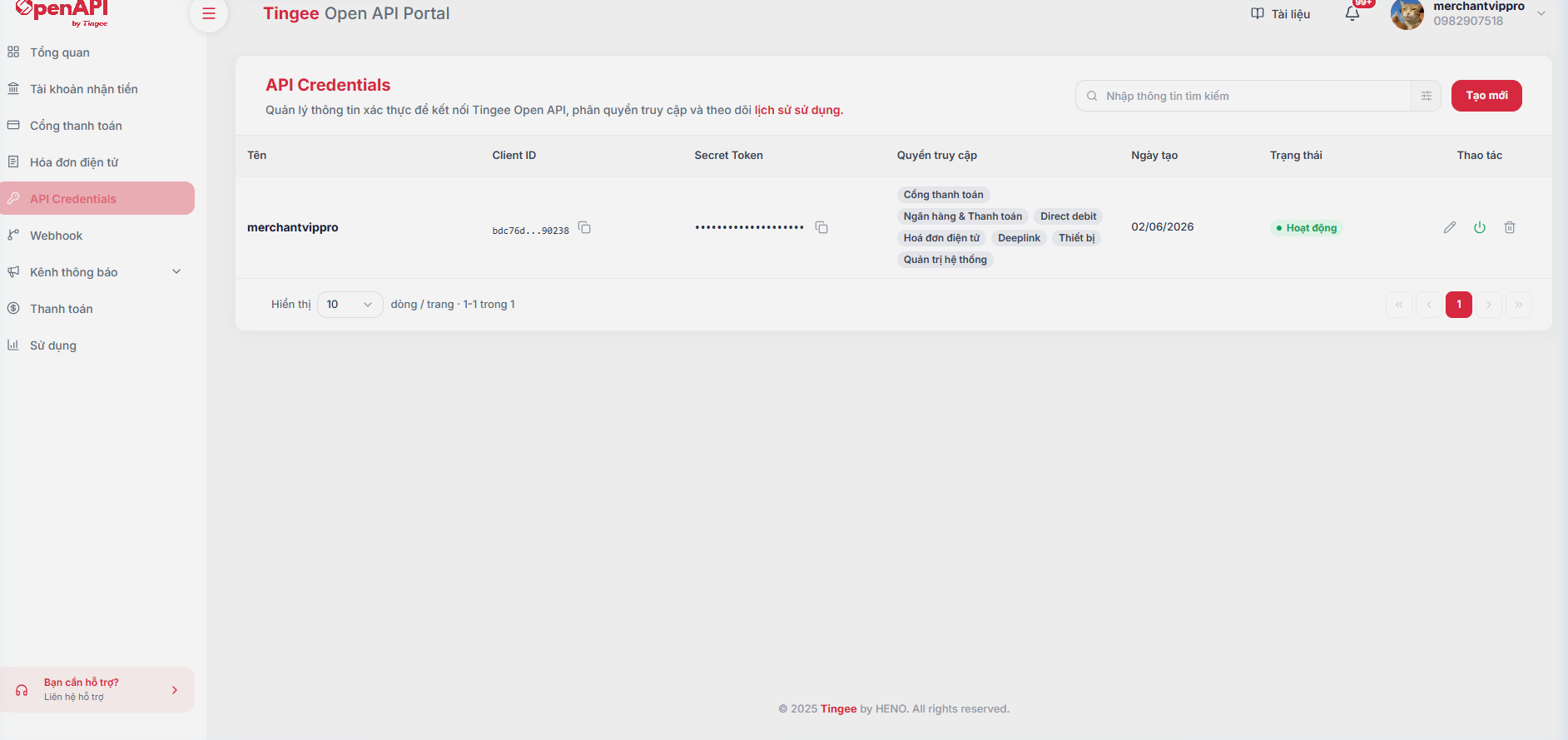
Step 2. In the left sidebar menu, click API Credentials (or go directly to baas.tingee.vn/api-credentials).
-
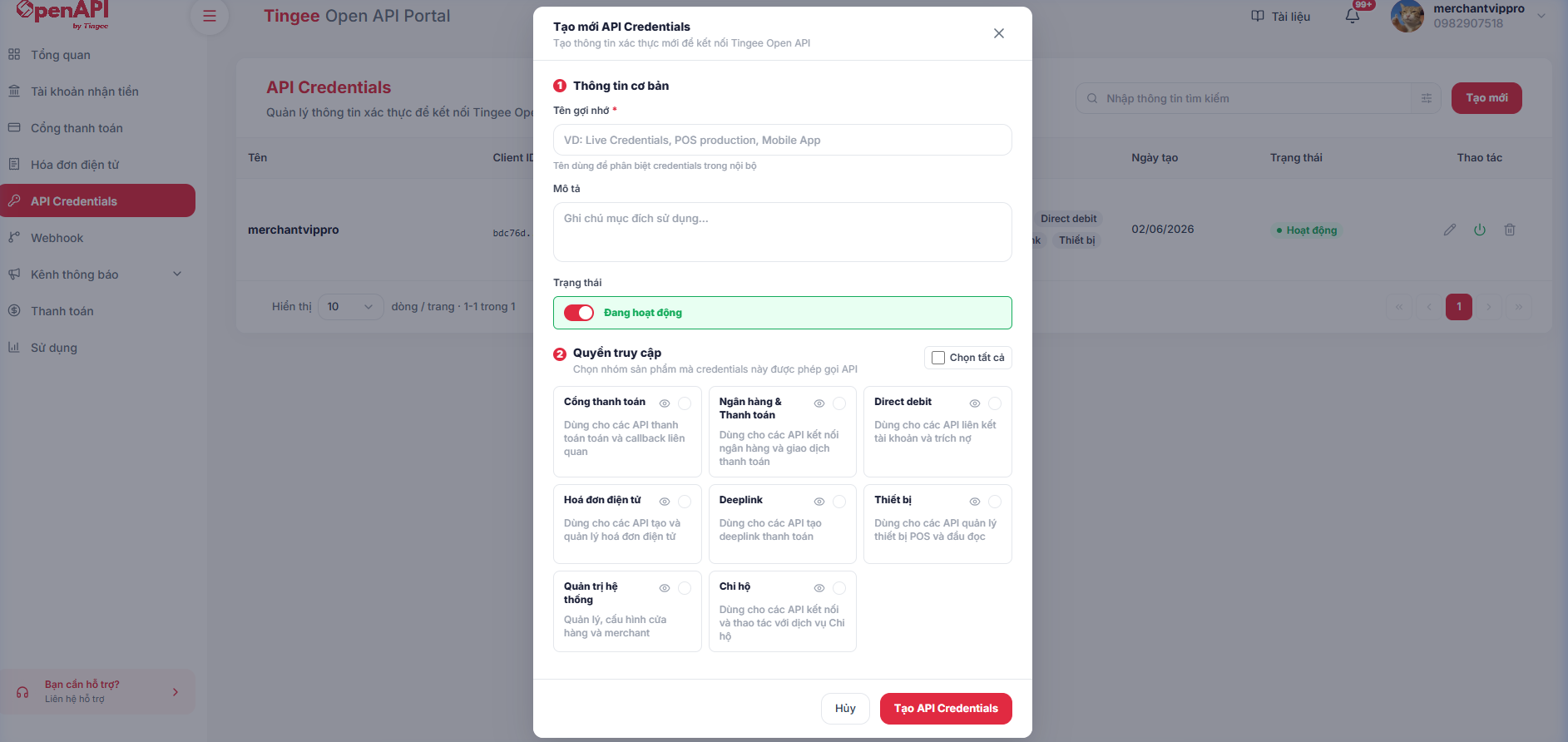
Step 3. Click Create new (or Create new API Credentials) to open the credential creation modal:
- Basic information: Enter a Display name (to tell credentials apart by purpose, e.g. Live Credentials, POS Test, Mobile App...) and a Description.
- Access permissions: Select the product/service groups this credential is allowed to call (Payment gateway, QR, Bank Link, Direct Debit, etc.), or click Select all.
-
Step 4. Click Create API Credentials to save. The system generates the credentials and shows the Client ID and Secret Token in the list. Use the Copy button to copy them into your integration configuration.
Generate the signature
Every API request sent to Tingee must include a digital signature to ensure integrity and authenticate the partner.
Signature formula
x-signature = HMAC_SHA512( x-request-timestamp + ":" + requestBody, secretToken )
Where:
x-request-timestamp— Time the request is sent, formatyyyyMMddHHmmssSSS(UTC+7)requestBody— The request body as a JSON string produced byJSON.stringify()(minified, no extra whitespace)secretToken— The Secret Token from the Developers page of your partner account
Required headers
| Header | Required | Example |
|---|---|---|
x-client-id | ✅ | Partner identifier issued by TINGEE See how to get it |
x-request-timestamp | ✅ | 20260101101122333 |
x-signature | ✅ | SHA-512 signature |
Content-Type | ✅ | application/json |
Sample code
- Node.js
- C#
- Java
- PHP
const crypto = require('crypto');

function generateSignature(timestamp, requestBody, secretToken) {
  const message = `${timestamp}:${requestBody}`;
  return crypto
    .createHmac('sha512', secretToken)
    .update(message, 'utf8')
    .digest('hex');
}

// Usage example
// Timestamp in UTC+7 (add 7 hours to UTC time)
const timestamp = new Date(Date.now() + 7 * 60 * 60 * 1000)
  .toISOString()
  .replace(/[-:T.Z]/g, '')
  .slice(0, 17); // "yyyyMMddHHmmssSSS"

const body = JSON.stringify({ clientId: 'abc123', amount: 50000 });
const signature = generateSignature(timestamp, body, 'YOUR_SECRET_TOKEN');

// Attach to the headers when calling the API
const headers = {
  'Content-Type': 'application/json',
  'x-client-id': 'YOUR_CLIENT_ID',
  'x-request-timestamp': timestamp,
  'x-signature': signature,
};
using System;
using System.Security.Cryptography;
using System.Text;

public class TingeeSignature
{
    public static string Generate(string timestamp, string requestBody, string secretToken)
    {
        var message = $"{timestamp}:{requestBody}";
        var keyBytes = Encoding.UTF8.GetBytes(secretToken);
        var messageBytes = Encoding.UTF8.GetBytes(message);

        using (var hmac = new HMACSHA512(keyBytes))
        {
            var hash = hmac.ComputeHash(messageBytes);
            return BitConverter.ToString(hash).Replace("-", "").ToLower();
        }
    }

    // Usage example
    public static void Example()
    {
        var timestamp = DateTime.UtcNow.AddHours(7).ToString("yyyyMMddHHmmssfff"); // UTC+7
        var body = "{\"clientId\":\"abc123\",\"amount\":50000}";
        var signature = Generate(timestamp, body, "YOUR_SECRET_TOKEN");

        // Attach to the headers when calling the API
        // request.Headers["x-client-id"] = "YOUR_CLIENT_ID";
        // request.Headers["x-request-timestamp"] = timestamp;
        // request.Headers["x-signature"] = signature;
    }
}
import javax.crypto.Mac;
import javax.crypto.spec.SecretKeySpec;
import java.nio.charset.StandardCharsets;
import java.time.ZoneId;
import java.time.ZonedDateTime;
import java.time.format.DateTimeFormatter;

public class TingeeSignature {
    public static String generate(String timestamp, String requestBody, String secretToken)
            throws Exception {
        String message = timestamp + ":" + requestBody;

        Mac hmac = Mac.getInstance("HmacSHA512");
        SecretKeySpec keySpec = new SecretKeySpec(
            secretToken.getBytes(StandardCharsets.UTF_8), "HmacSHA512");
        hmac.init(keySpec);

        byte[] hash = hmac.doFinal(message.getBytes(StandardCharsets.UTF_8));
        StringBuilder sb = new StringBuilder();
        for (byte b : hash) sb.append(String.format("%02x", b));
        return sb.toString();
    }

    public static void main(String[] args) throws Exception {
        String timestamp = ZonedDateTime.now(ZoneId.of("Asia/Ho_Chi_Minh")) // UTC+7
            .format(DateTimeFormatter.ofPattern("yyyyMMddHHmmssSSS"));
        String body = "{\"clientId\":\"abc123\",\"amount\":50000}";
        String signature = generate(timestamp, body, "YOUR_SECRET_TOKEN");

        System.out.println("x-signature: " + signature);
    }
}
function generateSignature(string $timestamp, string $requestBody, string $secretToken): string {
    $message = $timestamp . ':' . $requestBody;
    return hash_hmac('sha512', $message, $secretToken);
}

// Usage example
$now = new DateTime('now', new DateTimeZone('Asia/Ho_Chi_Minh')); // UTC+7
$timestamp = $now->format('YmdHisv'); // "yyyyMMddHHmmssSSS" (v = milliseconds)
// JSON_UNESCAPED_*: keep "/" and Vietnamese characters unescaped to match JSON.stringify on the TINGEE side
$body = json_encode(['clientId' => 'abc123', 'amount' => 50000], JSON_UNESCAPED_SLASHES | JSON_UNESCAPED_UNICODE);
$signature = generateSignature($timestamp, $body, 'YOUR_SECRET_TOKEN');

$headers = [
    'Content-Type: application/json',
    'x-client-id: YOUR_CLIENT_ID',
    'x-request-timestamp: ' . $timestamp,
    'x-signature: ' . $signature,
];
- Do not share your
secretTokenin source code or public repositories. - The timestamp must not be later than the current time and must not be more than 10 minutes old compared with the Tingee server time (UTC+7).
requestBodymust be the result ofJSON.stringify(body)— a minified JSON string, with no added whitespace or reformatting, so that the signature matches exactly.
Developer toolkit
The resources below are generated automatically from this documentation and always reflect the latest version.
| Resource | Description |
|---|---|
| Postman Collection | All APIs with sample requests. The x-signature and x-request-timestamp headers are generated automatically by a pre-request script. |
| OpenAPI 3 (openapi.json) | Standard OpenAPI specification for importing into Swagger UI, Insomnia, Apidog or generating SDK clients. |
| llms.txt · llms-full.txt | Index and full documentation in Markdown, for use with ChatGPT, Claude, Cursor... |
Using the Postman Collection
- Download the Postman Collection from the table above, open Postman and choose Import.
- In the collection's Variables tab, fill in
clientIdandsecretKeyfrom the API Key management page. - The
baseUrlvariable defaults to the UAT environment (https://uat-open-api.tingee.vn). Change it tohttps://open-api.tingee.vnwhen calling PROD. - Select any request and click Send — no need to compute the signature yourself.
Every documentation page has a Copy Markdown button in the top-right corner, so you can quickly paste the page content into an AI tool when writing integration code.
Webhook configuration
-
Tingee sends HTTP requests (POST method) to your Webhook URL whenever a transaction occurs on accounts linked on Tingee.
-
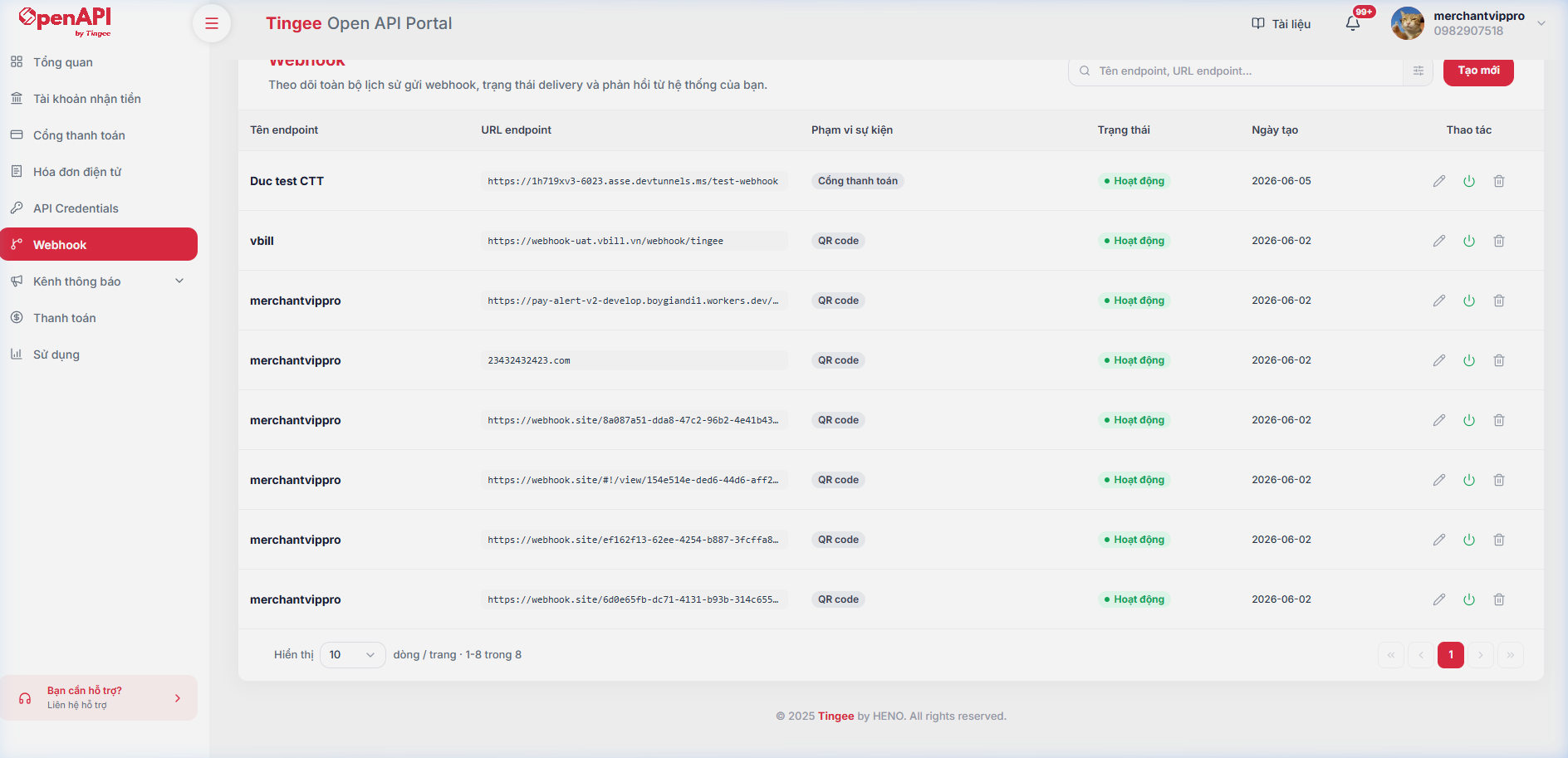
You configure and manage webhooks under Webhook in the Portal sidebar menu:
-
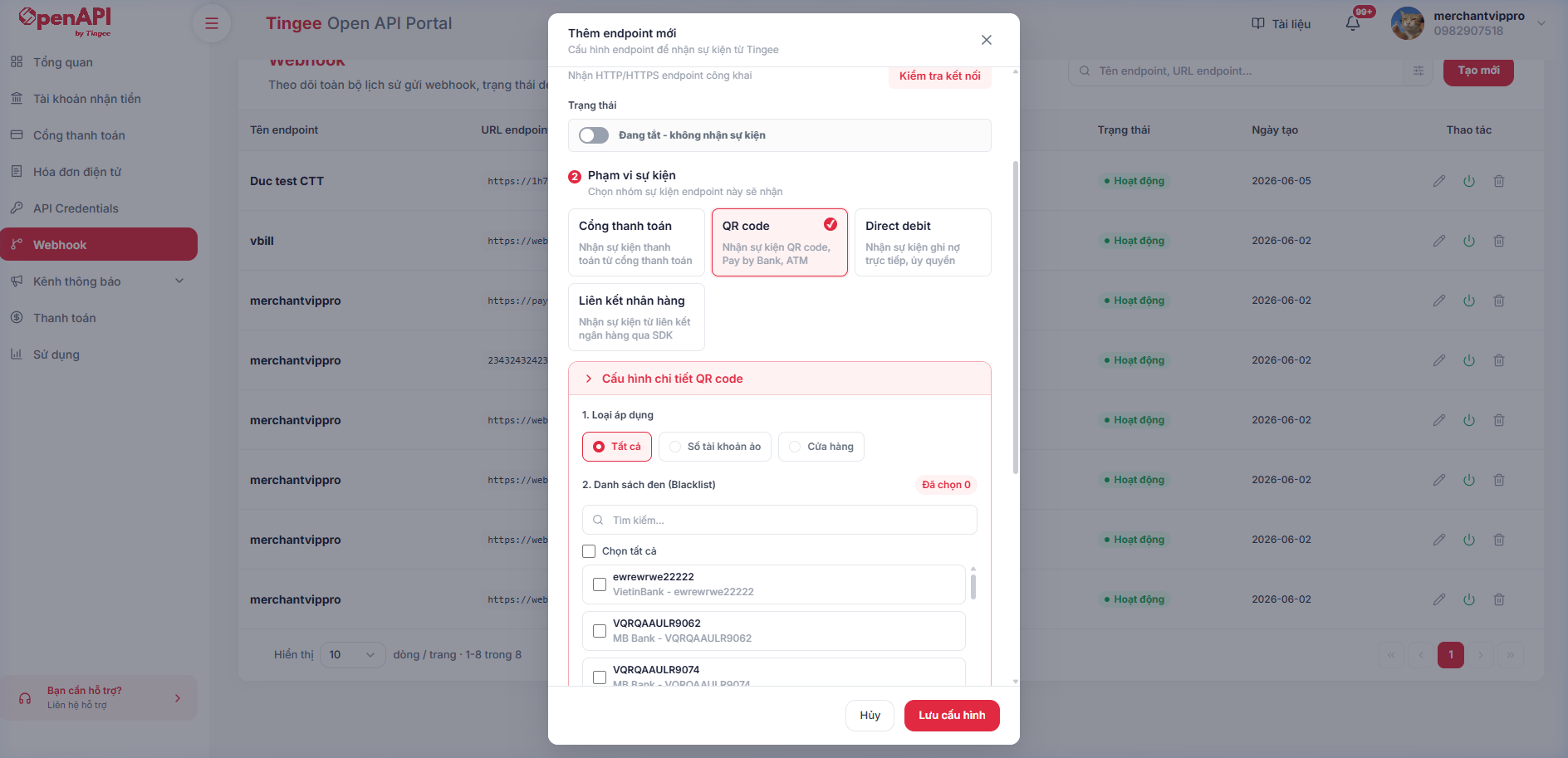
Click Create new to open the modal for configuring an event endpoint:
- Basic information:
- Endpoint name: Enter a display name.
- Webhook endpoint URL: Enter the HTTP/HTTPS address that receives the data. You can click Connection Test to check that the URL is reachable.
- Event scope: Select the event groups you want to be notified about (e.g. QR Code).
- If you select QR Code, choose the Apply to type:
- All: Receive events for all accounts.
- Virtual account number: Select the specific accounts you want to receive events for.
- Shop: Select the specific shops you want to receive events for.
- You can also set up a Blacklist to exclude account numbers you do not want webhooks sent for.
- If you select QR Code, choose the Apply to type:
- Webhook retry configuration: Turn retry on/off, set the resend conditions (timeout, HTTP status errors) and custom parameters such as timeout (5-10 seconds), number of retries (1-5) and interval (2-3600 seconds).
- Webhook authentication type: Choose the security method attached to the headers when Tingee sends a webhook (None, API Key or API Credentials).
- Basic information:
-
You can enable/disable (turn on/off) or edit a webhook configuration directly from the management screen.
Webhook log
- You can view the webhook delivery history (webhook status, number of retries, HTTP status code...) of each endpoint on the Usage page, Webhook history tab, of the Portal.
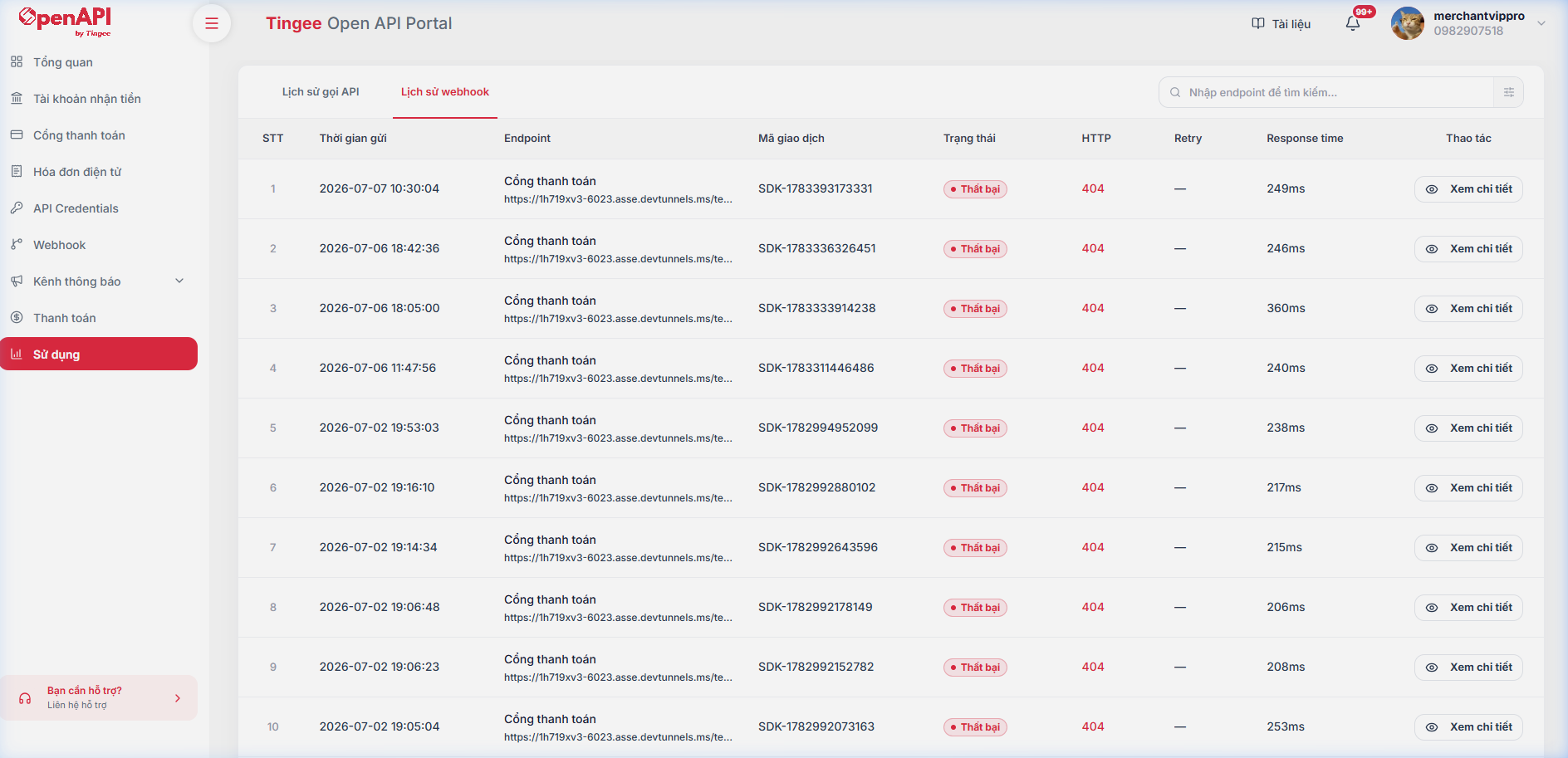
- Here you can track delivery status, retry count, HTTP response status code and response time in detail, or click View details to see the Request/Response payload of each webhook event.